
cxf-webservice完整示例
最近一段时间研究webservice,一般来说,开发java的Webservice经常使用axis2和cxf这两个比较流行的框架
先使用cxf,开发一个完整示例,方便对webservice有一个整体的概念
使用的工具主要有eclipse、maven
一、开发服务端
整体结构如下:
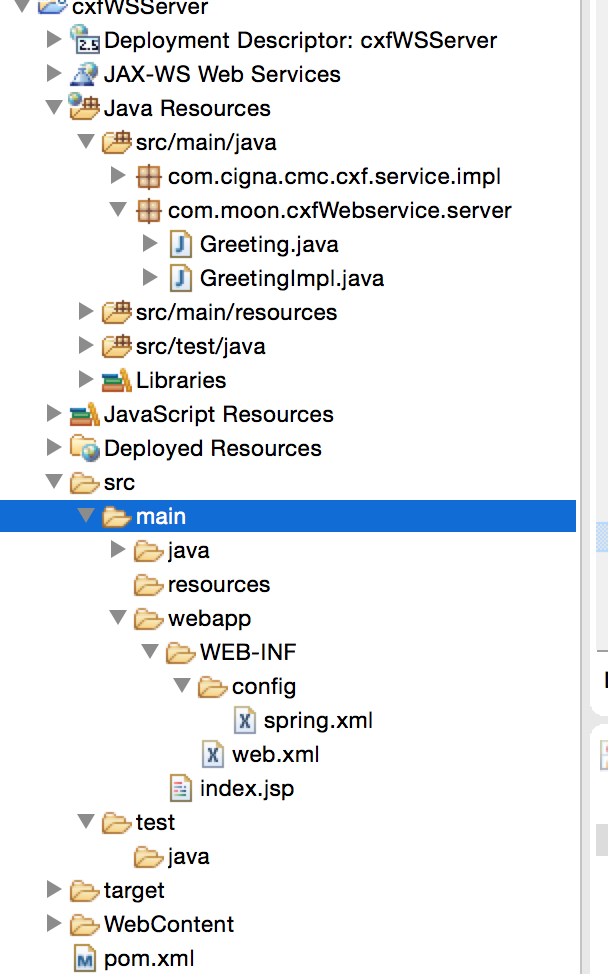
1、创建maven的web工程,这个就不多赘述了,如果以前没搭建过可以去网上搜索下,网上资源很多
2、配置POM.xml文件,引入相应的jar包
<project xmlns="http://maven.apache.org/POM/4.0.0" xmlns:xsi="http://www.w3.org/2001/XMLSchema-instance"

    xsi:schemaLocation="http://maven.apache.org/POM/4.0.0 http://maven.apache.org/maven-v4_0_0.xsd">

    <modelVersion>4.0.0</modelVersion>

    <groupId>com.moon.ws</groupId>

    <artifactId>cfxWSServer</artifactId>

    <packaging>war</packaging>

    <version>0.0.1-SNAPSHOT</version>

    <name>cfxWSServer Maven Webapp</name>

    <url>http://maven.apache.org</url>

    <dependencies>

        <dependency>

            <groupId>junit</groupId>

            <artifactId>junit</artifactId>

            <version>3.8.1</version>

            <scope>test</scope>

        </dependency>

        <dependency>

            <groupId>org.apache.cxf</groupId>

            <artifactId>cxf-api</artifactId>

            <version>2.5.0</version>

        </dependency>

        <dependency>

            <groupId>org.apache.cxf</groupId>

            <artifactId>cxf-rt-frontend-jaxws</artifactId>

            <version>2.5.0</version>

        </dependency>

        <dependency>

            <groupId>org.apache.cxf</groupId>

            <artifactId>cxf-rt-bindings-soap</artifactId>

            <version>2.5.0</version>

        </dependency>

        <dependency>

            <groupId>org.apache.cxf</groupId>

            <artifactId>cxf-rt-transports-http</artifactId>

            <version>2.5.0</version>

        </dependency>

        <dependency>

            <groupId>org.apache.cxf</groupId>

            <artifactId>cxf-rt-ws-security</artifactId>

            <version>2.5.0</version>

        </dependency>

    </dependencies>

    <build>

        <finalName>cfxWSServer</finalName>

    </build>

</project>
3、开发相关的接口和实现类
首先开发接口类
package com.moon.cxfWebservice.server;

import javax.jws.WebParam;

import javax.jws.WebService;

@WebService

public interface Greeting {

    public String greeting(@WebParam(name="username")String userName);

}
然后开发实现类
package com.moon.cxfWebservice.server;

import java.util.Calendar;

import javax.jws.WebService;

@WebService(endpointInterface="com.moon.cxfWebservice.server.Greeting")

public class GreetingImpl implements Greeting{

    public String greeting(String userName) {

        return "Hello " + userName + ", currentTime is "

                + Calendar.getInstance().getTime();

    }

}
至此,服务端的代码就开发完成了。
4、配置web.xml和spring配置文件
web.xml配置如下
<?xml version="1.0" encoding="UTF-8"?>

<web-app version="2.5"

    xmlns="http://java.sun.com/xml/ns/javaee"

    xmlns:xsi="http://www.w3.org/2001/XMLSchema-instance"

    xsi:schemaLocation="http://java.sun.com/xml/ns/javaee

    http://java.sun.com/xml/ns/javaee/web-app_2_5.xsd">

    <!-- 配置 Spring 配置文件的名称和位置 -->

    <context-param>

        <param-name>contextConfigLocation</param-name>

        <param-value>/WEB-INF/config/spring.xml</param-value>

    </context-param>

    <!-- 启动 IOC 容器的 ServletContextListener -->

    <listener>

        <listener-class>org.springframework.web.context.ContextLoaderListener</listener-class>

    </listener>

    <!-- 配置字符集 -->

    <filter>

        <filter-name>encodingFilter</filter-name>

        <filter-class>org.springframework.web.filter.CharacterEncodingFilter</filter-class>

        <init-param>

            <param-name>encoding</param-name>

            <param-value>UTF-8</param-value>

        </init-param>

        <init-param>

            <param-name>forceEncoding</param-name>

            <param-value>true</param-value>

        </init-param>

    </filter>

    <filter-mapping>

        <filter-name>encodingFilter</filter-name>

        <url-pattern>/*</url-pattern>

    </filter-mapping>

    <servlet>

        <servlet-name>CXFServlet</servlet-name>

        <servlet-class>org.apache.cxf.transport.servlet.CXFServlet</servlet-class>

        <load-on-startup>1</load-on-startup>

    </servlet>

    <servlet-mapping>

        <servlet-name>CXFServlet</servlet-name>

        <!--==这个设置很重要,那么我们的webservice的地址就是http://localhost:8080/yourProgramName/webservice/Greeting=== -->

        <url-pattern>/webservice/*</url-pattern>

    </servlet-mapping>

    <display-name>hello world!</display-name>

    <welcome-file-list>

        <welcome-file>index.html</welcome-file>

        <welcome-file>index.htm</welcome-file>

        <welcome-file>index.jsp</welcome-file>

        <welcome-file>default.html</welcome-file>

        <welcome-file>default.htm</welcome-file>

        <welcome-file>default.jsp</welcome-file>

    </welcome-file-list>

</web-app>
spring的配置文件
<?xml version="1.0" encoding="UTF-8"?>

<beans xmlns="http://www.springframework.org/schema/beans"

xmlns:context="http://www.springframework.org/schema/context"

xmlns:jaxws="http://cxf.apache.org/jaxws" xmlns:xsi="http://www.w3.org/2001/XMLSchema-instance"

xsi:schemaLocation="http://www.springframework.org/schema/beans

http://www.springframework.org/schema/beans/spring-beans-3.0.xsd

http://www.springframework.org/schema/context

http://www.springframework.org/schema/context/spring-context-3.0.xsd

http://cxf.apache.org/jaxws

http://cxf.apache.org/schemas/jaxws.xsd">

<!--=============== 实现类的bean,需要spring注入 ============================-->

<bean id="greetingImpl" class="com.moon.cxfWebservice.server.GreetingImpl"/>

 <jaxws:endpoint id="greeting"  implementor="#greetingImpl"   address="/Greeting" />

</beans>
配置完这两个文件后,服务器端就完成了,我们就可以将这个服务跑起来了,跑起来后 访问 http://localhost:8080/yourProgramName/webservice/Greeting?wsdl
例如我本地的项目访问的就是
http://localhost:8080/cxfWSServer/webservice/Greeting?wsdl
二、开发客户端
客户端调用我使用的两种方式
第一种使用apche cxf生成代码进行访问
1、下载apache cxf的包,地址为:http://cxf.apache.org/download.html 如:apache-cxf-3.1.6
2、解压apache-cxf-3.1.6到任意目录
3、配置环境变量
os系统设置
1)、export CXF_HOME=/Users/moon/Desktop/tools/apache-cxf-3.1.6
2)、path后面加 :$CXF_HOME/bin
windows系统设置
1)、CXF_HOME=D:\apache-cxf-3.1.6
2)、在path后面加上 %CXF_HOME%/bin;
在命令中输入wsdl2java,如果有提示usage,就表明配置成功
4、运行wsdl2java工具
在命令中输入:wsdl2java -d \xx\xxx\xx -client http://localhost:8080/cxfWSServer/webservice/Greeting?wsdl
(\xx\xxx\xx 是客户端程序代码所在的目录,http://localhost:8080/cxfWSServer/webservice/Greeting?wsdl 是发布的webservice服务)
附wsdl2java用法:
wsdl2java -p com -d D:\\src -all xx.wsdl
-p 指定其wsdl的命名空间,也就是要生成代码的包名:
-d 指定要产生代码所在目录
-client 生成客户端测试web service的代码
-server 生成服务器启动web service的代码
-impl 生成web service的实现代码
-ant 生成build.xml文件
-all 生成所有开始端点代码:types,service proxy,,service interface, server mainline, client mainline, implementation object, and an Ant build.xml file.
生成后的代码直接放到client工程上面

另外新建一个client类 直接使用生成的类调用
package com.moon.cxf;

import com.moon.cxf.client.Greeting;

import com.moon.cxf.client.GreetingImplService;

public class CxfClient {

    public static void main(String[] args) {

        GreetingImplService serviceFactory = new GreetingImplService();

        Greeting service =

            serviceFactory.getGreetingImplPort();

        String result = service.greeting("Jaune");

        System.out.println(result);

    }

}
二、使用axis调用webservice接口
引入axis 相关jar包

代码如下
package com.moon.cxf;

import java.rmi.RemoteException;

import javax.xml.namespace.QName;

import javax.xml.rpc.ParameterMode;

import javax.xml.rpc.ServiceException;

import org.apache.axis.client.Call;

import org.apache.axis.client.Service;

import org.apache.axis.encoding.XMLType;

/**

 * 使用axis调用cxf发布的webservice接口

 * @author moon

 *

 */

public class AxisClient {

    public static void main(String[] args) throws ServiceException, RemoteException {

         try {

             String endpoint = " http://localhost:8080/cfxWSServer/webservice/Greeting";

             // 调用过程

             Service service = new Service();

             Call call = (Call) service.createCall();

             call.setTargetEndpointAddress(new java.net.URL(endpoint));

             call.setOperationName(new QName("http://server.cxfWebservice.moon.com/","greeting"));// WSDL里面描述的操作名称

             call.addParameter("username",

                             org.apache.axis.encoding.XMLType.XSD_STRING,

                             javax.xml.rpc.ParameterMode.IN);// 操作的参数

             call.setReturnType(org.apache.axis.encoding.XMLType.XSD_STRING);// 设置返回类型

             call.setUseSOAPAction(true);

             // 给方法传递参数,并且调用方法

             String temp = "good";

             Object[] obj = new Object[] { temp };

             String result = (String) call.invoke(obj);

             System.out.println("Result is : " + result);

     } catch (Exception e) {

             e.printStackTrace();

     }

    }

}
相关代码:https://github.com/15210448683/WebServiceDemoImpl
cxf-webservice完整示例的更多相关文章
- eclipse+maven搭建cxf webservice 完整例子
开发环境是eclipse , maven. 在开发java webservice时,有两个比较流行的框架:axis2和cxf.cxf可以无缝的和spring集成,而axis2需要打包成aar文件,在t ...
- 利用JavaScriptSOAPClient直接调用webService --完整的前后台配置与调用示例
JavaScriptSoapClient下载地址:https://archive.codeplex.com/?p=javascriptsoapclient JavaScriptSoapClient的D ...
- php中创建和调用webservice接口示例
php中创建和调用webservice接口示例 这篇文章主要介绍了php中创建和调用webservice接口示例,包括webservice基本知识.webservice服务端例子.webservi ...
- Spring整合CXF webservice restful 实例
webservice restful接口跟soap协议的接口实现大同小异,只是在提供服务的类/接口的注解上存在差异,具体看下面的代码,然后自己对比下就可以了. 用到的基础类 User.java @Xm ...
- 《转》CXF WebService 开发文档-目录索引
CXF WebService 开发文档-目录索引 上次介绍了Axis的WebService,现在我们来看看CXF是怎么完成WebService的. Axis1 WebService 在线博文: htt ...
- java调用CXF WebService接口的两种方式
通过http://localhost:7002/card/services/HelloWorld?wsdl访问到xml如下,说明接口写对了. 2.静态调用 // 创建WebService客户端代理工厂 ...
- 【第四篇】ASP.NET MVC快速入门之完整示例(MVC5+EF6)
目录 [第一篇]ASP.NET MVC快速入门之数据库操作(MVC5+EF6) [第二篇]ASP.NET MVC快速入门之数据注解(MVC5+EF6) [第三篇]ASP.NET MVC快速入门之安全策 ...
- CXF WebService整合SpringMVC的maven项目
首先推荐博客:http://www.cnblogs.com/xdp-gacl/p/4259481.html http://blog.csdn.net/hu_shengyang/article/de ...
- WCF服务开发与调用的完整示例
WCF服务开发与调用的完整示例 开发工具:VS2008 开发语言:C# 开发内容:简单的权限管理系统 第一步.建立WCF服务库 点击确定,将建立一个WCF 服务库示例程序,自动生成一个包括IServi ...
随机推荐
- ssh命令远程登录
1.查看SSH客户端版本 有的时候需要确认一下SSH客户端及其相应的版本号.使用ssh -V命令可以得到版本号.需要注意的是,Linux一般自带的是OpenSSH: 下面的例子即表明该系统正在使用Op ...
- 供安全工程师实用的SOC模型
一.背景 如今,安全概念满天飞,什么安全运营中心(SOC).威胁情报(TI).态势感知等等不一而足,这些概念及其背后代表的安全思想都很好,不过很多产品为了迎合国内的工作汇报都做成了很多Dashboar ...
- 去掉VS2010代码中文注释的红色下划线
VS2010代码中文注释出现红色下划线,代码看上去很不美观,发现是由于安装Visual Assist X插件造成的. 解决办法:打开VAX的Options对话框,取消Advanced --> U ...
- Maven 搭建 SSM框架——Spring+SpringMVC+Mybatis的搭建教程
一:概述 SSM框架在项目开发中经常使用到,相比于SSH框架,它在仅几年的开发中运用的更加广泛. Spring作为一个轻量级的框架,有很多的拓展功能,最主要的我们一般项目使用的就是IOC和AOP.Sp ...
- uva 10983 Buy one, get the rest free 二分判定层次图
二分枚举租用飞机的最大花费,然后用小于等于最大花费的边构建层次图(依据时间) 构图思路: 利用二元组(x,y)表示 x天y城市 1. e天有飞机从a城市飞到b城市,能够承载x人,则添加单向边 ( ...
- PPTP不使用远程网关访问公网设置
使用PPTP拨号的时候默认使用PPTP远程网关访问公网,通过以下设置可以禁止远程网关访问公网 1,右下角选择网络图标右键-属性 2,选择网络IPv4属性,选择属性 3,点击高级选项 4,在远程网络上使 ...
- POJ 1815 - Friendship - [拆点最大流求最小点割集][暴力枚举求升序割点] - [Dinic算法模板 - 邻接矩阵型]
妖怪题目,做到现在:2017/8/19 - 1:41…… 不过想想还是值得的,至少邻接矩阵型的Dinic算法模板get√ 题目链接:http://poj.org/problem?id=1815 Tim ...
- 一套准确率高且效率高的分词、词性标注工具-thulac
软件简介 THULAC(THU Lexical Analyzer for Chinese)由清华大学自然语言处理与社会人文计算实验室研制推出的一套中文词法分析工具包,具有中文分词和词性标注功能.THU ...
- iOS-CoreLocation地理编码(转载)
一.简单说明 CLGeocoder:地理编码器,其中Geo是地理的英文单词Geography的简写. 1.使用CLGeocoder可以完成“地理编码”和“反地理编码” 地理编码:根据给定的地名,获得具 ...
- thinkphp 如何查询数据库
在控制器中使用M(); 数据表: 一.查询方式 1.字符串作为条件 2.使用索引数组作为条件查询条件 //可以更改逻辑关系 $condition['_logic'] = 'OR'; 二.表达式查询 三 ...