
spring boot学习(4) SpringBoot 之Spring Data Jpa 支持(1)
Spring-Data-Jpa
JPA(Java Persistence API)定义了一系列对象持久化的标准,目前实现这一规范的产品有Hibernate、TopLink等。

<?xml version="1.0" encoding="UTF-8"?>

<project xmlns="http://maven.apache.org/POM/4.0.0" xmlns:xsi="http://www.w3.org/2001/XMLSchema-instance"

    xsi:schemaLocation="http://maven.apache.org/POM/4.0.0 http://maven.apache.org/xsd/maven-4.0.0.xsd">

    <modelVersion>4.0.0</modelVersion>

    <groupId>com.cy</groupId>

    <artifactId>HelloWorld</artifactId>

    <version>0.0.1-SNAPSHOT</version>

    <packaging>war</packaging>

    <name>HelloWorld</name>

    <description>Demo project for Spring Boot</description>

    <parent>

        <groupId>org.springframework.boot</groupId>

        <artifactId>spring-boot-starter-parent</artifactId>

        <version>2.0.0.RELEASE</version>

        <relativePath/> <!-- lookup parent from repository -->

    </parent>

    <properties>

        <project.build.sourceEncoding>UTF-8</project.build.sourceEncoding>

        <project.reporting.outputEncoding>UTF-8</project.reporting.outputEncoding>

        <java.version>1.8</java.version>

    </properties>

    <dependencies>

        <dependency>

            <groupId>org.springframework.boot</groupId>

            <artifactId>spring-boot-starter-web</artifactId>

        </dependency>

        <dependency>

            <groupId>org.springframework.boot</groupId>

            <artifactId>spring-boot-starter-tomcat</artifactId>

            <scope>provided</scope>

        </dependency>

        <dependency>

            <groupId>org.springframework.boot</groupId>

            <artifactId>spring-boot-starter-test</artifactId>

            <scope>test</scope>

        </dependency>

        <dependency>

            <groupId>org.springframework.boot</groupId>

            <artifactId>spring-boot-configuration-processor</artifactId>

            <optional>true</optional>

        </dependency>

        <dependency>

            <groupId>org.springframework.boot</groupId>

            <artifactId>spring-boot-starter-freemarker</artifactId>

        </dependency>

        <dependency>

            <groupId>mysql</groupId>

            <artifactId>mysql-connector-java</artifactId>

            <scope>runtime</scope>

        </dependency>

        <dependency>

            <groupId>org.springframework.boot</groupId>

            <artifactId>spring-boot-starter-data-jpa</artifactId>

        </dependency>

    </dependencies>

    <build>

        <plugins>

            <plugin>

                <groupId>org.springframework.boot</groupId>

                <artifactId>spring-boot-maven-plugin</artifactId>

            </plugin>

        </plugins>

    </build>

</project>
2.src/main/resources/application.yml中配置server的根路径和port、数据源、showsql等:
server:

 port: 80

 servlet:

    context-path: /

spring:

  datasource:

    driver-class-name: com.mysql.jdbc.Driver

    url: jdbc:mysql://localhost:3306/db_book

    username: root

    password: root

  jpa:

    hibernate:

      ddl-auto: update

    show-sql: true
3.代码:
Book.java实体:
package com.cy.entity;

import javax.persistence.Column;

import javax.persistence.Entity;

import javax.persistence.GeneratedValue;

import javax.persistence.Id;

import javax.persistence.Table;

@Entity

@Table(name="t_book")

public class Book {

    @Id

    @GeneratedValue

    private Integer id;

    @Column(length=100)

    private String name;

    @Column(length=50)

    private String author;

    public Integer getId() {

        return id;

    }

    public void setId(Integer id) {

        this.id = id;

    }

    public String getName() {

        return name;

    }

    public void setName(String name) {

        this.name = name;

    }

    public String getAuthor() {

        return author;

    }

    public void setAuthor(String author) {

        this.author = author;

    }

}
com.cy.dao.BookDao.java:
package com.cy.dao;

import org.springframework.data.jpa.repository.JpaRepository;

import com.cy.entity.Book;

public interface BookDao extends JpaRepository<Book, Integer>{

}
CRUD的BookController.java:
package com.cy.controller;

import java.util.List;

import javax.annotation.Resource;

import org.springframework.stereotype.Controller;

import org.springframework.web.bind.annotation.GetMapping;

import org.springframework.web.bind.annotation.PathVariable;

import org.springframework.web.bind.annotation.PostMapping;

import org.springframework.web.bind.annotation.RequestMapping;

import org.springframework.web.bind.annotation.RequestMethod;

import org.springframework.web.servlet.ModelAndView;

import com.cy.dao.BookDao;

import com.cy.entity.Book;

@Controller

@RequestMapping("/book")

public class BookController {

    @Resource

    private BookDao bookDao;

    /**

     * 查找所有图书

     */

    @RequestMapping("/list")

    public ModelAndView list(){

        ModelAndView mav = new ModelAndView();

        List<Book> bookList = bookDao.findAll();

        mav.addObject("bookList", bookList);

        mav.setViewName("bookList");

        return mav;

    }

    /**

     * 添加图书

     */

    @RequestMapping(value="/add", method=RequestMethod.POST)

    public String add(Book book){

        bookDao.save(book);

        return "redirect:/book/list";

    }

    /**

     * 根据id查找图书

     */

    @RequestMapping("/preUpdate/{id}")

    public ModelAndView preUpdate(@PathVariable("id") Integer id){

        ModelAndView mav = new ModelAndView();

        mav.addObject("book", bookDao.getOne(id));

        mav.setViewName("bookUpdate");

        return mav;

    }

    /**

     * 修改图书

     */

    @PostMapping("/update")

    public String update(Book book){

        bookDao.save(book); //依然是save,有id就修改,没有id就添加

        return "redirect:/book/list";

    }

    /**

     * 删除图书

     */

    @GetMapping("/delete")

    public String delete(Integer id){

        bookDao.deleteById(id);

        return "redirect:/book/list";

    }

}
src/main/resources/templates/bookList.ftl:
<!DOCTYPE html>

<html>

<head>

<meta charset="UTF-8">

<title>图书管理</title>

</head>

<body>

<a href="/bookAdd.html">添加</a>

<table>

    <tr>

        <th>编号</th>

        <th>图书名称</th>

        <th>图书作者</th>

        <th>操作</th>

    </tr>

    <#list bookList as book>

        <tr>

            <td>${book.id}</td>

            <td>${book.name}</td>

            <td>${book.author}</td>

            <td>

                <a href="/book/preUpdate/${book.id}">修改</a>

                <a href="/book/delete?id=${book.id}">删除</a>

            </td>

        </tr>

    </#list>

</table>

</body>

</html>
添加图书页面src/main/webapp/bookAdd.html:
<!DOCTYPE html>

<html>

<head>

<meta charset="UTF-8">

<title>Insert title here</title>

</head>

<body>

<form action="/book/add" method="post">

    图书名称:<input type="text" name="name"/><br/>

    图书作者:<input type="text" name="author"/><br/>

    <input type="submit" value="提交"/>

</form>

</body>

</html>
修改图书页面:src/main/resources/templates/bookUpdate.ftl:
要注意修改这边要把book的id带过去,不然就成添加了;
<!DOCTYPE html>

<html>

<head>

<meta charset="UTF-8">

<title>图书修改</title>

</head>

<body>

<form action="/book/update" method="post">

    <input type="hidden" name="id" value="${book.id}"/>

    图书名称:<input type="text" name="name" value="${book.name}"/><br/>

    图书作者:<input type="text" name="author" value="${book.author}"/><br/>

    <input type="submit" value="提交"/>

</form>

</body>

</html>
mysql> show create table t_book;

+--------+--------------------------------------

------------------------------------------------

| Table  | Create Table

+--------+--------------------------------------

------------------------------------------------

| t_book | CREATE TABLE `t_book` (

  `id` int(11) NOT NULL auto_increment,

  `author` varchar(50) default NULL,

  `name` varchar(100) default NULL,

  PRIMARY KEY  (`id`)

) ENGINE=InnoDB DEFAULT CHARSET=utf8 |

+--------+--------------------------------------

------------------------------------------------

1 row in set (0.00 sec)
mysql> desc t_book;

+--------+--------------+------+-----+---------+----------------+

| Field  | Type         | Null | Key | Default | Extra          |

+--------+--------------+------+-----+---------+----------------+

| id     | int(11)      | NO   | PRI | NULL    | auto_increment |

| author | varchar(50)  | YES  |     | NULL    |                |

| name   | varchar(100) | YES  |     | NULL    |                |

+--------+--------------+------+-----+---------+----------------+
2.http://localhost/book/list,显示:
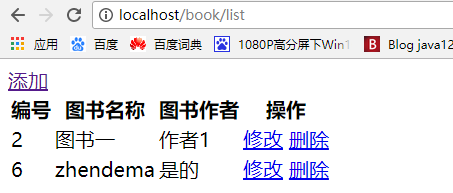
进行增、删、改、list操作正常;
spring boot学习(4) SpringBoot 之Spring Data Jpa 支持(1)的更多相关文章
- spring boot学习(5) SpringBoot 之Spring Data Jpa 支持(2)
第三节:自定义查询@Query 有时候复杂sql使用hql方式无法查询,这时候使用本地查询,使用原生sql的方式: 第四节:动态查询Specification 使用 什么时候用呢?比如搜索有很多条 ...
- Spring Boot学习(一)——Spring Boot介绍
Spring Boot介绍 Spring Boot简介 Spring Boot是由Pivotal团队提供的全新框架,其设计目的是用来简化新Spring应用的初始搭建以及开发过程.该框架使用了特定的方式 ...
- spring boot 学习(五)SpringBoot+MyBatis(XML)+Druid
SpringBoot+MyBatis(xml)+Druid 前言 springboot集成了springJDBC与JPA,但是没有集成mybatis,所以想要使用mybatis就要自己去集成. 主要是 ...
- spring boot学习(十三)SpringBoot缓存(EhCache 2.x 篇)
SpringBoot 缓存(EhCache 2.x 篇) SpringBoot 缓存 在 Spring Boot中,通过@EnableCaching注解自动化配置合适的缓存管理器(CacheManag ...
- spring boot 学习(十)SpringBoot配置发送Email
SpringBoot配置发送Email 引入依赖 在 pom.xml 文件中引入邮件配置: <dependency> <groupId>org.springframework. ...
- spring boot学习(6) SpringBoot 之事务管理
两个操作要么同时成功,要么同时失败: 事务的一致性: 以前学ssh ssm都有事务管理service层通过applicationContext.xml配置,所有service方法都加上事务操作: 用来 ...
- spring boot学习(2) SpringBoot 项目属性配置
第一节:项目内置属性 application.properties配置整个项目的,相当于以前的web.xml: 注意到上一节的访问HelloWorld时,项目路径也没有加:直接是http://loca ...
- spring boot学习(7) SpringBoot 之表单验证
第一节:SpringBoot 之表单验证@Valid 是spring-data-jpa的功能: 下面是添加学生的信息例子,要求姓名不能为空,年龄大于18岁. 贴下代码吧: Student实体: ...
- spring boot 学习入门篇【spring boot项目的搭建以及如何加载jsp界面】
[ 前言] Spring Boot 简介:Spring Boot是由Pivotal团队提供的全新框架,其设计目的是用来简化新Spring应用的初始搭建以及开发过程.该框架使用了特定的方式来进行配置, ...
随机推荐
- 练习vue(class,style属性)
<!DOCTYPE html> <html> <head> <meta charset="UTF-8"> <title> ...
- 数据集 过滤时 RecordCount 属性
如果是在 OnFilterRecord里写代码,过滤后RecordCount 是不变的. 如果是用 Filter属性过滤,过滤后RecordCount 是变的=过滤后的记录数. 难怪 有的说 变的,有 ...
- ipython与sublime调用其shell出现的问题
本机电脑 win10 已安装python3.5 1. 直接在命令行运行 pip install ipython[all] 安装 ipython 安装完成后 在命令行输入 jupyter note ...
- 用MyEclipse JPA创建项目(二)
MyEclipse 3.15 Style——在线购买低至75折!火爆开抢>> [MyEclipse最新版下载] 本教程介绍了MyEclipse中的一些基于PA的功能. 阅读本教程时,了解J ...
- MySQLzip压缩文件格式安装教程
MySQL是一个小巧玲珑但功能强大的数据库,目前十分流行.但是官网给出的安装包有两种格式,一个是msi格式,一个是zip格式的.很多人下了zip格式的解压发现没有setup.exe,面对一堆文件一头雾 ...
- HDU 3488
http://acm.hdu.edu.cn/showproblem.php?pid=3488 原来写过的一道题,今天重新看费用流又做了一遍 题意:给一个图,求环的并(权值和最小) 思路:每个点只能走一 ...
- XDocument 使用
摘要: 正文: 1.引入XDocument的命名空间 using System.Xml.Linq; 2. List<CourseItem> to XML doc //List<Cou ...
- 【opencv基础】cv::Point类型与行列的关系
关系 row == height == Point.y col == width == Point.x Mat::at(Point(x, y)) == Mat::at(y,x) 参考 1.博客: 完
- 在word文档里提取出所有的邮箱地址
怎样在word文档里提取出所有的邮箱地址 文档内容太多,邮箱也有很多,一个个复制粘贴太浪费时间,怎样把这些邮箱简单的提取出来 答案:用查找功能. 查找目标:[A-z,0-9]{1,}\@[A-z,0 ...
- IO练习--按字节截取字符串
* 在Java中字符串“abcd”和字符串“ab你好”都是4个字符, * 但是字节数不同,因为GBK中一个汉字占两个字节 * 定义一个方法用来按字节数截取字符串. * 如:对于“ab你好”,取3个字节 ...