
MyBatis 原码解析(version:3.2.7)
首先,我们看使用原生的JDBC来操作数据库的方式:
// 1. 获取JDBC Connection

Connection connection = DbManager.getConnectoin();

// 2. 组装sql语句

String sql = "insert into temp(id, name) values(?,?)";

// 3. 构造 PreparedStatement

PreparedStatement ps = connection.prepareStatement(sql);

// 4. 为 PreparedStatement 设置参数

ps.setLong(1, 1L);

ps.setString(2, "aaa");

// 5. 执行 PreparedStatement

int count = ps.executeUpdate();
那么,MyBatis是如何对上面的过程进行封装的呢?
我们以update为例,看MyBatis是如何封装这几个步骤的:
sql执行的入口:
DefaultSqlSession.update(String statement, Object parameter) --> Executor.update(MappedStatement ms, Object parameter) -->

 SimpleExecutor.doUpdate(MappedStatement ms, Object parameter)
DefaultSqlSession.update(String, Object)
public int update(String statement, Object parameter) {

    try {

      dirty = true;

      MappedStatement ms = configuration.getMappedStatement(statement); // 将mapper中的sql解析成原生的JDBC能够识别的sql,其中包括MyBatis标签的解析,"#{key,JdbcType=XXX}"占位符替换成"?"

      return executor.update(ms, wrapCollection(parameter)); // 构造java.sql.PreparedStatement --> 往java.sql.PreparedStatement设置sql的参数 --> 执行sql语句

    } catch (Exception e) {

      throw ExceptionFactory.wrapException("Error updating database.  Cause: " + e, e);

    } finally {

      ErrorContext.instance().reset();

    }

}
可以看出,MyBatis将这个过程封装成了两步:
1. sql语句解析 (解析sql,替换占位符为"?")
2. sql语句执行 (设置sql中的参数,执行sql)
### 1. sql语句解析
configuration.getMappedStatement(statement)会去解析MyBatis的标签(比如:<foreach>、<if>等),并且将"#{key, JdbcType=XXX}"替换成原生的JDBC看的懂的占位符"?"。
流程如下:
Configuration.getMappedStatement(String, boolean)  --> Configuration.buildAllStatements() --> MapperAnnotationBuilder.parseStatement(Method) -->

 MapperAnnotationBuilder.buildSqlSourceFromStrings(String[], Class<?>, LanguageDriver) --> RawLanguageDriver.createSqlSource(Configuration, String, Class<?>)

 --> XMLLanguageDriver.createSqlSource(Configuration, String, Class<?>)
20170721更新:(xml应该是如下)
Configuration.getMappedStatement(String, boolean)  --> Configuration.buildAllStatements() --> XMLStatementBuilder.parseStatementNode() -->

 LanguageDriver.createSqlSource(Configuration configuration, XNode script, Class<?> parameterType) --> RawLanguageDriver.createSqlSource(Configuration, String, Class<?>)

 --> XMLLanguageDriver.createSqlSource(Configuration, String, Class<?>)
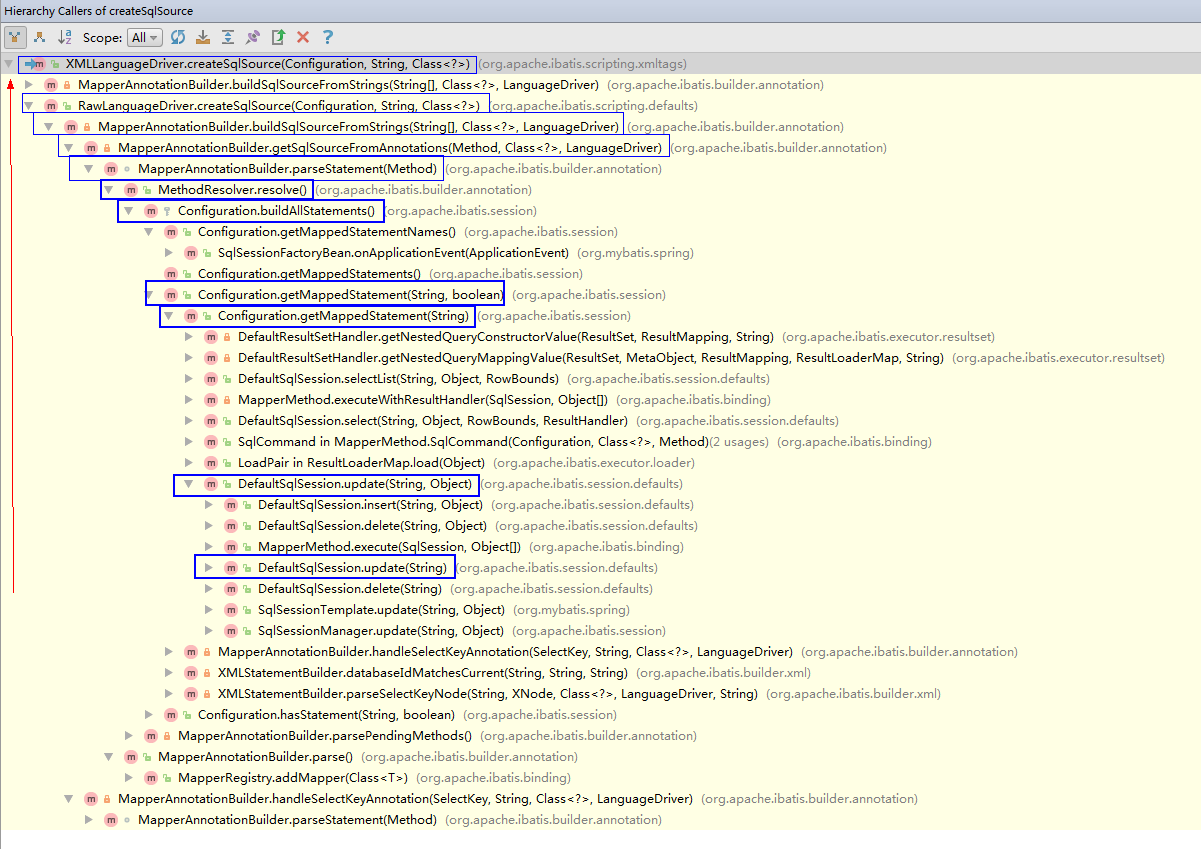
可以看出,MyBatis中的动态SQL解析是通过别名为 xml 语言驱动器 org.apache.ibatis.scripting.xmltags.XmlLanguageDriver 驱动解析的。
public class XMLLanguageDriver implements LanguageDriver {

  public ParameterHandler createParameterHandler(MappedStatement mappedStatement, Object parameterObject, BoundSql boundSql) {

    return new DefaultParameterHandler(mappedStatement, parameterObject, boundSql);

  }

  public SqlSource createSqlSource(Configuration configuration, XNode script, Class<?> parameterType) {

    XMLScriptBuilder builder = new XMLScriptBuilder(configuration, script, parameterType);

    return builder.parseScriptNode();

  }

  public SqlSource createSqlSource(Configuration configuration, String script, Class<?> parameterType) {

    if (script.startsWith("<script>")) { // issue #3

      XPathParser parser = new XPathParser(script, false, configuration.getVariables(), new XMLMapperEntityResolver());

      return createSqlSource(configuration, parser.evalNode("/script"), parameterType);

    } else {

      script = PropertyParser.parse(script, configuration.getVariables()); // issue #127

      TextSqlNode textSqlNode = new TextSqlNode(script);

      if (textSqlNode.isDynamic()) { // 动态sql解析入口

        return new DynamicSqlSource(configuration, textSqlNode);

      } else {

        return new RawSqlSource(configuration, script, parameterType);

      }

    }

  }

}
DynamicSqlSource.java
public class DynamicSqlSource implements SqlSource {

  private Configuration configuration;

  private SqlNode rootSqlNode;

  public DynamicSqlSource(Configuration configuration, SqlNode rootSqlNode) {

    this.configuration = configuration;

    this.rootSqlNode = rootSqlNode;

  }

  public BoundSql getBoundSql(Object parameterObject) {

    DynamicContext context = new DynamicContext(configuration, parameterObject); // 构造DynamicContext,并将DynamicContext中的属性ContextMap bindings赋值

    rootSqlNode.apply(context); // 处理sql中的标签,比如:<foreach>、<if>等

    SqlSourceBuilder sqlSourceParser = new SqlSourceBuilder(configuration);

    Class<?> parameterType = parameterObject == null ? Object.class : parameterObject.getClass();

    SqlSource sqlSource = sqlSourceParser.parse(context.getSql(), parameterType, context.getBindings()); // 将占位符"#{key, jdbcType=XXX}"替换成占位符"?"。也就是原生的java.sql.PreparedStatement支持的占位符。(具体是通过GenericTokenParser#parse(String text)来实现的)

    BoundSql boundSql = sqlSource.getBoundSql(parameterObject); // 构造BoundSql

    for (Map.Entry<String, Object> entry : context.getBindings().entrySet()) {

      boundSql.setAdditionalParameter(entry.getKey(), entry.getValue()); // 将参数的key和value存放至BoundSql的MetaObject metaParameters;中

    }

    return boundSql;

  }

}
####2. sql语句执行
通过SimpleExecutor.java 去执行sql语句。其中,最重要的两步是 1. prepareStatement(handler, ms.getStatementLog()); 2. handler.update(stmt);
public class SimpleExecutor extends BaseExecutor {

  public SimpleExecutor(Configuration configuration, Transaction transaction) {

    super(configuration, transaction);

  }

  // 所有的数据库更新操作,都会调用doUpdate(),包括insert、update、delete

  public int doUpdate(MappedStatement ms, Object parameter) throws SQLException {

    Statement stmt = null;

    try {

      Configuration configuration = ms.getConfiguration();

      StatementHandler handler = configuration.newStatementHandler(this, ms, parameter, RowBounds.DEFAULT, null, null); // 构造执行Statement的StatementHandler

      stmt = prepareStatement(handler, ms.getStatementLog()); // 通过java.sql.Connection拿到java.sql.PreparedStatement,并且为 java.sql.PreparedStatement 设置sql中的参数

      return handler.update(stmt); // 代理执行 java.sql.PreparedStatement (PreparedStatementHandler.update(Statement))

    } finally {

      closeStatement(stmt);

    }

  }

  // 所有的数据库查询操作,都用调用doQuery()

  public <E> List<E> doQuery(MappedStatement ms, Object parameter, RowBounds rowBounds, ResultHandler resultHandler, BoundSql boundSql) throws SQLException {

    Statement stmt = null;

    try {

      Configuration configuration = ms.getConfiguration();

      StatementHandler handler = configuration.newStatementHandler(wrapper, ms, parameter, rowBounds, resultHandler, boundSql);

      stmt = prepareStatement(handler, ms.getStatementLog());

      return handler.<E>query(stmt, resultHandler);

    } finally {

      closeStatement(stmt);

    }

  }

  public List<BatchResult> doFlushStatements(boolean isRollback) throws SQLException {

    return Collections.emptyList();

  }

  private Statement prepareStatement(StatementHandler handler, Log statementLog) throws SQLException {

    Statement stmt;

    Connection connection = getConnection(statementLog);

    stmt = handler.prepare(connection); // 通过 java.sql.Connection 拿到 java.sql.PreparedStatement (PreparedStatementHandler.instantiateStatement(Connection))

    handler.parameterize(stmt); // 为 java.sql.PreparedStatement 设置sql中的参数。(DefaultParameterHandler.setParameters(PreparedStatement))

    return stmt;

  }

}
至此,MyBatis的封装就一目了然了。^_^
附:
MyBatis开发文档: http://www.mybatis.org/mybatis-3/zh/dynamic-sql.html
MyBatis 原码解析(version:3.2.7)的更多相关文章
- 【MyBatis源码解析】MyBatis一二级缓存
MyBatis缓存 我们知道,频繁的数据库操作是非常耗费性能的(主要是因为对于DB而言,数据是持久化在磁盘中的,因此查询操作需要通过IO,IO操作速度相比内存操作速度慢了好几个量级),尤其是对于一些相 ...
- mybatis源码-解析配置文件(三)之配置文件Configuration解析
目录 1. 简介 1.1 系列内容 1.2 适合对象 1.3 本文内容 2. 配置文件 2.1 mysql.properties 2.2 mybatis-config.xml 3. Configura ...
- Mybatis源码解析,一步一步从浅入深(一):创建准备工程
Spring SpringMVC Mybatis(简称ssm)是一个很流行的java web框架,而Mybatis作为ORM 持久层框架,因其灵活简单,深受青睐.而且现在的招聘职位中都要求应试者熟悉M ...
- Mybatis源码解析,一步一步从浅入深(四):将configuration.xml的解析到Configuration对象实例
在Mybatis源码解析,一步一步从浅入深(二):按步骤解析源码中我们看到了XMLConfigBuilder(xml配置解析器)的实例化.而且这个实例化过程在文章:Mybatis源码解析,一步一步从浅 ...
- Mybatis源码解析,一步一步从浅入深(五):mapper节点的解析
在上一篇文章Mybatis源码解析,一步一步从浅入深(四):将configuration.xml的解析到Configuration对象实例中我们谈到了properties,settings,envir ...
- Mybatis源码解析-DynamicSqlSource和RawSqlSource的区别
XMLLanguageDriver是ibatis的默认解析sql节点帮助类,其中的方法其会调用生成DynamicSqlSource和RawSqlSource这两个帮助类,本文将对此作下简单的简析 应用 ...
- mybatis源码-解析配置文件(四-1)之配置文件Mapper解析(cache)
目录 1. 简介 2. 解析 3 StrictMap 3.1 区别HashMap:键必须为String 3.2 区别HashMap:多了成员变量 name 3.3 区别HashMap:key 的处理多 ...
- mybatis源码-解析配置文件(四)之配置文件Mapper解析
在 mybatis源码-解析配置文件(三)之配置文件Configuration解析 中, 讲解了 Configuration 是如何解析的. 其中, mappers作为configuration节点的 ...
- Mybatis源码解析,一步一步从浅入深(二):按步骤解析源码
在文章:Mybatis源码解析,一步一步从浅入深(一):创建准备工程,中我们为了解析mybatis源码创建了一个mybatis的简单工程(源码已上传github,链接在文章末尾),并实现了一个查询功能 ...
随机推荐
- 理解ThreadPoolExecutor源代码(二)execute函数的巧妙设计和阅读心得
ThreadPoolExecutor.execute()源代码提供了大量凝视来解释该方法的设计考虑.以下的源代码来自jdk1.6.0_37 public void execute(Runnable c ...
- 【转载】解决Windows和Ubuntu时间不一致的问题
大家在切换操作系统的时候会发现一个问题, Windows 和Ubuntu的时间会出现不一致的情况.在 Windows 中把时间设置正确了过后,回到在 Ubuntu 后系统的时间又不一样了,在 Ubun ...
- 【javascript】浮点数运算问题分析及解决方法
问题: 在用 js 进行小数四则运算时发现了一个重大问题,比如:0.7 * 0.8 = 0.5599999999999999 分析: 在 js 中只有一种数字类型 Number,而且在 js 中所有的 ...
- EMERGENCY! EUREKA MAY BE INCORRECTLY CLAIMING INSTANCES ARE UP WHEN THEY'RE NOT. RENEWALS ARE LESSER THAN THRESHOLD AND HENCE THE INSTANCES ARE NOT BEING EXPIRED JUST TO BE SAFE.
启动两个client,过了一会,停了其中一个,访问注册中心时,界面上显示了红色粗体警告信息: 查阅了很多资料,终于了解了中间的问题.现将理解整理如下: Eureka server和client之间每隔 ...
- git 无法提交空目录
git不能提交子文件夹? 空目录无法add,在最里面的目录下加上随便加上一个txt就可以了
- Navi.Soft31.WinForm框架(含下载地址)
1概述 1.1应用场景 尽管互联网高速发展,互联网软件也随之越来越多,但桌面应用程序在某些领域中还是不可替代,如MIS,ERP,CRM等软件产品,同时,这类软件均包括一些通用的功能,如:与数据库操作, ...
- 点击input 禁止手机自带键盘弹出
<input readonly data-field="date" placeholder="請選擇結束時間" class="start_t ...
- 将Web项目War包部署到Tomcat服务器
1. 配置Java运行环境 1.1 下载并安装JDK 从官网上下载最新的JDK:http://java.sun.com/javase/downloads/index.jsp ,下载后安装,选择想把JD ...
- so在genymotation中错误问题
genymotation的android模拟器运行起来非常快,但是有些项目安装到上面不是crash,log一般是so文件调用失败的信息,或则直接提示INSTALL_FAILED_CPU_ABI_INC ...
- VMware虚拟机找不到USB设备
VMware虚拟机找不到USB设备该怎么办?打开虚拟机发现竟然找不到usb设备,键盘和鼠标都是usb的,这该怎么办呢?出现这个问题是因为VMUSBArbService服务没有开启,下面分享开启的方法 ...