
MySQL Crash Course #02# Chapter 3. 4 通配符. 分页
索引
- 查看表.文档操作
- 检索必须知道的两件事
- 数据演示由谁负责
- 通配符.非必要不用
- 检索不同的行
- 限制结果集.分页查找
- 运用数据库.表全名
- 命令后加分号对于很多 DBMS 都不是必要的,但是加了也没有坏处
Learning About Databases and Tables
Learning More About SHOW In the mysql command-line utility, execute command HELP SHOW; to display a list of allowed SHOW statements.
查看表结构.创建表信息
DESC table_name;

SHOW CREATE TABLE table_name;
The SELECT Statement
To use SELECT to retrieve table data you must, at a minimum, specify two pieces of information what you want to select, and from where you want to select it.
Presentation of Data
SQL statements typically return raw, unformatted data. Data formatting is a presentation issue, not a retrieval issue. Therefore, presentation (for example, alignment and displaying the price values as currency amounts with the currency symbol and commas) is typically specified in the application that displays the data. Actual raw retrieved data (without application-provided formatting) is rarely displayed as is.
Using Wildcards
As a rule, you are better off not using the * wildcard unless you really do need every column in the table. Even though use of wildcards might save you the time and effort needed to list the desired columns explicitly, retrieving unnecessary columns usually slows down the performance of your retrieval and your application.
Retrieving Distinct Rows
在表中,可能会包含重复值。这并不成问题,不过,有时您也许希望仅仅列出不同(distinct)的值。
SELECT DISTINCT vend_id tells MySQL to only return distinct (unique) vend_id rows, and so only 4 rows are returned, as seen in the following output. If used, the DISTINCT keyword must be placed directly in front of the column names.

select distinct name, id from A
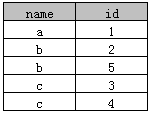
更多详细内容可以参阅 MySQL中distinct的使用方法
Limiting Results
mysql> SELECT manga_id, manga_name

    -> FROM manga

    -> LIMIT ;

+----------+-----------------------+

| manga_id | manga_name            |

+----------+-----------------------+

|     1000 | 至不死的你            |

|     1001 | 烙印勇士              |

|     1002 | 幸福(happiness)     |

+----------+-----------------------+
mysql> SELECT manga_id, manga_name

    -> FROM manga

    -> LIMIT ,;

+----------+-----------------+

| manga_id | manga_name      |

+----------+-----------------+

|     1003 | 东京食尸鬼      |

|     1004 | dasda           |

|     1005 | 2asdasds        |

+----------+-----------------+
返回的行是第 4, 5 ,6 行。
When There Aren't Enough Rows The number of rows to retrieve specified in LIMIT is the maximum number to retrieve. If there aren't enough rows (for example, you specified LIMIT 10,5, but there were only 13 rows), MySQL returns as many as it can.
Using Fully Qualified Table Names
mysql> SELECT manga.manga_id

    -> FROM mangast.manga;

+----------+

| manga_id |

+----------+

|     1000 |

|     1001 |
在某些情况下应用全名是必要的。
MySQL Crash Course #02# Chapter 3. 4 通配符. 分页的更多相关文章
- MySQL Crash Course #04# Chapter 7. 8 AND. OR. IN. NOT. LIKE
索引 AND. OR 运算顺序 IN Operator VS. OR NOT 在 MySQL 中的表现 LIKE 之注意事项 运用通配符的技巧 Understanding Order of Evalu ...
- MySQL Crash Course #13# Chapter 21. Creating and Manipulating Tables
之前 manipulate 表里的数据,现在则是 manipulate 表本身. INDEX 创建多列构成的主键 自动增长的规定 查看上一次插入的自增 id 尽量用默认值替代 NULL 外键不可以跨引 ...
- MySQL Crash Course #12# Chapter 18. Full-Text Searching
INDEX 由于性能.智能结果等多方面原因,在搜索文本时,全文搜索一般要优于通配符和正则表达式,前者为指定列建立索引,以便快速找到对应行,并且将结果集智能排序.启用查询扩展可以让我们得到未必包含关键字 ...
- MySQL Crash Course #11# Chapter 20. Updating and Deleting Data
INDEX Updating Data The IGNORE Keyword Deleting Data Faster Deletes Guidelines for Updating and Dele ...
- MySQL Crash Course #10# Chapter 19. Inserting Data
INDEX BAD EXAMPLE Improving Overall Performance Inserting Multiple Rows INSTEAD OF Inserting a Singl ...
- MySQL Crash Course #06# Chapter 13. 14 GROUP BY. 子查询
索引 理解 GROUP BY 过滤数据 vs. 过滤分组 GROUP BY 与 ORDER BY 之不成文的规定 子查询 vs. 联表查询 相关子查询和不相关子查询. 增量构造复杂查询 Always ...
- MySQL Crash Course #03# Chapter 5. 6 排序. BETWEEN. IS NULL
索引 排序检索的数据 SQL 过滤 vs. 应用程序过滤 简单 Where 补充:大小写敏感. BETWEEN. IS NULL Sorting Retrieved Data mysql> SE ...
- MySQL Crash Course #21# Chapter 29.30. Database Maintenance & Improving Performance
终于结束这本书了,最后两章的内容在官方文档中都有详细介绍,简单过一遍.. 首先是数据备份,最简单直接的就是用 mysql 的内置工具 mysqldump MySQL 8.0 Reference Man ...
- MySQL Crash Course #20# Chapter 28. Managing Security
限制用户的操作权限并不是怕有人恶意搞破坏,而是为了减少失误操作的可能性. 详细文档:https://dev.mysql.com/doc/refman/8.0/en/user-account-manag ...
随机推荐
- [EF]vs15+ef6+mysql code first方式
写在前面 前面有篇文章,尝试了db first方式,但不知道是什么原因一直没有成功,到最后也没解决,今天就尝试下code first的方式. [EF]vs15+ef6+mysql这个问题,你遇到过么? ...
- easyui_1
--- easyui.css包括所有组件的css,
- slam学习资源
从零开始学slam: http://blog.csdn.net/akunainiannian/article/details/45363731 史上最全的SLAM学习资料收集 http://www. ...
- HDU 2602 - Bone Collector - [01背包模板题]
题目链接:http://acm.hdu.edu.cn/showproblem.php?pid=2602 Many years ago , in Teddy’s hometown there was a ...
- CAP 一致性协议及应用解析
https://mp.weixin.qq.com/s/26x8O1bRzurl84e3nM6TTA CAP 一致性协议及应用解析 原创: 有赞技术 有赞coder 1周前 文 | 云开 on 用户中心 ...
- 它是对 ACME(automated certificate management environment) 协议的实现,只要实现了 ACME 协议的客户端都可以跟它交互。
它是对 ACME(automated certificate management environment) 协议的实现,只要实现了 ACME 协议的客户端都可以跟它交互. https://mp.we ...
- is_link
'Symbolic Link' to File1 content containing path to File1'Hard Link' to File1 content containing Fi ...
- Jmeter(十五)_上传与下载
今天重点说一下Jmeter的上传与下载 1:Jmeter上传文件 首先确认你的文件名称,参数名称,MIME类型,这些可以从接口文档里面获取,或者直接在页面抓包然后从请求头里面查看.注意,此处我的文件路 ...
- B. Berland National Library---cf567B(set|模拟)
题目链接:http://codeforces.com/problemset/problem/567/B 题意:题目大意: 一个计数器, +号代表一个人进入图书馆, -号代表一个人出去图书馆. 给一个 ...
- 问题:bower git is not installed or not in the path
用bower install jquery安装jquery,bower提示错误bower git is not installed or not in the path. 根据错误信息的知道出现错误两 ...