
Nginx配置Awstats分析Nginx日志笔记
1、修改Nginx日志格式:
log_format json '$remote_addr - $remote_user [$time_local] "$request" '

             '$status $body_bytes_sent "$http_referer" '

             '"$http_user_agent" "$http_x_forwarded_for"';


access_log /data/nginx_logs/access.log json;
2、Nginx日志切割(shell脚本,略)
3、安装GeoIP库
yum -y install GeoIP GeoIP-devel perl-Geo-IP
4、安装Awstats
tar xvf awstats-7.4.tar.gz

mv awstats-7.4 /usr/local/awstats

cd /usr/local/

chown root:root -R awstats/

chmod +x /usr/local/awstats/tools/*.pl

chmod +x /usr/local/awstats/wwwroot/cgi-bin/*.pl
5、运行脚本生成配置
cd /usr/local/awstats/tools/

./awstats_configure.pl
脚本交互1:
Config file path ('none' to skip web server setup):

因为在此我们使用的是nginx,所以填写none
脚本交互2:
Do you want me to build a new AWStats config/profile

file (required if first install) [y/N]

输入Y创建一个新的统计配置文件。
脚本交互3:
Your web site, virtual server or profile name:

> www.test.com

在这输入自己的网站域名
脚本交互4:
Directory path to store config file(s) (Enter for default):

>

使用默认配置,生成配置文件
后面的直接按回车就可以
6、修改上面生成的配置文件/etc/awstats/awstats.app.mir.6wtx.com.conf
LogFile="/data/nginx_logs/cut_logs/%YYYY-24%MM-24%DD-24/

DirData="/data/awstats"

LoadPlugin="geoip GEOIP_STANDARD /usr/share/GeoIP/GeoIP.dat"

LoadPlugin="geoip_city_maxmind GEOIP_STANDARD /usr/share/GeoIP/GeoLiteCity.dat"
7、生成数据文件并配置Nginx,此处应该有两种办法:
一种是用fastcgi调用perl分析数据文件
一种是直接生成静态文件nginx解析
第一种办法:
7.1.1、安装FCGI和FCGI::ProcManager
cpan>install FCGI

cpan>install FCGI::ProcManager
7.1.2、创建fastcgi来执行perl:/usr/local/nginx/sbin/fcgi
#!/usr/bin/perl

use FCGI;

#perl -MCPAN -e 'install FCGI'

use Socket;

use POSIX qw(setsid);

#use Fcntl;

require 'syscall.ph';

&daemonize;

#this keeps the program alive or something after exec'ing perl scripts

END() { } BEGIN() { }

*CORE::GLOBAL::exit = sub { die "fakeexit\nrc=".shift()."\n"; };

eval q{exit};

if ($@) {

        exit unless $@ =~ /^fakeexit/;

};

&main;

sub daemonize() {

    chdir '/'                 or die "Can't chdir to /: $!";

    defined(my $pid = fork)   or die "Can't fork: $!";

    exit if $pid;

    setsid                    or die "Can't start a new session: $!";

    umask 0;

}

sub main {

        #$socket = FCGI::OpenSocket( "127.0.0.1:8999", 10 );

        $socket = FCGI::OpenSocket( "/usr/local/nginx/fastcgi_temp/perl_cgi-dispatch.sock", 10 );

#use UNIX sockets - user running this script must have w access to the 'nginx' folder!!

        $request = FCGI::Request( \*STDIN, \*STDOUT, \*STDERR, \%req_params, $socket );

        if ($request) { request_loop()};

            FCGI::CloseSocket( $socket );

}

sub request_loop {

        while( $request->Accept() >= 0 ) {


           #processing any STDIN input from WebServer (for CGI-POST actions)

           $stdin_passthrough ='';

           $req_len = 0 + $req_params{'CONTENT_LENGTH'};

           if (($req_params{'REQUEST_METHOD'} eq 'POST') && ($req_len != 0) ){

                my $bytes_read = 0;

                while ($bytes_read < $req_len) {

                        my $data = '';

                        my $bytes = read(STDIN, $data, ($req_len - $bytes_read));

                        last if ($bytes == 0 || !defined($bytes));

                        $stdin_passthrough .= $data;

                        $bytes_read += $bytes;

                }

            }

            #running the cgi app

            if ( (-x $req_params{SCRIPT_FILENAME}) && #can I execute this?

                 (-s $req_params{SCRIPT_FILENAME}) && #Is this file empty?

                 (-r $req_params{SCRIPT_FILENAME})     #can I read this file?

            ){

                pipe(CHILD_RD, PARENT_WR);

                my $pid = open(KID_TO_READ, "-|");

                unless(defined($pid)) {

                        print("Content-type: text/plain\r\n\r\n");

                        print "Error: CGI app returned no output - Executing $req_params

{SCRIPT_FILENAME} failed !\n";

                        next;

                }

                if ($pid > 0) {

                        close(CHILD_RD);

                        print PARENT_WR $stdin_passthrough;

                        close(PARENT_WR);

                        while(my $s = <KID_TO_READ>) { print $s; }

                        close KID_TO_READ;

                        waitpid($pid, 0);

                } else {

                        foreach $key ( keys %req_params){

                           $ENV{$key} = $req_params{$key};

                        }

                        # cd to the script's local directory

                        if ($req_params{SCRIPT_FILENAME} =~ /^(.*)\/[^\/]+$/) {

                                chdir $1;

                        }

                        close(PARENT_WR);

                        close(STDIN);

                        #fcntl(CHILD_RD, F_DUPFD, 0);

                        syscall(&SYS_dup2, fileno(CHILD_RD), 0);

                        #open(STDIN, "<&CHILD_RD");

                        exec($req_params{SCRIPT_FILENAME});

                        die("exec failed");

                }

            }

            else {

                print("Content-type: text/plain\r\n\r\n");

                print "Error: No such CGI app - $req_params{SCRIPT_FILENAME} may not exist or is

not executable by this process.\n";

            }

        }

}
7.1.3、授权:
chmod 755 /usr/local/nginx/sbin/fcgi
7.1.4、启动:
perl /usr/local/nginx/sbin/fcgi >/dev/null 2>&1
7.1.5、授权socker让Nginx调用:
chown www:www /usr/local/nginx/fastcgi_temp/perl_cgi-dispatch.sock
7.1.6、创建/usr/local/nginx/conf/fastcgi_params1
               fastcgi_param SCRIPT_FILENAME $document_root$fastcgi_script_name;

               fastcgi_param QUERY_STRING     $query_string;

               fastcgi_param REQUEST_METHOD   $request_method;

               fastcgi_param CONTENT_TYPE     $content_type;

               fastcgi_param CONTENT_LENGTH   $content_length;

               fastcgi_param GATEWAY_INTERFACE CGI/1.1;

               fastcgi_param SERVER_SOFTWARE    nginx;

               fastcgi_param SCRIPT_NAME        $fastcgi_script_name;

               fastcgi_param REQUEST_URI        $request_uri;

               fastcgi_param DOCUMENT_URI       $document_uri;

               fastcgi_param DOCUMENT_ROOT      $document_root;

               fastcgi_param SERVER_PROTOCOL    $server_protocol;

               fastcgi_param REMOTE_ADDR        $remote_addr;

               fastcgi_param REMOTE_PORT        $remote_port;

               fastcgi_param SERVER_ADDR        $server_addr;

               fastcgi_param SERVER_PORT        $server_port;

               fastcgi_param SERVER_NAME        $server_name;

               fastcgi_read_timeout 60;
7.1.7、Nginx增加虚拟主机:
server {

                listen      33333;

                server_name  xxxxxxxxxxx;


                 location / {

                        root   /data/awstats;

                        index  index.html index.htm;

                }


                location ~* ^/cgi-bin/.*\.pl$ {

                        root /usr/local/awstats/wwwroot;

                        fastcgi_pass unix:/usr/local/nginx/fastcgi_temp/perl_cgi-dispatch.sock;

                        fastcgi_index index.pl;

                        include  fastcgi_params1;

                        charset gb2312;

                }

                location ~ ^/icon/ {        # 图标目录

                        root   /usr/local/awstats/wwwroot;

                        index  index.html;

                        access_log off;

                        error_log off;

                }

        }
最后重启Nginx
7.1.8、生成awstats数据文件:
/usr/local/awstats/wwwroot/cgi-bin/awstats.pl -update -config=www.test.com
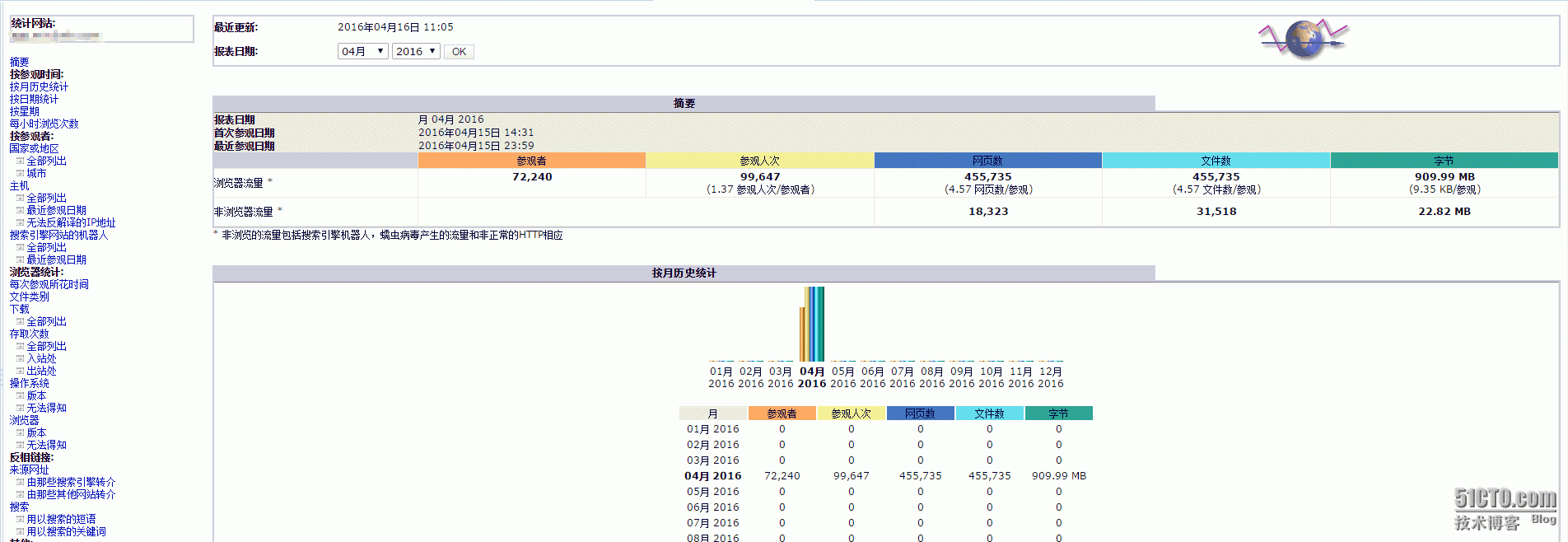
7.1.9、打开URL查看效果:http://xxxxxxxxx:33333/cgi-bin/awstats.pl?config=www.test.com
第二种办法:
7.2.1、配置Nginx,不需要调用perl
server {

                listen       44444;

                server_name  xxxxxxxxxxx;

                root   /data/awstats;

                index  index.html;

                access_log off;

                error_log off;

                charset gb2312;

                location ~ ^/icon/ {        # 图标目录

                        root   /usr/local/awstats/wwwroot;

                        index  index.html;

                        access_log off;

                        error_log off;

                }

        }
重启Nginx
7.2.2、生成awstats静态数据文件:
/usr/local/awstats/tools/awstats_buildstaticpages.pl -update -config=www.test.com -lang=cn -dir=/data/awstats -awstatsprog=/usr/local/awstats/wwwroot/cgi-bin/awstats.pl
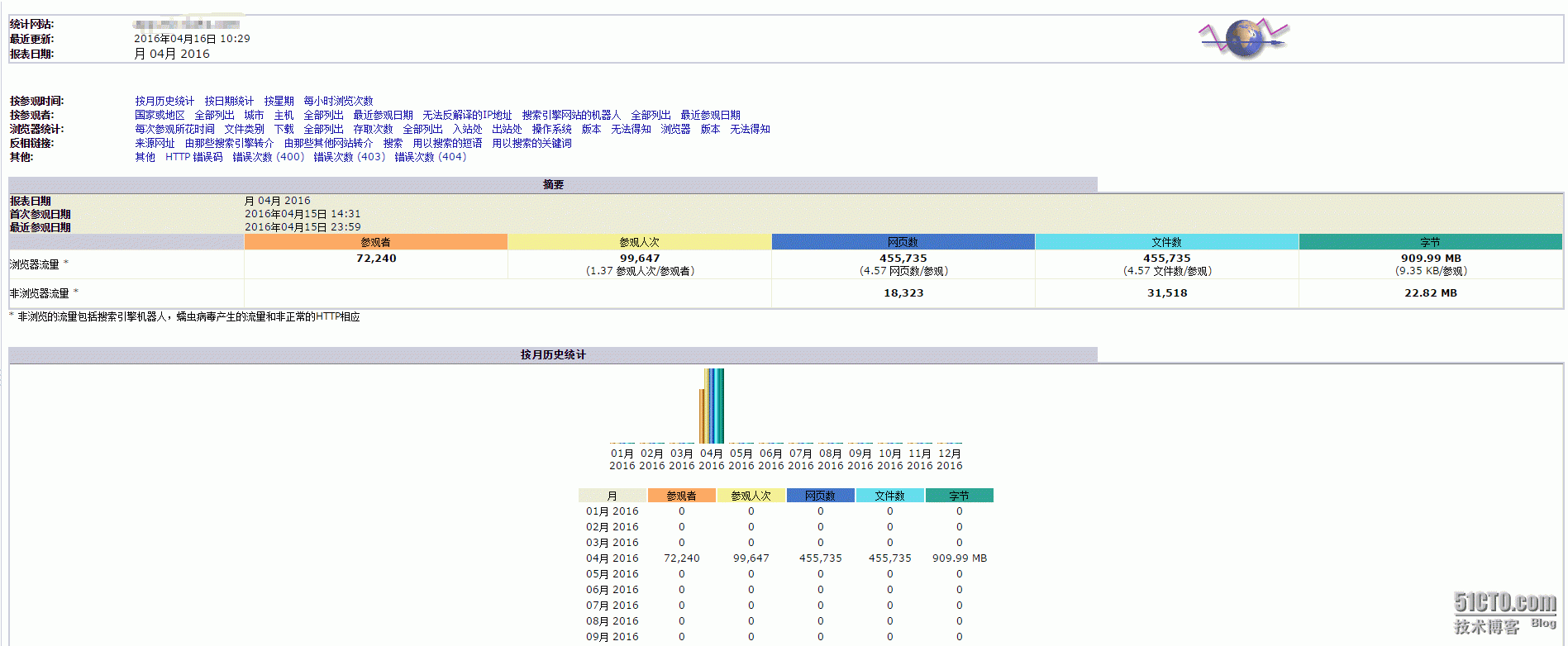
7.2.3、 打开URL查看效果:http://xxxxxxxxxx:44444/awstats.www.test.com.html
8、添加定时任务:
5 0 * * * /usr/local/awstats/wwwroot/cgi-bin/awstats.pl -update -config=www.sunsky.com >/dev/null 2>&1

10 0 * * * /usr/local/awstats/tools/awstats_buildstaticpages.pl -update -config=www.test.com -lang=cn -dir=/data/awstats -awstatsprog=/usr/local/awstats/wwwroot/cgi-bin/awstats.pl >/dev/null 2>&1
本文出自 “运维笔记” 博客,请务必保留此出处http://lihuipeng.blog.51cto.com/3064864/1764467
Nginx配置Awstats分析Nginx日志笔记的更多相关文章
- 烂泥:利用awstats分析nginx日志
本文由ilanniweb提供友情赞助,首发于烂泥行天下 想要获得更多的文章,可以关注我的微信ilanniweb 昨天把nginx的日志进行了切割,关于如何切割nginx日志,可以查看<烂泥:切割 ...
- Awstats分析Nginx日志
1.nginx日志格式设定 log_format access '$remote_addr - $remote_user [$time_local] "$request" ' '$ ...
- 使用 awstats 分析 Nginx 的访问日志(IBM)
前言 在我的上一篇文章<使用 Nginx 提升网站访问速度>中介绍了 Nginx 这个 HTTP 服务器以及如何通过它来加速网站的访问速度.在实际的网站运营中,我们经常需要了解到网站的访问 ...
- 使用awstats分析nginx日志
1.awstats介绍 本文主要是记录centos6.5下安装配置awstats,并统计nginx访问日志 1.1 awstats介绍 awstats是一款日志统计工具,它使用Perl语言编写,可统计 ...
- Nginx 配置埋点js日志采集
页面埋点&nginx日志采集 页面(web容器:httpd/nginx负载均衡 + apache server)<===> 日志采集服务器(nginx服务器) 通过某个页面跳转到我 ...
- nginx 配置重定向及nginx配置if
需求:地址 http://testa/inlinePreview/live.html?id=463738305721405440重定向到 http://testb/shares/live.html?n ...
- nginx配置负载均衡分发服务器笔记
记录学习搭建nginx负载均衡分发服务器的过程笔记 1.服务器IP:192.168.31.202(当前需要搭建nginx负载均衡分发的服务器)安装好nginx 2.在服务器IP:192.168.31. ...
- nginx配置:支持phpfastcgi,nginx和php-cgi通信,部分nginx常量解释
支持phpfastcgi的配置如下: server { listen 8000; server_name localhost; root F:/home/projects/test; i ...
- nginx配置:支持phpfastcgi,nginx和php-cgi通信,部分nginx常量解释
支持phpfastcgi的配置如下: server { listen 8000; server_name localhost; root F:/home/projects/test; index in ...
随机推荐
- 开源ckplayer 网页播放器去logo去广告去水印修改
功能设置介绍 本教程涉及到以下各点,点击对应标题页面将直接滑动到相应内容: 1:修改或去掉播放器前置logo 2:修改或去掉右上角的logo 3:修改.关闭.设置滚动文字广告 4:去掉右边的开关灯分享 ...
- Android -- tools
工具属性 Android 有一个专用的XML命名空间,用于使工具可以记录XML文件里的信息,并且在打包程序的进行把信息剥离到不会带来运行时期和下载大小的负面影响的程度. 这个命名空间的 URI 是 h ...
- 转: wireshark的使用说明
原创者:http://www.cnblogs.com/TankXiao/archive/2012/10/10/2711777.html from: https://mp.weixin.qq.com/ ...
- elasticsearch控制台中文乱码和jvm内存大小调整。 解决办法:
修改config下面的jvm.options如下 -Xms256m -Xmx256m # ensure UTF-8 encoding by default (e.g. filenames) #-Dfi ...
- [Spring Boot] Introduce to Mockito
We have the implemetion: @SpringBootApplication public class MockitoDemoApplication { public static ...
- 小教程:自己创建一个jQuery长阴影插件
长阴影设计是平面设计的一个变体,添加了阴影,产生了深度的幻觉,并导致了三维的设计.在本教程中,我们将创建一个jQuery插件,通过添加完全可自定义的长阴影图标,我们可以轻松地转换平面图标. 戳我查看效 ...
- 解决input框中加入disabled="disabled"之后,改变字体的颜色(默认的是灰色)
在input框中加入disabled="disabled"之后,字体默认的就变成灰色了 解决方案 input[disabled]{color:#fff;opacity:1} dis ...
- LintCode: 3 Sum
C++ 把3个数求和,转变为2个数求和 1. 把数组排序 2. 注意过滤重复值 3. 从前到后遍历,游标i 4. 从后边数中找start + end = -arr[i]的2 sum 5. start ...
- 使用Selenium+PhantomJS实现网页内容加载(包括网页后期Ajax出来的结果)
一.需求 需要Nuget下面的库: 二.代码 class Program { static void Main(string[] args) { TestPhantomJsDriver(); } pr ...
- linux2.6.30.4内核移植(2)——Nand Flash驱动移植
内核源码:linux2.6.30.4 交叉编译工具:3.4.5 移植linux内核至:TQ2440 工作基础:http://www.cnblogs.com/nufangrensheng/p/36696 ...