
Nginx配置Awstats分析Nginx日志笔记
1、修改Nginx日志格式:
log_format json '$remote_addr - $remote_user [$time_local] "$request" '

             '$status $body_bytes_sent "$http_referer" '

             '"$http_user_agent" "$http_x_forwarded_for"';


access_log /data/nginx_logs/access.log json;
2、Nginx日志切割(shell脚本,略)
3、安装GeoIP库
yum -y install GeoIP GeoIP-devel perl-Geo-IP
4、安装Awstats
tar xvf awstats-7.4.tar.gz

mv awstats-7.4 /usr/local/awstats

cd /usr/local/

chown root:root -R awstats/

chmod +x /usr/local/awstats/tools/*.pl

chmod +x /usr/local/awstats/wwwroot/cgi-bin/*.pl
5、运行脚本生成配置
cd /usr/local/awstats/tools/

./awstats_configure.pl
脚本交互1:
Config file path ('none' to skip web server setup):

因为在此我们使用的是nginx,所以填写none
脚本交互2:
Do you want me to build a new AWStats config/profile

file (required if first install) [y/N]

输入Y创建一个新的统计配置文件。
脚本交互3:
Your web site, virtual server or profile name:

> www.test.com

在这输入自己的网站域名
脚本交互4:
Directory path to store config file(s) (Enter for default):

>

使用默认配置,生成配置文件
后面的直接按回车就可以
6、修改上面生成的配置文件/etc/awstats/awstats.app.mir.6wtx.com.conf
LogFile="/data/nginx_logs/cut_logs/%YYYY-24%MM-24%DD-24/

DirData="/data/awstats"

LoadPlugin="geoip GEOIP_STANDARD /usr/share/GeoIP/GeoIP.dat"

LoadPlugin="geoip_city_maxmind GEOIP_STANDARD /usr/share/GeoIP/GeoLiteCity.dat"
7、生成数据文件并配置Nginx,此处应该有两种办法:
一种是用fastcgi调用perl分析数据文件
一种是直接生成静态文件nginx解析
第一种办法:
7.1.1、安装FCGI和FCGI::ProcManager
cpan>install FCGI

cpan>install FCGI::ProcManager
7.1.2、创建fastcgi来执行perl:/usr/local/nginx/sbin/fcgi
#!/usr/bin/perl

use FCGI;

#perl -MCPAN -e 'install FCGI'

use Socket;

use POSIX qw(setsid);

#use Fcntl;

require 'syscall.ph';

&daemonize;

#this keeps the program alive or something after exec'ing perl scripts

END() { } BEGIN() { }

*CORE::GLOBAL::exit = sub { die "fakeexit\nrc=".shift()."\n"; };

eval q{exit};

if ($@) {

        exit unless $@ =~ /^fakeexit/;

};

&main;

sub daemonize() {

    chdir '/'                 or die "Can't chdir to /: $!";

    defined(my $pid = fork)   or die "Can't fork: $!";

    exit if $pid;

    setsid                    or die "Can't start a new session: $!";

    umask 0;

}

sub main {

        #$socket = FCGI::OpenSocket( "127.0.0.1:8999", 10 );

        $socket = FCGI::OpenSocket( "/usr/local/nginx/fastcgi_temp/perl_cgi-dispatch.sock", 10 );

#use UNIX sockets - user running this script must have w access to the 'nginx' folder!!

        $request = FCGI::Request( \*STDIN, \*STDOUT, \*STDERR, \%req_params, $socket );

        if ($request) { request_loop()};

            FCGI::CloseSocket( $socket );

}

sub request_loop {

        while( $request->Accept() >= 0 ) {


           #processing any STDIN input from WebServer (for CGI-POST actions)

           $stdin_passthrough ='';

           $req_len = 0 + $req_params{'CONTENT_LENGTH'};

           if (($req_params{'REQUEST_METHOD'} eq 'POST') && ($req_len != 0) ){

                my $bytes_read = 0;

                while ($bytes_read < $req_len) {

                        my $data = '';

                        my $bytes = read(STDIN, $data, ($req_len - $bytes_read));

                        last if ($bytes == 0 || !defined($bytes));

                        $stdin_passthrough .= $data;

                        $bytes_read += $bytes;

                }

            }

            #running the cgi app

            if ( (-x $req_params{SCRIPT_FILENAME}) && #can I execute this?

                 (-s $req_params{SCRIPT_FILENAME}) && #Is this file empty?

                 (-r $req_params{SCRIPT_FILENAME})     #can I read this file?

            ){

                pipe(CHILD_RD, PARENT_WR);

                my $pid = open(KID_TO_READ, "-|");

                unless(defined($pid)) {

                        print("Content-type: text/plain\r\n\r\n");

                        print "Error: CGI app returned no output - Executing $req_params

{SCRIPT_FILENAME} failed !\n";

                        next;

                }

                if ($pid > 0) {

                        close(CHILD_RD);

                        print PARENT_WR $stdin_passthrough;

                        close(PARENT_WR);

                        while(my $s = <KID_TO_READ>) { print $s; }

                        close KID_TO_READ;

                        waitpid($pid, 0);

                } else {

                        foreach $key ( keys %req_params){

                           $ENV{$key} = $req_params{$key};

                        }

                        # cd to the script's local directory

                        if ($req_params{SCRIPT_FILENAME} =~ /^(.*)\/[^\/]+$/) {

                                chdir $1;

                        }

                        close(PARENT_WR);

                        close(STDIN);

                        #fcntl(CHILD_RD, F_DUPFD, 0);

                        syscall(&SYS_dup2, fileno(CHILD_RD), 0);

                        #open(STDIN, "<&CHILD_RD");

                        exec($req_params{SCRIPT_FILENAME});

                        die("exec failed");

                }

            }

            else {

                print("Content-type: text/plain\r\n\r\n");

                print "Error: No such CGI app - $req_params{SCRIPT_FILENAME} may not exist or is

not executable by this process.\n";

            }

        }

}
7.1.3、授权:
chmod 755 /usr/local/nginx/sbin/fcgi
7.1.4、启动:
perl /usr/local/nginx/sbin/fcgi >/dev/null 2>&1
7.1.5、授权socker让Nginx调用:
chown www:www /usr/local/nginx/fastcgi_temp/perl_cgi-dispatch.sock
7.1.6、创建/usr/local/nginx/conf/fastcgi_params1
               fastcgi_param SCRIPT_FILENAME $document_root$fastcgi_script_name;

               fastcgi_param QUERY_STRING     $query_string;

               fastcgi_param REQUEST_METHOD   $request_method;

               fastcgi_param CONTENT_TYPE     $content_type;

               fastcgi_param CONTENT_LENGTH   $content_length;

               fastcgi_param GATEWAY_INTERFACE CGI/1.1;

               fastcgi_param SERVER_SOFTWARE    nginx;

               fastcgi_param SCRIPT_NAME        $fastcgi_script_name;

               fastcgi_param REQUEST_URI        $request_uri;

               fastcgi_param DOCUMENT_URI       $document_uri;

               fastcgi_param DOCUMENT_ROOT      $document_root;

               fastcgi_param SERVER_PROTOCOL    $server_protocol;

               fastcgi_param REMOTE_ADDR        $remote_addr;

               fastcgi_param REMOTE_PORT        $remote_port;

               fastcgi_param SERVER_ADDR        $server_addr;

               fastcgi_param SERVER_PORT        $server_port;

               fastcgi_param SERVER_NAME        $server_name;

               fastcgi_read_timeout 60;
7.1.7、Nginx增加虚拟主机:
server {

                listen      33333;

                server_name  xxxxxxxxxxx;


                 location / {

                        root   /data/awstats;

                        index  index.html index.htm;

                }


                location ~* ^/cgi-bin/.*\.pl$ {

                        root /usr/local/awstats/wwwroot;

                        fastcgi_pass unix:/usr/local/nginx/fastcgi_temp/perl_cgi-dispatch.sock;

                        fastcgi_index index.pl;

                        include  fastcgi_params1;

                        charset gb2312;

                }

                location ~ ^/icon/ {        # 图标目录

                        root   /usr/local/awstats/wwwroot;

                        index  index.html;

                        access_log off;

                        error_log off;

                }

        }
最后重启Nginx
7.1.8、生成awstats数据文件:
/usr/local/awstats/wwwroot/cgi-bin/awstats.pl -update -config=www.test.com
7.1.9、打开URL查看效果:http://xxxxxxxxx:33333/cgi-bin/awstats.pl?config=www.test.com
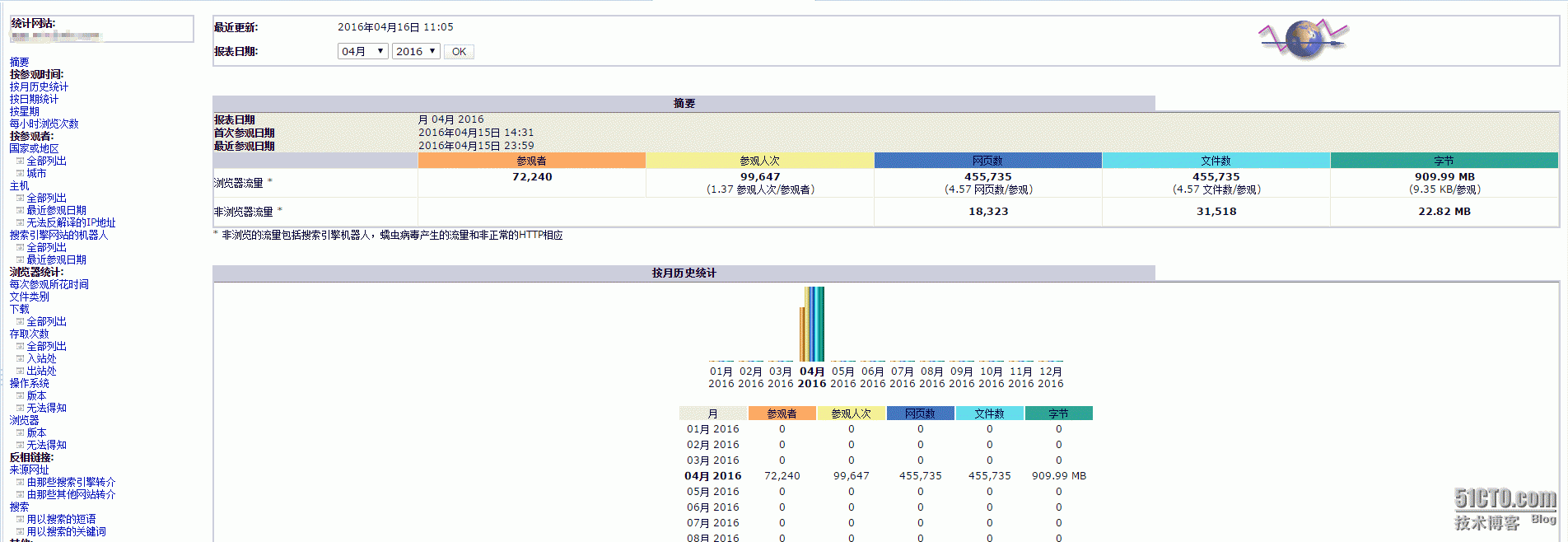
第二种办法:
7.2.1、配置Nginx,不需要调用perl
server {

                listen       44444;

                server_name  xxxxxxxxxxx;

                root   /data/awstats;

                index  index.html;

                access_log off;

                error_log off;

                charset gb2312;

                location ~ ^/icon/ {        # 图标目录

                        root   /usr/local/awstats/wwwroot;

                        index  index.html;

                        access_log off;

                        error_log off;

                }

        }
重启Nginx
7.2.2、生成awstats静态数据文件:
/usr/local/awstats/tools/awstats_buildstaticpages.pl -update -config=www.test.com -lang=cn -dir=/data/awstats -awstatsprog=/usr/local/awstats/wwwroot/cgi-bin/awstats.pl
7.2.3、 打开URL查看效果:http://xxxxxxxxxx:44444/awstats.www.test.com.html
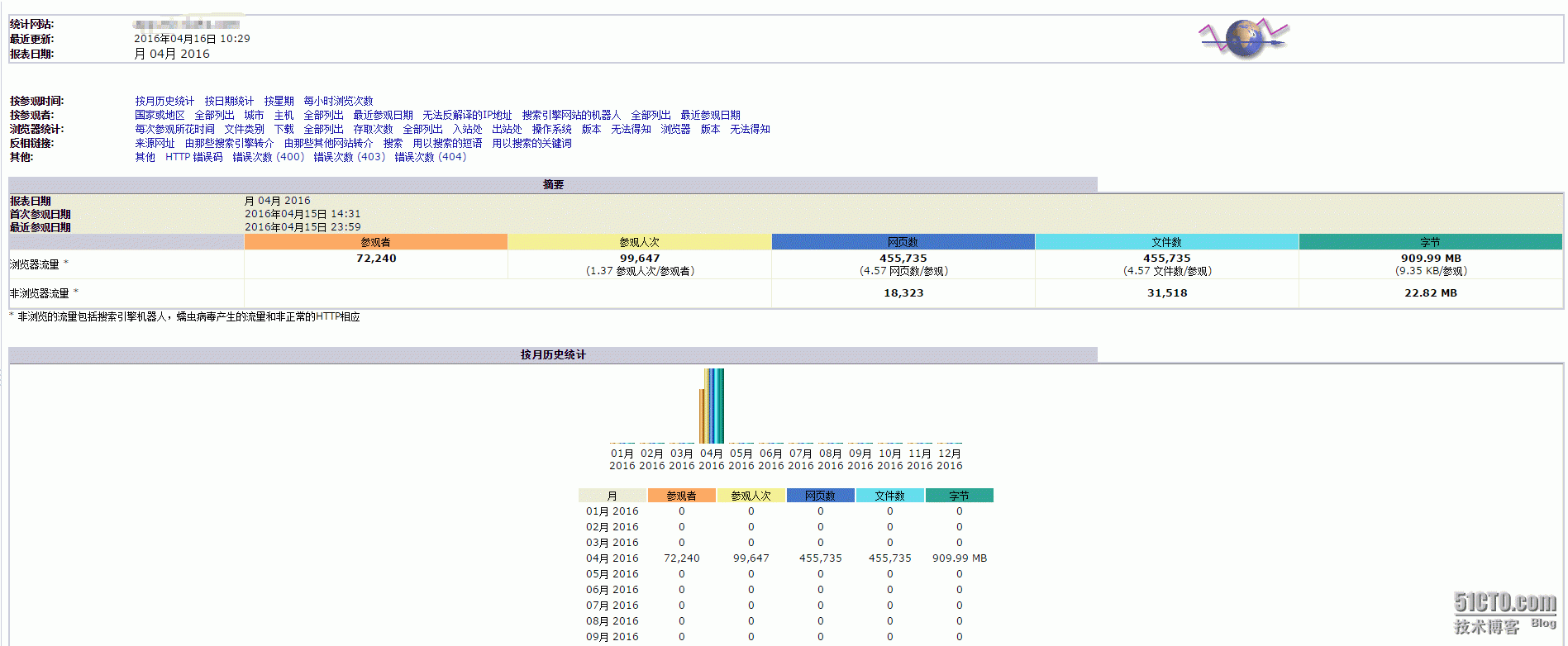
8、添加定时任务:
5 0 * * * /usr/local/awstats/wwwroot/cgi-bin/awstats.pl -update -config=www.sunsky.com >/dev/null 2>&1

10 0 * * * /usr/local/awstats/tools/awstats_buildstaticpages.pl -update -config=www.test.com -lang=cn -dir=/data/awstats -awstatsprog=/usr/local/awstats/wwwroot/cgi-bin/awstats.pl >/dev/null 2>&1
本文出自 “运维笔记” 博客,请务必保留此出处http://lihuipeng.blog.51cto.com/3064864/1764467
Nginx配置Awstats分析Nginx日志笔记的更多相关文章
- 烂泥:利用awstats分析nginx日志
本文由ilanniweb提供友情赞助,首发于烂泥行天下 想要获得更多的文章,可以关注我的微信ilanniweb 昨天把nginx的日志进行了切割,关于如何切割nginx日志,可以查看<烂泥:切割 ...
- Awstats分析Nginx日志
1.nginx日志格式设定 log_format access '$remote_addr - $remote_user [$time_local] "$request" ' '$ ...
- 使用 awstats 分析 Nginx 的访问日志(IBM)
前言 在我的上一篇文章<使用 Nginx 提升网站访问速度>中介绍了 Nginx 这个 HTTP 服务器以及如何通过它来加速网站的访问速度.在实际的网站运营中,我们经常需要了解到网站的访问 ...
- 使用awstats分析nginx日志
1.awstats介绍 本文主要是记录centos6.5下安装配置awstats,并统计nginx访问日志 1.1 awstats介绍 awstats是一款日志统计工具,它使用Perl语言编写,可统计 ...
- Nginx 配置埋点js日志采集
页面埋点&nginx日志采集 页面(web容器:httpd/nginx负载均衡 + apache server)<===> 日志采集服务器(nginx服务器) 通过某个页面跳转到我 ...
- nginx 配置重定向及nginx配置if
需求:地址 http://testa/inlinePreview/live.html?id=463738305721405440重定向到 http://testb/shares/live.html?n ...
- nginx配置负载均衡分发服务器笔记
记录学习搭建nginx负载均衡分发服务器的过程笔记 1.服务器IP:192.168.31.202(当前需要搭建nginx负载均衡分发的服务器)安装好nginx 2.在服务器IP:192.168.31. ...
- nginx配置:支持phpfastcgi,nginx和php-cgi通信,部分nginx常量解释
支持phpfastcgi的配置如下: server { listen 8000; server_name localhost; root F:/home/projects/test; i ...
- nginx配置:支持phpfastcgi,nginx和php-cgi通信,部分nginx常量解释
支持phpfastcgi的配置如下: server { listen 8000; server_name localhost; root F:/home/projects/test; index in ...
随机推荐
- CRF++地名实体识别(特征为词性和词)
http://x-algo.cn/index.php/2016/02/29/crf-name-entity-recognition/ 类似使用CRF实现分词和词性标注,地域识别也是需要生成相应的tag ...
- 【R】函数-统计函数
- 自己理解BFC 和 stack context , stack order
1. stack order 发生在BFC计算好了之后. 2.一个一个的BFC里面,不同的block 里面的stack context 会根据 stack order的顺序,进行堆叠.呈现互相遮盖的效 ...
- (转)Unity3D研究院之Assetbundle的原理(六十一)
Assetbundle 是Unity Pro提供提供的功能,它可以把多个游戏对象或者资源二进制文件封装到Assetbundle中,提供了封装与解包的方法使用起来很便利. 1.预设 A ...
- Spring 集成 redistemplate
jar包 <version.clients.jedis>2.7.2</version.clients.jedis><version.data.redis>1.6.2 ...
- mysql忘记密码解决方法
在windows下:打开命令行窗口,停止mysql服务: net stop mysql 启动mysql,执行: mysqld -nt --skip-grant-tables 另外打开一个命令行窗口,执 ...
- JavaScript筛选出数组种连续的数字
function arrange(source) { var t; var ta; var r = []; for(var j=0;j<source.length;j++){ var v=sou ...
- 机器学习-分类器-级联分类器训练(Train CascadeClassifier )
一.简介: adaboost分类器由级联分类器构成,"级联"是指最终的分类器是由几个简单分类器级联组成.在图像检测中,被检窗口依次通过每一级分类器,这样在前面几层的检测中大部分的候 ...
- MACD底背离选股公式——通达信、同花顺
{底背离,通达信版.同花顺版} DIFF:=EMA(CLOSE,) - EMA(CLOSE,); DEA:=EMA(DIFF,); MACD:=*(DIFF-DEA); QZQ:=BARSLAST(R ...
- Android Webservices 返回多行多列数据(Dataset)
对于之前从事.net或者java开发人员,习惯了从后台获取网格数据(多行多列DataTable),但转行从事android开发,难免会不习惯 Android调用Webservice时,如果返回值是一个 ...