
ASP.NET MVC+JQueryEasyUI1.4+ADO.NET Demo
1.JQueryEasyUI使用
JQuery EasyUI中文官网:http://www.jeasyui.net/
JQuery EasyUI中文官网下载地址:http://www.jeasyui.net/download/
jQuery EasyUI 1.4 版 API 中文版: 链接:http://pan.baidu.com/s/1c1pAutE%20 密码:0mk8
JQuery EasyUI 1.4.4 百度云盘:链接:http://pan.baidu.com/s/1bnRpH3T 密码:pbe9
1.1:把jquery.easyui.min.js和easyui-lang-zh_CN.js(1.4中是在locale文件夹下) 放到Scripts文件夹下

1.2:把themes文件夹下的css和icon放到Content/themes文件夹下
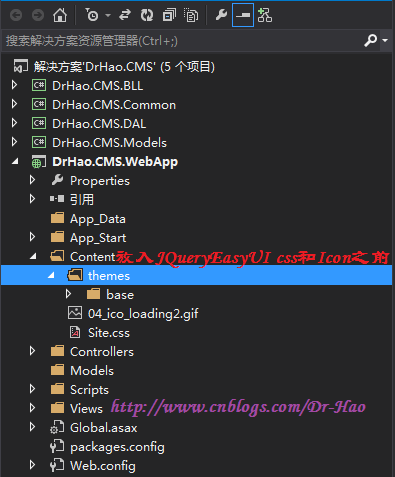
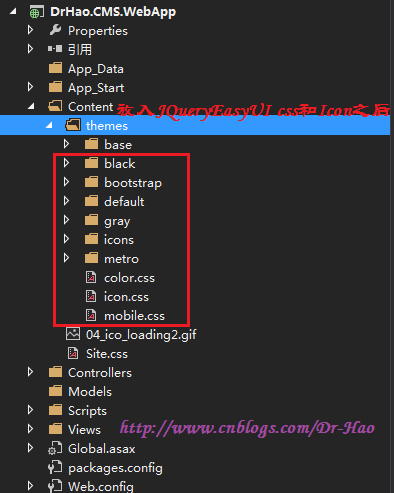
1.3:对于页面引用JQuery EasyUI那个css和js文件,参考如下:

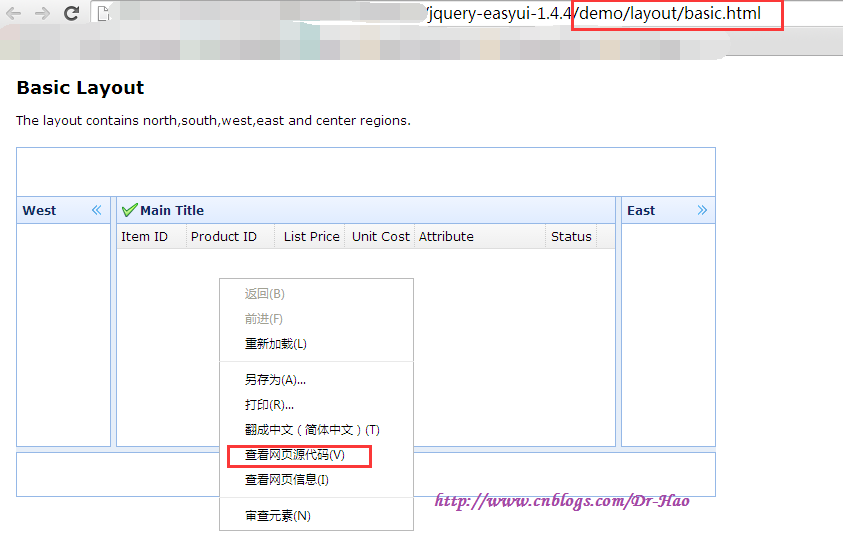
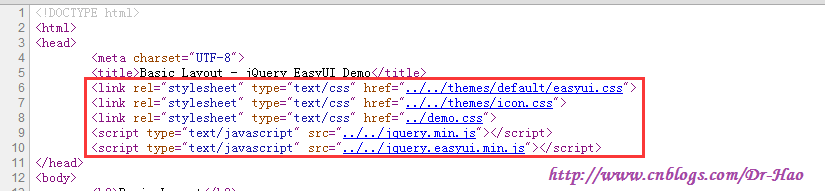
1.3.1:可以根据JQuery EasyUI Demo文件中具体引用的内容决定当前页面要引用的css和Js

1.3.2:使用chorme浏览器打开Demo/layout/basic.html,鼠标右键-->查看网页源代码
1.3.3:即可确定当前页面需要引用的css和jss
2:首先创建LoginControllers,然后添加Index视图
 using DrHao.CMS.BLL;

 using DrHao.CMS.Model;

 using System;

 using System.Collections.Generic;

 using System.Linq;

 using System.Web;

 using System.Web.Mvc;

 namespace DrHao.CMS.WebApp.Controllers

 {

     public class LoginController : Controller

     {

         //

         // GET: /Login/

         public ActionResult Index()

         {

             return View();

         }

         public ActionResult ProcessLogin()

         {

             string strUserName = Request["txtUserName"];

             string strPwd = Request["txtPwd"];

             UserInfoBLL userBll = new UserInfoBLL();

             string strLoginSuccess = "ok:登录成功,请稍等..";

             string strLoginFaild = "no:用户名或密码错误,请检查";

             UserInfo userInfo = userBll.GetUserInfo(strUserName, strPwd);

             Session.Add("UserInfo", userInfo);

             string strReturn = userInfo != null ? strLoginSuccess : strLoginFaild;

             return Content(strReturn);

         }

     }

 }
LoginControllers下的ProcessLogin方法
 @{

     Layout = null;

 }

 <!DOCTYPE html>

 <html>

 <head>

     <meta name="viewport" content="width=device-width" />

     <title>Index</title>

     <script src="~/Scripts/jquery-1.8.2.min.js"></script>

     <script src="~/Scripts/jquery.unobtrusive-ajax.min.js"></script>

     <script>

         function ajaxSuccess(data) {

             //alert(data);

             var strSplit = data.split(':');

             if (strSplit[0]=='no') {

                 $('#lbltxtMsg').text(strSplit[1]);

             } else if(strSplit[0]=='ok') {

                 //登录成功

                 $('#lbltxtMsg').text(strSplit[1]);

                 window.location.href = '/Home/Index';

             }

             else {

                 $("#lbltxtMsg").text('系统繁忙,请稍后再试...');

             }

         }

     </script>

 </head>

 <body>

     <div>

         @using (Ajax.BeginForm("ProcessLogin", "Login", new AjaxOptions { HttpMethod = "post", LoadingElementId = "loading", OnSuccess = "ajaxSuccess" }))

         {

             <table>

                 <tr>

                     <td>用户姓名:</td>

                     <td>@Html.TextBox("txtUserName")</td>

                 </tr>

                 <tr>

                     <td>用户密码:</td>

                     <td>@Html.Password("txtPwd")</td>

                 </tr>

                 <tr>

                     <td colspan="2">

                         <input type="submit" name="AjaxSubmit" value="登陆" />

                     </td>

                 </tr>

                 <tr>

                     <td colspan="2">

                         <label id="lbltxtMsg" style="color:red;"></label>

                     </td>

                 </tr>

             </table>

         }

         <div id="loading" style="display:none;">

             <img src="~/Content/04_ico_loading2.gif" />

         </div>

     </div>

 </body>

 </html>
LoginController Index视图
使用到的ASP.NET MVC Ajax参考:Mvc4MicrosoftAjaxDemo
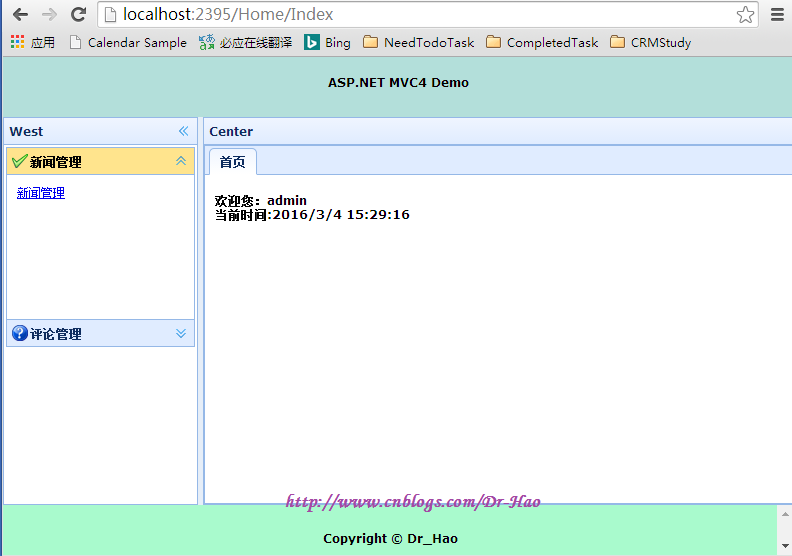
3:登录成功之后重定向到/Home/Index [使用JQueryEasyUI布局 参考\demo\layout下的full.html]
 using DrHao.CMS.Model;

 using System;

 using System.Collections.Generic;

 using System.Linq;

 using System.Web;

 using System.Web.Mvc;

 namespace DrHao.CMS.WebApp.Controllers

 {

     public class HomeController : Controller

     {

         //

         // GET: /Home/

         public ActionResult Index()

         {

             UserInfo user = Session["UserInfo"] as UserInfo;

             if (user == null)

             {

                 return Redirect("/Login/Index");

             }

             else

             {

                 ViewBag.userLogin = user.UUserName;

                 return View();

             }

         }

     }

 }
HomeController下的Index方法
@{
Layout = null;
}
<!DOCTYPE html>
<html>
<head>
<meta name="viewport" content="width=device-width" />
<title>Index</title>
<link href="~/Content/themes/default/easyui.css" rel="stylesheet" />
<link href="~/Content/themes/icon.css" rel="stylesheet" />
<link href="~/Content/themes/demo.css" rel="stylesheet" />
<script src="~/Scripts/jquery-1.8.2.min.js"></script>
<script src="~/Scripts/easyui-lang-zh_CN.js"></script>
<script src="~/Scripts/jquery.easyui.min.js"></script>
<script>
$(function () {
BindClickEvent();
});
function BindClickEvent() {
$(".detailListLink").click(function () {
var strText = $(this).text();
var url = $(this).attr('Url');
var isExist = $('#ttCenter').tabs('exists', strText);//判断选项卡是否存在
if (isExist) {
$('#ttCenter').tabs('select', strText);
} else {
$('#ttCenter').tabs('add', {
title: strText,
content: ShowContent(url),
closable: true
});
}
});
}
function ShowContent(url) {
var strHtml = '<iframe src="' + url + '" scrolling="no" width="100%" height="100%" frameborder="0"></iframe>';
return strHtml;
}
</script>
</head>
<body class="easyui-layout">
<!--页面顶部设置开始-->
<div data-options="region:'north',border:false" style="height:60px;background:#B3DFDA;padding:10px">
<h1 style="text-align:center;">ASP.NET MVC4 Demo</h1>
</div>
<!--页面顶部设置结束-->
<!--页面左边设置开始-->
<div data-options="region:'west',split:true,title:'West'" style="width:200px;padding:2px;">
<!--左边菜单栏设置开始-->
<div class="easyui-accordion" style="width:auto;height:200px;">
<div title="新闻管理" data-options="iconCls:'icon-ok'" style="overflow:auto;padding:10px;">
<a href="Javascript:void(0)" class="detailListLink" url="/AdminNewList/Index">新闻管理</a>
</div>
<div title="评论管理" data-options="iconCls:'icon-help'" style="padding:10px;">
<a href="Javascript:void(0)" class="detailListLink" url="/AdminCommentList/Index">评论管理</a>
</div>
</div>
<!--左边菜单栏设置结束-->
</div>
<!--页面左边设置结束-->
<!--页面中部设置开始-->
<div data-options="region:'center',title:'Center'" id="dvCenter">
<div class="easyui-tabs" style="width:700px;height:250px" fit="true" id="ttCenter">
<div title="首页" style="padding:10px;overflow:hidden;">
<h1>欢迎您:@ViewBag.userLogin<br/>
当前时间:@DateTime.Now.ToString()
</h1>
</div>
@*<div title="首页" style="padding:10px;overflow:hidden;">
<iframe src="/AdminNewList/Index" scrolling="no" width="100%" height="100%" frameborder="0"></iframe>
</div>*@
</div>
</div>
<!--页面中部设置结束-->
<!--页面底部设置开始-->
<div data-options="region:'south',border:false" style="height:50px;background:#A9FACD;padding:10px;">
<h4 style="text-align:center;">Copyright © Dr_Hao</h4>
</div>
<!--页面底部设置结束-->
</body>
</html>
HomeController Index视图
显示效果为:
4:点击左边[新闻管理],请求/AdminNewList/Index,返回新闻列表(使用数据库分页)

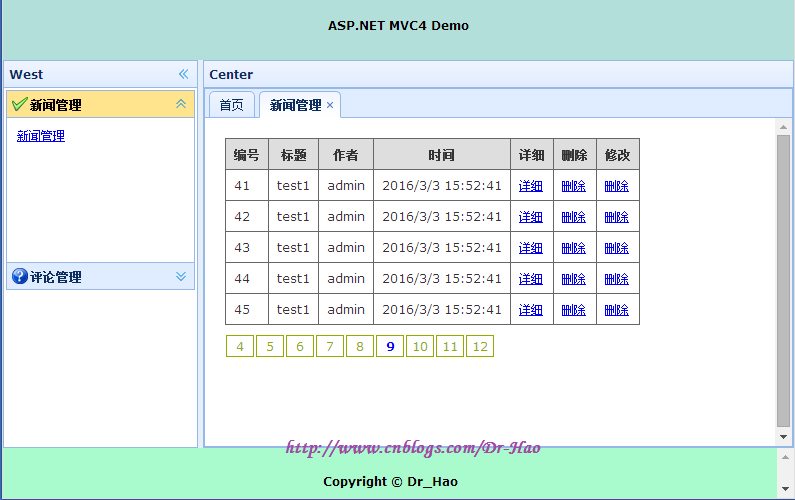
MSSql分页查询语句参考:
select * from

  (select row_number() over(order by id asc) as num,Id,Title,Msg,ImagePath,Author,SubDateTime from T_NewInfo) as T

   where T.num>=@start and T.num<=@end
PageBar.cs Common类 [根据pageIndex(当前页面值)和PageCount(总的页码值)确定]
 using System;

 using System.Collections.Generic;

 using System.Linq;

 using System.Text;

 using System.Threading.Tasks;

 namespace DrHao.CMS.Common

 {

     public class PageBar

     {

         /// <summary>

         /// 产生数字页码条

         /// </summary>

         /// <param name="pageIndex">当前页码值</param>

         /// <param name="PageCount">总的页码值</param>

         /// <returns></returns>

         public static string GetPageBar(int pageIndex, int PageCount)

         {

             if (PageCount == )

             {

                 return string.Empty;

             }

             int start = pageIndex - ;//起始位置,要求页面上显示10个数字页码

             if (start < )

             {

                 start = ;

             }

             int end = start + ;//终止位置

             if (end > PageCount)

             {

                 end = PageCount;

             }

             StringBuilder sbStr = new StringBuilder();

             for (int i = start; i <= end; i++)

             {

                 if (i == pageIndex)

                 {

                     sbStr.Append(string.Format("<a href='javascript:void(0)' style='color:blue;font-weight: bold;'>{0}</a>", i));

                 }

                 else

                 {

                     sbStr.Append(string.Format("<a href='?pageIndex={0}'>{0}</a>", i));

                 }

             }

             return sbStr.ToString();

         }

     }

 }
PageBar.cs
TableStyle.css [用于设置table表格的样式]
 table.gridtable {

     font-family: verdana,arial,sans-serif;

     font-size:11px;

     color:#333333;

     border-width: 1px;

     border-color: #666666;

     border-collapse: collapse;

 }

 table.gridtable th {

     border-width: 1px;

     padding: 8px;

     border-style: solid;

     border-color: #666666;

     background-color: #dedede;

 }

 table.gridtable td {

     border-width: 1px;

     padding: 8px;

     border-style: solid;

     border-color: #666666;

     background-color: #ffffff;

 }
TableStyle.css
PageBar.css [用于设置分页<a>标签样式]
 #Page {

     float: left;

     height: 50px;

     font-family: Verdana;

 }

     #Page a {

         float: left;

         margin: 10px 1px 0 1px;

         width: 26px;

         height: 20px;

         line-height: 20px;

         color: #91ad00;

         font: 12px;

         text-align: center;

         text-decoration: none;

         border: 1px solid #91ad00;

     }

         #Page a:hover {

             /*position: relative;*/

             /*margin: 0 -10px 0 -10px;*/

             /*padding: 0 1px;*/

             /*width: 30px;*/

             /*line-height: 40px;*/

             /*height: 40px;*/

             color: #000;

             border: 1px solid #91ad00;

             background: url() no-repeat left -10px;

             font-size: 18px;

             font-weight: bold;

         }

     #Page span {

         float: left;

         line-height: 165%;

         padding: 0px 8px;

         margin: 10px 1px 0 1px;

         border: 1px solid #91ad00;

         background: #91ad00;

         color: #FFF;

         font-weight: bold;

     }
PageBar.css
5:点击[详细]链接,弹出新闻管理详细页面[使用JQuery EasyUI \demo\dialog下的 toolbarbuttons.html]

5.1: 使用Ajax异步请求Controller的Action,返回Json数据到View
  public ActionResult GetNewInfoModel()

  {

      int id = Convert.ToInt32(Request["id"]);

      NewInfo newInfoModel = newinfoBll.GetUserInfoModel(id);

      return Json(newInfoModel, JsonRequestBehavior.AllowGet);

  }
Controller下Action GetNewInfoModel
5.2: View中使用Ajax请求Action
     $(function () {

         $("#dvDetails").css("display", "none");

         $("#divAdd").css("display","none");

         //显示详细内容

         $(".newInfoDetails").click(function () {

             ShowNewInfoDetail($(this).attr("dis"));

         });

         //删除信息

         $(".newInfoDelete").click(function () {

             DeleteNewInfo($(this).attr("dis"), this);

         });

         //修改信息

         $(".newInfoUpdate").click(function () {

             UpdateNewInfo($(this).attr("dis"));

         });

         //添加信息

         $("#addInfo").click(function () {

             AddNewInfo();

         });

     });

     //显示详细信息

     function ShowNewInfoDetail(id) {

         $.post("/AdminNewList/GetNewInfoModel", { "id": id }, function (data) {

             $("#title").text(data.Title);

             $("#author").text(data.Author);

             $("#subDateTime").text(ChangeDataFormat(data.SubDateTime));

             $("#msg").text(data.Msg);

         }, "json");

         $("#dvDetails").css("display", "block");

         $('#dvDetails').dialog({

             title: '详细内容',

             width: ,

             height: ,

             closed: false,

             cache: false,

             collapsible: true,

             minimizable: true,

             maximizable: true,

             modal: true,

             buttons: [{

                 text: 'Ok',

                 iconCls: 'icon-ok',

                 handler: function () {

                     alert('ok');

                 }

             }, {

                 text: 'Cancel',

                 handler: function () {

                     $('#dvDetails').dialog('close');

                 }

             }]

         });

     }
Index.cshtml Page JavaScript
Ps: Action返回Json数据,DateTime类型会返回为毫秒数,需要使用以下方法进行处理ChangeDataFormat(cellval)
 function ChangeDataFormat(cellval) {

     var data = new Date(parseInt(cellval.replace("/Date(", "").replace(")/", ""), 10));

     var month = data.getMonth() + 1 < 10 ? "0" + (data.getMonth() + 1) : data.getMonth() + 1;

     var currentDate = data.getDate() < 10 ? "0" + data.getDate() : data.getDate();

     return data.getFullYear() + "-" + month + "-" + currentDate;

 }
ChangeDataFormat(cellval) function
6:点击[删除]链接,弹出confirm确认信息页面,使用JQuery.post Ajax,成功删除后,右下角显示成功删除提示信息
[使用JQuery EasyUI \demo\messager下的interactive.html和basic.html]
6.1:点击[删除]链接,弹出确认窗体
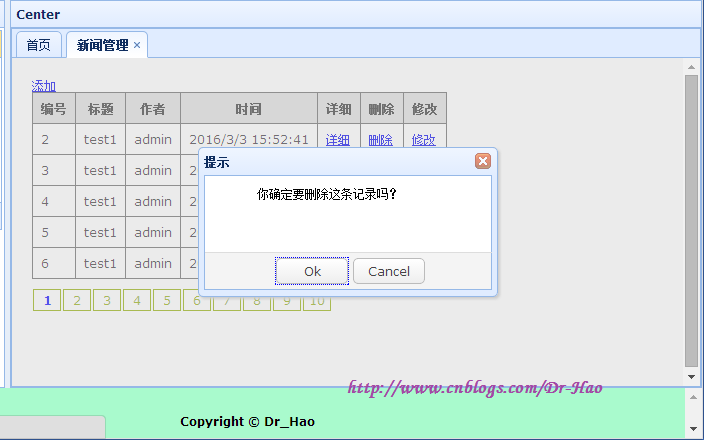
6.2:点击[Ok],删除成功后,右下角显示删除成功提示信息

7:点击[添加]链接,弹出模态dialog
7.1:使用kindeditor富文本编辑器:参考 ASP.NET 配置KindEditor文本编辑器
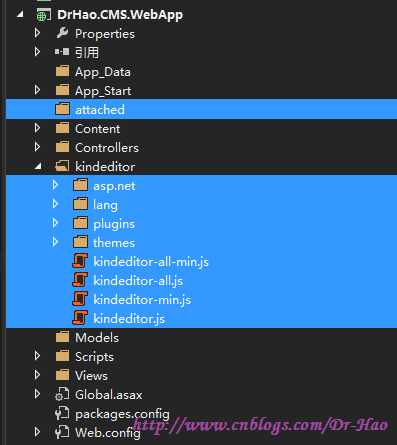
页面添加kindeditor css和js的引用
    <link href="~/kindeditor/themes/default/default.css" rel="stylesheet" />

    <link href="~/kindeditor/plugins/code/prettify.css" rel="stylesheet" />

    <script src="~/kindeditor/plugins/code/prettify.js"></script>

    <script src="~/kindeditor/kindeditor.js"></script>

    <script src="~/kindeditor/lang/zh_CN.js"></script>

    <link href="~/Content/themes/TableStyle.css" rel="stylesheet" />

    <script>

        KindEditor.ready(function (K) {

            var editor1 = K.create('#MsgContent', {

                uploadJson: 'kindeditor/asp.net/upload_json.ashx',

                //文件管理

                fileManagerJson: 'kindeditor/asp.net/file_manager_json.ashx',

                allowFileManager: true,

                //设置编辑器创建后执行的回调函数

                afterBlur: function () { this.sync(); },//异步提交时需要

                afterCreate: function () {

                    var self = this;

                    self.sync();//把富文本编辑器的内容放到文本域中

                }

            });

            prettyPrint();//要调用该方法

        });

    </script>
<textarea id="MsgContent" cols="100" rows="8" style="width:400px;height:250px;visibility:hidden;" name="Msg"></textarea>
7.2:异步上传图片 MyAjaxForm.js 基于 ASP.NET MVC Microsoft Ajax 参考地址:http://www.cnblogs.com/Dr-Hao/p/5206575.html
MyAjaxForm.js 下载地址:http://jquery.malsup.com/form/
MyAjaxForm.js 百度云盘:链接:http://pan.baidu.com/s/1gekKOgj 密码:83ud
jQueryFormPlugin参考文档[html]百度云盘:链接:http://pan.baidu.com/s/1hrxAby8 密码:ph56
页面添加js引用:
<script src="~/Scripts/jquery-1.8.2.min.js"></script>

<script src="~/Scripts/jquery.unobtrusive-ajax.min.js"></script>

<script src="~/Scripts/MyAjaxForm.js"></script>
$("#form1").ajaxSubmit({

     type: "post",

     url: "url",

     success: function (data) {

        //server data

     }

 });
7.3:父窗体调用子窗体方法
//调用子窗体中的方法

var childWindow = $("")[0].contentWindow; //转换为dom对象 获取子窗体对象

childWindow.subForm(); //subForm 是子窗体方法
子窗体调用父窗体的方法
//添加完成以后,调用该方法,关闭添加的窗口

//调用父窗体AfterAdd方法

function AfterAdd() {

    window.parent.AfterAdd();

}
7.4:允许富文本编辑器提交HTML
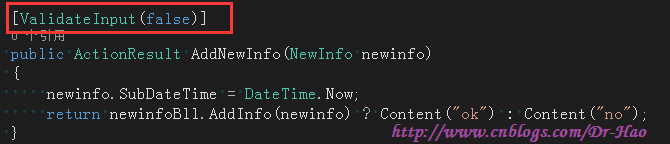
1:Controller中Action标记为 [ValidateInput(false)]
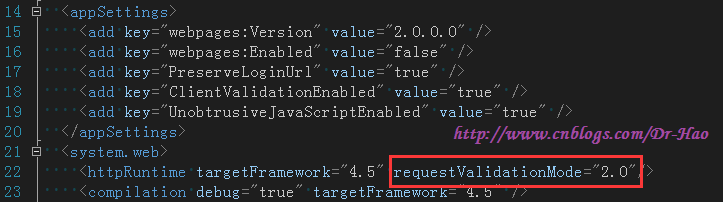
2:web.config 中httpRuntime 添加requestValidationMode="2.0"
父窗体Index.cshtml源代码:
 @{

     Layout = null;

 }

 @using DrHao.CMS.Model

 @using DrHao.CMS.Common

 <!DOCTYPE html>

 <html>

 <head>

     <meta name="viewport" content="width=device-width" />

     <title>Index</title>

     <link href="~/Content/themes/PageBar.css" rel="stylesheet" />

     <link href="~/Content/themes/TableStyle.css" rel="stylesheet" />

     <link href="~/Content/themes/default/easyui.css" rel="stylesheet" />

     <link href="~/Content/themes/icon.css" rel="stylesheet" />

     <link href="~/Content/themes/demo.css" rel="stylesheet" />

     <script src="~/Scripts/jquery-1.8.2.min.js"></script>

     <script src="~/Scripts/easyui-lang-zh_CN.js"></script>

     <script src="~/Scripts/jquery.easyui.min.js"></script>

     <script>

         $(function () {

             $("#dvDetails").css("display", "none");

             $("#divAdd").css("display", "none");

             //显示详细内容

             $(".newInfoDetails").click(function () {

                 ShowNewInfoDetail($(this).attr("dis"));

             });

             //删除信息

             $(".newInfoDelete").click(function () {

                 DeleteNewInfo($(this).attr("dis"), this);

             });

             //修改信息

             $(".newInfoUpdate").click(function () {

                 UpdateNewInfo($(this).attr("dis"));

             });

             //添加信息

             $("#addInfo").click(function () {

                 AddNewInfo();

             });

         });

         //显示详细信息

         function ShowNewInfoDetail(id) {

             $.post("/AdminNewList/GetNewInfoModel", { "id": id }, function (data) {

                 $("#title").text(data.Title);

                 $("#author").text(data.Author);

                 $("#subDateTime").text(ChangeDataFormat(data.SubDateTime));

                 $("#msg").html(data.Msg);

             }, "json");

             //$.get("/AdminNewList/GetNewInfoModel", { "id": id }, function (data) {

             //    $("#title").text(data.Title);

             //    $("#author").text(data.Author);

             //    $("#subDateTime").text(data.SubDateTime);

             //    $("#msg").text(data.Msg);

             //}, "json");

             ////本来还以为是ajax跨域问题,使用jsonp来解决,请求没有跨域

             //$.ajax({

             //    type: "get",

             //    async: false,

             //    url: "/AdminNewList/GetNewInfoModel",

             //    data: { "id": id },

             //    dataType: "json",

             //    //jsonp: "callback",//传递给请求处理程序或页面的,用以获得jsonp回调函数名的参数名(一般默认为:callback)

             //    //jsonpCallback: "?",//自定义的jsonp回调函数名称,默认为jQuery自动生成的随机函数名,也可以写"?",jQuery会自动为你处理数据

             //    success: function (json) {

             //        $("#title").text(json.Title);

             //        $("#author").text(json.Author);

             //        $("#subDateTime").text(json.SubDateTime);

             //        $("#msg").text(json.Msg);

             //    },

             //    error: function () {

             //        alert('fail');

             //    }

             //});

             $("#dvDetails").css("display", "block");

             $('#dvDetails').dialog({

                 title: '详细内容',

                 width: 400,

                 height: 300,

                 closed: false,

                 cache: false,

                 collapsible: true,

                 minimizable: true,

                 maximizable: true,

                 modal: true,

                 buttons: [{

                     text: 'Ok',

                     iconCls: 'icon-ok',

                     handler: function () {

                         alert('ok');

                     }

                 }, {

                     text: 'Cancel',

                     handler: function () {

                         $('#dvDetails').dialog('close');

                     }

                 }]

             });

         }

         function ChangeDataFormat(cellval) {

             var data = new Date(parseInt(cellval.replace("/Date(", "").replace(")/", ""), 10));

             var month = data.getMonth() + 1 < 10 ? "0" + (data.getMonth() + 1) : data.getMonth() + 1;

             var currentDate = data.getDate() < 10 ? "0" + data.getDate() : data.getDate();

             return data.getFullYear() + "-" + month + "-" + currentDate;

         }

         //删除NewInfo记录

         function DeleteNewInfo(id, control) {

             $.messager.confirm("提示", "你确定要删除这条记录吗?", function (data) {

                 if (data) {

                     $.post("/AdminNewList/DeleteNewInfo", { "id": id }, function (data) {

                         if (data == "ok") {

                             //确定删除

                             $.messager.show({

                                 title: '提示',

                                 msg: '你已经成功删除Id为:' + id + " 的数据",

                                 timeout: 4000,

                                 showType: 'slide'

                             });

                             //删除页面的信息

                             $(control).parent().parent().remove();

                         }

                     });

                 }

             });

         }

         //修改NewInfo信息

         function UpdateNewInfo(id) {

         }

         //添加NewInfo信息

         function AddNewInfo() {

             $("#AddFrame").attr("src", "/AdminNewList/ShowAddInfo");

             $('#divAdd').dialog({

                 title: '添加新闻',

                 top: 50,

                 left: 200,

                 width: 750,

                 height: 500,

                 closed: false,

                 cache: false,

                 collapsible: true,

                 minimizable: true,

                 maximizable: true,

                 modal: true,

                 buttons: [{

                     text: 'Ok',

                     iconCls: 'icon-ok',

                     handler: function () {

                         //调用子窗体中的方法

                         var childWindow = $("#AddFrame")[0].contentWindow;//获取子窗体的window对象

                         childWindow.subForm();

                     }

                 }, {

                     text: 'Cancel',

                     handler: function () {

                         $('#divAdd').dialog('close');

                     }

                 }]

             });

             $("#divAdd").css("display", "block");

         }

         //添加完成以后,调用该方法关闭添加窗口

         function AfterAdd() {

             $('#divAdd').dialog('close');

         }

     </script>

 </head>

 <body>

     <div>

         <a href="javascript:void(0)" id="addInfo">添加</a>

         @if (ViewData["liNewInfo"] != null)

         {

             <table class="gridtable">

                 <tr>

                     <th>编号</th>

                     <th>标题</th>

                     <th>作者</th>

                     <th>时间</th>

                     <th>详细</th>

                     <th>删除</th>

                     <th>修改</th>

                 </tr>

                 @foreach (NewInfo newInfo in (List<NewInfo>)ViewData["liNewInfo"])

                 {

                     <tr>

                         <td>@newInfo.Id</td>

                         <td>@newInfo.Title</td>

                         <td>@newInfo.Author</td>

                         <td>@newInfo.SubDateTime</td>

                         <td><a href="javascript:void(0)" class="newInfoDetails" dis="@newInfo.Id">详细</a></td>

                         <td><a href="javascrpit:void(0)" class="newInfoDelete" dis="@newInfo.Id">删除</a></td>

                         <td><a href="javascrpit:void(0)" class="newInfoUpdate" dis="@newInfo.Id">修改</a></td>

                     </tr>

                 }

             </table>

             <div id="Page">

                 @Html.Raw(

                  @PageBar.GetPageBar(Convert.ToInt32(ViewData["pageIndex"]), Convert.ToInt32(ViewData["pageCount"])))

             </div>

         }

         else

         {

             <span>暂无数据</span>

         }

         <!--详细内容开始-->

         <div id="dvDetails">

             <table class="gridtable">

                 <tr>

                     <td>标题</td>

                     <td><span id="title"></span></td>

                 </tr>

                 <tr>

                     <td>作者</td>

                     <td><span id="author"></span></td>

                 </tr>

                 <tr>

                     <td>时间</td>

                     <td><span id="subDateTime"></span></td>

                 </tr>

                 <tr>

                     <td>详细内容</td>

                     <td><span id="msg"></span></td>

                 </tr>

             </table>

         </div>

         <!--详细内容结束-->

         <!--添加信息内容开始-->

         <div id="divAdd" style="overflow:hidden;">

             <iframe id="AddFrame" frameborder="0" width="100%" height="100%" scrolling="auto"> </iframe>

         </div>

         <!--添加信息内容结束-->

         <!---修改内容开始-->

         <!---修改内容结束-->

     </div>

 </body>

 </html>
Index.cshtml
子窗体ShowAddInfo.cshtml源代码:
 @{

     Layout = null;

 }

 <!DOCTYPE html>

 <html>

 <head>

     <meta name="viewport" content="width=device-width" />

     <title>添加新闻</title>

     <link href="~/kindeditor/themes/default/default.css" rel="stylesheet" />

     <link href="~/kindeditor/plugins/code/prettify.css" rel="stylesheet" />

     <script src="~/kindeditor/plugins/code/prettify.js"></script>

     <script src="~/kindeditor/kindeditor.js"></script>

     <script src="~/kindeditor/lang/zh_CN.js"></script>

     <link href="~/Content/themes/TableStyle.css" rel="stylesheet" />

     <script src="~/Scripts/jquery-1.8.2.min.js"></script>

     <script src="~/Scripts/jquery.unobtrusive-ajax.min.js"></script>

     <script src="~/Scripts/MyAjaxForm.js"></script>

     <script src="~/Scripts/jquery.easyui.min.js"></script>

     <script src="~/Scripts/easyui-lang-zh_CN.js"></script>

     <script>

         KindEditor.ready(function (K) {

             var editor1 = K.create('#MsgContent', {

                 uploadJson: 'kindeditor/asp.net/upload_json.ashx',

                 //文件管理

                 fileManagerJson: 'kindeditor/asp.net/file_manager_json.ashx',

                 allowFileManager: true,

                 //设置编辑器创建后执行的回调函数

                 afterBlur: function () { this.sync(); },//异步提交时需要

                 afterCreate: function () {

                     var self = this;

                     self.sync();//把富文本编辑器的内容放到文本域中

                 }

             });

             prettyPrint();//要调用该方法

         });

         $(function () {

             FileUpload();

         });

         function FileUpload() {

             $("#btnFileUp").click(function () {

                 if ($("#fileUpImage").val() == "") {

                     $.messager.alert("提示", "请选择上传的文件图片", "info");

                     return;

                 }

                 $("#form1").ajaxSubmit({

                     type: "post",

                     url: "/AdminNewList/FileUpload",

                     success: function (data) {

                         var serverData = data.split(":");

                         if (serverData[0] == "ok") {

                             $("#showImage").append("<img src='" + serverData[1] + "'width='40px' height='40px'/>");

                             $("#hidImagePath").val(serverData[1]);//将路径赋值给隐藏域,提交表单时将提交给服务端保存到数据库

                             $("#txtMsg").text();

                         } else if (serverData[0] == "no") {

                             $("#txtMsg").text(serverData[1]);

                         } else {

                             $("#txtMsg").text('系统繁忙,请稍后再试...');

                         }

                     }

                 });

             });

         }

         //提交表单

         function subForm() {

             $("#form1").submit();

         }

         //添加完成以后,调用该方法,关闭添加的窗口

         //调用父窗体AfterAdd方法

         function AfterAdd() {

             window.parent.AfterAdd();

         }

     </script>

 </head>

 <body>

     <div>

         @using (Ajax.BeginForm("AddNewInfo", "AdminNewList", new AjaxOptions() { HttpMethod = "post", OnSuccess = "AfterAdd" }, new { id = "form1" }))

         {

             <table class="gridtable">

                 <tr>

                     <td>新闻标题</td>

                     <td><input type="text" name="Title" value=" " /></td>

                 </tr>

                 <tr>

                     <td>作者</td>

                     <td><input type="text" name="Author" value=" " /></td>

                 </tr>

                 <tr>

                     <td>上传图片</td>

                     <td>

                         <input type="file" name="fileUp" id="fileUpImage" />

                         <input type="submit" value="上传图片" id="btnFileUp" />

                         <input type="hidden" name="ImagePath" value="hidImagePath" />

                         <div id="showImage"></div>

                         <span id="txtMsg" style="color:red;"></span>

                     </td>

                 </tr>

                 <tr>

                     <td>新闻内容</td>

                     <td>

                         <textarea id="MsgContent" cols="100" rows="8" style="width:400px;height:250px;visibility:hidden;" name="Msg"></textarea>

                     </td>

                 </tr>

             </table>

         }

     </div>

 </body>

 </html>
ShowAddInfo.cshtml
控制器AdminNewListController.cs源代码:
 using DrHao.CMS.Model;

 using System;

 using System.Collections.Generic;

 using System.IO;

 using System.Linq;

 using System.Web;

 using System.Web.Mvc;

 namespace DrHao.CMS.WebApp.Controllers

 {

     public class AdminNewListController : BaseController

     {

         //

         // GET: /AdminNewList/

         BLL.NewInfoBLL newinfoBll = new BLL.NewInfoBLL();

         public ActionResult Index()

         {

             int pageIndex = Request["pageIndex"] != null ? Convert.ToInt32(Request["pageIndex"]) : ;

             int pageSize = ;

             int pageCount = newinfoBll.GetPageCount(pageSize);

             pageIndex = pageIndex <  ?  : pageIndex;

             pageIndex = pageIndex > pageCount ? pageCount : pageIndex;

             List<NewInfo> liNewInfo = newinfoBll.GetPageList(pageIndex, pageSize);//获得分页数据

             ViewData["liNewInfo"] = liNewInfo;

             ViewData["pageIndex"] = pageIndex;

             ViewData["pageCount"] = pageCount;

             return View();

         }

         public ActionResult GetNewInfoModel()

         {

             int id = Convert.ToInt32(Request["id"]);

             NewInfo newInfoModel = newinfoBll.GetUserInfoModel(id);

             return Json(newInfoModel, JsonRequestBehavior.AllowGet);

         }

         public ActionResult DeleteNewInfo()

         {

             int id = Convert.ToInt32(Request["id"]);

             int result = newinfoBll.DeleteNewInfo(id);

             return Content(result >  ? "ok" : "no");

         }

         public ActionResult ShowAddInfo()

         {

             return View();

         }

         public ActionResult FileUpload()

         {

             HttpPostedFileBase postFile = Request.Files["fileUp"];

             if (postFile == null)

             {

                 return Content("no:请选择上传文件");

             }

             else

             {

                 string fileName = Path.GetFileName(postFile.FileName);//文件名

                 string fileExt = Path.GetExtension(fileName);//文件的扩展名

                 if (fileExt == ".jpg")

                 {

                     string dir = "/attached/" + DateTime.Now.Year + "/" + DateTime.Now.Month + "/" + DateTime.Now.Day + "/";

                     Directory.CreateDirectory(Path.GetDirectoryName(Request.MapPath(dir)));//创建文件夹

                     string newFileName = Guid.NewGuid().ToString();//新的文件名

                     string fulDir = dir + newFileName + fileExt;

                     postFile.SaveAs(Request.MapPath(fulDir));

                     return Content("ok:" + fulDir);

                 }

                 else

                 {

                     return Content("no:文件格式错误");

                 }

             }

         }

         [ValidateInput(false)]

         public ActionResult AddNewInfo(NewInfo newinfo)

         {

             newinfo.SubDateTime = DateTime.Now;

             return newinfoBll.AddInfo(newinfo) ? Content("ok") : Content("no");

         }

     }

 }
AdminNewListController.cs
DrHao.CMS整体参考源代码:链接:http://pan.baidu.com/s/1jHfpkmM%20 密码:f2t8
MVCBlog(ASP.NET MVC 4.0+EF 简单Demo) 链接:http://pan.baidu.com/s/1bkVvcU 密码:1c2f
Q:我在DrHao.CMS中定义一个BaseController控制器,代码如下:
 using System;

 using System.Collections.Generic;

 using System.Linq;

 using System.Web;

 using System.Web.Mvc;

 using System.Web.Providers.Entities;

 namespace DrHao.CMS.WebApp.Controllers

 {

     public class BaseController : Controller

     {

         //

         // GET: /Base/

         protected override void OnActionExecuting(ActionExecutingContext filterContext)

         {

             if (Session["UserInfo"]==null)

             {

                 //没效果,还是会执行Action的方法

                 filterContext.HttpContext.Response.Redirect("/Login/Index");

             }

             base.OnActionExecuting(filterContext);

         }

     }

 }
BaseController .cs
运行DrHao.CMS 直接访问 /Home/Index ,HomeController继承BaseController 代码如下:
 using DrHao.CMS.Model;

 using System;

 using System.Collections.Generic;

 using System.Linq;

 using System.Web;

 using System.Web.Mvc;

 namespace DrHao.CMS.WebApp.Controllers

 {

     public class HomeController : BaseController

     {

         //

         // GET: /Home/

         public ActionResult Index()

         {

             UserInfo user = Session["UserInfo"] as UserInfo;

             //user判断 正常情况下不需要写

             if (user == null)

             {

                 return Redirect("/Login/Index");

             }

             else

             {

                 ViewBag.userLogin = user.UUserName;

                 return View();

             }

         }

     }

 }
HomeController.cs
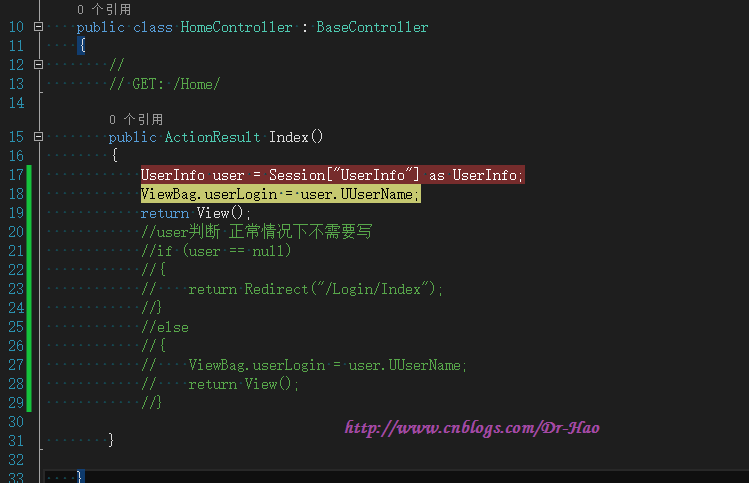
正常情况下,在没有登陆当前用户的时候,直接访问/Home/Index,会执行BaseController中的 protected override void OnActionExecuting(ActionExecutingContext filterContext)方法,判断当前用户没有登陆,则直接跳转,不会执行/Home/Index Action中的方法,但实际运行效果,会继续执行/Home/Index中的方法(若在/Home/Index中不加入判断,则直接抛出异常信息,user不能为null)
1:直接访问/Home/Index View,执行代码如下:
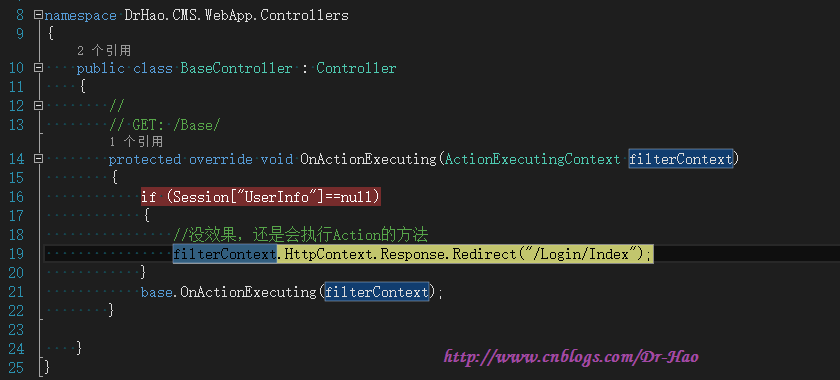
2:判断当前Session["UserInfo"]==null,执行跳转代码,但是还会继续执行base.OnActionExecuting(filterContext);方法

3:执行完BaseController中OnActionExecuting方法,则会继续执行HomeController控制器下的Index Action(按照我的理解不应该继续执行)

关于这点疑问,解决方案:
filterContext.HttpContext.Response.Redirect("/Login/Index");
是浏览器端的跳转,执行完上面代码,会继续往下执行Action,直到发生错误(错误信息客户端看不到),然后执行客户端跳转(不推荐)
filterContext.Result = new RedirectResult("/Login/Index");
是服务器端的跳转,后续Action都不会执行(推荐)
ASP.NET MVC+JQueryEasyUI1.4+ADO.NET Demo的更多相关文章
- CRUD Operations In ASP.NET MVC 5 Using ADO.NET
Background After awesome response of an published by me in the year 2013: Insert, Update, Delete In ...
- asp.net mvc JQGrid
http://mikedormitorio.azurewebsites.net/BlogPost/jqgrid-series-part-1-loading-data-to-a-jqgrid-on-an ...
- IBatis.net在asp.net MVC下的使用
IBatis.net 是2001年发起的开源项目,它是一个轻量级的ORM框架,现在IBatisNET已经是属于Apache下的一个子项目了,最新版本是1.6.2. 官方网站:http://www.my ...
- 【转】ASP.NET MVC教程
转自:http://www.cnblogs.com/QLeelulu/category/123326.html ASP.NET MVC的最佳实践与性能优化的文章 摘要: 就一些文章链接,就不多废话了. ...
- ASP.NET MVC 自定义Razor视图WorkContext
概述 1.在ASP.NET MVC项目开发的过程中,我们经常需要在cshtml的视图层输出一些公用信息 比如:页面Title.服务器日期时间.页面关键字.关键字描述.系统版本号.资源版本号等 2.普通 ...
- 返璞归真 asp.net mvc (1) - 添加、查询、更新和删除的 Demo
原文:返璞归真 asp.net mvc (1) - 添加.查询.更新和删除的 Demo [索引页] [源码下载] 返璞归真 asp.net mvc (1) - 添加.查询.更新和删除的 Demo 作者 ...
- ASP.NET MVC搭建项目后台UI框架—5、Demo演示Controller和View的交互
目录 ASP.NET MVC搭建项目后台UI框架—1.后台主框架 ASP.NET MVC搭建项目后台UI框架—2.菜单特效 ASP.NET MVC搭建项目后台UI框架—3.面板折叠和展开 ASP.NE ...
- ASP.NET MVC+EF框架+EasyUI实现权限管理系列(2)-数据库访问层的设计Demo
原文:ASP.NET MVC+EF框架+EasyUI实现权限管理系列(2)-数据库访问层的设计Demo ASP.NET MVC+EF框架+EasyUI实现权限管系列 (开篇) (1)框架搭建 前言:这 ...
- Asp.net MVC集成Google Calendar API(附Demo源码)
Asp.net MVC集成Google Calendar API(附Demo源码) Google Calendar是非常方便的日程管理应用,很多人都非常熟悉.Google的应用在国内不稳定,但是在国外 ...
随机推荐
- ECHO不换行
我想用批处理实现向s.txt中多次分别导入文本例如:“aaaa","bbbb","cccc","dddd"实现s.txt内效果如: ...
- fl包下的TransitionManager的使用
http://www.republicofcode.com/tutorials/flash/as3transitionmanager/
- BitKeeper 和 Git
在 2002 年到 2005年, Linux 内核使用 BitKeeper 管理代码. BitKeeper 的 CEO 和 Linus 曾经是好友. 在 Git 诞生 11年后 BitKeeper 宣 ...
- Mac OSX 正确地同时安装Python 2.7 和Python3
出处:http://www.jianshu.com/p/51811fa24752 python3 默认安装位置:/usr/local/Cellar/python3
- Jenkins进阶-获取git tags代码(2)
配置Jenkins获取git tag代码的方式其实方法很多,目前我使用比较多的主要是通过Git Parameter 来配置动态的获取最新tags代码,主要我们首先需要安装一下Git Parameter ...
- 深入理解ASP.NET MVC(1)
系列目录 ASP.NET MVC请求的服务过程 下图是书中的截图,表述了一次通常的ASP.NET MVC请求的服务过程: 从图中可以初步看出一个HttpRequest是如何被ASP.NET和ASP.N ...
- win xp 关闭动画屏幕角色,那只小狗
这个动画屏幕角色每次会占用两秒左右的时间. 在搜索选项中打开"改变首选项(G)" -选择 “不使用动画屏幕角色(S)”. - -
- 技巧:利用putty通过win7访问ubuntu
.用apt-get直接安装SSHD服务所需相关软件包: sudo apt-get install openssh-server .开启服务: sudo /etc/init.d/sshd start p ...
- git 未能顺利结束 (退出码 1)
Please make sure you have the correct access rightsand the repository exists.
- C++多线程同步之Mutex(互斥量)
原文链接: http://blog.csdn.net/olansefengye1/article/details/53086141 一.互斥量Mutex同步多线程 1.Win32平台 相关函数和头文件 ...