
非常酷的jQuery/HTML5图片滑块特效 带弹性菜单
新的一周刚刚开始,当我迷迷糊糊坐在办公桌前时,又不自主的去看了一些jQuery和HTML5的应用插件,今天我们来看一款非常酷的jQuery/HTML5图片滑块特效,这款插件的特点是图片上不错的弹性菜单,鼠标滑过菜单时可以弹出一张半透明的图片。先来看看效果图。
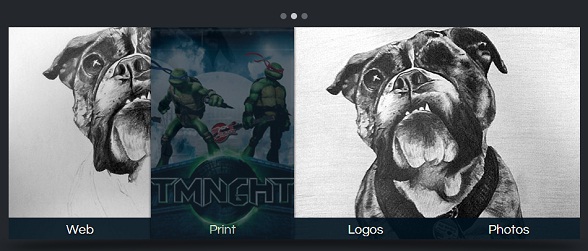
我们可以在这里看到生动的DEMO演示。
当然,我们光看效果是不行的,还是一起来简单地分析一下实现的源码。
首先是使用最简单的HTML代码来构造这个带菜单的图片滑块框架:
<div id="slider-wrapper">

        <div id="dots">

            <ul>

                <li class="active"></li>

                <li></li>

                <li></li>

            </ul>

        </div>

        <div id="arrow-left" class="nav-arrow"></div>

        <div id="image-slider">

            <ul>

                <li class="active-img"><img src="sunset.jpg" alt="" /></li><li><img src="lele.jpg" alt="" /></li><li><img src="logo.jpg" alt="" /></li>

            </ul>

            <div id="nav-bar">

                    <a href="#"><div><img src="thumb-web.jpg" /></div>Web</a><a href="#"><div><img src="thumb-print.jpg" /></div>Print</a><a href="#"><div><img src="thumb-logo.jpg" /></div>Logos</a><a href="#"><div><img src="thumb-photo.jpg" /></div>Photos</a>

            </div>

        </div>

        <div id="arrow-right" class="nav-arrow"></div>

    </div>
下面是CSS3代码,主要是对左右箭头、图片阴影效果的渲染,这里贴一下核心的CSS代码:
.nav-arrow{

        width: 46px;

        height: 343px;

        display: inline-block;

            *display: inline;

            zoom: 1.0;

        cursor: pointer;

    }

    #arrow-left{

        background: url(arrow-left.png) center center no-repeat;

    }

    #arrow-right{

        background: url(arrow-right.png) center center no-repeat;

    }

    #arrow-right:hover, #arrow-left:hover{

        background-color: #1e2225;

    }

    #image-slider{

        width: 923px;

        height: 343px;

        position: relative;

        margin-top: 10px;

        overflow: hidden;

        display: inline-block;

            *display: inline;

            zoom: 1.0;

    }

    #slider-wrapper:before{

        content: '';

        width: 974px;

        height: 52px;

        display: block;

        position: absolute;

        left: 50%;

        margin-left: -487px;

        top: 375px;

        background: url(shadow.png) center center no-repeat;

    }
重点是jQuery代码,下面的jQuery代码就实现了图片的滑块动画以及鼠标滑过菜单时的弹性动画效果:
$(function(){

        var sliderInterval = setInterval(function() {

             nextImg();

        }, 7000);

        $('.nav-arrow').click(function(){

            if($(this).attr('id') == 'arrow-left'){

                prevImg();

            }else{

                nextImg();

            }

            clearInterval(sliderInterval);

        });

        $('#dots li').click(function(){

            var thisIndex = $(this).index()

            if(thisIndex < $('#dots li.active').index()){

                prevDot(thisIndex);

            }else if(thisIndex > $('#dots li.active').index()){

                nextDot(thisIndex);

            }

            $('#dots li.active').removeClass('active');

            $(this).addClass('active');

            clearInterval(sliderInterval);

        });

    })

    function prevImg(){

        var curIndex = $('#image-slider li.active-img').index();

        if(curIndex == 0){

            $('#image-slider li:last-child').addClass('next-img').animate({

                left: 0

            }, function(){

                $('#image-slider li.active-img').removeClass('active-img').css('left', '-923px');

                $('#image-slider li.next-img').attr('class', 'active-img');

                var nextIndex = $('#image-slider li.active-img').index();

                $('#dots li.active').removeClass('active');

                $('#dots li').eq(nextIndex).addClass('active');

            });

        }else{

            $('#image-slider li.active-img').prev().addClass('next-img').animate({

                left: 0

            }, function(){

                $('#image-slider li.active-img').removeClass('active-img').css('left', '-923px');

                $('#image-slider li.next-img').attr('class', 'active-img');

                var nextIndex = $('#image-slider li.active-img').index();

                $('#dots li.active').removeClass('active');

                $('#dots li').eq(nextIndex).addClass('active');

            });

        }

    }

    function nextImg(){

        var curIndex = $('#image-slider li.active-img').index();

        if(curIndex == $('#image-slider li').length - 1){

            $('#image-slider li:first-child').addClass('next-img').css('left', 923).animate({

                left: 0

            }, function(){

                $('#image-slider li.active-img').removeClass('active-img').css('left', '-923px');

                $('#image-slider li.next-img').attr('class', 'active-img');

                var nextIndex = $('#image-slider li.active-img').index();

                $('#dots li.active').removeClass('active');

                $('#dots li').eq(nextIndex).addClass('active');

            });

        }else{

            $('#image-slider li.active-img').next().addClass('next-img').css('left', 923).animate({

                left: 0

            }, function(){

                $('#image-slider li.active-img').removeClass('active-img').css('left', '-923px');

                $('#image-slider li.next-img').attr('class', 'active-img');

                var nextIndex = $('#image-slider li.active-img').index();

                $('#dots li.active').removeClass('active');

                $('#dots li').eq(nextIndex).addClass('active');

            });

        }

    }

    function prevDot(newIndex){

        $('#image-slider li').eq(newIndex).addClass('next-img').animate({

            left: 0

        }, function(){

            $('#image-slider li.active-img').removeClass('active-img').css('left', '-923px');

            $('#image-slider li.next-img').attr('class', 'active-img');

        });

    }

    function nextDot(newIndex){

        $('#image-slider li').eq(newIndex).addClass('next-img').css('left', 923).animate({

            left: 0

        }, function(){

            $('#image-slider li.active-img').removeClass('active-img').css('left', '-923px');

            $('#image-slider li.next-img').attr('class', 'active-img');

        });

    }
非常简洁的JS代码。
最后声明一下,在IE6.7.8中只能看到基本的滑块效果。最后附上源码。下载地址>>
非常酷的jQuery/HTML5图片滑块特效 带弹性菜单的更多相关文章
- 超酷的jQuery百叶窗图片滑块实现教程
原文:超酷的jQuery百叶窗图片滑块实现教程 今天我们要来分享一款基于jQuery的百叶窗焦点图插件,也可以说是图片滑块插件.这种jQuery焦点图插件的应用非常广泛,在早些年前,我们需要用flas ...
- jQuery百叶窗图片滑块
超酷的jQuery百叶窗图片滑块实现教程 今天我们要来分享一款基于jQuery的百叶窗焦点图插件,也可以说是图片滑块插件.这种jQuery焦点图插件的应用非常广泛,在早些年前,我们需要用flash ...
- 超炫酷的jQuery/HTML5应用效果及源码
jQuery非常强大,我们之前也用jQuery分享过很多实用的插件.HTML5可以让网页变得更加绚丽多彩,将HTML5和jQuery结合使用那将发挥更棒的效果. 今天向大家收集了一些关于HTML5和j ...
- jquery Loading图片延迟加载特效
<!DOCTYPE html PUBLIC "-//W3C//DTD XHTML 1.0 Transitional//EN" "http://www.w3.org/ ...
- 40免费的 jQuery & CSS3 图片热点特效
jQuery CSS3 形象悬停效果可能是一个优秀的网站项目中添加的效果.这个特殊的收集是大约50个 jQuery CSS3 形象徘徊影响最近出版的.这些图像悬停效果可以作为一个有效的和创造性的方式添 ...
- 8款耀眼的jQuery/HTML5焦点图滑块插件
1.HTML5/CSS3超酷焦点图特效 带前后翻页按钮 今天要分享的这款HTML5/CSS3焦点图插件切换效果比较简单,但是外观和功能却十分强大.该CSS3焦点图在切换图片时,图片以淡入淡出的方式缩小 ...
- 分享10款效果惊艳的HTML5图片特效
在HTML5的世界里,图片特效都十分绚丽,我们在网站上也分享过很多不错的HTML5图片特效,现在我们精选10款效果惊艳的HTML5图片特效分享给大家. 1.HTML5 3D正方体旋转动画 很酷的3D特 ...
- 分享10款效果惊艳的HTML5图片特效【转】
先插入一条广告,博主新开了一家淘宝店,经营自己纯手工做的发饰,新店开业,只为信誉!需要的亲们可以光顾一下!谢谢大家的支持!店名: 小鱼尼莫手工饰品店经营: 发饰.头花.发夹.耳环等(手工制作)网店: ...
- 精选7款绚丽的HTML5和jQuery图片动画特效
在HTML5出现后,图片就变得更加富有动感了,各种图片动画特效也层出不穷,例如图片播放器.图片导航.3D图片动画等等.本文将精选几款具有代表性的HTML5和jQuery图片动画特效,绚丽的画面.实用的 ...
随机推荐
- maven profile 多环境
<profiles> <profile> <!-- 本地开发环境 --> <id>dev</id> <properties> & ...
- Lintcode: Sort Colors II 解题报告
Sort Colors II 原题链接: http://lintcode.com/zh-cn/problem/sort-colors-ii/# Given an array of n objects ...
- type、object和class的关系
- 【机器学习】粗糙集属性约简—Attribute Reduction
介绍 RoughSets算法是一种比较新颖的算法,粗糙集理论对于数据的挖掘方面提供了一个新的概念和研究方法.本篇文章我不会去介绍令人厌烦的学术概念,就是简单的聊聊RoughSets算法的作用,直观上做 ...
- pandas的连接函数concat()函数
pd.concat(objs, axis=0, join='outer', join_axes=None, ignore_index=False, keys=None, levels=No ...
- 解决maven项目 maven install失败 错误 Failed to execute goal org.apache.maven.plugins
1.Maven构建失败 Failed to execute goal org.apache.maven.plugins:maven-compiler-plugin: 2.3.4 :compile ( ...
- CTF之PHP黑魔法总结
继上一篇php各版本的姿势(不同版本的利用特性),文章总结了php版本差异,现在在来一篇本地日记总结的php黑魔法,是以前做CTF时遇到并记录的,很适合在做CTF代码审计的时候翻翻看看. 一.要求变量 ...
- ISO8601时间格式
格式解析 R2/2015-06-04T19:25:16.828696-07:00/P1DT10S 上面的字符串通过"/"分为了三部分即: 重复次数/开始时间/运行间隔 重复次数 R ...
- Oracle查看数据库表的创建时间
select OBJECT_NAME, CREATED from DBA_OBJECTS obj, USER_TABLES tab where obj.OBJECT_NAME = tab.TABLE_ ...
- [Python] 探索性编程与idleX
1 探索式编程 前面介绍过几个Python的Interactive Shell,对于Python, Ruby这类动态语言来说,一个交互式的shell(用 emacs的术语来说,叫做REPL,也就是Re ...