
Miniconda 安装测试
背景:
conda 是一个python的计算环境,minicoda 可以看做是conda的精简版
官网:
https://conda.io/miniconda.html
安装:
miniconda 支持多个操作系统,根据自己的操作系统选择对应的安装包
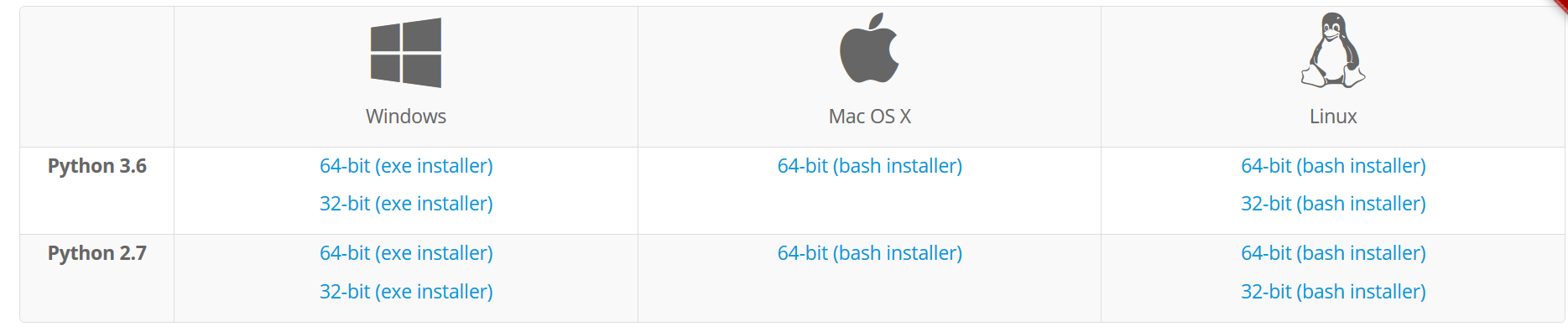
以 Linux 平台,python 2.7 为例, 安装过程如下:
wget https://repo.continuum.io/miniconda/Miniconda2-latest-Linux-x86_64.sh
bash Miniconda2-latest-Linux-x86_64.sh
首先是一个欢迎界面,按 ENTER 键继续:
Welcome to Miniconda2 4.3.21 (by Continuum Analytics, Inc.)

In order to continue the installation process, please review the license

agreement.

Please, press ENTER to continue
阅读软件的许可证:
>>>

===================================

Anaconda End User License Agreement

===================================

Copyright 2017, Continuum Analytics, Inc.

All rights reserved under the 3-clause BSD License:

Redistribution and use in source and binary forms, with or without

modification, are permitted provided that the following conditions are met:

* Redistributions of source code must retain the above copyright notice,

this list of conditions and the following disclaimer.

* Redistributions in binary form must reproduce the above copyright notice,

this list of conditions and the following disclaimer in the documentation

and/or other materials provided with the distribution.

* Neither the name of Continuum Analytics, Inc. ("Continuum") nor the names

of its contributors may be used to endorse or promote products derived from

this software without specific prior written permission.

THIS SOFTWARE IS PROVIDED BY THE COPYRIGHT HOLDERS AND CONTRIBUTORS "AS IS"

AND ANY EXPRESS OR IMPLIED WARRANTIES, INCLUDING, BUT NOT LIMITED TO, THE

IMPLIED WARRANTIES OF MERCHANTABILITY AND FITNESS FOR A PARTICULAR PURPOSE

ARE DISCLAIMED. IN NO EVENT SHALL CONTINUUM ANALYTICS, INC. BE LIABLE FOR

ANY DIRECT, INDIRECT, INCIDENTAL, SPECIAL, EXEMPLARY, OR CONSEQUENTIAL

DAMAGES (INCLUDING, BUT NOT LIMITED TO, PROCUREMENT OF SUBSTITUTE GOODS OR

SERVICES; LOSS OF USE, DATA, OR PROFITS; OR BUSINESS INTERRUPTION) HOWEVER

CAUSED AND ON ANY THEORY OF LIABILITY, WHETHER IN CONTRACT, STRICT

LIABILITY, OR TORT (INCLUDING NEGLIGENCE OR OTHERWISE) ARISING IN ANY WAY

OUT OF THE USE OF THIS SOFTWARE, EVEN IF ADVISED OF THE POSSIBILITY OF SUCH

DAMAGE.

Notice of Third Party Software Licenses

=======================================

Anaconda contains open source software packages from third parties. These

are available on an "as is" basis and subject to their individual license

agreements. These licenses are available in Anaconda or at

http://docs.continuum.io/anaconda/pkg-docs . Any binary packages of these

third party tools you obtain via Anaconda are subject to their individual

licenses as well as the Anaconda license. Continuum Analytics ("Continuum")

reserves the right to change which third party tools are provided in

Anaconda.

In particular, Anaconda contains re-distributable, run-time, shared-library

files from the Intel(TM) Math Kernel Library ("MKL binaries"). You are

specifically authorized to use the MKL binaries with your installation of

Anaconda. You are also authorized to redistribute the MKL binaries with

Anaconda or in the conda package that contains them. Use and redistribution

of the MKL binaries are subject to the licensing terms located at

https://software.intel.com/en-us/license/intel-simplified-software-license.

If needed, instructions for removing the MKL binaries after installation of

Anaconda are available at http://www.continuum.io.

Anaconda also contains cuDNN software binaries from NVIDIA Corporation

("cuDNN binaries"). You are specifically authorized to use the cuDNN

binaries with your installation of Anaconda. You are also authorized to

redistribute the cuDNN binaries with an Anaconda package that contains

them. If needed, instructions for removing the cuDNN binaries after

installation of Anaconda are available at http://www.continuum.io.

Cryptography Notice

===================

This distribution includes cryptographic software. The country in which you

currently reside may have restrictions on the import, possession, use,

and/or re-export to another country, of encryption software. BEFORE using

any encryption software, please check your country's laws, regulations and

policies concerning the import, possession, or use, and re-export of

encryption software, to see if this is permitted. See the Wassenaar

Arrangement <http://www.wassenaar.org/> for more information.

Continuum has self-classified this software as Export Commodity Control

Number (ECCN) 5D002.C.1, which includes information security software using

or performing cryptographic functions with asymmetric algorithms. The form

and manner of this distribution makes it eligible for export under the

License Exception ENC Technology Software Unrestricted (TSU) exception (see

the BIS Export Administration Regulations, Section 740.13) for both object

code and source code. In addition, the Intel(TM) Math Kernel Library

contained in Continuum's software is classified by Intel(TM) as ECCN 5D992b

with no license required for export to non-embargoed countries.

The following packages are included in this distribution that relate to

cryptography:

openssl

The OpenSSL Project is a collaborative effort to develop a robust,

commercial-grade, full-featured, and Open Source toolkit implementing the

Transport Layer Security (TLS) and Secure Sockets Layer (SSL) protocols as

well as a full-strength general purpose cryptography library.

pycrypto

A collection of both secure hash functions (such as SHA256 and RIPEMD160),

and various encryption algorithms (AES, DES, RSA, ElGamal, etc.).

pyopenssl

A thin Python wrapper around (a subset of) the OpenSSL library.

kerberos (krb5, non-Windows platforms)

A network authentication protocol designed to provide strong authentication

for client/server applications by using secret-key cryptography.

cryptography

A Python library which exposes cryptographic recipes and primitives.

Do you approve the license terms? [yes|no]
输入yes之后,选择安装的路径:
>>> yes

Miniconda2 will now be installed into this location:

/home/xudl/miniconda2

  - Press ENTER to confirm the location

  - Press CTRL-C to abort the installation

  - Or specify a different location below
选择好之后,开始安装:
[/home/xudl/miniconda2] >>> /home/xudl/soft/miniconda2

PREFIX=/home/xudl/soft/miniconda2

installing: python-2.7.13-0 ...

installing: asn1crypto-0.22.0-py27_0 ...

installing: cffi-1.10.0-py27_0 ...

installing: conda-env-2.6.0-0 ...

installing: cryptography-1.8.1-py27_0 ...

installing: enum34-1.1.6-py27_0 ...

installing: idna-2.5-py27_0 ...

installing: ipaddress-1.0.18-py27_0 ...

installing: libffi-3.2.1-1 ...

installing: openssl-1.0.2l-0 ...

installing: packaging-16.8-py27_0 ...

installing: pycosat-0.6.2-py27_0 ...

installing: pycparser-2.17-py27_0 ...

installing: pyopenssl-17.0.0-py27_0 ...

installing: pyparsing-2.1.4-py27_0 ...

installing: readline-6.2-2 ...

installing: requests-2.14.2-py27_0 ...

installing: ruamel_yaml-0.11.14-py27_1 ...

installing: setuptools-27.2.0-py27_0 ...

installing: six-1.10.0-py27_0 ...

installing: sqlite-3.13.0-0 ...

installing: tk-8.5.18-0 ...

installing: yaml-0.1.6-0 ...

installing: zlib-1.2.8-3 ...

installing: conda-4.3.21-py27_0 ...

installing: pip-9.0.1-py27_1 ...

installing: wheel-0.29.0-py27_0 ...

Python 2.7.13 :: Continuum Analytics, Inc.

creating default environment...

installation finished.

WARNING:

    You currently have a PYTHONPATH environment variable set. This may cause

    unexpected behavior when running the Python interpreter in Miniconda2.

    For best results, please verify that your PYTHONPATH only points to

    directories of packages that are compatible with the Python interpreter

    in Miniconda2: /home/xudl/soft/miniconda2

Do you wish the installer to prepend the Miniconda2 install location

to PATH in your /home/xudl/.bashrc ? [yes|no]

[no] >>>

You may wish to edit your .bashrc or prepend the Miniconda2 install location:

$ export PATH=/home/xudl/soft/miniconda2/bin:$PATH

Thank you for installing Miniconda2!

Share your notebooks and packages on Anaconda Cloud!
Sign up for free: https://anaconda.org
在安装过程中,会提示修改PATH系统变量,根据需求输入yes或者no就可以了
我这里选择了no , 后续再调用的时候后就需要使用完整的路径了
安装好之后,可以测试一下,这里我升级一下conda, 确保是最新版本:
/home/xudl/soft/miniconda2/bin/conda update conda

Fetching package metadata .........

Solving package specifications: .

Package plan for installation in environment /home/xudl/soft/miniconda2:

The following packages will be UPDATED:

    conda: 4.3.21-py27_0 --> 4.3.22-py27_0

Proceed ([y]/n)? y

conda-4.3.22-p 100% |#################################################################################################| Time: 0:00:00   2.21 MB/s
安装其他的python包也可以通过conda 这个包管理器进行
Miniconda 安装测试的更多相关文章
- Miniconda 安装 & Pip module 安装 & Shell 脚本调用 Miniconda 虚拟环境手册(实战项目应用)
(实战项目应用) 1. 下载Miniconda 两个安装方式: 方式1:wget https://mirrors.tuna.tsinghua.edu.cn/anaconda/miniconda/Min ...
- mahout 安装测试
1 下载 在http://archive.apache.org/dist/mahout下载相应版本的mahout 版本,获取官网查看http://mahout.apache.org 相关的信息
- Hbase的安装测试工作
Hbase的安装测试工作: 安装:http://www.cnblogs.com/neverwinter/archive/2013/03/28/2985798.html 测试:http://www.cn ...
- ubuntu下opencv2.4.9安装测试
ubuntu下opencv2.4.9安装测试 whowhoha@outlook.com 一.依赖包安装 1. build-essential 软件包 sudo apt-get install bui ...
- 如何在本地安装测试ECSHOP 转载
如何在本地安装测试ECSHOP 如何在本地(自己的电脑)上先安装ECShop 一.创建PHP环境 1.下载AppServ 因为ECShop在线网上商店系统是用PHP语言开发的,所以,在本地架设网店之前 ...
- 谷歌Cartographer学习(1)-快速安装测试(转载)
转载自谷歌Cartographer学习(1)-快速安装测试 代码放到个人github上,https://github.com/hitcm/ 如下,需要安装3个软件包,ceres solver.cart ...
- ubuntu-10.04的测试环境 安装测试 Coreseek开源中文检索引擎-Sphinx中文版
主要参考文档:http://www.coreseek.cn/products-install/install_on_bsd_linux/ 一. 32位版本: coreseek安装需要预装的软件: ap ...
- Centos 7.3 编译 & 安装 & 测试 facebook faiss
许多 AI 系统训练完毕,正式上线时的基本操作往往可以抽象为:在高维向量空间中,给定一个向量,寻找与之最相近的 k 个向量.当向量数目异常巨大时,如何快速地执行这一基本操作,便成为 AI 系统在工程应 ...
- Python 3.6.3 官网 下载 安装 测试 入门教程 (windows)
1. 官网下载 Python 3.6.3 访问 Python 官网 https://www.python.org/ 点击 Downloads => Python 3.6.3 下载 Python ...
随机推荐
- 【教程】ubuntu下安装samba服务器
一.准备工作 首先更新 software sources, 找到最快的源 lcw@ubuntu:~$ sudo apt-get update 二.安装samba lcw@ubuntu:~$ sudo ...
- Django admin 常用方法
1.调整页面头部显示内容和页面标题 #admin.py admin.site.site_header = '广告业务系统' admin.site.site_title = '广告业务系统'
- Python 执行linux 命令
# !/usr/bin/env python # -*- coding: utf-8 -* import os def main(): file_list = os.popen("ls&qu ...
- MySQL数据库权限管理
# MySQL数据库权限管理 ### 前言------------------------------ 对不同的用户赋予不同级别的访问权限是个好习惯- 杜绝一些恶意用户 ### 参考资料------- ...
- Android开发(三)——Android布局中实现圆角边框
设置corners_bg.xml(设置边框圆角可以在drawable-mdpi目录里定义一个xml): <?xml version="1.0" encoding=" ...
- Kafka vs RocketMQ——单机系统可靠性
引言 前几期的评测中,我们对比了Kafka和RocketMQ的吞吐量和稳定性,本期我们要引入一个新的评测标准——软件可靠性. 何为“可靠性”? 先看下面这种情况:有A,B两辆越野汽车,在城市的周边地区 ...
- Beef安装与简单使用
安装 Debian / Ubuntu 安装依赖 sudo apt-get update sudo apt-get install curl git curl -sSL https://raw.gith ...
- 阿里云RDS上用mysqldump导入导出
文章转载自: http://blog.csdn.net/jk0803_wantao/article/details/9179217 1. 开通云服务器服务.2. 开通RDS服务,如果开通成功,会返回给 ...
- [Linux实用工具]munin-node插件配置和插件编写
前面介绍了2篇munin使用的相关文章: [Linux实用工具]Linux监控工具munin的安装和配置 [Linux实用工具]Linux监控工具munin的展示(Nginx) 这次介绍一下mun ...
- C语言 · 企业奖金发放
算法提高 企业奖金发放 时间限制:1.0s 内存限制:512.0MB 企业发放的奖金根据利润提成.利润低于或等于10万元时,奖金可提10%:利润高于10万元,低于20万元时,低于10 ...