
在centos 7上安装BIMServer
下载bimserverwar-1.5.85.war
https://github.com/opensourceBIM/BIMserver/releases
mkdir -p /opt/bim

cd /opt/bim

wget https://github.com/opensourceBIM/BIMserver/releases/download/parent-1.5.85/bimserverwar-1.5.85.war
下载tomcat
cd /opt/bim

wget http://mirrors.tuna.tsinghua.edu.cn/apache/tomcat/tomcat-8/v8.5.20/bin/apache-tomcat-8.5.20.zip -O tomcat.zip

unzip tomcat.zip
在服务器可访问的一个windows上安装Lantern并修改Lantern的设置
BIMServer在初始化时会检查程序能否访问http://www.google.com, 所以需要设置代理。我这里用的是Lantern. Lantern默认绑定127.0.0.1,需要修改C:\Users\james.h.fu\AppData\Roaming\Lantern\settings.yaml,允许其绑定到所有IP
Lantern的设置如下:
addr: '[::]:50786'

autoLaunch: true

autoReport: true

language: zh-CN

localHTTPToken: 3fd72e1d76fb0f49dadaaef13f13cabe

pacURL: ""

proxyAll: false

socksAddr: '[::]:50790'

systemProxy: true

uiAddr: localhost:50783

userID: 94560713

userToken: 1Ilrpik8LuHlf-ryVQxx0jcVHI5znU_0lTZ_TO8FMtp_jtjDNDEjzw
将bimserverwar-1.5.85.war部署到./tomcat/webapps/ROOT
rm -rf ./tomcat/webapps/ROOT

unzip ./bimserverwar-1.5.85.war -d ./tomcat/webapps/ROOT

# 设置JAVA_OPTS -Dhttp.proxyHost=172.16.30.166 -Dhttp.proxyPort=50786

vim ./tomcat/bin/catalina.sh

# Uncomment the following line to make the umask available when using the

# org.apache.catalina.security.SecurityListener

JAVA_OPTS="$JAVA_OPTS -Dorg.apache.catalina.security.SecurityListener.UMASK=`umask` -Dhttp.proxyHost=172.16.30.166 -Dhttp.proxyPort=50786"
访问BIMServer的安装界面
访问http://172.0.0.0:8080/,根据向导一步一步设置。
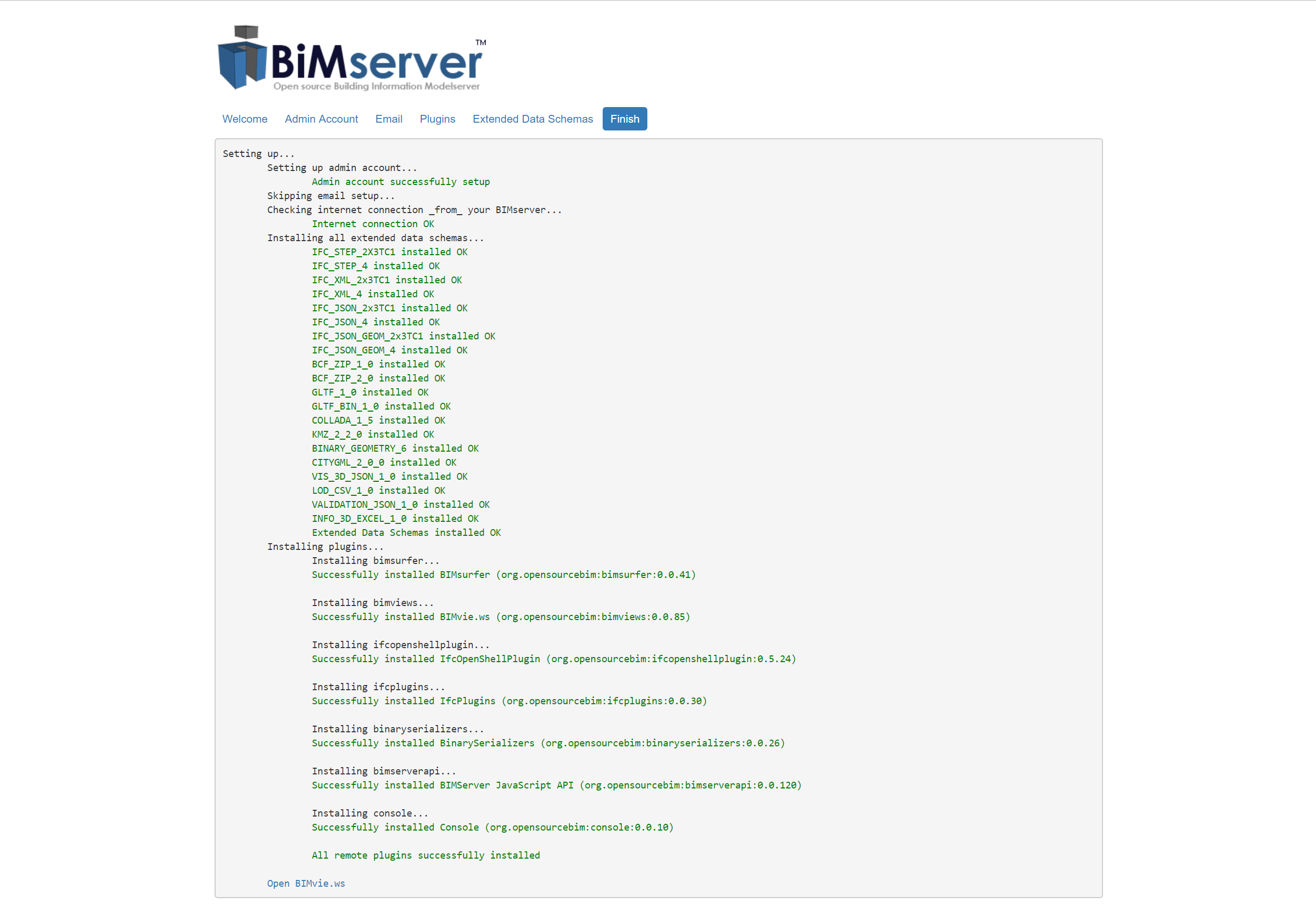
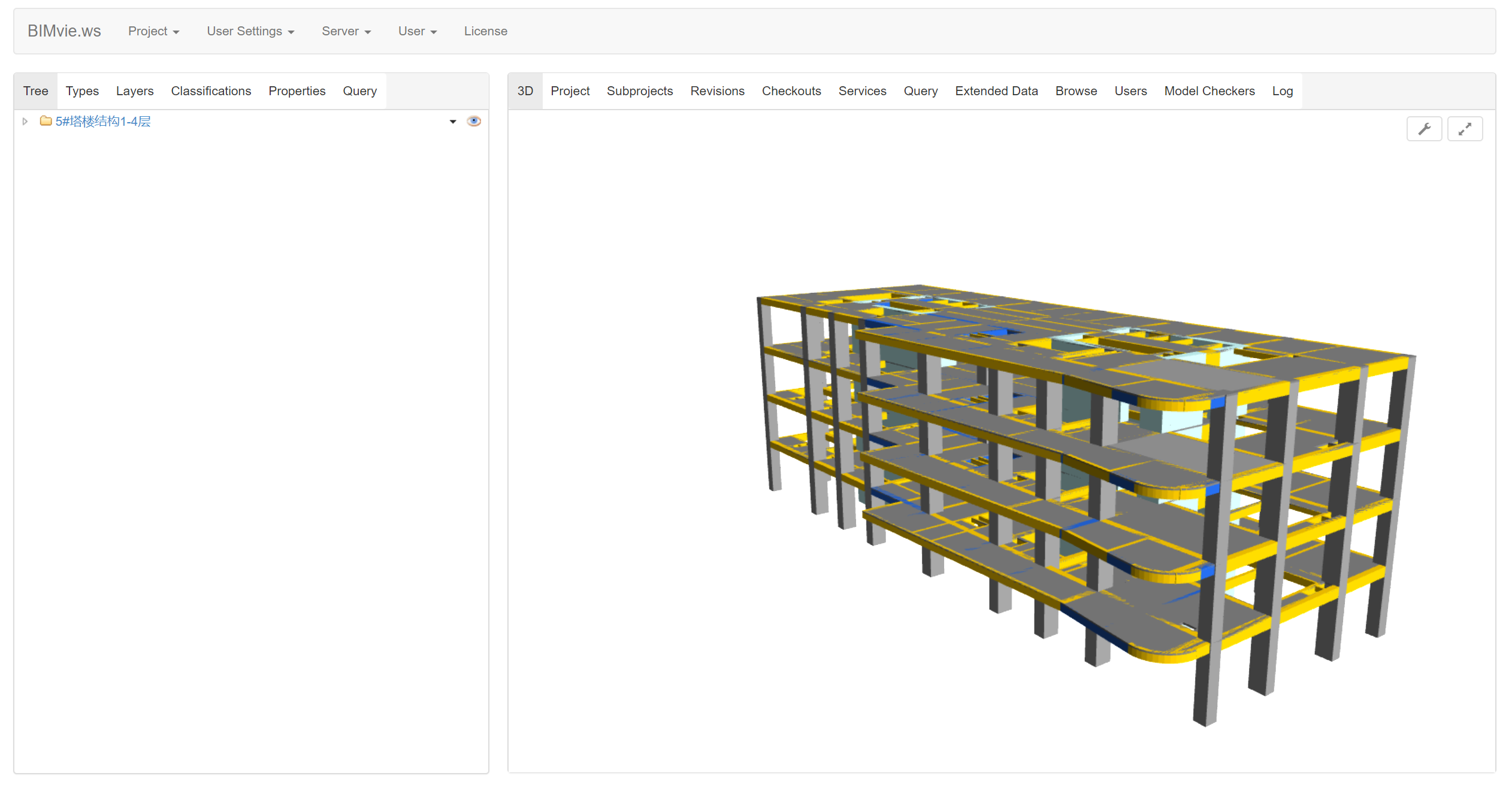
然后点击 “Open BIMvie.ws”(http://172.0.0.0:8080/apps/bimviews/?page=Login), 访问BIMServer的GUI。然后创建项目,然后上传ifc文件,然后就可以预览BIM模型了:
常用链接:
- http://172.0.0.0:8080/index.html
- http://172.0.0.0:8080/apps/bimviews/?page=Projects
- http://172.0.0.0:8080/apps/console/
- http://172.0.0.0:8080/apps/bimserverjavascriptapi/
参考资料
- opensourceBIM
- BIMServer wiki
- Install on Ubuntu
- [分享]BIM轻量化平台之不完整归纳整理
- 毕加索CTO杜长宇:BIM轻量化助力建筑业迈向BIM+时代
- 基于WebGL BIM轻量化引擎的二次开发
- BIM施工过程管理系统
- 毕加索
- tomcat服务器部署多项目方法
- Tomcat多实例单应用部署方案
在centos 7上安装BIMServer的更多相关文章
- 在CentOS 7上安装.NET Core R2跑Hello World
前言 在上个月.NET Core出了最新版本预览版,只是在Window系统上试验了一下.原本想等发布正式版的时候在linux系统上试试,可能还需要一段时间,刚好有空可以折腾一下. 由于之前安装的Ubu ...
- 如何在 CentOS 7 上安装 Redis 服务器
大家好,本文的主题是 Redis,我们将要在 CentOS 7 上安装它.编译源代码,安装二进制文件,创建.安装文件.在安装了它的组件之后,我们还会配置 redis ,就像配置操作系统参数一样,目标就 ...
- Linux Centos 系统上安装BT客户端 Transmission
Linux Centos 系统上安装BT客户端 Transmission Transmission是一种BitTorrent客户端,特点是一个跨平台的后端和其上的简洁的用户界面,以MIT许可证和G ...
- 在CentOS 7上安装phpMyAdmin
原文 在CentOS 7上安装phpMyAdmin phpMyAdmin是一款以PHP为基础,基于Web的MySQL/MariaDB数据库管理工具.虽然已经存在着一些诸如Adminer的轻量级数据库管 ...
- 在CentOS 6上安装Apache和PHP
本文演示如何在CentOS 6上安装Apache和PHP.CentOS 6自带的是Apache 2.2.3和PHP 5.1.6,您可以使用默认的CentOS包管理器进行安装yum.使用yum(而不是使 ...
- CentOS Linux上安装Oracle11g笔记
CentOS Linux上安装Oracle11g 到 otn.oracle.com 网站上下载 Linux版的oracle 11g 编辑 /etc/sysctl.conf : kernel.shmal ...
- 如何在CentOS 7上安装Munin
在CentOS 7上安装Munin 首先我们需要在我们的系统中添加EPEL仓库. yum install epel-release 步骤2.安装LAMP(Linux,Apache,MariaDB,PH ...
- centos 7 上安装 testlink 1.9.15/1.9.16/1.9.17/1.9.18 (mysql/php/httpd)
1.9.18 的System Requirements - server.注意,适用于 1.9.15 及以后. Server environment should consist of: web-se ...
- Jenkins安装 CentOS 7上安装Jenkins
CentOS 7上安装Jenkins Jenkins 安装 只安装不介绍 步骤1:更新CentOS 7 Linux系统管理员的最佳做法之一是使系统保持最新.安装最新的稳定包,然后重新启动. 1 2 ...
随机推荐
- SAP 官网中文帮助文件&BP中文资料汇总
系统 描述 版本 连接 SAP ME 制造执行 SAP Manufacturing Execution (SAP ME) 15.0 点击我 SAP ECC EHP6 财务部分 SAP ERP 6.0 ...
- 【转】HTTP协议之multipart/form-data请求分析
原文链接:http://blog.csdn.net/five3/article/details/7181521 首先来了解什么是multipart/form-data请求: 根据http/1.1 rf ...
- 你不可不知的Java引用类型之——软引用
定义 软引用是使用SoftReference创建的引用,强度弱于强引用,被其引用的对象在内存不足的时候会被回收,不会产生内存溢出. 说明 软引用,顾名思义就是比较"软"一点的引用. ...
- 11.1、socket连接中的粘包、精确传输问题
粘包: 发生原因: 当调用send的时候,数据并不是即时发给客户端的.而是放到了系统的socket发送缓冲区里,等缓冲区满了.或者数据等待超时了,数据才会发送,所以有时候发送太快的话,前一份数据还没有 ...
- Spring Boot Actuator认识
概述 spring-boot-starter-actuator:是一个用于暴露自身信息的模块,主要用于监控与管理. 为了保证actuator暴露的监控接口的安全性,需要添加安全控制的依赖spring- ...
- sqlserver序列定时初始化
1.创建序列 2.序列初始化存储过程 create procedure proDemo as begin alter sequence dbo.序列名 restart with 0; end 3.创建 ...
- Win10安装Redis
Redis安装 下载地址:https://github.com/MicrosoftArchive/redis/releases 下载对应的版本:这里下载Redis-x64-3.2.100 解压文件 进 ...
- 第3章 Git使用人门
[初识Github] 首先让我们大家一起喊一句“Hello Github”.YEAH!就是这样. Git是一个分布式的版本控制系统,最初由Linus Torvalds编写,用作Linux内核代码的管理 ...
- January 13th, 2018 Week 02nd Saturday
Anyone who has no spiritual aspirations is an idiot. 任何没有精神追求的人都是愚昧无知的人. Today I went to a bookshop ...
- python windows环境下文档备份
#python 2.7 #Filename:backup.py import os import time source = [r'C:\Users\zeng.shufang\Desktop\mess ...