
在IDEA中使用MyBatis Generator自动生成代码
转载自 https://blog.csdn.net/hua_faded/article/details/78900780
一、配置Maven pom.xml 文件
在pom.xml增加以下插件:
- <build>
- <finalName>zsxt</finalName>
- <plugins>
- <plugin>
- <groupId>org.mybatis.generator</groupId>
- <artifactId>mybatis-generator-maven-plugin</artifactId>
- <version>1.3.2</version>
- <configuration>
- <verbose>true</verbose>
- <overwrite>true</overwrite>
- </configuration>
- </plugin>
- </plugins>
- </build>
配置好Maven插件,下面需要配置插件需要配置文件
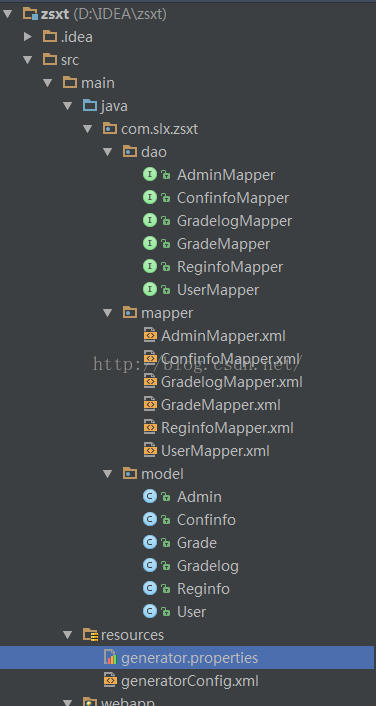
二、在maven项目下的src/main/resources 目录下建立名为 Maven的项目配置文件存放路径如下图:generatorConfig.xml和generator.properties配置文件,
Maven的项目配置文件存放路径如下图:
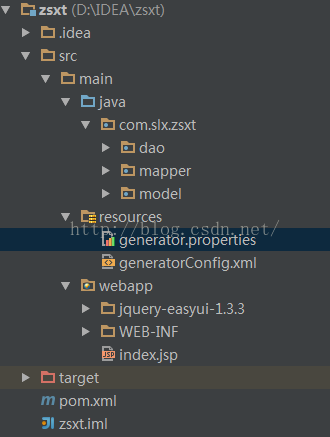
generatorConfig.xml代码如下:
- <?xml version="1.0" encoding="UTF-8"?>
- <!DOCTYPE generatorConfiguration
- PUBLIC "-//mybatis.org//DTD MyBatis Generator Configuration 1.0//EN"
- "http://mybatis.org/dtd/mybatis-generator-config_1_0.dtd">
- <generatorConfiguration>
- <!--导入属性配置-->
- <properties resource="generator.properties"></properties>
- <!--指定特定数据库的jdbc驱动jar包的位置-->
- <classPathEntry location="${jdbc.driverLocation}"/>
- <context id="default" targetRuntime="MyBatis3">
- <!-- optional,旨在创建class时,对注释进行控制 -->
- <commentGenerator>
- <property name="suppressDate" value="true"/>
- <property name="suppressAllComments" value="true"/>
- </commentGenerator>
- <!--jdbc的数据库连接 -->
- <jdbcConnection
- driverClass="${jdbc.driverClass}"
- connectionURL="${jdbc.connectionURL}"
- userId="${jdbc.userId}"
- password="${jdbc.password}">
- </jdbcConnection>
- <!-- 非必需,类型处理器,在数据库类型和java类型之间的转换控制-->
- <javaTypeResolver>
- <property name="forceBigDecimals" value="false"/>
- </javaTypeResolver>
- <!-- Model模型生成器,用来生成含有主键key的类,记录类 以及查询Example类
- targetPackage 指定生成的model生成所在的包名
- targetProject 指定在该项目下所在的路径
- -->
- <javaModelGenerator targetPackage="com.slx.zsxt.model"
- targetProject="src/main/java">
- <!-- 是否允许子包,即targetPackage.schemaName.tableName -->
- <property name="enableSubPackages" value="false"/>
- <!-- 是否对model添加 构造函数 -->
- <property name="constructorBased" value="true"/>
- <!-- 是否对类CHAR类型的列的数据进行trim操作 -->
- <property name="trimStrings" value="true"/>
- <!-- 建立的Model对象是否 不可改变 即生成的Model对象不会有 setter方法,只有构造方法 -->
- <property name="immutable" value="false"/>
- </javaModelGenerator>
- <!--Mapper映射文件生成所在的目录 为每一个数据库的表生成对应的SqlMap文件 -->
- <sqlMapGenerator targetPackage="com.slx.zsxt.mapper"
- targetProject="src/main/java">
- <property name="enableSubPackages" value="false"/>
- </sqlMapGenerator>
- <!-- 客户端代码,生成易于使用的针对Model对象和XML配置文件 的代码
- type="ANNOTATEDMAPPER",生成Java Model 和基于注解的Mapper对象
- type="MIXEDMAPPER",生成基于注解的Java Model 和相应的Mapper对象
- type="XMLMAPPER",生成SQLMap XML文件和独立的Mapper接口
- -->
- <javaClientGenerator targetPackage="com.slx.zsxt.dao"
- targetProject="src/main/java" type="XMLMAPPER">
- <property name="enableSubPackages" value="true"/>
- </javaClientGenerator>
- <table tableName="reguser" domainObjectName="User"
- enableCountByExample="false" enableUpdateByExample="false"
- enableDeleteByExample="false" enableSelectByExample="false"
- selectByExampleQueryId="false">
- </table>
- <table tableName="adminuser" domainObjectName="Admin"
- enableCountByExample="false" enableUpdateByExample="false"
- enableDeleteByExample="false" enableSelectByExample="false"
- selectByExampleQueryId="false">
- </table>
- <table tableName="configinfo" domainObjectName="Confinfo"
- enableCountByExample="false" enableUpdateByExample="false"
- enableDeleteByExample="false" enableSelectByExample="false"
- selectByExampleQueryId="false">
- </table>
- <table tableName="grade" domainObjectName="Grade"
- enableCountByExample="false" enableUpdateByExample="false"
- enableDeleteByExample="false" enableSelectByExample="false"
- selectByExampleQueryId="false">
- </table>
- <table tableName="gradelog" domainObjectName="Gradelog"
- enableCountByExample="false" enableUpdateByExample="false"
- enableDeleteByExample="false" enableSelectByExample="false"
- selectByExampleQueryId="false">
- </table>
- <table tableName="reginfo" domainObjectName="Reginfo"
- enableCountByExample="false" enableUpdateByExample="false"
- enableDeleteByExample="false" enableSelectByExample="false"
- selectByExampleQueryId="false">
- </table>
- </context>
- </generatorConfiguration>
generator.propertites代码如下:
- jdbc.driverLocation=E:\\mvn_home\\mysql\\mysql-connector-java\\5.1.20\\mysql-connector-java-5.1.20.jar
- jdbc.driverClass=com.mysql.jdbc.Driver
- jdbc.connectionURL=jdbc:mysql:///zsxt
- jdbc.userId=root
- jdbc.password=123456
三、在Intellij IDEA添加一个“Run运行”选项,使用maven运行mybatis-generator-maven-plugin插件
点击 菜单run中Edit Configurations,会出现
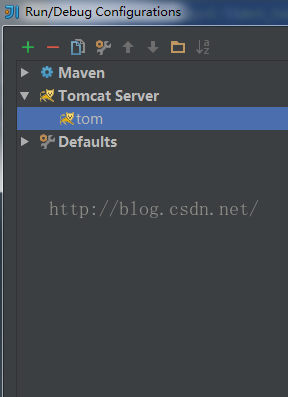
点击+号,选择maven,会出现
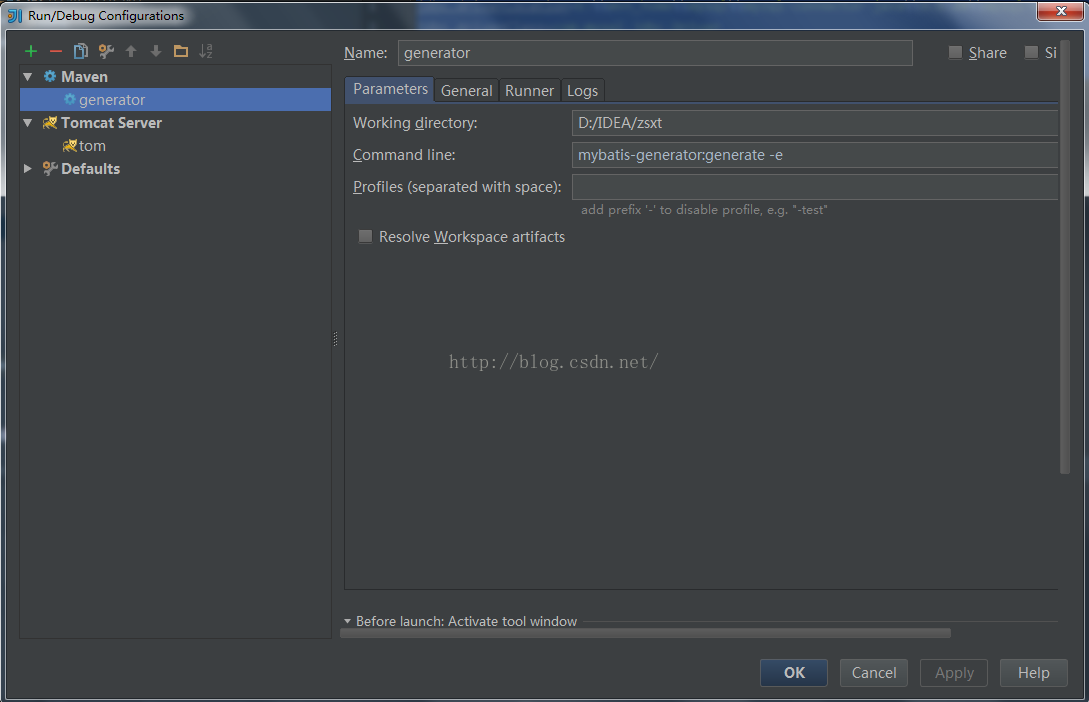
在name和Commond line分别填上如上图所示,apply和ok
最后点击generator,生成model,mapper,dao
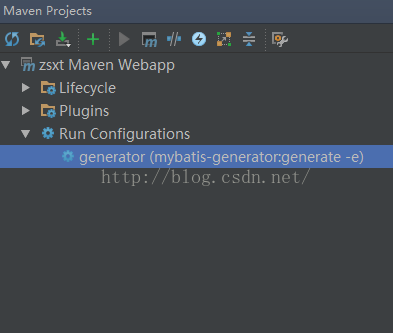
逆向工程生成结果如下:
在IDEA中使用MyBatis Generator自动生成代码的更多相关文章
- idea中mybatis generator自动生成代码配置 数据库是sqlserver
好长时间没有写博客了,最近公司要用java语言,开始学习java,属于初学者,今天主要记录一下mybatis generator自动生成代码,首先在如下图的目录中新建两个文件,如下图 generato ...
- SpringBoot 添加mybatis generator 自动生成代码插件
自动生成数据层代码,提高开发效率 1.pom添加插件,并指定配置文件路径 <!-- mybatis generator 自动生成代码插件 --> <plugin> <gr ...
- SpringBoot入门篇--整合mybatis+generator自动生成代码+druid连接池+PageHelper分页插件
原文链接 我们这一篇博客讲的是如何整合Springboot和Mybatis框架,然后使用generator自动生成mapper,pojo等文件.然后再使用阿里巴巴提供的开源连接池druid,这个连接池 ...
- IDEA Maven Mybatis generator 自动生成代码
IDEA Maven Mybatis generator 自动生成代码 一.安装配置maven以及在Idea中配置maven 安装过程步骤可以看上面的博文,里面介绍得很详细. 二.建数据表 DROP ...
- IDEA Maven Mybatis generator 自动生成代码(实例讲解)(转)
IDEA Maven Mybatis generator 自动生成代码(实例讲解) MyBatis Generator • 简称MBG,是一个专门为MyBatis框架使用者定制的代码生成器,可以快速的 ...
- 使用Mybatis Generator自动生成代码
MyBatis Generator(MBG)是MyBatis MyBatis 和iBATIS的代码生成器.它将为所有版本的MyBatis以及版本2.2.0之后的iBATIS版本生成代码.它将内省数据库 ...
- Mybatis generator 自动生成代码(2)
最近准备开始做一个项目,需要开始手动创建sql,于是将Mybatis generator 工具功能强化了下. 首先,这里引入到版本一点的包 <dependency> <groupId ...
- IDEA使用mybatis generator自动生成代码
主要就三步: 1.pom 文件中引入jar包并配置 build 属性 <dependencies> <!-- 自动生产mapper Begin! --> <depende ...
- idea 中使用Mybatis Generator逆向工程生成代码
通过MAVEN完成 Mybatis 逆向工程 1. POM文件中添加插件 在 pom 文件的build 标签中 添加 plugin 插件和 数据库连接 jdbc 的依赖. <build> ...
随机推荐
- EF LIKE 查询
<!-- CSDL content --> <edmx:ConceptualModels> <Schema Namespace="Model" Ali ...
- zip()函数,max()和min(),built-in function,import模块,read(),readlines(),write(),writelines(),with..as..文件处理方式
zip()函数:将可迭代对象作为参数,将对象中的对应元素打包成一个个元组. #map()普通的输出例子 print(list(zip(('a','n','c'),(1,2,3)))) print(li ...
- Flask--templates-多个模板文件,视图函数如何判断查询路径
结论:以当前视图的模板为基准,查找模板文件,如果没有找到就会报错,如果需要更换模板的访问路径,可以修改__name__参数. 参考资料: https://blog.csdn.net/f70408410 ...
- 架构-架构风格:REST
ylbtech-架构-架构风格:REST REST即表述性状态传递(英文:Representational State Transfer,简称REST)是Roy Fielding博士在2000年他的博 ...
- Linux根据MAC地址自动设置IP
Linux根据MAC地址自动设置IP #!/bin/sh #============config============ route_defa=60.12.70.65 addr_ip= link_ma ...
- 一切为了落地,为什么要把PP.io设计成三个阶段!
之前的一篇文章,我讲解了PP.io的三个阶段:“强中心”,“弱中心”,“去中心”.今天来解释下,我为什么要分三个阶段逐步实现PP.io去中心化存储网络: 简单地说,就是在区块链不可能三角理论中,我暂时 ...
- docker network基础
前面介绍了nginx与php两个容器间是如何进行通信的: [root@docker ~]# docker run -d --name=php -v /www:/usr/local/nginx/html ...
- SQLServer 清空某个库所有表
select @n=1 insert #temp(tablename) SELECT distinct sobjects.name FROM sysobjects sobjects WHERE sob ...
- 全面了解Ngnix的主要应用的场景
前言 本文只针对 Nginx 在不加载第三方模块的情况能处理哪些事情,由于第三方模块太多所以也介绍不完,当然本文本身也可能介绍的不完整,毕竟只是我个人使用过和了解到过得.所以还请见谅,同时欢迎留言交流 ...
- HTML5 超链接:a标签的href 属性
H5中a标签的 href 属性用于指定超链接目标的 URL,这里主要给大家介绍一下 href 属性的定义和用法以及应用实例. 定义和用法: <a> 标签的 href 属性用于指定超链接目标 ...