
ReactNative学习笔记(七)Navigator的使用
前言
Navigator主要用于ReactNative中的跳转,中文文档:
http://reactnative.cn/docs/0.39/using-navigators.html
懒得打字介绍更多了,将上面的官网文档看一遍之后应该有个大概了解了。
- initialRoute 配置初始路由参数;
- configureScene 用于配置场景动画;
- renderScene 指示具体如何渲染一个场景;
- 一个可选的导航栏组件,个人感觉这个不太好用,一般不用它;
{...route.passProps}用于批量传递参数到this.props
简单示例
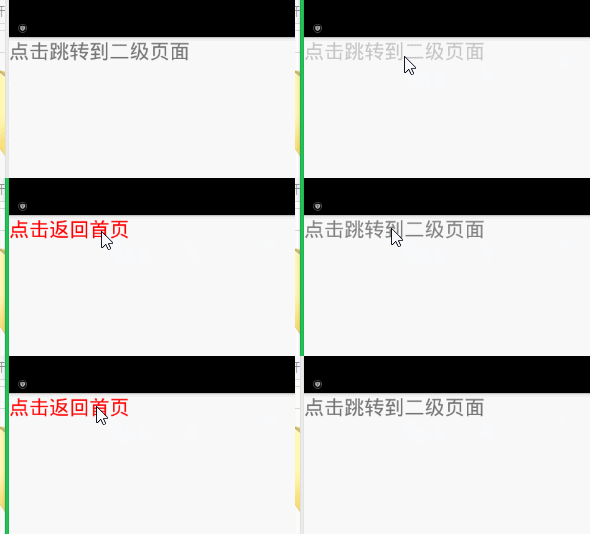
下面写了一个最简单的页面跳转与返回的例子test-navigator-no-bar.js:
效果图:
import React, { Component } from 'react';

import { AppRegistry, Text, Image, View, StyleSheet, Navigator, TouchableOpacity } from 'react-native';

// 一个简单的navigator使用示例

export default class TestNavigator extends Component

{

	configureScene(route, routeStack)

	{

		return Navigator.SceneConfigs.PushFromRight;

	}

	render()

	{

		return (

			<Navigator

				style={{flex:1}}

				initialRoute={{component: FirstPage}}

				configureScene={this.configureScene}

				renderScene={(route, navigator) => <route.component navigator={navigator} {...route.passProps} />} />

		);

	}

}

// 首页

class FirstPage extends Component

{

	render()

	{

		return (

			<View>

				<TouchableOpacity onPress={() => this.props.navigator.push({component: SecondPage})}>

					<Text style={{fontSize:28}}>点击跳转到二级页面</Text>

				</TouchableOpacity>

			</View>

		);

	}

}

// 二级页面

class SecondPage extends Component

{

	render()

	{

		return (

			<View>

				<TouchableOpacity onPress={()=>this.props.navigator.pop()}>

					<Text style={{color: 'red', fontSize: 28}}>点击返回首页</Text>

				</TouchableOpacity>

			</View>

		);

	}

}
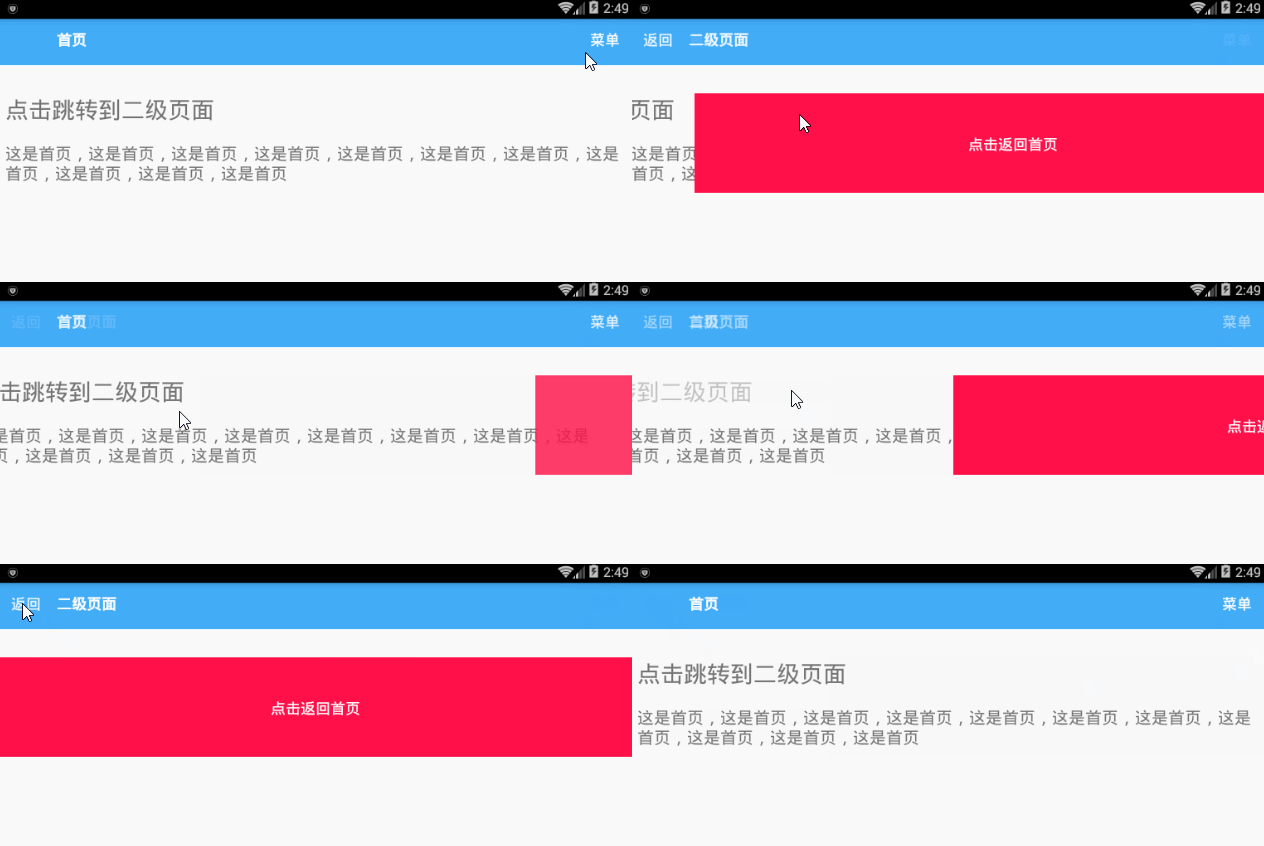
带导航的示例
效果图:
完整代码如下(test-navigator-with-bar.js):
import React, { Component } from 'react';

import { AppRegistry, Text, Image, View, StyleSheet, TextInput, ScrollView, ListView, Navigator, TouchableOpacity } from 'react-native';

// 一个简单的navigator使用示例

export default class TestNavigator extends Component

{

	configureScene(route, routeStack)

	{

		if (route.type == 'Modal') {

			return Navigator.SceneConfigs.FloatFromBottom;

		}

		return Navigator.SceneConfigs.PushFromRight;

	}

	render()

	{

		return (

			<Navigator

				style={{flex:1}}

				initialRoute={{component: FirstPage, passProps: {title: '首页', rightText: '菜单'}}}

				configureScene={this.configureScene}

				renderScene={(route, navigator) => <route.component route={route} navigator={navigator} {...route.passProps} />}

				navigationBar={

					<Navigator.NavigationBar

						style={styles.navContainer}

						routeMapper={NavigationBarRouteMapper}/>} />

		);

	}

}

// 首页

class FirstPage extends Component

{

	/**

	 * 跳转

	 */

	gotoPage(component, title)

	{

		this.props.navigator.push(

		{

			component: component,

			passProps: {

				title: '二级页面',

				lastPageTitle: this.props.title

			}

		})

	}

	render()

	{

		return (

			<View style={{paddingTop: 80}}>

				<TouchableOpacity onPress={() => this.gotoPage(SecondPage, '二级页面')}>

					<Text style={{fontSize:28, padding: 10}}>点击跳转到二级页面</Text>

				</TouchableOpacity>

				<Text style={{padding: 10, fontSize: 20}}>这是首页,这是首页,这是首页,这是首页,这是首页,这是首页,这是首页,这是首页,这是首页,这是首页,这是首页</Text>

			</View>

		);

	}

}

// 二级页面

class SecondPage extends Component

{

	render()

	{

		return (

			<View style={{paddingTop: 80}}>

				<TouchableOpacity

					style={styles.button}

					onPress={()=>this.props.navigator.pop()}>

					<Text style={styles.buttonText}>

						点击返回{this.props.lastPageTitle}

					</Text>

				</TouchableOpacity>

			</View>

		);

	}

}

// 导航栏的Mapper

var NavigationBarRouteMapper =

{

	// 左键

	LeftButton(route, navigator, index, navState)

	{

		if (index <= 0) return null;

		return (

			<TouchableOpacity

				underlayColor='transparent'

				onPress={() => {if (index > 0) {navigator.pop()}}}>

				<Text style={styles.leftNavButtonText}>

					返回

				</Text>

			</TouchableOpacity>

		);

	},

	// 右键

	RightButton(route, navigator, index, navState)

	{

		if(!route.passProps.rightText) return null;

		return (

			<TouchableOpacity

				onPress={() => alert('测试菜单')}>

				<Text style={styles.rightNavButtonText}>

					{route.passProps.rightText}

				</Text>

			</TouchableOpacity>

		);

	},

	// 标题

	Title(route, navigator, index, navState)

	{

		return (

			<Text style={styles.title}>

				{route.passProps.title || '默认标题'}

			</Text>

		);

	}

};

var styles = StyleSheet.create({

	// 页面框架

	container: {

		flex: 4,

		marginTop: 100,

		flexDirection: 'column'

	},

	// 导航栏

	navContainer: {

		backgroundColor: '#41ABF7',

		paddingTop: 12,

		paddingBottom: 10,

		flex: 1

	},

	// 导航栏文字

	headText: {

		color: '#ffffff',

		fontSize: 22

	},

	// 按钮

	button: {

		height: 120,

		marginTop: 10,

		justifyContent: 'center', // 内容居中显示

		backgroundColor: '#ff1049',

		alignItems: 'center'

	},

	// 按钮文字

	buttonText: {

		fontSize: 18,

		color: '#ffffff'

	},

	// 左面导航按钮

	leftNavButtonText: {

		color: '#ffffff',

		fontSize: 18,

		marginLeft: 13,

		marginTop: 12,

		flex: 1

	},

	// 右面导航按钮

	rightNavButtonText: {

		color: '#ffffff',

		fontSize: 18,

		marginRight: 13,

		marginTop: 12,

		flex: 1

	},

	// 标题

	title: {

		fontSize: 18,

		color: '#fff',

		textAlign: 'center',

		alignItems: 'center',

		justifyContent: 'center',

		fontWeight: 'bold',

		marginTop: 12

	}

});
关于动画
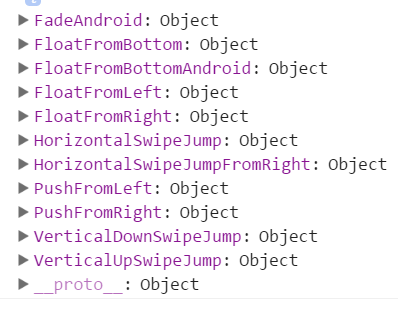
所有可用的场景动画:
console.log(Navigator.SceneConfigs);
其它
判断一个页面是否能够继续返回:
var navigator = this.props.navigator;

if(navigator.getCurrentRoutes().length > 1)

{

	navigator.pop();

}

else

{

	alert('不能再返回了!');

}
ReactNative学习笔记(七)Navigator的使用的更多相关文章
- react-native学习笔记--史上最详细Windows版本搭建安装React Native环境配置
参考:http://www.lcode.org/react-native/ React native中文网:http://reactnative.cn/docs/0.23/android-setup. ...
- (转)Qt Model/View 学习笔记 (七)——Delegate类
Qt Model/View 学习笔记 (七) Delegate 类 概念 与MVC模式不同,model/view结构没有用于与用户交互的完全独立的组件.一般来讲, view负责把数据展示 给用户,也 ...
- Learning ROS for Robotics Programming Second Edition学习笔记(七) indigo PCL xtion pro live
中文译著已经出版,详情请参考:http://blog.csdn.net/ZhangRelay/article/category/6506865 Learning ROS forRobotics Pro ...
- Typescript 学习笔记七:泛型
中文网:https://www.tslang.cn/ 官网:http://www.typescriptlang.org/ 目录: Typescript 学习笔记一:介绍.安装.编译 Typescrip ...
- python3.4学习笔记(七) 学习网站博客推荐
python3.4学习笔记(七) 学习网站博客推荐 深入 Python 3http://sebug.net/paper/books/dive-into-python3/<深入 Python 3& ...
- Go语言学习笔记七: 函数
Go语言学习笔记七: 函数 Go语言有函数还有方法,神奇不.这有点像python了. 函数定义 func function_name( [parameter list] ) [return_types ...
- iOS 学习笔记七 【博爱手把手教你使用2016年gitHub Mac客户端】
iOS 学习笔记七 [博爱手把手教你使用gitHub客户端] 第一步:首先下载git客户端 链接:https://desktop.github.com 第二步:fork 大神的代码[这里以我的代码为例 ...
- 【opencv学习笔记七】访问图像中的像素与图像亮度对比度调整
今天我们来看一下如何访问图像的像素,以及如何改变图像的亮度与对比度. 在之前我们先来看一下图像矩阵数据的排列方式.我们以一个简单的矩阵来说明: 对单通道图像排列如下: 对于双通道图像排列如下: 那么对 ...
- Linux学习笔记(七) 查询系统
1.查看命令 (1)man 可以使用 man 命令名称 命令查看某个命令的详细用法,其显示的内容如下: NAME:命令名称 SYNOPSIS:语法 DESCRIPTION:说明 OPTIONS:选项 ...
- go微服务框架kratos学习笔记七(kratos warden 负载均衡 balancer)
目录 go微服务框架kratos学习笔记七(kratos warden 负载均衡 balancer) demo demo server demo client 池 dao service p2c ro ...
随机推荐
- C#设计模式(3)——工厂方法模式(Factory Method)
在简单工厂模式中通过工厂Factory获取不同的对象,但是有一个明显的缺点——简单工厂模式系统难以扩展! 一旦添加新产品就不得不修改简单工厂方法,这样就会造成简单工厂的实现逻辑过于复杂, 可以通过工厂 ...
- Vue proxy
npm run dev 我们访问的是localhost:8080 config文件夹下的index.js配置文件的dev dev: { env: require('./dev.env'), port: ...
- Java编写串口程序
用Java编写串口程序一般都会用到这个 http://fizzed.com/oss/rxtx-for-java 根据电脑的情况下载 解压以后有安装文档 For a JDK installation: ...
- java学习--面向对象
对象及类的概念 对象是java程序的核心,在java程序中“万事万物皆对象” 对象可以看成是属性和方法的封装体 类是用来创建同一类型的对象的模板,在一个类中定义了该类对象所应具有的属性和方法 J2SD ...
- C#、Unity 数据类型的默认值
using System.Collections; using System.Collections.Generic; using UnityEngine; public class Main : M ...
- 最适合入门的Laravel中级教程(一)
Laravel 是一个全栈框架: 我们使用 Laravel 开发业务常见有 3 个方向: 前端页面和后端逻辑混合的应用 主要是面向对 SEO 有需求的项目: 比如说新闻资讯博客文章等: 一般在控制器中 ...
- win10 下安装 neo4j(转)
1.neo4j介绍 neo4j是基于Java语言编写图形数据库.图是一组节点和连接这些节点的关系.图形数据库也被称为图形数据库管理系统或GDBMS.详细介绍可看Neo4j 教程 2.安装Java jd ...
- 云笔记项目-补充JS面向对象编程基础知识
简单介绍: 此部分知识为在做云笔记项目中补充,因为云笔记项目中涉及到前端js,里面写了很多js脚本,用到了创建js属性和方法,在js中直接声明的属性和方法最终都会变成window的对象,即其成为了全局 ...
- 在ASP.NET MVC中使用Area区域
在大型的ASP.NET mvc5项目中一般都有许多个功能模块,这些功能模块可以用Area(中文翻译为区域)把它们分离开来,比如:Admin,Customer,Bill.ASP.NET MVC项目中把各 ...
- ExecuteNonQuery()
ExecuteNonQuery():执行一个SQL语句,返回受影响的行数,这个方法主要用于执行对数据库执行增加.更新.删除操作,注意查询的时候不是调用这个方法.用于完成insert,delete,up ...