
交换路由中期测验20181205(DHCP、IOS、静态路由、RIP、EIGRP)
测试拓扑:

知识点:DHCP;IOS的备份恢复与更新;静态路由;动态路由(RIP);动态路由(EIGRP)
1.DHCP
拓扑:
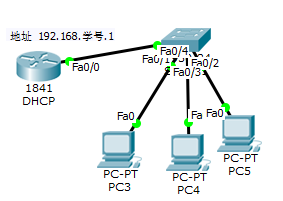
主要指令:
ip dhcp pool 地址池名称
network 网络号 子网掩码
详细配置(参考答案):
详细配置:
int f0/0
ip add 192.168.15.1 255.255.255.0
no shu
exit
ip dhcp pool lilywhite
network 192.168.15.0 255.255.255.0
exit
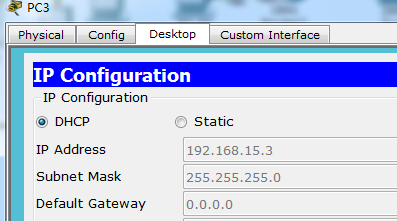
PC机下IP设置为DHCP自动获取IP地址,验证结果。
2.IOS的备份恢复与更新
拓扑:
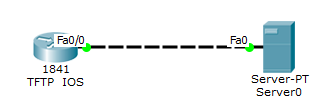
题目背景:
进入1841路由器后显示rommon 1,显然只剩下最基础的bash环境了,需要通过Server0服务器上保存的IOS进行恢复的操作。
操作步骤:
tftpdnld(进入tftpdownload模式,从而方便查看参数
IP_ADDRESS=192.168.1.2
IP_SUBNET_MASK=255.255.255.0
DEFAULT_GATEWAY=192.168.1.1
TFTP_SERVER=192.168.1.1
TFTP_FILE=c1841-advipservicesk9-mz.124-15.T1.bin
(值得注意的是这里的文件名是从服务器copy下的文件名)
tftpdnld(再次进入tftpdnld模式查看)
(此时显示出参数信息,并询问是否下载IOS,并烧录,输入y开始烧录)
boot(烧录成功后,加载系统)
值得注意的是:必须要先确认好Server0服务器的IP地址,否则无法与服务器联通,下载不了数据。
3.静态路由
拓扑:
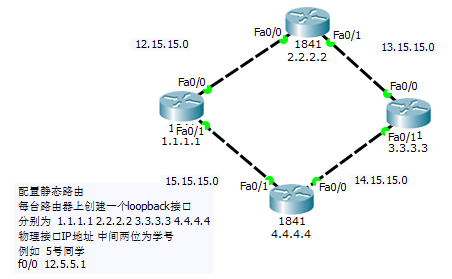
主要指令:
ip route 目标网络号 子网掩码 下一跳
详细配置(参考答案):
标红处代表当前路由配置信息,下同
1.1.1.1:
int loop 0
ip add 1.1.1.1 255.255.255.0
no shu
exit
int f0/0
ip add 12.15.15.1 255.255.255.0
no shu
exit
int f0/1
ip add 15.15.15.2 255.255.255.0
exit
ip route 13.15.15.0 255.255.255.0 12.15.15.2
ip route 14.15.15.0 255.255.255.0 12.15.15.2
ip route 2.2.2.0 255.255.255.0 12.15.15.2
ip route 3.3.3.0 255.255.255.0 12.15.15.2
ip route 4.4.4.0 255.255.255.0 15.15.15.1
2.2.2.2:
int loop 0
ip add 2.2.2.2 255.255.255.0
no shu
exit
int f0/0
ip add 12.15.15.2 255.255.255.0
no shu
exit
int f0/1
ip add 13.15.15.1 255.255.255.0
no shu
exit
ip route 14.15.15.0 255.255.255.0 13.15.15.2
ip route 15.15.15.0 255.255.255.0 12.15.15.1
ip route 1.1.1.0 255.255.255.0 12.15.15.1
ip route 3.3.3.0 255.255.255.0 13.15.15.2
ip route 4.4.4.0 255.255.255.0 13.15.15.2
3.3.3.3:
int loop 0
ip add 3.3.3.3 255.255.255.0
no shu
exit
int f0/0
ip add 13.15.15.2 255.255.255.0
no shu
exit
int f0/1
ip add 14.15.15.1 255.255.255.0
no shu
exit
ip route 12.15.15.0 255.255.255.0 13.15.15.1
ip route 15.15.15.0 255.255.255.0 14.15.15.2
ip route 2.2.2.0 255.255.255.0 13.15.15.1
ip route 4.4.4.0 255.255.255.0 14.15.15.2
ip route 1.1.1.0 255.255.255.0 13.15.15.1
4.4.4.4:
int loop 0
ip add 4.4.4.4 255.255.255.0
no shu
exit
int f0/0
ip add 14.15.15.2 255.255.255.0
no shu
exit
int f0/1
ip add 15.15.15.1 255.255.255.0
no shu
exit
ip route 12.15.15.0 255.255.255.0 15.15.15.2
ip route 13.15.15.0 255.255.255.0 14.15.15.1
ip route 1.1.1.0 255.255.255.0 15.15.15.2
ip route 2.2.2.0 255.255.255.0 15.15.15.2
ip route 3.3.3.0 255.255.255.0 14.15.15.1
4.动态路由(RIP)排错
拓扑:
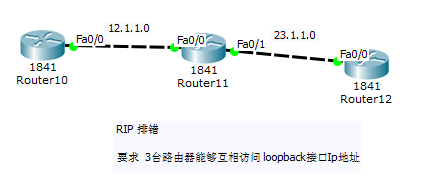
错误点:
R10:
RIP配置错误:宣告网络的主类号和RIP版本错误,没有关闭自动聚合。
R11:
F0/0和F0/1的IP地址配置错误;
RIP配置错误:缺少宣告网络的主类号,没有关闭自动聚合。
R12:
缺少loopback接口的IP;
F0/0接口的IP地址设置错误,F0/1接口上多了个IP地址;
RIP配置错误:同上。
更正后配置:
R10:
iterface Loopback1
ip address 1.1.1.1 255.255.255.0
!
interface FastEthernet0/0
ip address 12.1.1.1 255.255.255.0
!
router rip
version 2
network 1.0.0.0
network 12.0.0.0
no auto-summary
R11:
iterface Loopback1
ip address 2.2.2.2 255.255.255.0
!
interface FastEthernet0/0
ip address 12.1.1.2 255.255.255.0
!
interface FastEthernet0/1
ip address 23.1.1.1 255.255.255.0
!
router rip
version 2
network 2.0.0.0
network 12.0.0.0
network 23.0.0.0
no auto-summary
R12:
iterface Loopback0
ip address 3.3.3.3 255.255.255.0
!
interface FastEthernet0/0
ip address 23.1.1.2 255.255.255.0
!
router rip
version 2
network 3.0.0.0
network 23.0.0.0
no auto-summary
5.动态路由(EIGRP)
拓扑:
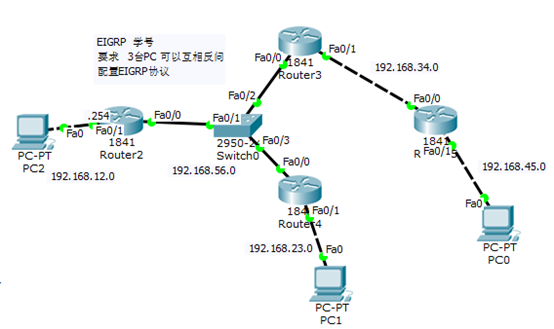
主要指令:
router eigrp X
network 网络号
no auto-summary(关闭自动聚合)
详细配置(参考答案):
R2:
int f0/0
ip add 192.168.56.1 255.255.255.0
no shu
exit
int f0/1
ip add 192.168.12.254 255.255.255.0
no shu
exit
router eigrp 15
network 192.168.12.0
network 192.168.56.0
no auto-summary
R3:
int f0/0
ip add 192.168.56.2 255.255.255.0
no shu
exit
int f0/1
ip add 192.168.34.1 255.255.255.0
no shu
exit
router eigrp 15
network 192.168.34.0
network 192.168.56.0
no auto-summary
R4:
int f0/0
ip add 192.168.56.3 255.255.255.0
no shu
exit
int f0/1
ip add 192.168.23.254 255.255.255.0
no shu
exit
router eigrp 15
network 192.168.23.0
network 192.168.56.0
no auto-summary
R5:
int f0/0
ip add 192.168.34.2 255.255.255.0
no shu
exit
int f0/1
ip add 192.168.45.254 255.255.255.0
no shu
exit
router eigrp 15
network 192.168.34.0
network 192.168.45.0
no auto-summary
交换路由中期测验20181205(DHCP、IOS、静态路由、RIP、EIGRP)的更多相关文章
- 路由与交换,cisco路由器配置,浮动静态路由
设置浮动静态路由的目的就是为了防止因为一条线路故障而引起网络故障.言外之意就是说浮动静态路由实际上是主干路由的备份.例如下图: 假如我们设路由器之间的串口(seria)为浮动静态路由(管理距离为100 ...
- 【Cisco】实现同一个路由器一个端口用动态路由,另一个端口用静态路由
一.先构建以下网络图: 准备三台路由器,三台交换机,三台主机,连接所有设备并配置端口IP和网关,DCE端口的时钟频率都设置为64000.
- 交换路由中期测验20181226(动态路由配置与重分发、NAT转换、ACL访问控制列表)
测试拓扑: 接口配置信息 HostName 接口 IP地址 网关 Server 0 Fa0 172.16.15.1/24 172.16.15.254 Server 1 Fa0 100.2.15.200 ...
- 华为eNSP路由交换-静态路由
静态路由 一. 静态路由及默认路由基本配置 1.1实验内容 在由三台路由器所组成的简单网络中,R1和R3各连着一台PC,现在要求能够实现PC-1和PC-2之间的通信.本实验将通过配置基本的静态路由和默 ...
- Cisco配置单臂路由及静态路由
实验环境: 如图下图所示,PC0.PC1.PC2.PC3分别属于不同的VLAN,通过配置单臂路由及静态路由,实现不同VLAN之间的PC能相互访问. 操作步骤: 1. 思科 2960交换机SW1配置信息 ...
- eNSP——静态路由的基本配置
原理: 静态路由是指用户或网络管理员手工配置的路由信息.当网络的拓扑结构或链路状态发生改变时,需要网络管理人员手工修改静态路由信息. 相比于动态路由协议,静态路由无需频繁地交换各自的路由表,配置简单, ...
- CCNA - Part12 - 路由协议 (1) - 静态路由,动态路由 RIP
路由器 在之前关于路由器的介绍中,我们知道它是网络互联的核心设备,用于连接不同的网络,在网络之间转发 IP 数据报.对于路由器来说,路由表是其内部最为重要的构成组件.当路由器需要转发数据时,就会按照路 ...
- 解决CentOS添加新网卡后找不到网卡配置文件,配置多网卡并设置静态路由
参考文章 https://blog.csdn.net/qq_36512792/article/details/79787649 使用VMware Workstation虚拟机安装好CentOS7虚拟机 ...
- IP路由及静态路由配置
IP路由及静态路由配置 qianghaohao(CodingNutter) 链接来源:http://www.cnblogs.com/codingnutter/p/5654271.html 一.IP路由 ...
随机推荐
- flex布局实现elment容器布局
一.flex布局是什么 flex布局,意为"弹性布局",是一种响应式的布局方法 采用 Flex 布局的元素,称为 Flex 容器,它的所有子元素自动成为容器成员. 先放上一个ele ...
- related_name和related_query_name举例区别
例1: class UserInfo(models.Model): nickname = models.CharField(max_length=32) username = models.CharF ...
- Entity Framework - PostgresQL CodeFirst
经过几年的更新及业界对Entity Framework 的认同. 现在 EF 可以支持的数据库越来越多了.而PostgresQL 数据库现在也可以使用code first的方式来创建数据库了. 不多说 ...
- boost::asio 学习
安装 下载-解压 指定安装目录 ./bootstrap.sh --prefix=/usr/local/boost_1_68_0 查看所有必须要编译才能使用的库 ./b2 --show-librarie ...
- Linux移植之tag参数列表解析过程分析
在Linux移植之内核启动过程start_kernel函数简析中已经指出了start_kernel函数的调用层次,这篇主要是对具体的tag参数列表进行解析. 1.内存参数ATAG_MEM参数解析 2. ...
- Eigen矩阵基本运算
1 矩阵基本运算简介 Eigen重载了+,-,*运算符.同时提供了一些方法如dot(),cross()等.对于矩阵类的运算符重载只支持线性运算,比如matrix1*matrix2是矩阵相乘,当然必须要 ...
- BZOJ4386[POI2015]Wycieczki / Luogu3597[POI2015]WYC - 矩乘
Solution 想到边权为$1$的情况直接矩乘就可以得出长度$<=t$ 的路径条数, 然后二分check一下即可 但是拓展到边权为$2$,$3$ 时, 需要新建节点 $i+n$ 和 $i+2n ...
- epoll_wait会被系统中断唤醒
今天,当一个程序在epoll_wait阻塞时,用strace跟踪了一下,结果epoll_wait就被EINTR唤醒了,并且返回-1: 所以,当epoll_wait返回-1时,需要判断errno是不是E ...
- centos7安装keepalived问题
● keepalived.service - LVS and VRRP High Availability Monitor Loaded: loaded (/usr/lib/systemd/syste ...
- Memcache cpu占用过高
分析应该是memcache的内存大小还是默认配置,已经满足不了当前的大数据量的需要了,大量的新缓存需要进入,同时大量的旧缓存又需要被淘汰出来,一进一出导致CPU占用过多.进入注册表,找到:HKEY_L ...