
Angular使用总结 --- 通过指令动态添加组件
之前自己写的公共组件,都是会先引入,需要调起的时候再通过service控制公共组件状态、值、回调函数什么的。但是有一些场景不适合这种方式,还是动态添加组件更加好。通过写过的一个小组件来总结下。
创建组件
场景:鼠标移动到图标上时,展示解释性的说明文字。那就需要创建一个普通的tooltip组件。如下:
<aside class="hover-tip-wrapper">

  <span>{{tipText}}</span>

</aside>
HTML
import { Component, OnInit } from '@angular/core';

@Component({

  selector: 'app-hovertip',

  templateUrl: './hovertip.component.html',

  styleUrls: ['./hovertip.component.scss']

})

export class HovertipComponent implements OnInit {

  public tipText: string;

  constructor() { }

  ngOnInit() {

  }

}
ts
.hover-tip-wrapper{

    width: max-content;

    position: absolute;

    height: 30px;

    line-height: 30px;

    bottom: calc(100% + 5px);

    right: calc( -10px - 100%);

    background-color: rgba(#000000,.8);

    padding: 0 5px;

    border-radius: 3px;

    &::after{

        content: '';

        position: absolute;

        height:;

        width:;

        border: 4px solid transparent;

        border-top-color: rgba(#000000,.8);

        left: 10px;

        top: 100%;

    }

    span {

        color: #ccc;

        font-size: 12px;

    }

}
scss
非常简单的一个组件,tipText来接收需要展示的文字。
需要注意的是,声明组件的时候,除了需要添加到declarations中外,还记得要添加到entryComponents中。
entryComponents: [HovertipComponent],

declarations: [HovertipComponent, HovertipDirective]
那entryComponents这个配置项是做什么的呢?看源码注释,大概意思就是:Angular会为此配置项中的组件创建一个ComponentFactory,并存放在ComponentFactoryResolver中。动态添加组件时,需要用到组件工厂,所以此配置是必不可少的。

创建指令
通过指令为目标元素绑定事件,控制创建组件、传递tipText以及组件的销毁。
import { Input , Directive , ViewContainerRef , ComponentRef, ComponentFactory, HostListener , ComponentFactoryResolver} from '@angular/core';

import { HovertipComponent } from './hovertip.component';

@Directive({

  selector: '[appHovertip]'

})

export class HovertipDirective {

  public hovertip: ComponentRef<HovertipComponent>;

  public factory: ComponentFactory<HovertipComponent>;

  constructor(

    private viewContainer: ViewContainerRef,

    private resolver: ComponentFactoryResolver

  ) {
    // 获取对应的组件工厂

    this.factory = this.resolver.resolveComponentFactory(HovertipComponent);

   }

  @Input('appHovertip') tipText: string;


  // 绑定鼠标移入的事件

  @HostListener('mouseenter') onmouseenter() {
   // 清空所有的view
   this.viewContainer.clear();
    // 创建组件

    this.hovertip = this.viewContainer.createComponent(this.factory);
    // 向组件实例传递参数

    this.hovertip.instance.tipText = this.tipText;

  }


 // 绑定鼠标移出时的事件

  @HostListener('mouseleave') onmouseleave() {

    if (this.hovertip) {
  // 组件销毁

      this.hovertip.destroy();

    }

  }

}
通过ViewContainerRef类来管理视图,这里用到了创建组件。这个 专栏 解释的挺清楚的。这里用到了以下两个API,清除和创建。
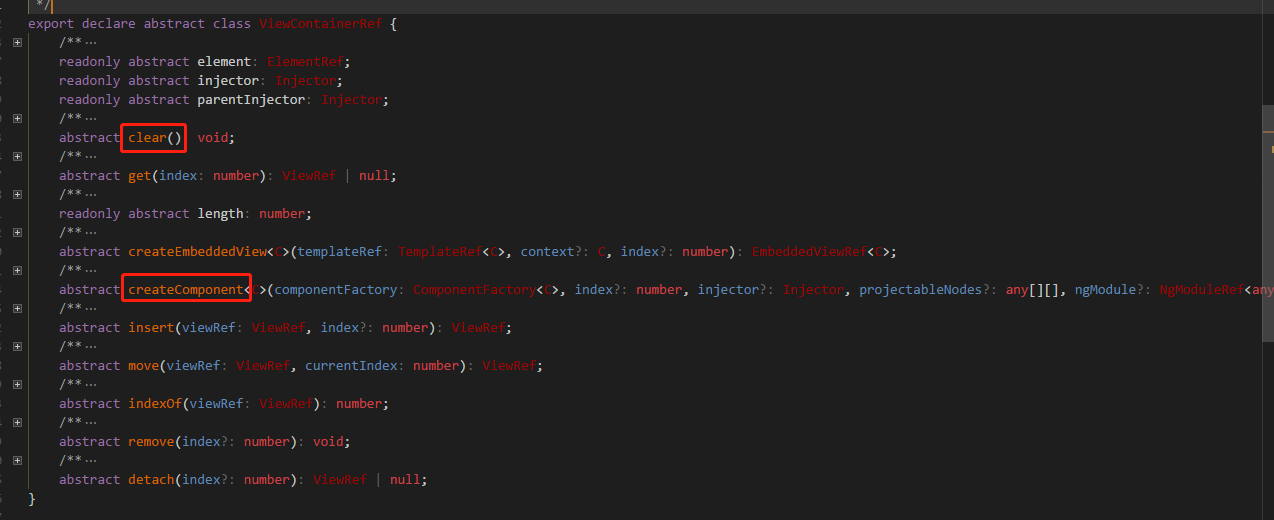
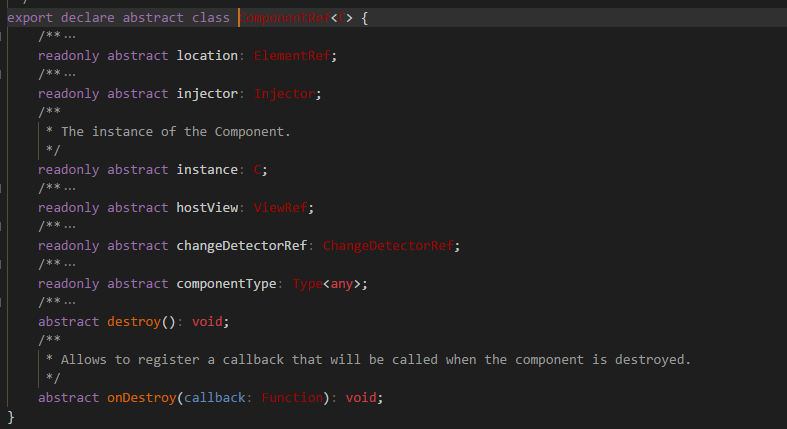
createComponent方法接受ComponentFactoty类,创建后返回的ComponentRef类,可以获取到组件实例(instance),控制组件销毁。
大致思路是这样的,先获取到了HovertipComponent组件对于的componentFactory,监听鼠标移入事件,在触发事件时,通过ViewContainerRef类来创建组件,存下返回的组件componentRef(获取实例,销毁组件时需要用到),向组件实例传递tipText。监听鼠标移出事件,在事件触发时,销毁组件。
使用
在目标元素是绑定指令,同时传递tipText即可。
可以正常的创建和销毁。

总结
开始做的时候,主要是对这几个类比较懵,ViewContainerRef、ComponentRef、ComponentFactory、ComponentFactoryResolver等,看看源码,查查资料,总会梳理清楚的。
参考资料:
https://segmentfault.com/a/1190000008672478#articleHeader1
https://segmentfault.com/a/1190000009175508
Angular使用总结 --- 通过指令动态添加组件的更多相关文章
- easyui 动态添加组件 要重新渲染
做项目时动态添加组件是常有的事,easyui动态添加组件时样式会失效,这是因为这个组件没有经过 easyui的解析器解析, 比如: <pre name="code" cl ...
- 使用js动态添加组件
在文章开始之前,我想说两点 1 自己初学js,文章的内容在大神看来可能就是不值一提,但是谁都是从hello world来的,望高 手不吝指教# 2 我知道这个标题起的比较蛋疼,大家看图就能说明问题 ...
- vue2.0动态添加组件
方法一.<template> <input type="text" v-model='componentName'> <button @click=' ...
- Android笔记(六十一)动态添加组件
想要一个功能,点击按钮,可以在已有的布局上,新添加一组组件. 动态的创建组件,本质上还是创建组件,只不过是在程序中根据逻辑来创建.大致步骤是找到要创建控件的位置,然后将要创建的组件添加进去. 看代码: ...
- 动态添加组件(XML)
1.利用LayoutInflater的inflate动态加载XMLmLinearLayout = (LinearLayout)findViewById(R.id.LinearLayout_ID);La ...
- easyui 使用jquery动态添加组件样式问题
可以使用$.parser.parse();这个方法进行处理: 例如: $.parser.parse(); 表示对整个页面重新渲染,渲染完就可以看到easyui原来的样式了: var targe ...
- [deviceone开发]-动态添加组件add方法的示例
一.简介 这个示例详细介绍ALayout的add方法的使用(原理也适用于Linearlayout),以及add上去的新ui和已有的ui如何数据交换,初学者推荐.二.效果图 三.相关下载 https:/ ...
- svg web拓扑更新了,支持动态添加svg组件
版本1.0请点此 预览地址 https://svg.yaolunmao.top 如何使用 # 克隆项目 git clone https://github.com/yaolunmao/vue-webto ...
- unity3d动态操作组件
利用范型,动态操作组件(添加或删除) e.AddComponent<CubeTranslate> ();//动态添加组件 Destroy (e.GetComponent<CubeTr ...
随机推荐
- springcloud-知识点总结(二):Ribbon&Feign
1.Ribbon简介 前面讲了eureka服务注册与发现,但是结合eureka集群的服务调用没讲. 这里的话 就要用到Ribbon,结合eureka,来实现服务的调用: Ribbon是Netflix发 ...
- python--第十四天总结(js)
选择器允许您对元素组或单个元素进行操作. jQuery 选择器 在前面的章节中,我们展示了一些有关如何选取 HTML 元素的实例. 关键点是学习 jQuery 选择器是如何准确地选取您希望应用效果的元 ...
- nlp算法工程师养成记 目标要求
时间规定: 2018.12.07-2018.02.15 能力养成: linux, shell python, c++(会多少算多少) tensorflow, keras, pytorch(tf优先) ...
- 如何强制停止http请求
http请求很多时候会受到网络阻塞.重连等原因导致响应很慢,如果此时做了一些操作,但过几秒后又响应了之前的请求,就会造成很多问题,此时我们可以使用abort()方法强制停止http请求: let aj ...
- [SpringBoot]Web综合开发-笔记
Web开发 Json接口开发 @RestController 给类添加 @RestController 即可,默认类中的方法都会以 json 的格式返回. 自定义filter filter作用: 用于 ...
- 移动端(处理边距样式)reset.css
移动端reset.css,来自张鑫旭网站的推荐,下载地址:https://huruqing.gitee.io/demos/source/reset.css 代码 /* html5doctor.com ...
- 582. Kill Process杀死所有子代
[抄题]: Given n processes, each process has a unique PID (process id) and its PPID (parent process id) ...
- Node.js 中使用 ES6 中的 import / export 的方法大全
https://blog.csdn.net/universsky2015/article/details/83754741
- mysql error#1251客户端版本过低
mysql> ALTER USER 'root'@'localhost' IDENTIFIED BY 'password' PASSWORD EXPIRE NEVER; Query OK, 0 ...
- js检测输入域的值是否变化
场景: 用户在新建或编辑表单数据时,操作关闭按钮,如果有输入项已经变动时,提示用户存在信息变更,是否放弃当前操作. 初始值情景: 1.通过原生的value指定,如: <input value=' ...