
swaggerui集成oauth implicit

swaggerui集成oauth implicit
添加引用
Swashbuckle.AspNetCore
IdentityServer4.AccessTokenValidation
预先准备好IdentityServer4配置client与Api Resources
Startup 配置 Authentication Api Resources 和SwaggerUI Client配置
public void ConfigureServices(IServiceCollection services)
{
services.AddMvc(option =>
{
option.Filters.Add(typeof(ActionFilter));
option.Filters.Add(typeof(ExceptionFilter));
})
.SetCompatibilityVersion(CompatibilityVersion.Version_2_2);
string youAuthority = "http://127.0.0.1";
services.AddAuthentication("Bearer")
.AddIdentityServerAuthentication(options =>
{
options.Authority = youAuthority;
options.ApiName = "Api";
options.RequireHttpsMetadata = false;
});
services.AddSwaggerGen(options =>
{
options.SwaggerDoc("v1", new Info { Title = "Test Service API", Version = "v1" });
options.DocInclusionPredicate((docName, description) => true);
options.CustomSchemaIds(type => type.FullName);
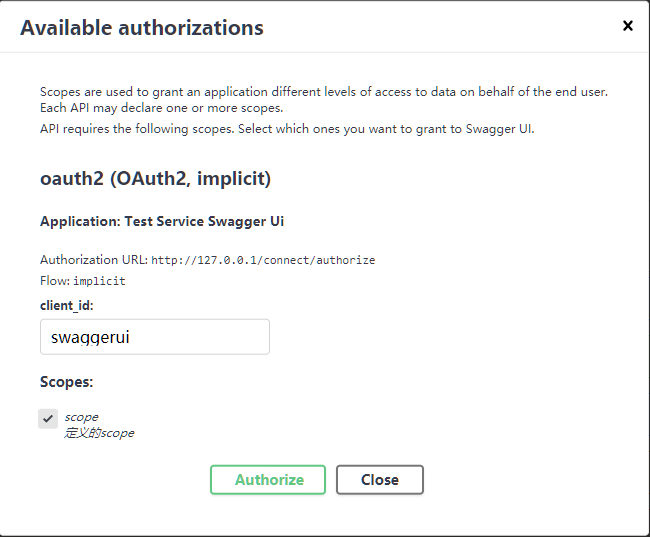
options.AddSecurityDefinition("oauth2", new OAuth2Scheme
{
Type = "oauth2",
Flow = "implicit",
AuthorizationUrl = $"{youAuthority}/connect/authorize",
TokenUrl = $"{youAuthority}/connect/token",
Scopes = new Dictionary<string, string>()
{
{ "scope", "定义的scope" } //Api Resources 中的 scope
}
});
options.OperationFilter<AuthResponsesOperationFilter>();
});
}
public void Configure(IApplicationBuilder app, IHostingEnvironment env)
{
if (env.IsDevelopment())
{
app.UseDeveloperExceptionPage();
}
app.UseAuthentication();
app.UseMiddleware<FirstMiddleware>();
app.UseMvc();
app.UseSwagger().
UseSwaggerUI(options =>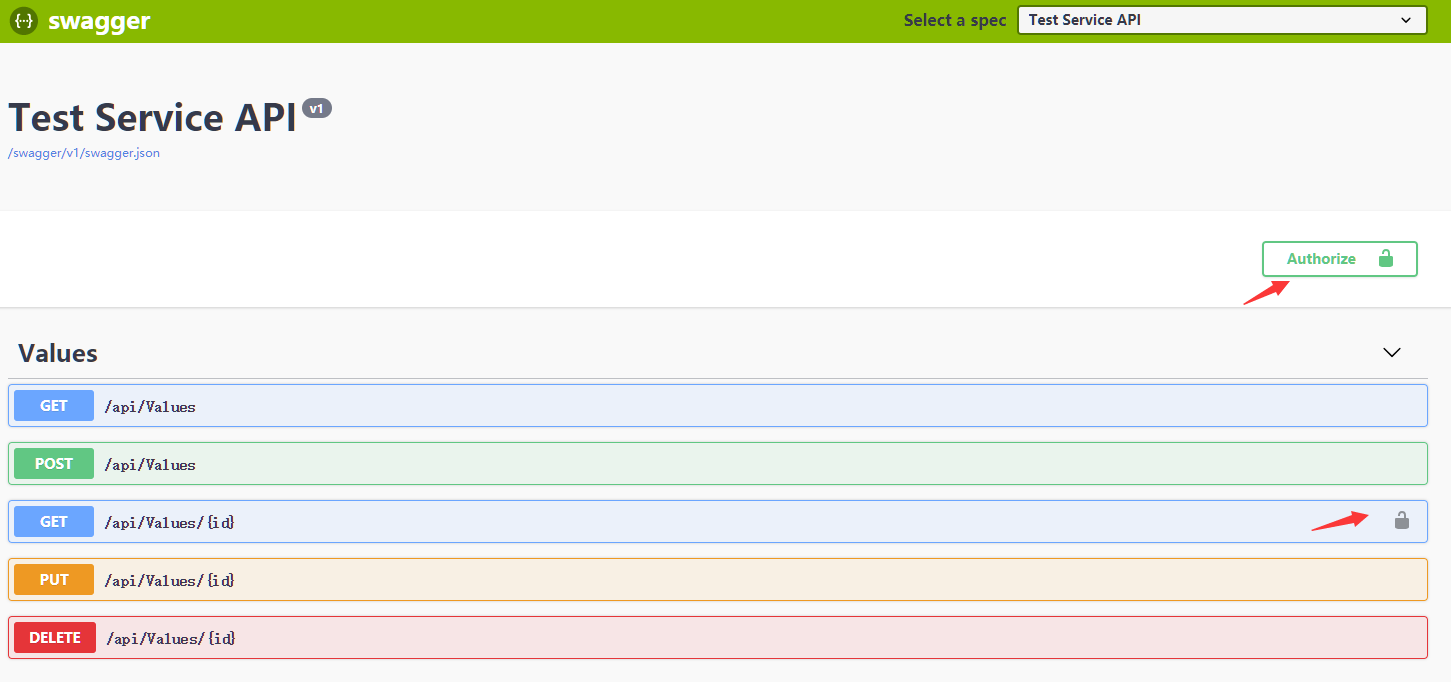
{
options.SwaggerEndpoint("/swagger/v1/swagger.json", "Test Service API");
//支持 implicit 的 Client
options.OAuthClientId("swaggerui");
options.OAuthAppName("Test Service Swagger Ui");
});
}
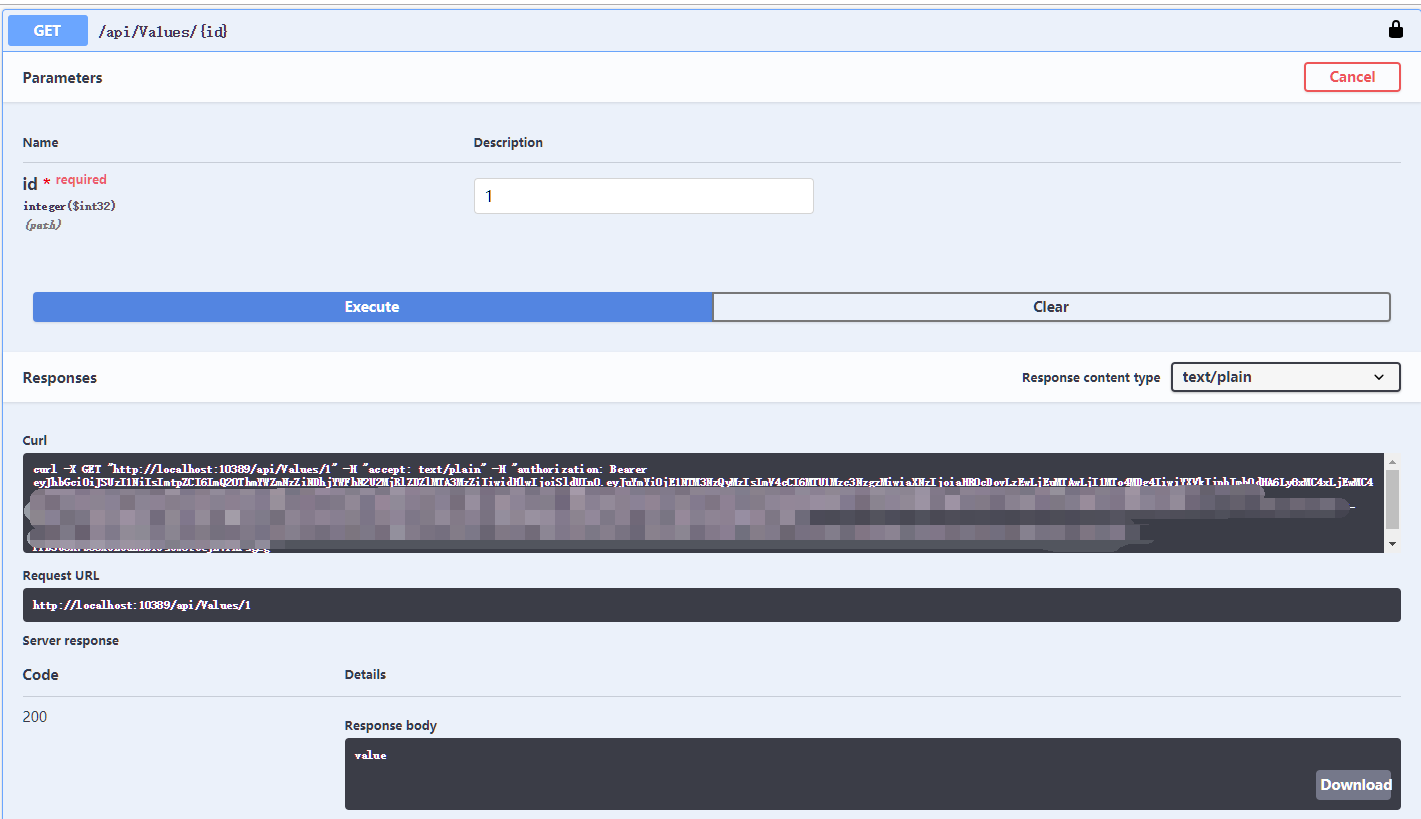
对有鉴权属性的方法添加请求时传递token和添加预设返回状态
public class AuthResponsesOperationFilter : IOperationFilter

{

    public void Apply(Operation operation, OperationFilterContext context)

    {

        // 反射Controller 包含 AuthorizeAttribute 时在请求头添加authorization: Bearer

        var controllerScopes = context.ApiDescription.ControllerAttributes()

            .OfType<AuthorizeAttribute>()

            .Select(attr => attr.Policy);

        var actionScopes = context.MethodInfo

            .GetCustomAttributes(true)

            .OfType<AuthorizeAttribute>()

            .Select(attr => attr.Policy)

            .Distinct();

        var requiredScopes = controllerScopes.Union(actionScopes).Distinct();

        if (requiredScopes.Any())

        {

            operation.Responses.Add("401", new Response { Description = "Unauthorized" });

            operation.Responses.Add("403", new Response { Description = "Forbidden" });

            operation.Security = new List<IDictionary<string, IEnumerable<string>>>();

            operation.Security.Add(new Dictionary<string, IEnumerable<string>>

            {

                { "oauth2", requiredScopes }

            });

        }

    }

}
在 Action 上添加 Authorize
[HttpGet("{id}")]

[Authorize]

public ActionResult<string> Get(int id)

{

    return "value";

}
效果图
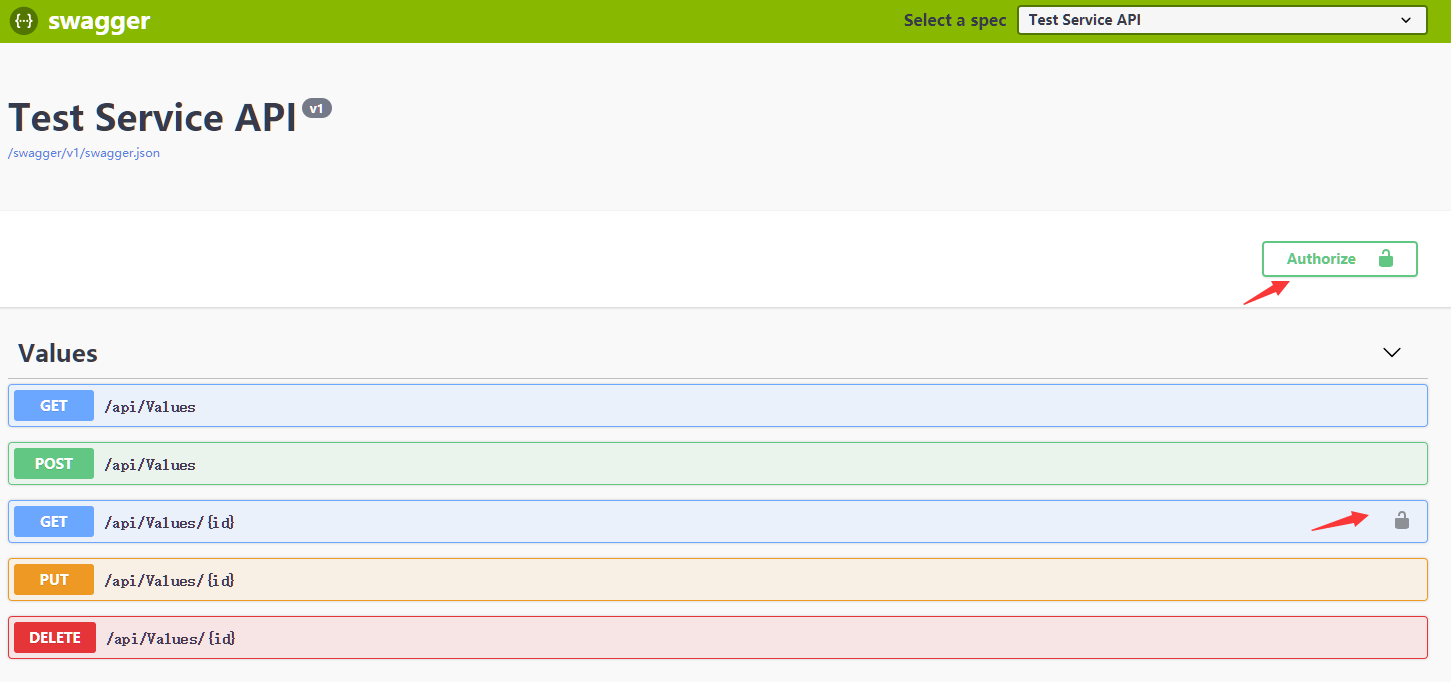
//新增的两种返回状态

operation.Responses.Add("401", new Response { Description = "Unauthorized" });

operation.Responses.Add("403", new Response { Description = "Forbidden" });

登录完后请求会带上authorization: Bearer
swaggerui集成oauth implicit的更多相关文章
- ABP官方文档翻译 5.4 SwaggerUI集成
SwaggerUI集成 介绍 ASP.NET Core 安装Nuget包 配置 测试 ASP.NET 5.x 安装Nuget包 配置 测试 介绍 在它的网站上:“...使用Swagger可用的API, ...
- 集成基于OAuth协议的单点登陆
在之前的一篇文章中,我们已经介绍了如何为一个应用添加对CAS协议的支持,进而使得我们的应用可以与所有基于CAS协议的单点登陆服务通讯.但是现在的单点登陆服务实际上并不全是通过实现CAS协议来完成的.例 ...
- iOS集成丁香园DXY OAuth 登陆 swift代码示例
问:iOS集成OAuth登陆分几步? 答:和把大象放冰箱里一样. 第一步:打开webview,跳转到登陆页面: let url = "https://auth.dxy.cn/conn/oau ...
- OpenID Connect:OAuth 2.0协议之上的简单身份层
OpenID Connect是什么?OpenID Connect(目前版本是1.0)是OAuth 2.0协议(可参考本人此篇:OAuth 2.0 / RCF6749 协议解读)之上的简单身份层,用 A ...
- OAuth 2.0、OIDC 原理
OAuth 目录 OAuth 什么是 OAuth? 为什么是 OAuth? SAML OAuth 和 API OAuth 主要组件 OAuth 作用域 OAuth 参与者 OAuth 令牌 OAuth ...
- ASP.NET WebApi OWIN 实现 OAuth 2.0
OAuth(开放授权)是一个开放标准,允许用户让第三方应用访问该用户在某一网站上存储的私密的资源(如照片,视频,联系人列表),而无需将用户名和密码提供给第三方应用. OAuth 允许用户提供一个令牌, ...
- NET WebApi OWIN 实现 OAuth 2.0
NET WebApi OWIN 实现 OAuth 2.0 OAuth(开放授权)是一个开放标准,允许用户让第三方应用访问该用户在某一网站上存储的私密的资源(如照片,视频,联系人列表),而无需将用户名和 ...
- 在Web API中使用Swagger-UI开源组件(一个深坑的解决)
介绍: Swagger-Ui是一个非常棒的Web API说明帮助页,具体详情可自行Google和百度. 官网:http://swagger.io/ GitHub地址:https://github ...
- 学习Spring Boot:(六) 集成Swagger2
前言 Swagger是用来描述和文档化RESTful API的一个项目.Swagger Spec是一套规范,定义了该如何去描述一个RESTful API.类似的项目还有RAML.API Bluepri ...
随机推荐
- 写jsp文件时需要注意的一些小细节
①jsp文件的最开始的部分: <%@ page language="java" contentType="text/html; charset=UTF-8" ...
- python积累二:中文乱码解决方法
根据网上提供的解决方法:添加#coding=utf-8或# -*- coding: utf-8 -*- #coding=utf-8 print "还不行?" 执行结果:还是乱码!: ...
- ES6 的面向对象
JavaScript 语言中,生成实例对象的传统方法是通过构造函数. function Animal(name, age) { this.name = name; this.age = age; } ...
- 微信公众号的分享接口,分享提示config:fail,invalid signature的解决办法(2017年12月)
微信中打开网页,使用微信右上角菜单中自带的分享功能的经历及总结: 最开始,微信分享页面时,直接读取页面的标题(title)和页面中的第一张符合条件的图片[此种方式在2017-03-29之前管用,这一天 ...
- LibreOJ #6014. 「网络流 24 题」最长 k 可重区间集
#6014. 「网络流 24 题」最长 k 可重区间集 内存限制:256 MiB时间限制:1000 ms标准输入输出 题目类型:传统评测方式:文本比较 上传者: 匿名 提交提交记录统计讨论测试数据 ...
- boost学习 内嵌类型检测 与 any 的代码练习
本文是学习 boost源码的一些练习 参考文章来自 刘未鹏 C++的罗浮宫(http://blog.csdn.net/pongba) 目录 http://blog.csdn.net/pongba/ar ...
- background-clip 和 background-origin 的区别
background-origin:指定绘制背景图片的起点. background-clip:是对背景图片的剪裁,指定背景图片的显示范围. 1.background-origin:padding | ...
- poj1860
刚上来一堆英文着实有点蒙逼,仔细分析是一个Bellman的变形,只要能找出一个无限增大的环这个题就好解决了,我这里用的SPFA,用邻接链表进行储存,直接套用的模板,部分变量名字没有改的很好 #incl ...
- C++标准库第二版笔记 1
C++标准库第二版笔记 1 C++ std历史 第一份标准化文档: C++98 & C++03 & TR1 TR1 Information Technology- Programmin ...
- JSP内置对象page/pageContext/Config/Exception
Config对象 config对象实是在一个Servlet初始化时,JSP引擎向它传递信息用的,此信息包括Servlet初始化时所要用到的参数(通过属性名和属性值构成)以及服务器的有关信息(通过传递一 ...