
QT-QWebEngineView-createWindow弹出页面解决
首先要写一个继承QWebEngineView的类
头文件:
#ifndef WEBBROWSER_H

#define WEBBROWSER_H

#include <QWebEngineView>

#include <QWidget>

namespace netsharp {

class WebBrowser : public QWebEngineView

{

     Q_OBJECT

public:

    explicit WebBrowser(QWidget* parent = Q_NULLPTR);

protected:

    /**

     * @brief createWindow 在鼠标左键点击的时候会触发这个方法

     * @param type

     * @return

     */

    QWebEngineView *createWindow(QWebEnginePage::WebWindowType type);

private :

};

}

#endif // WEBBROWSER_H
实现文件:
#include "webbrowser.h"

#include "MainWindow.h"

#include <QWidget>

#include<QMessageBox>

#include<QMainWindow>

namespace netsharp {

WebBrowser::WebBrowser(QWidget *parent) : QWebEngineView(parent)

{

}

QWebEngineView *WebBrowser::createWindow(QWebEnginePage::WebWindowType type)

{

    WebBrowser *webbrowser = new WebBrowser(this);

    QMainWindow *dialog = new QMainWindow() ;

    dialog->setCentralWidget(webbrowser);

    dialog->show();

    return webbrowser;

}

}
主窗口调用文件代码(mainwindow.cpp)
#include "mainwindow.h"

#include "ui_mainwindow.h"

#include "WebBrowser.h"

#include "QSystemTrayIcon"

#include "QMessageBox"

#include <QTimer>

#include <QUrl>

using namespace netsharp;

MainWindow::MainWindow(QWidget *parent) :

    QMainWindow(parent),

    ui(new Ui::MainWindow)

{

    ui->setupUi(this);

   this->webbrowser = new WebBrowser(this);

    this->webbrowser->load(QUrl("http://beehive.gongsibao.com"));

    this->setCentralWidget(this->webbrowser);

}
另:
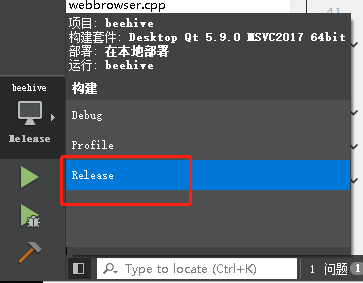
QWebEngineView在QT Creator开发的时候网页加载特别慢,使用release方式即可解决,嗖嗖快
QT-QWebEngineView-createWindow弹出页面解决的更多相关文章
- linux下QT程序输出乱码解决方法
参考文章:http://blog.csdn.net/jiang1013nan/article/details/6667871 http://my.oschina.net/zjlaobusi/blog/ ...
- qt 视频播放器错误解决方法
DirectShowPlayerService::doRender: Unresolved error code 0x80040266 () 当你发布的qmlproject包含QtMultimedia ...
- ubuntu16.04下fcitx无法在QT Creator输入中文解决办法
我的博客新地址:www.liuquanhao.com ------------------------------------------------------ Qt creator无法用fcitx ...
- 两个常见Qt编译错误的解决
作者:朱金灿 来源:http://blog.csdn.net/clever101 如果在电脑上安装了两个Qt版本,在编译一个工程时有可能出现如下的编译错误: ERROR: failed to refr ...
- 基于Linux(中标麒麟)上QT的环境搭建——解决cannot find lGL的问题
接上一篇,QT在中标麒麟环境安装完成后遇到运行报错的问题 一.问题描述: 在中标麒麟上配置好QT的环境后,新建一个工程,不做其他的任何操作,直接运行都会报cannot find lGL的错误.如图所示 ...
- fedora 18~20 中Qt 5.2.1 解决连接mysql数据库出现QMYSQL driver not loaded的问题
QT += sql //在.pro文件里加入这一句 //包含头文件 #include <QDebug> #include <QSqlQuery> #include ...
- ubuntu18.04安装qt时候的错误解决
在ubuntu系统下安装好qt5.5后启动qtceator时提示: Qt5.5.1/Tools/QtCreator/lib/qtcreator/plugins/libHelp.so: 无法加载库Qt5 ...
- Mac下QT错误,Xcode配置解决办法
出现错误: Xcode not set up properly. You may need to confirm the license agreement by running / 解决办法如下: ...
- Window下Qt Creator启动错误解决方法
很多电脑现在都是用的是双显卡,高性能的独显和性能比较差但耗电少的集显,在Window10系统下右键点击软件,在"图形处理器"里面可以选择使用什么显卡操作此软件.下面是我在运行Qt ...
随机推荐
- Redis和Memcache区别,优缺点对比
1. Redis和Memcache都是将数据存放在内存中,都是内存数据库.不过memcache还可用于缓存其他东西,例如图片.视频等等. 2.Redis不仅仅支持简单的k/v类型的数据,同时还提供li ...
- 常量&字符编码
day1 name='Nod Chen' name2=name print('My name is ',name,name2) name='Luna zhou' print(name,name2) _ ...
- 网络之TCP握手总结
目录: 31.Tcp握手的一些问题? 21.Tcp三次握手及SYN攻击: 四次握手? 为什么建立连接是三次握手,而关闭连接却是四次挥手? 13.TCP释放连接四次握手 12.TCP建立连接三次握手 1 ...
- python网页爬虫开发之五-反爬
1.头信息检查是否频繁相同 随机产生一个headers, #user_agent 集合 user_agent_list = [ 'Mozilla/5.0 (Windows NT 6.1; WOW64 ...
- 编写高质量java代码151个建议
http://blog.csdn.net/aishangyutian12/article/details/52699938 第一章 Java开发中通用的方法和准则 建议1:不要在常量和变量中出现易混 ...
- Python—requests模块详解
1.模块说明 requests是使用Apache2 licensed 许可证的HTTP库. 用python编写. 比urllib2模块更简洁. Request支持HTTP连接保持和连接池,支持使用co ...
- Java --Servlet 32个经典问题
Servlet方面 1.说一说Servlet的生命周期? Servlet有良好的生存期的定义,包括加载和实例化.初始化.处理请求以及服务结束.这个生存期由javax.servlet.Servlet接口 ...
- leetcode141
/** * Definition for singly-linked list. * public class ListNode { * public int val; * public ListNo ...
- C# 数值的隐式转换
Debug2.Log(5/8.0f, 5.0f/8, 5/8);//output:0.625, 0.625, 0 隐式数值转换表
- 1011 A+B 和 C (15 分)
pragma warning(disable:4996) a-c+b>0? 考虑可能越界 在循环体内判断,然后有序号输出 输入输出格式看多个题然后总结下 不会处理单行数据 include < ...