
使用C#控制台应用程序完成一个2048小游戏
曾经使用C#控制台应用程序写的一个2048,现在翻出来回顾一下
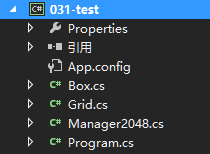
- Box类是2048中每一个小格子的相关信息,包括格子的横纵坐标、格子的值和格子是否刚合并这些信息。
- Grid类是网格的相关信息,包括网格的长宽(默认是4X4,也可以改成其他形式的),分数等。
- Manager2048类是个大杂烩的类,写的很乱,什么乱七八糟的方法都丢在了里面。
=================================贼好看的分割线=============
Program.CS
 using System;

 using System.Collections.Generic;

 using System.Linq;

 using System.Text;

 using System.Threading.Tasks;

 namespace _031_test

 {

     /// <summary>

     /// 2048

     /// </summary>

     class Program

     {

         static void Main(string[] args)

         {

             Manager2048 m2048 = new Manager2048();

             m2048.Strat();

             m2048.Control();

             Console.ReadLine();

         }

     }

 }
Program.CS
Box.CS
 using System;

 using System.Collections.Generic;

 using System.Linq;

 using System.Text;

 using System.Threading.Tasks;

 namespace _031_test

 {

     /// <summary>

     /// 格子

     /// </summary>

     class Box

     {

         //格子的坐标

         int row;

         int col;

         public int Row { get { return row; } }

         public int Col { get { return col; } }

         //格子的值

         public int Value { get; set; }

         //是否已经合并

         public bool IsMerge { get; set; }

         public Box(int row,int col)

         {

             this.row = row;

             this.col = col;

             //初始化默认值为0

             this.Value = ;

             this.IsMerge = false;

         }

     }

 }
Box.CS
Grid.CS
 using System;

 using System.Collections.Generic;

 using System.Linq;

 using System.Text;

 using System.Threading.Tasks;

 using System.IO;

 namespace _031_test

 {

     /// <summary>

     /// 网格

     /// </summary>

     class Grid

     {

         //网格的长宽

         int rows;

         int cols;

         public int Rows { get { return rows; } }

         public int Cols { get { return cols; } }

         public int score;

         public int randomTimes = ;//判断游戏是否结束的标识位16结束

         Random random;

         //存放格子对象

         public Box[,] bList;

         //是否是第一次,第一次则出现两个数,否则只出现一个数

         bool isFirst = true;

         public Grid(int rows, int cols)

         {

             this.random = new Random();

             this.rows = rows <  ?  : rows;

             this.cols = cols <  ?  : cols;

             bList = new Box[rows, cols];

         }

         //初始化

         public void InitGrid()

         {

             //对网格中的每一个格子进行初始化,并将每一个格子对象存入bList中

             for (int i = ; i < bList.GetLength(); i++)

             {

                 for (int j = ; j < bList.GetLength(); j++)

                 {

                     Box box = new Box(i, j);

                     bList[i, j] = box;

                 }

             }

             RandomNum();

         }

         ///////////////////////////////////

         //随机---包括生成的数字和位置

         public void RandomNum()

         {

             //count表示要生成的数字的个数,进行判断,初始化时候生成两个,否则就一个

             int count;

             if (isFirst) { count = ; isFirst = false; }

             else count = ;

             int i = ;

             while (i < count)

             {

                 //随机出现数字的下标

                 int r = random.Next(, rows);

                 int c = random.Next(, cols);

                 //若随机到的位置已经有值了,则返回重新随机

                 if (bList[r, c].Value != ) continue;

                 //随机2和4   出现几率  80%   20%

                 int valuePercent = random.Next(, );

                 //将出现的值

                 int value;

                 if (valuePercent < ) value = ;

                 else value = ;

                 bList[r, c].Value = value;

                 i++;

                 //当randomTimes到16时说明所有格子都满了

                 randomTimes++;

             }

         }

         //显示游戏界

         public void DisPlay()

         {

             Console.WriteLine("===============================");

             for (var i = ; i < bList.GetLength(); i++)

             {

                 for (var j = ; j < bList.GetLength(); j++)

                 {

                     Console.Write(bList[i, j].Value + "\t");

                 }

                 Console.WriteLine("\n");

             }

             Console.WriteLine("===============================");

             Console.WriteLine("当前分数:" + score + "历史最高:" + Int32.Parse(File.ReadAllText("score.txt")));

         }

     }

 }
Grid.CS
Manager2048.CS
using System;
using System.Collections.Generic;
using System.Linq;
using System.Text;
using System.Threading.Tasks;
using System.IO; namespace _031_test
{
/// <summary>
/// 控制器
/// </summary>
class Manager2048
{
Grid g; public Manager2048()
{
g = new Grid(, );
} //开始游戏 public void Strat()
{
g.InitGrid();
g.DisPlay();
Console.WriteLine("游戏开始,请直接使用方向键进行操作");
} public void Control()
{
while (true)
{
//ConsoleKeyInfo可以直接接受一个字符不需要再按下回车键确认
ConsoleKeyInfo keyInfo = Console.ReadKey();
switch (keyInfo.Key)
{
case ConsoleKey.UpArrow: Up(); break;
case ConsoleKey.DownArrow: Down(); break;
case ConsoleKey.LeftArrow: Left(); break;
case ConsoleKey.RightArrow: Right(); break;
default: Console.WriteLine("按错了"); break;
}
if (g.randomTimes==g.Rows*g.Cols&&!CanWeMergeInFull())
{
Console.WriteLine("游戏结束");
break;
}
}
} public void Up()
{
bool ismove=false;
//遍历每一个box,检测该box是否要移动
for (int i = ; i < g.bList.GetLength(); i++)//向上移动不需要考虑第一行的上移,所以直接i=1
{
for (int j = ; j < g.bList.GetLength(); j++)
{
//如果该box值不是0,说明该box需要移动,否则继续遍历下一个box
if (g.bList[i, j].Value != )
{
int temp = g.bList[i, j].Value;
//从该box的上一行开始一直遍历到最顶上
int k = i - ;
while (k >= )
{
if (g.bList[k, j].Value != || k == ) break;
else k--;
}
//如果碰到了和要移动的box值一样的box,就要把他们合并(IsMerge:当这个box是这一轮合并来的box时,则不能合并)
if (temp == g.bList[k, j].Value && g.bList[k, j].IsMerge==false)
{
g.bList[i, j].Value = ;
g.bList[k, j].Value = temp * ;
g.score += temp * ;
if (g.score > Int32.Parse(File.ReadAllText("score.txt")))
{
File.WriteAllText("score.txt", g.score.ToString());
}
g.bList[k, j].IsMerge = true;
g.randomTimes--;
ismove = true;
}
else if (temp == g.bList[k, j].Value && g.bList[k, j].IsMerge==true)
{
g.bList[i, j].Value = ;
g.bList[k + , j].Value = temp;
//i=k+1表示该box并没有移动
if (i == k + ) ismove = false;
else ismove = true;
}
//值不一样的时候,就把要移动的box放到这个box下面去
else if (g.bList[k, j].Value != )
{
g.bList[i, j].Value = ;
g.bList[k + , j].Value = temp;
if (i == k + ) ismove = false;
else ismove = true;
}
//这种情况是遍历到最顶行的box且该box为0时,直接把要动的box移到这
else
{
g.bList[i, j].Value = ;
g.bList[k, j].Value = temp;
if (i == k) ismove = false;
else ismove = true;
}
}
}
}
if (ismove && !IsFull()) g.RandomNum();//当所有格子都满了时就不随机生成数字
else Console.WriteLine("该方向无法移动");
ResetIsMerge();//重置所有box的合并状态为false
g.DisPlay();
} public void Down()
{
bool ismove = false;
//错误写法:for (int i = 0; i < g.bList.GetLength(0) - 1; i++)
//以上写法会导致上层的数先被遍历从而导致先移动完毕,所以要从最后一个数开始遍历
for (int i = g.bList.GetLength() - ; i >= ; i--)
{
for (int j = g.bList.GetLength() - ; j >= ; j--)
{
if (g.bList[i, j].Value != )
{
int temp = g.bList[i, j].Value;
int k = i + ;
while (k <= g.bList.GetLength() - )
{
if (g.bList[k, j].Value != || k == g.bList.GetLength() - ) break;
else k++;
}
if (temp == g.bList[k, j].Value && g.bList[k, j].IsMerge == false)
{
g.bList[i, j].Value = ;
g.bList[k, j].Value = temp * ;
g.bList[k, j].IsMerge = true;
g.score += temp * ;
if (g.score > Int32.Parse(File.ReadAllText("score.txt")))
{
File.WriteAllText("score.txt", g.score.ToString());
}
g.randomTimes--;
ismove = true;
}
else if (temp == g.bList[k, j].Value && g.bList[k, j].IsMerge == true)
{
g.bList[i, j].Value = ;
g.bList[k - , j].Value = temp;
if (i == k - ) ismove = false;
else ismove = true;
}
else if (g.bList[k, j].Value != )
{
g.bList[i, j].Value = ;
g.bList[k - , j].Value = temp;
if (i == k - ) ismove = false;
else ismove = true;
}
else
{
g.bList[i, j].Value = ;
g.bList[k, j].Value = temp;
if (i == k) ismove = false;
else ismove = true;
}
}
}
}
if (ismove && !IsFull()) g.RandomNum();
else Console.WriteLine("该方向无法移动");
ResetIsMerge();
g.DisPlay();
} public void Left()
{
bool ismove = false;
for (int i = ; i < g.bList.GetLength(); i++)
{
for (int j = ; j < g.bList.GetLength(); j++)
{
if (g.bList[i, j].Value != )
{
int temp = g.bList[i, j].Value;
int k = j - ;
while (k >= )
{
if (g.bList[i, k].Value != || k == ) break;
else k--;
}
if (temp == g.bList[i, k].Value && g.bList[i, k].IsMerge == false)
{
g.bList[i, j].Value = ;
g.bList[i, k].Value = temp * ;
g.score += temp * ;
if (g.score > Int32.Parse(File.ReadAllText("score.txt")))
{
File.WriteAllText("score.txt", g.score.ToString());
}
g.bList[k, j].IsMerge = true;
g.randomTimes--;
ismove = true;
}
else if (temp == g.bList[i, k].Value && g.bList[i, k].IsMerge == true)
{
g.bList[i, j].Value = ;
g.bList[i, k + ].Value = temp;
if (j == k + ) ismove = false;
else ismove = true;
}
else if (g.bList[i, k].Value != )
{
g.bList[i, j].Value = ;
g.bList[i, k + ].Value = temp;
if (j == k + ) ismove = false;
else ismove = true;
}
else
{
g.bList[i, j].Value = ;
g.bList[i, k].Value = temp;
if (j == k) ismove = false;
else ismove = true;
}
}
}
}
if (ismove && !IsFull()) g.RandomNum();
else Console.WriteLine("该方向无法移动");
ResetIsMerge();
g.DisPlay();
} public void Right()
{
bool ismove = false;
//错误写法:for (int i = 0; i < g.bList.GetLength(0) - 1; i++)
//以上写法会导致上层的数先被遍历从而导致先移动完毕,所以要从最后一个数开始遍历
for (int i = g.bList.GetLength() - ; i >= ; i--)
{
for (int j = g.bList.GetLength() - ; j >= ; j--)
{
if (g.bList[i, j].Value != )
{
int temp = g.bList[i, j].Value;
int k = j + ;
while (k <= g.bList.GetLength() - )
{
if (g.bList[i, k].Value != || k == g.bList.GetLength() - ) break;
else k++;
}
if (temp == g.bList[i, k].Value && g.bList[i, k].IsMerge == false)
{
g.bList[i, j].Value = ;
g.bList[i, k].Value = temp * ;
g.score += temp * ;
if (g.score > Int32.Parse(File.ReadAllText("score.txt")))
{
File.WriteAllText("score.txt", g.score.ToString());
}
g.bList[k, j].IsMerge = true;
g.randomTimes--;
ismove = true;
}
else if (temp == g.bList[i, k].Value && g.bList[i, k].IsMerge == true)
{
g.bList[i, j].Value = ;
g.bList[i, k - ].Value = temp;
if (j == k - ) ismove = false;
else ismove = true;
}
else if (g.bList[i, k].Value != )
{
g.bList[i, j].Value = ;
g.bList[i, k - ].Value = temp;
if (j == k - ) ismove = false;
else ismove = true;
}
else
{
g.bList[i, j].Value = ;
g.bList[i, k].Value = temp;
if (j == k) ismove = false;
else ismove = true;
}
}
}
}
if (ismove && !IsFull()) g.RandomNum();
else Console.WriteLine("该方向无法移动");
ResetIsMerge();
g.DisPlay();
} //判断网格是否已满
public bool IsFull()
{
for (int i = ; i < g.Rows; i++)
{
for (int j = ; j < g.Cols; j++)
{
if (g.bList[i, j].Value == )
{
return false;
}
}
}
return true;
} //重置所有box合并状态
public void ResetIsMerge()
{
for (int i = ; i < g.Rows; i++)
{
for (int j = ; j < g.Cols; j++)
{
g.bList[i, j].IsMerge = false;
}
}
} //网格满时是否还可以继续合并 true表示还有能合并的
public bool CanWeMergeInFull()
{
for (int i = ; i < g.Rows; i++)
{
for (int j = ; j < g.Cols; j++)
{
//检测上方向
if (i - >= && g.bList[i, j].Value == g.bList[i - , j].Value)
{
return true;
}
//检测下方向
if (i + < g.Rows && g.bList[i, j].Value == g.bList[i + , j].Value)
{
return true;
}
//检测左方向
if (j - >= && g.bList[i, j].Value == g.bList[i, j - ].Value)
{
return true;
}
//检测右方向
if (j + < g.Cols && g.bList[i, j].Value == g.bList[i, j + ].Value)
{
return true;
}
}
}
return false;
} }
}
Manager2048.CS
=================================贼好看的分割线=============
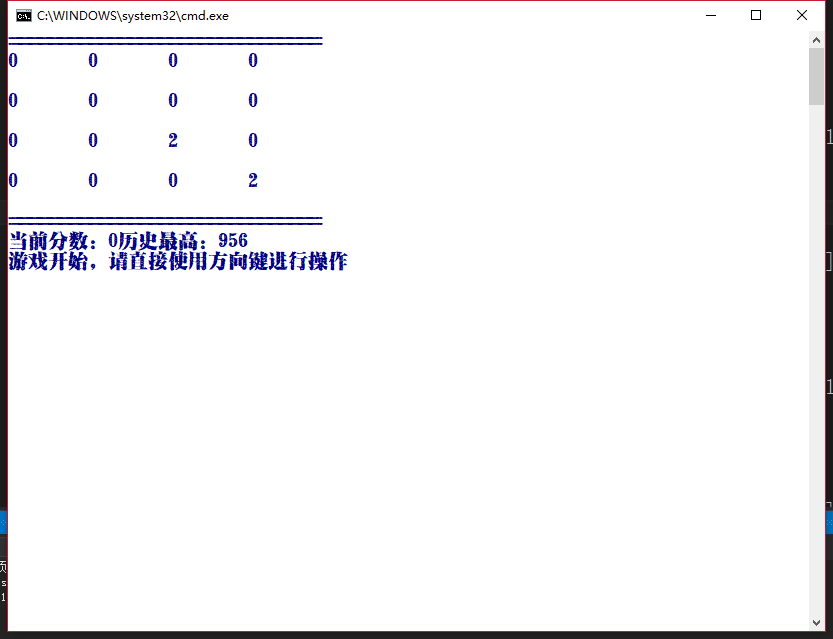
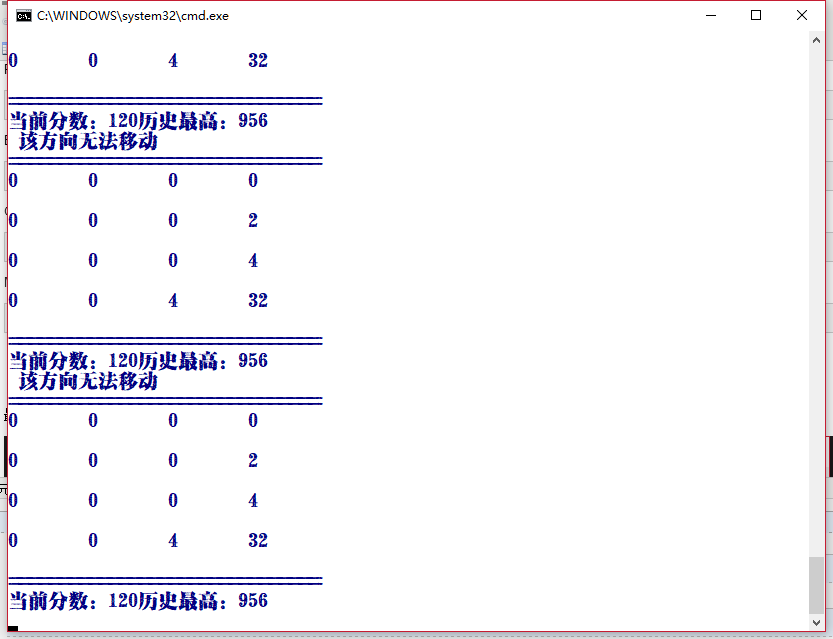
最终效果:
使用C#控制台应用程序完成一个2048小游戏的更多相关文章
- 如何在CentOS上安装一个2048小游戏
如何在centos上安装一个2048小游戏 最近在学习CentOS系统,就琢磨着玩点什么,然后我看到有人在玩2048小游戏,所有我就在想,为啥不装一个2048小游戏搞一下嘞,于是乎,我就开始工作啦 由 ...
- c#撸的控制台版2048小游戏
1.分析 最近心血来潮,突然想写一个2048小游戏.于是搜索了一个在线2048玩玩,熟悉熟悉规则. 只谈核心规则:(以左移为例) 1.1合并 以行为单位,忽略0位,每列依次向左进行合并,且每列只能合并 ...
- Swift实战之2048小游戏
上周在图书馆借了一本Swift语言实战入门,入个门玩一玩^_^正好这本书的后面有一个2048小游戏的实例,笔者跟着实战了一把. 差不多一周的时间,到今天,游戏的基本功能已基本实现,细节我已不打算继续完 ...
- 基于jQuery的2048小游戏设计(网页版)
上周模仿一个2048小游戏,总结一下自己在编写代码的时候遇到的一些坑. 游戏规则:省略,我想大部分人都玩过,不写了 源码地址:https://github.com/xinhua6/2048game.g ...
- C# 开发2048小游戏
这应该是几个月前,闲的手痒,敲了一上午代码搞出来的,随之就把它丢弃了,当时让别人玩过,提过几条更改建议,但是时至今日,我也没有进行过优化和更改(本人只会作案,不会收场,嘎嘎),下面的建议要给代码爱好的 ...
- 【2048小游戏】——原生js爬坑之封装行的移动算法&事件
引言:2048小游戏的核心玩法是移动行,包括横行和纵行,玩家可以选择4个方向,然后所有行内的数字就会随着行的移动而向特定的方向移动.这个行的移动是一个需要重复调用的算法,所以这里就要将一行的移动算法封 ...
- .NET手撸2048小游戏
.NET手撸2048小游戏 2048是一款益智小游戏,得益于其规则简单,又和2的倍数有关,因此广为人知,特别是广受程序员的喜爱. 本文将再次使用我自制的"准游戏引擎"FlysEng ...
- jQuery实践-网页版2048小游戏
▓▓▓▓▓▓ 大致介绍 看了一个实现网页版2048小游戏的视频,觉得能做出自己以前喜欢玩的小游戏很有意思便自己动手试了试,真正的验证了这句话-不要以为你以为的就是你以为的,看视频时觉得看懂了,会写了, ...
- 用Python设计一个经典小游戏
这是关于Python的第9篇文章,介绍如何用Python设计一个经典小游戏:猜大小. 在这个游戏中,将用到前面我介绍过的所有内容:变量的使用.参数传递.函数设计.条件控制和循环等,做个整体的总结和复习 ...
随机推荐
- HTML02单词
form:表单action:行动(提交的路径)method:方法(提交的方式)input:输入type:类型text:文本(文本输入项)password:密码radio:单选按钮checkbox:复选 ...
- Python IDLE arcpy设置环境变量
在IDLE中 import arcpy help(arcpy) 得到的路径为: 但是在arcmap中,路径为: 说明IDLE的环境变量设置有问题: 在windows的环境变量中设置环境变量PYTHON ...
- [bash][awk] bash下使用awk方便的列求和
这么多年,始终在用awk进行文本处理.但是一直没有好好的学习awk的语法.所以很多情况都是知其然,不知其所以然. 如今,亦如此.先记下来如下,以后有时间系统的学习一下awk的语法. ┬─[tong@T ...
- Redis应用场景说明与部署
Redis简介 REmote DIctionary Server(Redis)是一个基于key-value键值对的持久化数据库存储系统.redis和大名鼎鼎的memcached缓存服务很像,但是red ...
- javaweb(4)之Listener&Filter
监听器 (Listener) 介绍 监听器用于监听 web 应用中某些对象.信息的创建.销毁.增加,修改,删除等动作的发生,然后作出相应的响应处理.当范围对象的状态发生变化的时候,服务器自动调用监听器 ...
- [py]一致性hash原理
1,可变,不可变 python中值得是引用地址是否变化. 2.可hash 生命周期里不可变得值都可hash 3.python中内置数据结构特点 有序不可变 有序可变 无序可变 无序不可变 5.一致性h ...
- android studio相关配置
启动出现:Unable to access Android SDK add-on list 解决: Android Studio First Run 检测 Android SDK 及更新,由于众所周知 ...
- 日志采集器windows客户端的配置释义
<Extension json> Module xm_json </Extension> <Extension charconv> Module xm_charco ...
- java之WebService
链接:https://www.jianshu.com/p/1c145315da47 WebService介绍 首先我们来谈一下为什么需要学习webService这样的一个技术吧.... 问题一 如果我 ...
- acm 2015北京网络赛 F Couple Trees 主席树+树链剖分
提交 题意:给了两棵树,他们的跟都是1,然后询问,u,v 表 示在第一棵树上在u点往根节点走 , 第二棵树在v点往根节点走,然后求他们能到达的最早的那个共同的点 解: 我们将第一棵树进行书链剖,然后第 ...