
java框架之Struts2(4)-拦截器&标签库
拦截器
概述
Interceptor (拦截器):起到拦截客户端对 Action 请求的作用。
- Filter:过滤器,过滤客户端向服务器发送的请求。
- Interceptor:拦截器,拦截的是客户端对 Action 的访问,是更细粒度化的拦截。
Struts2 框架的核心功能都是通过拦截器实现。
自定义拦截器
编写拦截器类
编写一个类实现 Interceptor 接口或继承 AbstractInterceptor 类。
package com.zze.interceptor;

import com.opensymphony.xwork2.ActionInvocation;
import com.opensymphony.xwork2.interceptor.Interceptor;

public class Test1Interceptor implements Interceptor {
    @Override
    public void destroy() {
        System.out.println("from Test1Interceptor.destroy");
    }

    @Override
    public void init() {
        System.out.println("from Test1Interceptor.init");
    }

    @Override
    public String intercept(ActionInvocation invocation) throws Exception {
        System.out.println("from Test1Interceptor.intercept");
        return invocation.invoke();
    }
}
com.zze.interceptor.Test1Interceptor 方式一:实现 Interceptor 接口
package com.zze.interceptor;

import com.opensymphony.xwork2.ActionInvocation;
import com.opensymphony.xwork2.interceptor.AbstractInterceptor;

public class Test2Interceptor extends AbstractInterceptor {
    @Override
    public String intercept(ActionInvocation invocation) throws Exception {
        System.out.println("Test2Interceptor.intercept");
        return invocation.invoke();
    }
}
com.zze.interceptor.Test2Interceptor 方式二:继承 AbstractInterceptor 类
配置拦截器
<?xml version="1.0" encoding="UTF-8" ?>
<!DOCTYPE struts PUBLIC
        "-//Apache Software Foundation//DTD Struts Configuration 2.3//EN"
        "http://struts.apache.org/dtds/struts-2.3.dtd">
<struts>
    <constant name="struts.devMode" value="true"/>
    <package name="test" extends="struts-default" namespace="/">
        <!--定义拦截器-->
        <interceptors>
            <interceptor name="interceptor1" class="com.zze.interceptor.Test1Interceptor"/>
            <interceptor name="interceptor2" class="com.zze.interceptor.Test2Interceptor"/>
        </interceptors>
        <action name="*" class="com.zze.action.{1}Action">
            <result>/index.jsp</result>
            <!--引入拦截器-->
            <interceptor-ref name="defaultStack"/>
            <interceptor-ref name="interceptor1"/>
            <interceptor-ref name="interceptor2"/>
        </action>
    </package>
</struts>
struts.xml 方式一:引入拦截器
<?xml version="1.0" encoding="UTF-8" ?>
<!DOCTYPE struts PUBLIC
        "-//Apache Software Foundation//DTD Struts Configuration 2.3//EN"
        "http://struts.apache.org/dtds/struts-2.3.dtd">
<struts>
    <constant name="struts.devMode" value="true"/>
    <package name="test" extends="struts-default" namespace="/">
        <!--定义拦截器-->
        <interceptors>
            <interceptor name="interceptor1" class="com.zze.interceptor.Test1Interceptor"/>
            <interceptor name="interceptor2" class="com.zze.interceptor.Test2Interceptor"/>
            <!--定义拦截器栈-->
            <interceptor-stack name="myStack">
                <interceptor-ref name="defaultStack"/>
                <interceptor-ref name="interceptor1"/>
                <interceptor-ref name="interceptor2"/>
            </interceptor-stack>
        </interceptors>
        <action name="*" class="com.zze.action.{1}Action">
            <result>/index.jsp</result>
            <!--引入拦截器栈-->
            <interceptor-ref name="myStack"/>
        </action>
    </package>
</struts>
struts.xml 方式二:引入拦截器栈
补充
Struts2 还为我们提供了一些功能增强的过滤器,我们只需要继承它简单配置即可,例如:
package com.zze.interceptor;

import com.opensymphony.xwork2.ActionInvocation;
import com.opensymphony.xwork2.interceptor.MethodFilterInterceptor;

/**
 * MethodFilterInterceptor 可以让我们很简单的控制要拦截的方法和不需拦截的方法
 */
public class TestInterceptor extends MethodFilterInterceptor {

    @Override
    protected String doIntercept(ActionInvocation invocation) throws Exception {
        System.out.println("from TestInterceptor.doIntercept");
        return invocation.invoke();
    }
}
com.zze.interceptor.TestInterceptor
<?xml version="1.0" encoding="UTF-8" ?>
<!DOCTYPE struts PUBLIC
        "-//Apache Software Foundation//DTD Struts Configuration 2.3//EN"
        "http://struts.apache.org/dtds/struts-2.3.dtd">
<struts>
    <constant name="struts.devMode" value="true"/>
    <package name="test" extends="struts-default" namespace="/">
        <!--定义拦截器-->
        <interceptors>
            <interceptor name="methodInterceptor" class="com.zze.interceptor.TestInterceptor"/>
        </interceptors>
        <action name="*_*" class="com.zze.action.{1}Action" method="{2}">
            <result>/index.jsp</result>
            <interceptor-ref name="methodInterceptor">
                <!--配置不拦截的方法名-->
                <param name="excludeMethods">login,index</param>
                <!--配置要拦截的方法名-->
                <param name="includeMethods">home,list</param>
            </interceptor-ref>
        </action>
    </package>
</struts>
struts.xml
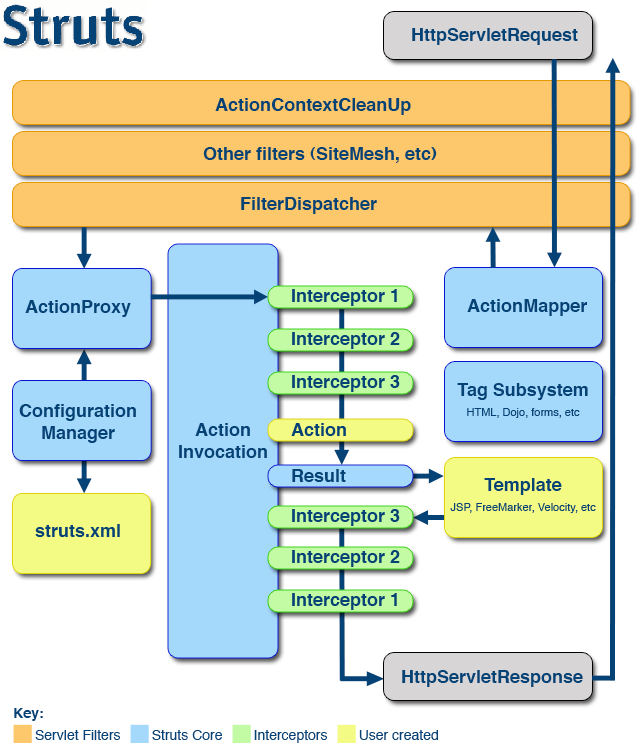
Struts2执行流程
官方架构图
源码分析
依旧是从核心过滤器的 doFilter 方法开始:
 public void doFilter(ServletRequest req, ServletResponse res, FilterChain chain) throws IOException, ServletException {

         HttpServletRequest request = (HttpServletRequest) req;
         HttpServletResponse response = (HttpServletResponse) res;

         try {
             // 判断当前请求 URL 是否在不处理范围内
             if (excludedPatterns != null && prepare.isUrlExcluded(request, excludedPatterns)) {
                 chain.doFilter(request, response);
             } else {
                 // 设置编码,默认 request.setCharacterEncoding("UTF-8")
                 prepare.setEncodingAndLocale(request, response);
                 // 创建 Action 及创建 ValueStack 值栈
                 prepare.createActionContext(request, response);
                 // 将本次请求相关配置绑定到当前线程 ThreadLocal
                 prepare.assignDispatcherToThread();
                 // 包装原生 request ,对其进行增强
                 request = prepare.wrapRequest(request);
                 // 找到此次请求对应配置文件 struts.xml 中的映射相关信息,封装到 ActionMapping 实例
                 ActionMapping mapping = prepare.findActionMapping(request, response, true);
                 if (mapping == null) { // 未找到映射信息
                     // 查看此次请求目标是否是静态资源
                     boolean handled = execute.executeStaticResourceRequest(request, response);
                     if (!handled) {
                         chain.doFilter(request, response);
                     }
                 } else {// 找到了映射信息
                     // 执行拦截器及 Action
                     execute.executeAction(request, response, mapping);
                 }
             }
         } finally {
             // 清理请求信息
             prepare.cleanupRequest(request);
         }
     }
org.apache.struts2.dispatcher.ng.filter.StrutsPrepareAndExecuteFilter#doFilter
进到 29 行的 execute.executeAction 方法:
 public void executeAction(HttpServletRequest request, HttpServletResponse response, ActionMapping mapping) throws ServletException {
     dispatcher.serviceAction(request, response, mapping);
 }
org.apache.struts2.dispatcher.ng.ExecuteOperations#executeAction
继续进到 dispatcher.serviceAction 方法:
 public void serviceAction(HttpServletRequest request, HttpServletResponse response, ActionMapping mapping)
         throws ServletException {

     Map<String, Object> extraContext = createContextMap(request, response, mapping);
     // 从 request 中获取值栈
     ValueStack stack = (ValueStack) request.getAttribute(ServletActionContext.STRUTS_VALUESTACK_KEY);
     boolean nullStack = stack == null;
     if (nullStack) {
         // 如果从 request 中未获取到值栈,则从 ActionContext 中取出值栈赋值给 stack
         ActionContext ctx = ActionContext.getContext();
         if (ctx != null) {
             stack = ctx.getValueStack();
         }
     }
     if (stack != null) {
         extraContext.put(ActionContext.VALUE_STACK, valueStackFactory.createValueStack(stack));
     }

     String timerKey = "Handling request from Dispatcher";
     try {
         UtilTimerStack.push(timerKey);
         String namespace = mapping.getNamespace();
         String name = mapping.getName();
         String method = mapping.getMethod();
         // 创建 Action 代理对象
         ActionProxy proxy = getContainer().getInstance(ActionProxyFactory.class).createActionProxy(
                 namespace, name, method, extraContext, true, false);
         // 将值栈放入 request
         request.setAttribute(ServletActionContext.STRUTS_VALUESTACK_KEY, proxy.getInvocation().getStack());
         if (mapping.getResult() != null) {
             Result result = mapping.getResult();
             result.execute(proxy.getInvocation());
         } else {
             // Action 代理开始执行过滤器和 Action
             proxy.execute();
         }

         if (!nullStack) {
             // 将已存在的值栈放入 Request
             request.setAttribute(ServletActionContext.STRUTS_VALUESTACK_KEY, stack);
         }
     } catch (ConfigurationException e) {
         logConfigurationException(request, e);
         sendError(request, response, HttpServletResponse.SC_NOT_FOUND, e);
     } catch (Exception e) {
         if (handleException || devMode) {
             sendError(request, response, HttpServletResponse.SC_INTERNAL_SERVER_ERROR, e);
         } else {
             throw new ServletException(e);
         }
     } finally {
         UtilTimerStack.pop(timerKey);
     }
 }
org.apache.struts2.dispatcher.Dispatcher#serviceAction
Action 及过滤器的执行在 34 行,查看 proxy.execute 方法:
 public String execute() throws Exception {
     ActionContext previous = ActionContext.getContext();
     ActionContext.setContext(invocation.getInvocationContext());
     try {
         return invocation.invoke();
     } finally {
         if (cleanupContext)
             ActionContext.setContext(previous);
     }
 }
org.apache.struts2.impl.StrutsActionProxy#execute
在这里又执行 invocation.invoke 方法:
 public String invoke() throws Exception {
     String profileKey = "invoke: ";
     try {
         UtilTimerStack.push(profileKey);

         if (executed) {
             throw new IllegalStateException("Action has already executed");
         }
         // interceptors 是一个 Iterator (迭代器)对象,存放了所有拦截器的引用
         if (interceptors.hasNext()) { // 如果存在下一个未迭代的拦截器
             final InterceptorMapping interceptor = interceptors.next(); // 获取到拦截器
             String interceptorMsg = "interceptor: " + interceptor.getName();
             UtilTimerStack.push(interceptorMsg);
             try {
                             // 执行拦截器的 intercept 方法
                             resultCode = interceptor.getInterceptor().intercept(DefaultActionInvocation.this);
                         }
             finally {
                 UtilTimerStack.pop(interceptorMsg);
             }
         } else { // 如果不存在下一个未迭代的拦截器
             // 开始执行 Action
             resultCode = invokeActionOnly();
         }

         if (!executed) {
             if (preResultListeners != null) {
                 LOG.trace("Executing PreResultListeners for result [#0]", result);

                 for (Object preResultListener : preResultListeners) {
                     PreResultListener listener = (PreResultListener) preResultListener;

                     String _profileKey = "preResultListener: ";
                     try {
                         UtilTimerStack.push(_profileKey);
                         listener.beforeResult(this, resultCode);
                     }
                     finally {
                         UtilTimerStack.pop(_profileKey);
                     }
                 }
             }

             if (proxy.getExecuteResult()) {
                 executeResult();
             }

             executed = true;
         }

         return resultCode;
     }
     finally {
         UtilTimerStack.pop(profileKey);
     }
 }
com.opensymphony.xwork2.DefaultActionInvocation#invoke
重点就在这个方法的 10-24 行了,这里在迭代所有拦截器,并且在 16 行把当前 DefaultActionInvocation 实例作为 invocation 参数传入执行了当前迭代的拦截器的 intercept 方法。而我们已经知道,拦截器中放行就是通过调用传入的 invocation 参数的 invocation.invoke 方法,即当前 invoke 方法。没错,这是一个递归!!!
Struts2 就是通过递归来迭代调用拦截器,这个递归能维持下去的条件有两个:
1、迭代器 interceptors 中还存在未迭代的拦截器。
2、在迭代器的 intercept 方法中必须调用 invocation.invoke 方法。
总结上述,Struts2 的执行流程如下:
客户端向服务器发送一个 Action 请求,首先执行核心过滤器 (StrutsPrepareAndExecuteFilter) 的 doFilter 方法。
在这个方法中,调用了 ExecuteOperations 实例 execute 的 executeAction 方法,而 executeAction 方法中又执行了 Dispatcher 实例 dispatcher 的 serviceAction 方法。
在 serviceAction 中创建了 Action 代理对象 proxy,这个代理对象为 StrutsActionProxy 的实例,接着执行了 Action 代理对象的 execute 方法。
在 execute 方法中又执行了 DefaultActionInvocation 的实例 invocation 的 invoke 方法。
在 invoke 方法中递归迭代执行拦截器,当拦截器迭代完毕,就会执行目标 Action 的目标方法,最后 Struts2 处理 Action 返回的逻辑视图结果,将处理结果交给 response 对象响应给浏览器。
通过上述代码也可以看到,Action 的执行时机是在迭代器正常执行完之后,到这里可以得出结论:
如果在迭代器中未调用 invocation.invoke ,则后续的迭代器不会被执行,且 Action 也不会被执行,这就是 invocation.invoke 放行的原理。
标签库
通用标签库
判断
<%@ page contentType="text/html;charset=UTF-8" language="java" %>
<%@ taglib prefix="s" uri="/struts-tags" %>
<html>
<head>
    <title>标签库测试</title>
</head>
<body>
<s:set var="i" value="3" scope="request"/>
<s:if test="#request.i>3">
    i>3
</s:if>
<s:elseif test="#request.i<3">
    i<3
</s:elseif>
<s:else>
    i=3
</s:else>
</body>
</html>
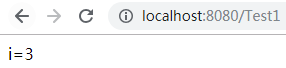
例:if/elseif/else
循环
<%@ page contentType="text/html;charset=UTF-8" language="java" %>
<%@ taglib prefix="s" uri="/struts-tags" %>
<html>
<head>
    <title>标签库测试</title>
</head>
<body>

<%--当前遍历对象会被放到值栈的root和context中--%>

<%--遍历 List--%>
<s:iterator var="letter" value="{'a','b','c'}">
    <s:property value="letter"></s:property>
</s:iterator>
<hr>
<%--遍历 Map--%>
<s:iterator value="#{'a':'1','b':'2','c':'3'}">
   key: <s:property value="key"/>
   value: <s:property value="value"/>
    <br>
</s:iterator>

<hr>
<%--类似 for 循环--%>
<s:iterator var="i" begin="0" end="10" step="2" status="s">
   <s:property value="#s.count"/> : <s:property value="i"/> <br>
</s:iterator>
</body>
</html>
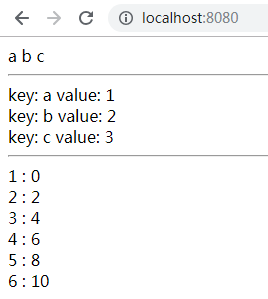
例:iterator
日期
<%@ page import="java.util.Date" %>
<%@ page contentType="text/html;charset=UTF-8" language="java" %>
<%@ taglib prefix="s" uri="/struts-tags" %>
<html>
<head>
    <title>标签库测试</title>
</head>
<body>
<%
    Date date = new Date();
    request.setAttribute("date", date);
%>
<s:date name="#request.date" /> <br>
<s:date name="#request.date" format="yyyy年MM月dd日 HH:mm:ss" />
</body>
</html>
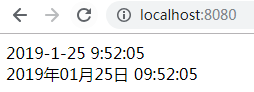
例:date
UI标签库
<%@ page import="java.util.Date" %>
<%@ page import="java.util.TreeMap" %>
<%@ page import="java.util.HashMap" %>
<%@ page import="java.util.Map" %>
<%@ page contentType="text/html;charset=UTF-8" language="java" %>
<%@ taglib prefix="s" uri="/struts-tags" %>
<html>
<head>
    <title>标签库测试</title>
</head>
<body>
<%--
Struts2 默认会表单中标签套上 table
如果不想要 Struts2 提供的样式,可更改默认常量 struts.ui.theme
struts.ui.theme 有三个可选值:
xhtml : 默认值。
simple : 无样式提供。
ajax : 这个主题里的模板以 xhtml 主题里的模板为基础,但增加了一些ajax功能。

除了更改配置文件中的常量,还可以通过修改 s:form 上的 theme 属性来让主题只对当前表单生效
--%>

<%
    Map<String, String> gender = new HashMap<String, String>();
    gender.put("1", "男");
    gender.put("2", "女");
    request.setAttribute("gender", gender);

    Map<String, String> address = new HashMap<String, String>();
    address.put("hk", "香港");
    address.put("jp", "日本");
    request.setAttribute("address", address);

    Map<String, String> hobby = new HashMap<String, String>();
    hobby.put("1", "吃饭");
    hobby.put("2", "睡觉");
    hobby.put("3", "打豆豆");
    request.setAttribute("hobby",hobby);
%>
<s:form namespace="/" action="Test1">
    <%--隐藏域--%>
    <s:hidden name="id"/>
    <%--文本框--%>
    <s:textfield name="username" label="用户名"/>
    <%--密码框--%>
    <s:password name="password" label="密码"/>
    <%--单选框--%>
    <s:radio list="#request.gender" name="gender" label="性别"/>
    <%--下拉框--%>
    <s:select list="#request.address" name="address" label="地点"/>
    <%--多选框--%>
    <s:checkboxlist list="#request.hobby" name="hobby" label="爱好"/>
    <%--文本域--%>
    <s:textarea rows="3" cols="10" value="默认值" label="简介" />
    <%--提交按钮--%>
    <s:submit value="提交"/>
</s:form>
</body>
</html>

例:
补充
数据校验
手动编码方式
package com.zze.action;

import com.opensymphony.xwork2.ActionSupport;

public class Test1Action extends ActionSupport {
    private String name;

    public void setName(String name) {
        this.name = name;
    }

    @Override
    public String execute() throws Exception {
        System.out.println(".................");
        return super.execute();
    }

    /**
     * 编写一个类,继承 ActionSupport,重写 validate 方法
     * 每次请求此 Action 都会先执行 validate 方法
     * 如果验证有错误,将错误通过 this.addFieldError 或 this.addActionError 交给 Struts2
     * 然后 Struts2 会返回 input 逻辑视图,手动定义好 input 跳转到的页面
     * 在页面可以通过 <s:actionerror/> <s:fielderror/> 标签获取到错误信息
     */
    @Override
    public void validate() {
        if(name == null || name.trim().length() == 0){
            this.addFieldError("name","用户名不能为空");
        }
    }
}
例 1:对整个 Action 进行校验
package com.zze.action;

import com.opensymphony.xwork2.ActionSupport;

public class Test2Action extends ActionSupport {
    private String name;

    public void setName(String name) {
        this.name = name;
    }

    public String add() {
        System.out.println("from add....");
        return SUCCESS;
    }

    /**
     * 编写一个类,继承 ActionSupport
     * 如果要给指定的方法校验,需要按规则定义一个方法:
     * 校验的方法名要遵循:validate+方法名首字母大写
     * 如下,要给 add 方法校验,定义的方法名就为 validateAdd
     * 然后每次请求这个方法就会限制性校验方法
     * 如果验证有错误,将错误通过 this.addFieldError 或 this.addActionError 交给 Struts2
     * 然后 Struts2 会返回 input 逻辑视图,手动定义好 input 跳转到的页面
     * 在页面可以通过 <s:actionerror/> <s:fielderror/> 标签获取到错误信息
     */
    public void validateAdd() {
        System.out.println("from validateAdd...");
    }
}
例 2:对 Action 中指定方法进行校验
配置文件方式
<?xml version="1.0" encoding="UTF-8" ?>
<!DOCTYPE validators PUBLIC
        "-//Apache Struts//XWork Validator 1.0.3//EN"
        "http://struts.apache.org/dtds/xwork-validator-1.0.3.dtd">
<!--
1、在 Action 所在包下创建一个 xml 文件,名称为 Action类名-validation.xml
    如 : 此文件是给名为 Test3Action 的 Action 校验,文件名则为 Test3Action-validation.xml
2、引入 DTD 约束,该约束可在 xwork-core-2.3.37.jar!/xwork-validator-1.0.3.dtd 下找到
 -->
<validators>
    <!--
    name : 要校验的字段名
        注意:需要获取到值才能对字段进行校验,所以在 Action 中要给对应字段提供 get 方法。
    -->
    <field name="name">
        <!--
        type : Struts2 已经给我们提供了很多验证器
        在 xwork-core-2.3.37.jar!/com/opensymphony/xwork2/validator/validators/default.xml 中可以看到
        -->
        <field-validator type="requiredstring">
            <!--返回的错误信息-->
            <message>用户名不能为空</message>
        </field-validator>
    </field>
</validators>
例 1:对整个 Action 进行校验
<?xml version="1.0" encoding="UTF-8" ?>
<!DOCTYPE validators PUBLIC
        "-//Apache Struts//XWork Validator 1.0.3//EN"
        "http://struts.apache.org/dtds/xwork-validator-1.0.3.dtd">
<!--
1、在 Action 所在包下创建一个 xml 文件,名称为 Action类名-方法访问路径-validation.xml
    如 : 此文件只给名为 Test4Action 的 Action 下的 add 方法校验,
        Struts.xml 对应Action 配置为 <action name="*_*" class="com.zze.action.{1}Action" method="{2}">
        文件名则为 Test4Action-Test4_add-validation.xml
2、引入 DTD 约束,该约束可在 xwork-core-2.3.37.jar!/xwork-validator-1.0.3.dtd 下找到
 -->
<validators>
    <!--
    name : 要校验的字段名
        注意:需要获取到值才能对字段进行校验,所以在 Action 中要给对应字段提供 get 方法。
    -->
    <field name="name">
        <!--
        type : Struts2 已经给我们提供了很多验证器
        在 xwork-core-2.3.37.jar!/com/opensymphony/xwork2/validator/validators/default.xml 中可以看到
        -->
        <field-validator type="stringlength">
            <param name="minLength">6</param>
            <param name="maxLength">12</param>
            <!--返回的错误信息-->
            <message>用户名必须在6-12位之间</message>
        </field-validator>
    </field>
</validators>
例 2:对 Action 中指定方法进行校验
<?xml version="1.0" encoding="UTF-8"?>
<!DOCTYPE validators PUBLIC
        "-//Apache Struts//XWork Validator Definition 1.0//EN"
        "http://struts.apache.org/dtds/xwork-validator-definition-1.0.dtd">

<validators>
    <!--必填校验器,要求被校验的属性值不能为 null-->
    <validator name="required" class="com.opensymphony.xwork2.validator.validators.RequiredFieldValidator"/>
    <!--必填字符串校验器,要求被校验的属性值不能为 null,并且长度大于 0 ,默认情况下不会对字符串去前后空格-->
    <validator name="requiredstring" class="com.opensymphony.xwork2.validator.validators.RequiredStringValidator"/>
    <!--数值校验器,要求被校验的属性值可转 int ,且可指定范围,min 指定最小值,max 指定最大值-->
    <validator name="int" class="com.opensymphony.xwork2.validator.validators.IntRangeFieldValidator"/>
    <!--数值校验器,要求被校验的属性值可转 long,且可指定范围,min 指定最小值,max 指定最大值-->
    <validator name="long" class="com.opensymphony.xwork2.validator.validators.LongRangeFieldValidator"/>
    <!--数值校验器,要求被校验的属性值可转 short,且可指定范围,min 指定最小值,max 指定最大值-->
    <validator name="short" class="com.opensymphony.xwork2.validator.validators.ShortRangeFieldValidator"/>
    <!--数值校验器,要求被校验的属性值可转 double,且可指定范围,min 指定最小值,max 指定最大值-->
    <validator name="double" class="com.opensymphony.xwork2.validator.validators.DoubleRangeFieldValidator"/>
    <!--日期校验器,要求被校验的属性值可转 Date,且可指定范围,min 指定最小值,max 指定最大值-->
    <validator name="date" class="com.opensymphony.xwork2.validator.validators.DateRangeFieldValidator"/>
    <!--OGNL表达式校验器,它是一个非属性校验器,expression 指定 ognl 表达式,该逻辑表达式基于 ValueStack进行求值,返回 true 时校验通过,否则不通过,该校验器不可用在字段校验器风格的配置中-->
    <validator name="expression" class="com.opensymphony.xwork2.validator.validators.ExpressionValidator"/>
    <!--字段OGNL表达式校验器,要求被校验的属性值满足一个 OGNL 表达式,expression 参数指定 OGNL 表达式,该逻辑表达式基于 ValueStack进行求值,返回 true 时校验通过,否则不通过-->
    <validator name="fieldexpression" class="com.opensymphony.xwork2.validator.validators.FieldExpressionValidator"/>
    <!--邮件地址校验器,要求如果被校验的属性值非空,则必须是合法的邮件地址-->
    <validator name="email" class="com.opensymphony.xwork2.validator.validators.EmailValidator"/>
    <!--网址校验器,要求如果被校验的属性值非空,则必须是合法的 url 地址-->
    <validator name="url" class="com.opensymphony.xwork2.validator.validators.URLValidator"/>
    <!--用于校验 Action 中符合类型的属性,它指定一个校验文件用于校验复合类型属性中的属性-->
    <validator name="visitor" class="com.opensymphony.xwork2.validator.validators.VisitorFieldValidator"/>
    <!--转换校验器,指定在类型转换失败时,提示的错误消息-->
    <validator name="conversion" class="com.opensymphony.xwork2.validator.validators.ConversionErrorFieldValidator"/>
    <!--字符串长度校验器,要求被校验的属性值必须在指定的范围内,否则校验失败,minLength 指定最小长度,maxLength 指定最大长度,trim 指定交验之前是否去除字符串前后空格-->
    <validator name="stringlength" class="com.opensymphony.xwork2.validator.validators.StringLengthFieldValidator"/>
    <!--正则表达式校验器,检查被校验的属性值是否匹配一个正则表达式,expression 指定正则表达式,caseSensitive 指定进行正则表达式匹配时,是否区分大小写,默认为 true-->
    <validator name="regex" class="com.opensymphony.xwork2.validator.validators.RegexFieldValidator"/>

    <validator name="conditionalvisitor" class="com.opensymphony.xwork2.validator.validators.ConditionalVisitorFieldValidator"/>
</validators>
xwork-core-2.3.37.jar!/com/opensymphony/xwork2/validator/validators/default.xml
自定义校验器
package com.zze.validator;

import com.opensymphony.xwork2.validator.ValidationException;
import com.opensymphony.xwork2.validator.validators.FieldValidatorSupport;

/**
 * 对指定字段进行过滤
 *
 * 除了继承 FieldValidatorSupport
 * 还可以继承 ValidatorSupport
 */
public class AgeValidator extends FieldValidatorSupport {
    @Override
    public void validate(Object object) throws ValidationException {
        // 获得字段名称
        String fieldName = this.getFieldName();

        Object fieldValue = this.getFieldValue(fieldName, object);

        if(fieldValue instanceof Integer){
            int age = (Integer)fieldValue;
            if(age<0){
                this.addFieldError(fieldName,object);
            }
        }
    }
}
com.zze.validator.AgeValidator:自定义的校验器
<?xml version="1.0" encoding="UTF-8"?>
<!DOCTYPE validators PUBLIC
        "-//Apache Struts//XWork Validator Definition 1.0//EN"
        "http://struts.apache.org/dtds/xwork-validator-definition-1.0.dtd">
<!--在 src 下新建 validators.xml -->
<validators>
    <!--注册验证器-->
    <validator name="ageValidator" class="com.zze.validator.AgeValidator"/>
</validators>
validators.xml:注册验证器
国际化
全局国际化
1、在类路径下新建 properties 资源文件,文件名为如下格式:
名称_en_uS.properties  // 英文
名称_zh_CN.properties  // 中文
例如:
name=姓名不能为空
message_zh_CN.properties
name=name can't be null
message_en_US.properties
2、在 struts.xml 中配置常量:
<constant name="struts.custom.i18n.resources" value="message"/>
3、接下来就可以获取资源文件中国际化后的内容了:
package com.zze.action;

import com.opensymphony.xwork2.ActionSupport;

public class I18NAction extends ActionSupport {
    @Override
    public String execute() throws Exception {
        String name = getText("name");
        System.out.println(name); // 姓名不能为空
        return super.execute();
    }
}
在 Action 中获取
<%@ page contentType="text/html;charset=UTF-8" language="java" %>
<%@ taglib prefix="s" uri="/struts-tags" %>
<html>
<head>
    <title>国际化测试</title>
</head>
<body>
<s:text name="name"/>
</body>
</html>
在 JSP 中获取
<?xml version="1.0" encoding="UTF-8" ?>
<!DOCTYPE validators PUBLIC
        "-//Apache Struts//XWork Validator 1.0.3//EN"
        "http://struts.apache.org/dtds/xwork-validator-1.0.3.dtd">

<validators>
    <field name="name">
        <field-validator type="requiredstring">
            <!--通过 key 取出国际化文本-->
            <message key="name"></message>
        </field-validator>
    </field>
</validators>
配置文件中获取
Action范围国际化
1、在 Action 所在的包下创建 properties 资源文件,文件名为如下格式:
Action名_zh_CN.properties // 中文
Action名_en_US.properties // 英文
2、直接在 Action 中使用即可,使用方式同全局一致。
包范围国际化
1、在需国际化的包下新建 properties 资源文件,文件名格式如下:
package_zh_CN.properties // 中文
package_en_US.properties // 英文
2、接下来在当前包及子包中都能使用该国际化资源文件。
<%@ page contentType="text/html;charset=UTF-8" language="java" %>
<%@ taglib prefix="s" uri="/struts-tags" %>
<html>
<head>
    <title>国际化测试</title>
</head>
<body>
<s:i18n name="com/zze/action/package">
    <s:text name="msg"/>
</s:i18n>
</body>
</html>
JSP 中获取
使用占位符
wel=欢迎 {0}
com/zze/action/package_zh_CN.properties
<%@ page contentType="text/html;charset=UTF-8" language="java" %>
<%@ taglib prefix="s" uri="/struts-tags" %>
<html>
<head>
    <title>国际化测试</title>
</head>
<body>
<s:i18n name="com/zze/action/package">
    <s:text name="wel">
        <s:param>张三</s:param>
    </s:text>
</s:i18n>
</body>
</html>
JSP 中传参并获取
package com.zze.action;

import com.opensymphony.xwork2.ActionSupport;

public class I18NAction extends ActionSupport {
    @Override
    public String execute() throws Exception {
        String wel = getText("wel", new String[]{"张三"});
        System.out.println(wel); // 欢迎 张三
        return super.execute();
    }
}
Action 中传参并获取
文件上传
<?xml version="1.0" encoding="UTF-8" ?>
<!DOCTYPE struts PUBLIC
        "-//Apache Software Foundation//DTD Struts Configuration 2.3//EN"
        "http://struts.apache.org/dtds/struts-2.3.dtd">
<struts>
    <!--限制单次文件上传总大小不可大于 5m-->
    <constant name="struts.multipart.maxSize" value="5242880"/>
    <!--配置国际化资源文件名-->
    <constant name="struts.custom.i18n.resources" value="message"/>
    <package name="test" extends="struts-default" namespace="/">
        <action name="upload" class="com.zze.web.action.FileUploadAction">
            <result name="input">/index.jsp</result>
            <interceptor-ref name="defaultStack">
                <!--限制单个文件大小不超过 2m-->
                <param name="fileUpload.maximumSize">2097152</param>
                <!--限制文件后缀-->
                <param name="fileUpload.allowedExtensions">.jpg,.png</param>
                <!--限制文件的 MIME 类型-->
                <param name="fileUpload.allowedTypes">image/jpg,image/png</param>
            </interceptor-ref>
        </action>
    </package>
</struts>
struts.xml
struts.messages.error.uploading=\u4e0a\u4f20\u9519\u8bef
struts.messages.error.file.too.large=\u6587\u4ef6\u592a\u5927
struts.messages.error.content.type.not.allowed=\u8bf7\u9009\u62e9\u56fe\u7247\u6587\u4ef6
struts.messages.error.file.extension.not.allowed=\u8bf7\u9009\u62e9\u002e\u006a\u0070\u0067\u6216\u002e\u0070\u006e\u0067\u7ed3\u5c3e\u7684\u6587\u4ef6
message_zh_CN.properties
package com.zze.web.action;

import com.opensymphony.xwork2.ActionSupport;
import org.apache.commons.io.FileUtils;
import org.apache.struts2.interceptor.ServletResponseAware;

import javax.servlet.ServletResponse;
import javax.servlet.http.HttpServletResponse;
import java.io.File;

public class FileUploadAction extends ActionSupport implements ServletResponseAware {
    /*
     为文件上传提供三个属性 :
        String 表单项 name + FileName : 接收文件名称
        File 表单项 name : 接收文件内容
        String 表单项 name + ContentType : 上传文件的 ContentType
      */
    private String fileFileName;

    private File file;

    private String fileContentType;

    public void setFileFileName(String fileFileName) {
        this.fileFileName = fileFileName;
    }

    public void setFile(File file) {
        this.file = file;
    }

    public void setFileContentType(String fileContentType) {
        this.fileContentType = fileContentType;
    }

    private ServletResponse response;

    @Override
    public String execute() throws Exception {
        response.setContentType("text/plain;charset=utf8");
        String msg = "上传成功";
        System.out.println(fileFileName);
        System.out.println(file);
        System.out.println(fileContentType);
        // 存储路径
        String fullPath = "D://upload/"+fileFileName;
        File destFile = new File(fullPath);
        FileUtils.copyFile(file,destFile);
        response.getWriter().write(msg);
        return NONE;
    }

    @Override
    public void setServletResponse(HttpServletResponse response) {
        this.response = response;
    }
}
com.zze.web.action.FileUploadAction
<%@ page contentType="text/html;charset=UTF-8" language="java" %>
<%@taglib prefix="s" uri="/struts-tags" %>
<html>
<head>
    <title>Struts2 文件上传测试</title>
</head>
<body>
<form action="${pageContext.request.contextPath}/upload" method="post" enctype="multipart/form-data">
    <input type="file" name="file">
    <input type="submit" value="上传">
    <s:actionerror/>
    <s:fielderror/>
</form>
</body>
</html>
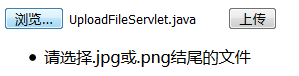
index.jsp
java框架之Struts2(4)-拦截器&标签库的更多相关文章
- java框架篇---struts实现拦截器
Struts2的拦截器和Servlet过滤器类似.在执行Action的execute方法之前,Struts2会首先执行在struts.xml中引用的拦截器,在执行完所有引用的拦截器的intercept ...
- JavaWeb框架_Struts2_(三)---->Struts2的拦截器
2. Struts2的拦截器(使用拦截器实现权限控制) 2.1 拦截器的概述 拦截器是Struts2的核心组成部分,它可以动态的拦截Action调用的对象,类似与Servlet中的过滤器.Struts ...
- java之struts2之拦截器
1.struts2能完成数据的设置,数据的封装,数据的类型转换,数据的校验等等.struts2是如何来完成这些功能的?struts2的所有功能都是由拦截器来完成的. 2.拦截器是struts2的核心. ...
- Struts2【拦截器】就是这么简单
什么是拦截器 拦截器Interceptor.....拦截器是Struts的概念,它与过滤器是类似的...可以近似于看作是过滤器 为什么我们要使用拦截器 前面在介绍Struts的时候已经讲解过了,Str ...
- 简单理解Struts2中拦截器与过滤器的区别及执行顺序
简单理解Struts2中拦截器与过滤器的区别及执行顺序 当接收到一个httprequest , a) 当外部的httpservletrequest到来时 b) 初始到了servlet容器 传递给一个标 ...
- struts2总结六: Struts2的拦截器
一.Struts2的系统结构图
- Struts2使用拦截器完成权限控制示例
http://aumy2008.iteye.com/blog/146952 Struts2使用拦截器完成权限控制示例 示例需求: 要求用户登录,且必须为指定用户名才可以查看系统中某个视图资源:否 ...
- Struts2默认拦截器栈及内建拦截器使用具体解释
Struts2内建拦截器介绍: alias (别名拦截器):同意參数在跨越多个请求时使用不同别名,该拦截器可将多个Action採用不同名字链接起来,然后用于处理同一信息. autowiring ...
- (六)Struts2的拦截器
一.简介 拦截器体系是struts2重要的组成部分.正是大量的内建拦截器完成了该框架的大部分操作. 比如params拦截器将请求参数解析出来,设置Action的属性.servletConfig拦截器负 ...
随机推荐
- 关于asyncio知识(二)
一.asyncio之—-入门初探 通过上一篇关于asyncio的整体介绍,看过之后基本对asyncio就有一个基本认识,如果是感兴趣的小伙伴相信也会尝试写一些小代码尝试用了,那么这篇文章会通过一个简单 ...
- linux shell命令之wc/split及特殊字符
[时间:2018-07] [状态:Open] [关键词:linux, wc, split, 通配符,转义符,linux命令] 0 引言 整理这篇文章的目的不是为了什么学习,仅仅是为了强化下记忆,以便下 ...
- python按行遍历一个大文件,最优的语法应该是什么?
理论上来说,总体上file.readlines()可以(取决于实现)不慢于你自己手动的一次次调用file.readline(),因为前者的循环在C语言层面,而你的循环是在Python语言层面. 但是在 ...
- python实现类似于Matlab中的magic函数
参考这篇文章的代码封装了一个类似Matlab中的magic函数,用来生成魔方矩阵. #!/usr/bin/env python # -*- coding: utf-8 -*- import numpy ...
- win10 caffe python Faster-RCNN训练自己数据集(转)
一.制作数据集 1. 关于训练的图片 不论你是网上找的图片或者你用别人的数据集,记住一点你的图片不能太小,width和height最好不要小于150.需要是jpeg的图片. 2.制作xml文件 1)L ...
- sql查父节点小笔记
)) ),sortNum int) as BEGIN DECLARE @sortNum int --得到当前id的父id, select @id = ParentId, @sortNum =Sortn ...
- 【转】wpf 模板选择器DataTemplateSelector及动态绑定,DataTemplate.Triggers触发器的使用
通常,如果有多个 DataTemplate 可用于同一类型的对象,并且您希望根据每个数据对象的属性提供自己的逻辑来选择要应用的 DataTemplate,则应创建 DataTemplateSelect ...
- 简单的 FastDFS + Nginx 应用实例
版权声明:本文为GitChat作者的原创文章,未经 GitChat 同意不得转载. https://blog.csdn.net/GitChat/article/details/79479148 wx_ ...
- Datagrip连接SQLServer Connecting DataGrip to MS SQL Server
Connecting DataGrip to MS SQL Server Posted on June 21, 2016 by Maksim Sobolevskiy Some specific nee ...
- MySQL 全文检索 ngram Mybatis
创建全文索引(FullText index) 创建表的同时创建全文索引 FULLTEXT (name) WITH PARSER ngram 通过 alter table 的方式来添加 alter ta ...