
HTML---仿网易新闻登录页
<!DOCTYPE html>

  <html lang="en">

<head>

  <meta charset="UTF-8"/>

  <title>网易注册界面</title>

  <style>

    body,div,dl,dt,dd,ul,ol,li,h1,h2,h3,h4,h5,h6,pre,code,form,fieldset,legend,input,textarea,p,blockquote,th,td{

      margin:0;padding:0

    }

    a{

      text-decoration: none;

      font-size: 12px;

      color: #ccc;

    }

    /*3.利用body设置整个界面的文字信息

       文字大小 文字字体 文字颜色

       */

    body{

      font-size:12px;

      font-family:"宋体";

      color: #333;

    }

    ul, ol{

      list-style: none;

    }

    /*头部样式*/

    .header{

      width: 960px;

      height: 80px;

      margin: 0 auto;

      padding-top: 28px;

      box-sizing: border-box;

    }

    .header .logo{

      width: 644px;

      height: 27px;

      float: left;

      background: url("images/glb_v2.png") no-repeat 0 0;

    }

    .header .logo a {

      display: inline-block;

      width: 130px;

      height: 27px;

    }

    .header .links{

        float: right;

      width: 200px;

      height: 27px;

      text-align: right;

    }

    .header .links a{

      line-height: 27px;

    }

   .content{

     width: 960px;

     height: 600px;

     margin: 0 auto;

   }

    .content .top {

      width: 960px;

      height: 38px;

      background: url("images/line-center.png") repeat-x;

    }

    .content .left{

      width: 960px;

      height: 38px;

      background: url("images/line-left.png") no-repeat left 0;

    }

    .content .right {

      width: 960px;

      height: 38px;

      background: url("images/line-right.png") no-repeat right 0;

    }

    .content .right p {

      color:white;

      font-size: 12px;

      line-height: 38px;

      text-indent: 2em;

    }

    /*

    bottom的底部表单

    */

    .content .bottom {

      width: 960px;

      height: 562px;

      background-color: blue;

    }

    .content .bottom .article {

      width: 642px;

      height: 562px;

      float: left;

      padding-top: 50px;

      padding-left: 80px;

      box-sizing: border-box;

      background-color: #f9f9f9;

      border: 1px solid #ccc;

      border-top:none;

    }

    .content .bottom .article .articleTop {

      width: 560px;

      height: 60px;

    }

    .content .bottom .article .articleTop ul{

      list-style: none;

      width: 412px;

      height: 34px;

      background-color: red;

      background: url("images/tab.jpg") no-repeat left 0;

    }

    .content .bottom .article .articleTop ul li{

      float: left;

      width: 137px;

      height: 34px;

      text-align: center;

      line-height: 34px;

    }

    .content .bottom .article .articleBottom {

      width: 560px;

      height: 373px;

    }

    .content .bottom .article .articleBottom .line {

      width: 413px;

      height: 28px;

    }

    .content .bottom .article .articleBottom .line .star

    {

      width: 0px;

      color: red;

    }

    .content .bottom .article .articleBottom .line span{

      width: 60px;

      height: 28px;

      float: left;

      font-size: 12px;

      line-height: 28px;

      text-align: right;

    }

    .content .bottom .article .articleBottom .line div{

      width: 333px;

      height: 28px;

      float: right;

    }

    .content .bottom .article .articleBottom .line input{

      width: 214px;

      height: 24px;

    }

    .content .bottom .article .articleBottom .line select {

      width: 100px;

      height: 28px;

    }

    .content .bottom .article .articleBottom .line .special{

      width: 324px;

    }

    .content .bottom .article .articleBottom .line img{

      width: 100px;

      height: 28px;

      float: left;

    }

    .content .bottom .article .articleBottom .line .vcodeInput{

      /*在企业开发中想让多个盒子的顶部对齐, 我们可以让多个盒子同时浮动*/

      float: left;

      margin-right:10px;

    }

    .content .bottom .article .articleBottom  p{

      font-size: 12px;

      margin-left: 80px;

      line-height: 28px;

      border: none;

    }

    .content .bottom .article .articleBottom input[type=submit]{

      width: 119px;

      height: 37px;

      background: url("images/glb_v2.png") no-repeat -144px -360px;

      border: none;

      font-size: 20px;

      color: white;

      margin-left: 80px;

      margin-top: 20px;

    }

    .content .bottom .aside{

      width: 318px;

      height: 562px;

      background-color: #f2f2f2;

      float: right;

      padding-top: 105px;

      padding-left: 45px;

      box-sizing: border-box;

      border: 1px solid #cccccc;

      border-top: none;

    }

    .footer{

      width: 960px;

      height: 48px;

      margin:0 auto;

    }

    .footer p{

      color: #ccc;

      text-align: center;

      line-height: 48px;

    }

  </style>

</head>

<body>

<div class="header">

<div class="logo">

  <a href="#" title="网易163免费邮"></a><a href="#" title="网易126免费邮"></a><a href="#" title="网易Yeah.net免费邮"></a>

</div>

  <div class="links">

    <a href="#">了解更多</a>

    |

    <a href="">反馈意见</a>

  </div>

</div>

<div class="content">

<div class="top">

<div class="left">

<div class="right">

<p>欢迎注册无限容量的网易邮箱!邮件地址可以登录使用其他网易旗下产品。</p>

</div>

</div>

</div>

  <div class="bottom">

    <div class="article">

<div class="articleTop">

  <ul>

    <li>注册字母邮箱</li>

    <li>注册手机号码邮箱</li>

    <li>注册VIP邮箱</li>

  </ul>

</div>

<div class="articleBottom">

    <div class="line">

      <span><span class="star">*</span>邮件地址</span>

      <div>

        <input type="text" value="建议使用手机号码注册">@<select>

        <option value="163.com">163.com</option>

        <option value="126.com">126.com</option>

        <option value="lnj.net">lnj.net</option>

      </select>

      </div>

     </div>

     <p>6~18个字符,可使用字母、数字、下划线,需以字母开头</p>

   <!--密码-->

     <div class="line">

    <span><span class="star">*</span>确认密码</span>

    <div>

      <input type="password" class="special">

    </div>

  </div>

  <p>请再次填写密码</p>

  <div class="line">

    <span><span class="star">*</span>确认密码</span>

    <div>

      <input type="password" class="special">

    </div>

  </div>

  <p>请再次填写密码</p>

  <div class="line">

    <span><span class="star">*</span>手机号码</span>

    <div>

      <input type="password" class="special">

    </div>

  </div>

  <p>忘记密码时,可以通过该手机号码快速找回密码</p>

  <div class="line">

    <span><span class="star">*</span>验证码</span>

    <div>

      <input type="text" class="vcodeInput">

      <img src="data:images/vcode.jpg" alt="">

    </div>

  </div>

  <p>请填写图片中的字符, 不区分大小写</p>

  <p>

    <input type="checkbox" checked="checked">

    同意

    <a href="#">“服务条款”</a>

    和

    <a href="#">“隐私权保护和个人信息利用政策”</a>

  </p>

   <input type="submit" value="立即注册">

</div>

    </div>

    <div class="aside">

      <img src="data:images/wy_right.jpg" alt="">

    </div>

  </div>

</div>

<div class="footer">

  <p>

    <a href="#">关于网易</a>

    <a href="#">关于网易免费邮</a>

    <a href="#">邮箱官方博客</a>

    <a href="#">客户服务</a>

    <a href="#">隐私政策</a>

    | 网易公司版权所有 © 1997-2016</p>

</div>

</body>

</html>
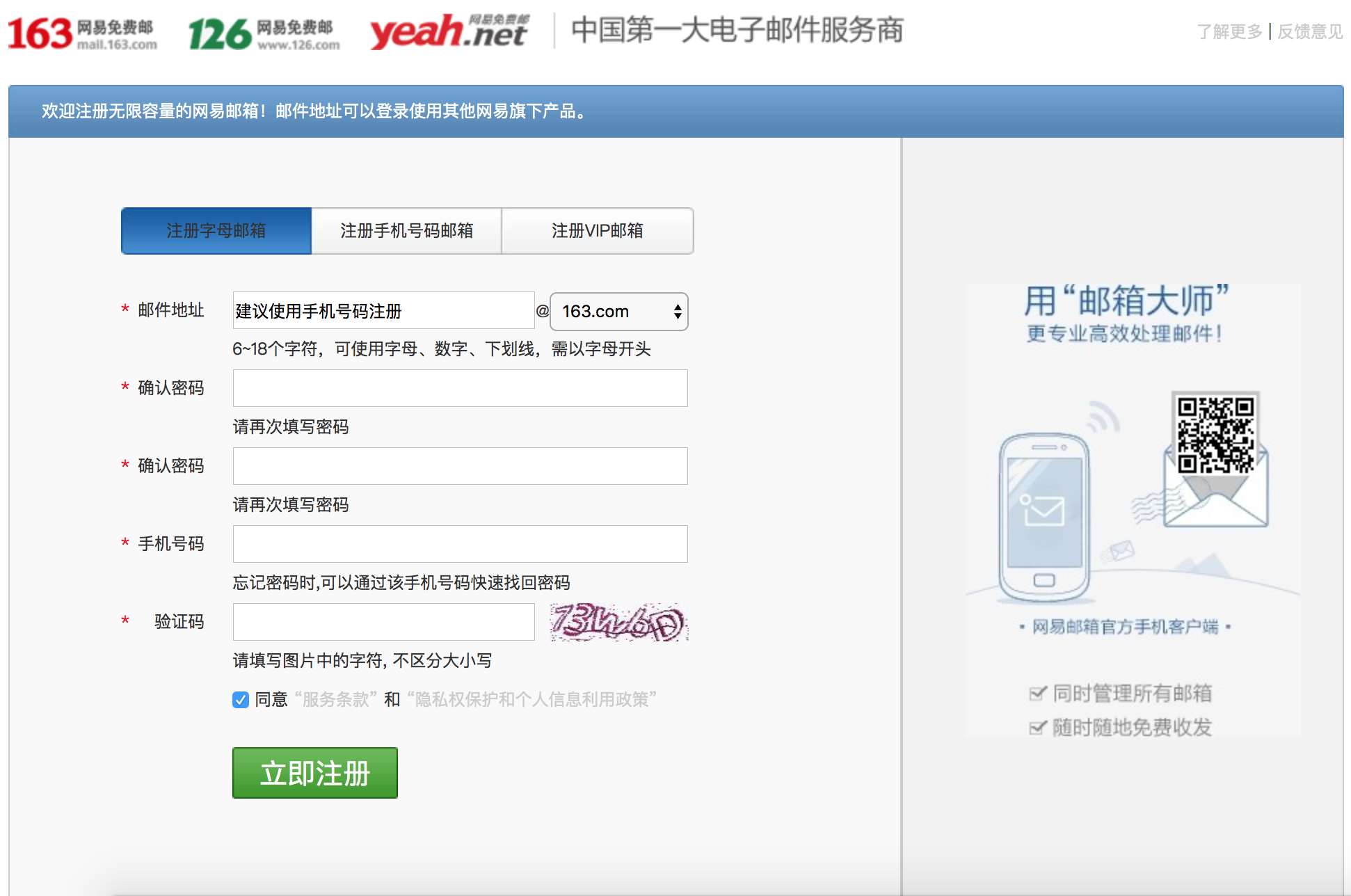
效果如下:
HTML---仿网易新闻登录页的更多相关文章
- iOS界面-仿网易新闻左侧抽屉式交互 续(添加新闻内容页和评论页手势)
本文转载至 http://blog.csdn.net/totogo2010/article/details/8637430 1.介绍 有的博友看了上篇博文iOS界面-仿网易新闻左侧抽屉 ...
- 类似掌盟的Tab页 Android 开源框架ViewPageIndicator 和 ViewPager 仿网易新闻客户端Tab标签 (转)
原博客地址 :http://blog.csdn.net/xiaanming/article/details/10766053 本文转载,记录学习用,如有需要,请到原作者网站查看(上面这个网址) 之前 ...
- iOS仿网易新闻栏目拖动重排添加删除效果
仿网易新闻栏目选择页面的基本效果,今天抽了点时间教大家如何实现UICollectionView拖动的效果! 其实实现起来并不复杂,这里只是基本的功能,没有实现细节上的修改,连UI都是丑丑的样子,随手画 ...
- Android 开源框架ActionBarSherlock 和 ViewPager 仿网易新闻客户端
转载请注明出处:http://blog.csdn.net/xiaanming/article/details/9971721 大家都知道Android的ActionBar是在3.0以上才有的,那么在3 ...
- 仿网易新闻app下拉标签选择菜单
仿网易新闻app下拉标签选择菜单 仿网易新闻app下拉标签选择菜单,长按拖动排序,点击增删标签控件 ##示例 ##EasyTagDragView的使用 在layout布局里添加:
- Android Studio精彩案例(一)《ActionBar和 ViewPager版仿网易新闻客户端》
转载本专栏文章,请注明出处,尊重原创 .文章博客地址:道龙的博客 为了能更好的分享高质量的文章,所以开设了此专栏.文章代码都以Android Studio亲测运行,读者朋友可在后面直接下载源码.该专栏 ...
- Android应用经典主界面框架之二:仿网易新闻client、CSDN client (Fragment ViewPager)
另外一种主界面风格则是以网易新闻.凤凰新闻以及新推出的新浪博客(阅读版)为代表.使用ViewPager+Fragment,即ViewPager里适配器里放的不是一般的View.而是Fragment.所 ...
- Android 开源框架ViewPageIndicator 和 ViewPager 仿网易新闻clientTab标签
之前用JakeWharton的开源框架ActionBarSherlock和ViewPager实现了对网易新闻clientTab标签的功能,ActionBarSherlock是在3.0下面的机器支持Ac ...
- Android 开源框架ViewPageIndicator 和 ViewPager 仿网易新闻客户端Tab标签
转载请注明出处:http://blog.csdn.net/xiaanming/article/details/10766053 之前用JakeWharton的开源框架ActionBarSherlock ...
随机推荐
- 手机端网页技术--使自己做的asp.net网页适应手机浏览
使自己做的asp.net网页适应手机浏览 特别提醒: 对于文本框和其他控件,无法自适应,只有纯粹的文本和table的单元格可以自适应,其他的只有设置为具体的宽度,或者在一个表格中(本来在电脑中显示一行 ...
- vuex-Module
Vuex 允许将 store 分割成模块(module). 每个模块拥有自己的 state.mutation.action.getter.甚至是嵌套子模块 const moduleA = { stat ...
- Beta 冲刺 (4/7)
Beta 冲刺 (4/7) 队名:第三视角 组长博客链接 本次作业链接 团队部分 团队燃尽图 工作情况汇报 张扬(组长) 过去两天完成了哪些任务 文字/口头描述 准备四六级 展示GitHub当日代码/ ...
- Guess Number Game
We are playing the Guess Game. The game is as follows: I pick a number from 1 to n. You have to gues ...
- [ZJOI2007]最大半联通子图
这个题,翻译一下题面,就是一个连通图,找他的最长链的数量... 所以说方法就比较明显了:tarjan缩点+拓扑+DP 注意也是本题唯一坑点,拓扑DP的时候要考虑重复边的情况... 呆码: #inclu ...
- 浅谈URI和URL
URI(Uniform Resource Identifier)字面上的意思是,统一资源标示符 URL(Uniform Resource Locator),统一资源定位符 光从字面上的意思,这个2个东 ...
- hadoop day 5
1.Zookeeper Zookeeper的安装和配置(集群模式) 1)在conf目录下创建一个配置文件zoo.cfg, tickTime=2000——心跳检测的时间间隔(ms) dataDir=/U ...
- CSS3 transform变形(3D转换)
一.三维坐标 空间中三维坐标如下图所示: 向上为-Y,向下为+Y,向左为-X,向右为+X,向前为+Z,向后为-Z. 二.perspective(n)为 3D 转换元素定义透视视图 perspectiv ...
- css颜色属性及设置颜色的地方
css颜色属性 在css中用color属性规定文本的颜色. 默认值是not specified 有继承性,在javascript中语法是object.style.color="#FF0000 ...
- mongo 索引,速度
(如有打扰,请忽略)阿里云ECS大羊群,2U4G低至1.4折,限实名新用户,需要的点吧https://promotion.aliyun.com/ntms/act/vm/aliyun-group/tea ...