
HTML---仿网易新闻登录页
<!DOCTYPE html>

  <html lang="en">

<head>

  <meta charset="UTF-8"/>

  <title>网易注册界面</title>

  <style>

    body,div,dl,dt,dd,ul,ol,li,h1,h2,h3,h4,h5,h6,pre,code,form,fieldset,legend,input,textarea,p,blockquote,th,td{

      margin:0;padding:0

    }

    a{

      text-decoration: none;

      font-size: 12px;

      color: #ccc;

    }

    /*3.利用body设置整个界面的文字信息

       文字大小 文字字体 文字颜色

       */

    body{

      font-size:12px;

      font-family:"宋体";

      color: #333;

    }

    ul, ol{

      list-style: none;

    }

    /*头部样式*/

    .header{

      width: 960px;

      height: 80px;

      margin: 0 auto;

      padding-top: 28px;

      box-sizing: border-box;

    }

    .header .logo{

      width: 644px;

      height: 27px;

      float: left;

      background: url("images/glb_v2.png") no-repeat 0 0;

    }

    .header .logo a {

      display: inline-block;

      width: 130px;

      height: 27px;

    }

    .header .links{

        float: right;

      width: 200px;

      height: 27px;

      text-align: right;

    }

    .header .links a{

      line-height: 27px;

    }

   .content{

     width: 960px;

     height: 600px;

     margin: 0 auto;

   }

    .content .top {

      width: 960px;

      height: 38px;

      background: url("images/line-center.png") repeat-x;

    }

    .content .left{

      width: 960px;

      height: 38px;

      background: url("images/line-left.png") no-repeat left 0;

    }

    .content .right {

      width: 960px;

      height: 38px;

      background: url("images/line-right.png") no-repeat right 0;

    }

    .content .right p {

      color:white;

      font-size: 12px;

      line-height: 38px;

      text-indent: 2em;

    }

    /*

    bottom的底部表单

    */

    .content .bottom {

      width: 960px;

      height: 562px;

      background-color: blue;

    }

    .content .bottom .article {

      width: 642px;

      height: 562px;

      float: left;

      padding-top: 50px;

      padding-left: 80px;

      box-sizing: border-box;

      background-color: #f9f9f9;

      border: 1px solid #ccc;

      border-top:none;

    }

    .content .bottom .article .articleTop {

      width: 560px;

      height: 60px;

    }

    .content .bottom .article .articleTop ul{

      list-style: none;

      width: 412px;

      height: 34px;

      background-color: red;

      background: url("images/tab.jpg") no-repeat left 0;

    }

    .content .bottom .article .articleTop ul li{

      float: left;

      width: 137px;

      height: 34px;

      text-align: center;

      line-height: 34px;

    }

    .content .bottom .article .articleBottom {

      width: 560px;

      height: 373px;

    }

    .content .bottom .article .articleBottom .line {

      width: 413px;

      height: 28px;

    }

    .content .bottom .article .articleBottom .line .star

    {

      width: 0px;

      color: red;

    }

    .content .bottom .article .articleBottom .line span{

      width: 60px;

      height: 28px;

      float: left;

      font-size: 12px;

      line-height: 28px;

      text-align: right;

    }

    .content .bottom .article .articleBottom .line div{

      width: 333px;

      height: 28px;

      float: right;

    }

    .content .bottom .article .articleBottom .line input{

      width: 214px;

      height: 24px;

    }

    .content .bottom .article .articleBottom .line select {

      width: 100px;

      height: 28px;

    }

    .content .bottom .article .articleBottom .line .special{

      width: 324px;

    }

    .content .bottom .article .articleBottom .line img{

      width: 100px;

      height: 28px;

      float: left;

    }

    .content .bottom .article .articleBottom .line .vcodeInput{

      /*在企业开发中想让多个盒子的顶部对齐, 我们可以让多个盒子同时浮动*/

      float: left;

      margin-right:10px;

    }

    .content .bottom .article .articleBottom  p{

      font-size: 12px;

      margin-left: 80px;

      line-height: 28px;

      border: none;

    }

    .content .bottom .article .articleBottom input[type=submit]{

      width: 119px;

      height: 37px;

      background: url("images/glb_v2.png") no-repeat -144px -360px;

      border: none;

      font-size: 20px;

      color: white;

      margin-left: 80px;

      margin-top: 20px;

    }

    .content .bottom .aside{

      width: 318px;

      height: 562px;

      background-color: #f2f2f2;

      float: right;

      padding-top: 105px;

      padding-left: 45px;

      box-sizing: border-box;

      border: 1px solid #cccccc;

      border-top: none;

    }

    .footer{

      width: 960px;

      height: 48px;

      margin:0 auto;

    }

    .footer p{

      color: #ccc;

      text-align: center;

      line-height: 48px;

    }

  </style>

</head>

<body>

<div class="header">

<div class="logo">

  <a href="#" title="网易163免费邮"></a><a href="#" title="网易126免费邮"></a><a href="#" title="网易Yeah.net免费邮"></a>

</div>

  <div class="links">

    <a href="#">了解更多</a>

    |

    <a href="">反馈意见</a>

  </div>

</div>

<div class="content">

<div class="top">

<div class="left">

<div class="right">

<p>欢迎注册无限容量的网易邮箱!邮件地址可以登录使用其他网易旗下产品。</p>

</div>

</div>

</div>

  <div class="bottom">

    <div class="article">

<div class="articleTop">

  <ul>

    <li>注册字母邮箱</li>

    <li>注册手机号码邮箱</li>

    <li>注册VIP邮箱</li>

  </ul>

</div>

<div class="articleBottom">

    <div class="line">

      <span><span class="star">*</span>邮件地址</span>

      <div>

        <input type="text" value="建议使用手机号码注册">@<select>

        <option value="163.com">163.com</option>

        <option value="126.com">126.com</option>

        <option value="lnj.net">lnj.net</option>

      </select>

      </div>

     </div>

     <p>6~18个字符,可使用字母、数字、下划线,需以字母开头</p>

   <!--密码-->

     <div class="line">

    <span><span class="star">*</span>确认密码</span>

    <div>

      <input type="password" class="special">

    </div>

  </div>

  <p>请再次填写密码</p>

  <div class="line">

    <span><span class="star">*</span>确认密码</span>

    <div>

      <input type="password" class="special">

    </div>

  </div>

  <p>请再次填写密码</p>

  <div class="line">

    <span><span class="star">*</span>手机号码</span>

    <div>

      <input type="password" class="special">

    </div>

  </div>

  <p>忘记密码时,可以通过该手机号码快速找回密码</p>

  <div class="line">

    <span><span class="star">*</span>验证码</span>

    <div>

      <input type="text" class="vcodeInput">

      <img src="data:images/vcode.jpg" alt="">

    </div>

  </div>

  <p>请填写图片中的字符, 不区分大小写</p>

  <p>

    <input type="checkbox" checked="checked">

    同意

    <a href="#">“服务条款”</a>

    和

    <a href="#">“隐私权保护和个人信息利用政策”</a>

  </p>

   <input type="submit" value="立即注册">

</div>

    </div>

    <div class="aside">

      <img src="data:images/wy_right.jpg" alt="">

    </div>

  </div>

</div>

<div class="footer">

  <p>

    <a href="#">关于网易</a>

    <a href="#">关于网易免费邮</a>

    <a href="#">邮箱官方博客</a>

    <a href="#">客户服务</a>

    <a href="#">隐私政策</a>

    | 网易公司版权所有 © 1997-2016</p>

</div>

</body>

</html>
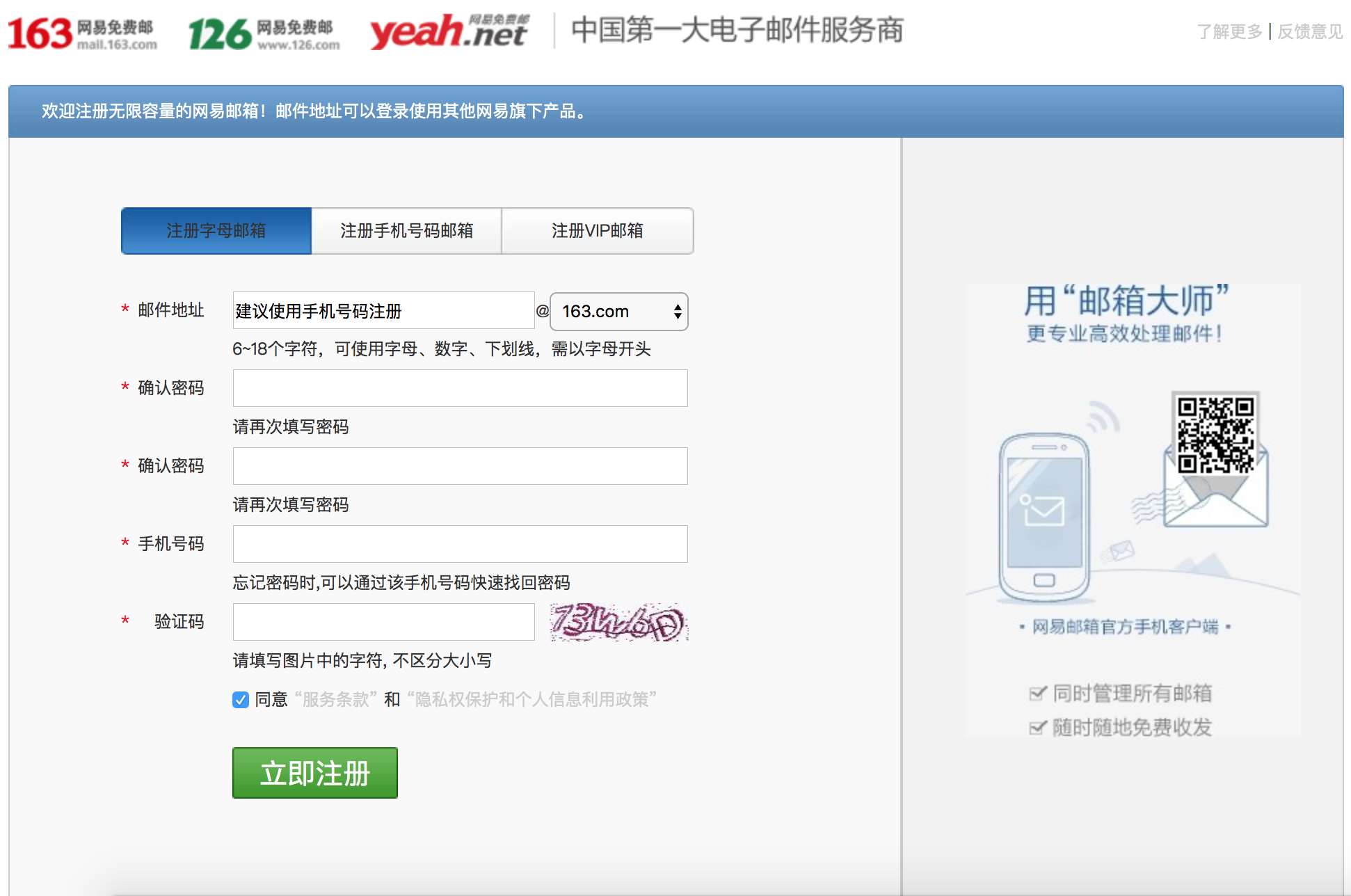
效果如下:
HTML---仿网易新闻登录页的更多相关文章
- iOS界面-仿网易新闻左侧抽屉式交互 续(添加新闻内容页和评论页手势)
本文转载至 http://blog.csdn.net/totogo2010/article/details/8637430 1.介绍 有的博友看了上篇博文iOS界面-仿网易新闻左侧抽屉 ...
- 类似掌盟的Tab页 Android 开源框架ViewPageIndicator 和 ViewPager 仿网易新闻客户端Tab标签 (转)
原博客地址 :http://blog.csdn.net/xiaanming/article/details/10766053 本文转载,记录学习用,如有需要,请到原作者网站查看(上面这个网址) 之前 ...
- iOS仿网易新闻栏目拖动重排添加删除效果
仿网易新闻栏目选择页面的基本效果,今天抽了点时间教大家如何实现UICollectionView拖动的效果! 其实实现起来并不复杂,这里只是基本的功能,没有实现细节上的修改,连UI都是丑丑的样子,随手画 ...
- Android 开源框架ActionBarSherlock 和 ViewPager 仿网易新闻客户端
转载请注明出处:http://blog.csdn.net/xiaanming/article/details/9971721 大家都知道Android的ActionBar是在3.0以上才有的,那么在3 ...
- 仿网易新闻app下拉标签选择菜单
仿网易新闻app下拉标签选择菜单 仿网易新闻app下拉标签选择菜单,长按拖动排序,点击增删标签控件 ##示例 ##EasyTagDragView的使用 在layout布局里添加:
- Android Studio精彩案例(一)《ActionBar和 ViewPager版仿网易新闻客户端》
转载本专栏文章,请注明出处,尊重原创 .文章博客地址:道龙的博客 为了能更好的分享高质量的文章,所以开设了此专栏.文章代码都以Android Studio亲测运行,读者朋友可在后面直接下载源码.该专栏 ...
- Android应用经典主界面框架之二:仿网易新闻client、CSDN client (Fragment ViewPager)
另外一种主界面风格则是以网易新闻.凤凰新闻以及新推出的新浪博客(阅读版)为代表.使用ViewPager+Fragment,即ViewPager里适配器里放的不是一般的View.而是Fragment.所 ...
- Android 开源框架ViewPageIndicator 和 ViewPager 仿网易新闻clientTab标签
之前用JakeWharton的开源框架ActionBarSherlock和ViewPager实现了对网易新闻clientTab标签的功能,ActionBarSherlock是在3.0下面的机器支持Ac ...
- Android 开源框架ViewPageIndicator 和 ViewPager 仿网易新闻客户端Tab标签
转载请注明出处:http://blog.csdn.net/xiaanming/article/details/10766053 之前用JakeWharton的开源框架ActionBarSherlock ...
随机推荐
- java替换字符串中的World为Money
public class Money{ public static void main(String[] args) { String a = "Hello Java World\n&quo ...
- LeetCode Best to buy and sell stock
Best Time to Buy and Sell Stock 题目大意;给定数组a[..],求解max a[j]-a[i] j>i 解决思路:将数组a的相邻值相减(右边减左边)变换成数组 ...
- Backpack VI
Given an integer array nums with all positive numbers and no duplicates, find the number of possible ...
- BFC清除浮动
BFC 就是清除浮动 用来处理文档脱离文档流的问题 清除浮动的方法: a.父元素也添加一个浮动 产生弊端就是:margin 不能使用 b.给父元素添加一个:display:inline-block 弊 ...
- Problem E: 类的初体验(V)
Description 定义一个类Data,只有一个int类型的属性和如下方法: 1. 缺省构造函数,将属性初始化为0,并输出"Data's default constructor.&q ...
- 奇异值分解(SVD)与在降维中的应用
奇异值分解(Singular Value Decomposition,SVD)是在机器学习领域广泛应用的算法,它不光可以用于降维算法中的特征分解,还可以用于推荐系统,以及自然语言处理等领域.是很多机器 ...
- WCF分布式服务2-服务配置部署
上图整理了服务配置过程中所用到的基本的元素,大致的步骤: 1. 主要是首先要在调用服务的程序集中添加服务的一个引用. 2. 然后添加一个service并指定服务的名称.终结点. 在添加一个servi ...
- X分钟速成Y (其中Y=Python3)
# 用井字符开头的是单行注释 """ 多行字符串用三个引号 包裹,也常被用来做多 行注释 """ ##################### ...
- WEB学习笔记1-综述
WEB前端基本技术:HTML.CSS.JavaScript 概念: 从职责上讲,Web前端开发要涉及网站开发的方方面面,从前端UI到和后端的数据交互都属于前端开发的范畴.Web前端开发是兼具艺术气息和 ...
- 深入理解Java中的同步静态方法和synchronized(class)代码块的类锁
一.回顾学习内容 在前面几篇博客中我我们已经理解了synchronized对象锁.对象锁的重入.synchronized方法块.synchronized非本对象的代码块, 链接:https://www ...