
vue路由异步组件案例
异步组件:页面需要用到时候才从服务端加载的组件。
最近研究了vue性能优化,涉及到vue异步组件。一番研究得出如下的解决方案。
原理:利用webpack对代码进行分割是异步调用组件前提。下面介绍的是怎么实现异步组件。
案例:
首先是组件,创建四个组件分别命名为first、second、three和four;内容如下
first

<template>

<div>我是第一个页面</div>

</template>

second

<template>

<div>我是第二个页面</div>

</template>

three

<template>

<div>我是第三个页面</div>

</template>

four

<template>

<div>我是第四个页面</div>

</template>
路由index.js代码,异步组件方式有两种,代码中的方案1和方案2;注意:方案1需要添加 syntax-dynamic-import 插件
import Vue from 'vue'

import VueRouter from 'vue-router'

/*import First from '@/components/First'

import Second from '@/components/Second'*/

Vue.use(VueRouter)

//方案1

const first =()=>import(/* webpackChunkName: "group-foo" */ "../components/first.vue");

const second = ()=>import(/* webpackChunkName: "group-foo" */ "../components/second.vue");

const three = ()=>import(/* webpackChunkName: "group-fooo" */ "../components/three.vue");

const four = ()=>import(/* webpackChunkName: "group-fooo" */ "../components/four.vue");

//方案2

const first = r => require.ensure([], () => r(require('../components/first.vue')), 'chunkname1')

const second = r => require.ensure([], () => r(require('../components/second.vue')), 'chunkname1')

const three = r => require.ensure([], () => r(require('../components/three.vue')), 'chunkname2')

const four = r => require.ensure([], () => r(require('../components/four.vue')), 'chunkname2')

//懒加载路由

const routes = [

 {   //当首次进入页面时,页面没有显示任何组件;让页面一加载进来就默认显示first页面

 path:'/', //重定向,就是给它重新指定一个方向,加载一个组件;

 component:first

 },

 {

 path:'/first',

 component:first

 },

 {

 path:'/second',

 component:second

 }, {

 path:'/three',

 component:three

 },

 {

 path:'/four',

 component:four

 }

//这里require组件路径根据自己的配置引入

]

//最后创建router 对路由进行管理,它是由构造函数 new vueRouter() 创建,接受routes 参数。

 const router = new VueRouter({

 routes

})

export default router;
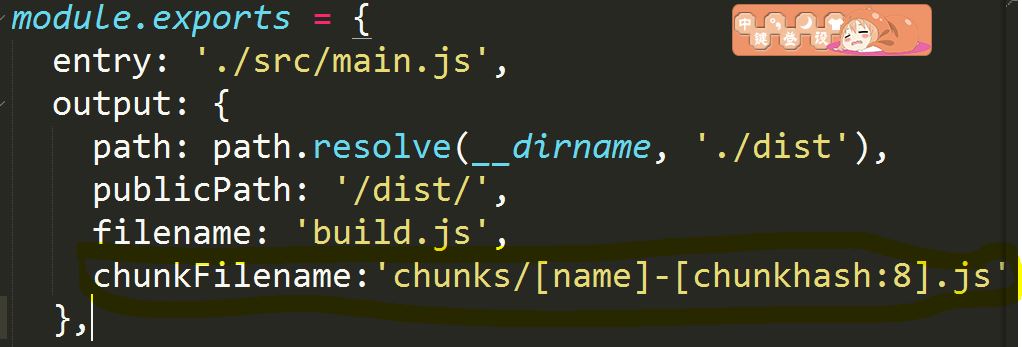
最后,如果想要让build之后的代码更便于识别,配置webpack代码
运行 npm run build结果
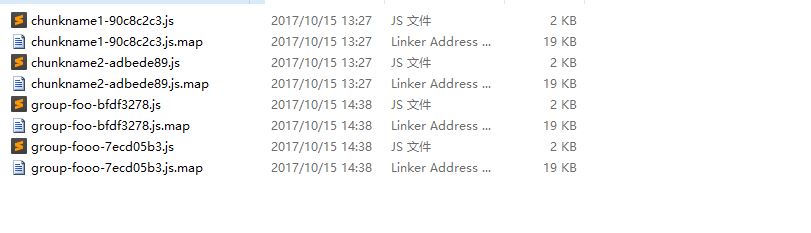
注意方案1和方案2只能用一个。然后运行项目试验一下就可以了。
vue路由异步组件案例的更多相关文章
- Vue中异步组件(结合webpack,转载)
转载,原文出处:https://www.jianshu.com/p/40a364b5e964 1.什么是异步组件? 异步组件就是定义的时候什么都不做,只在组件需要渲染(组件第一次显示)的时候进行加载渲 ...
- 极简Vue的异步组件函数
export default new Router({ routes: [ { path: '/live', name: 'live', component: () => import('@/v ...
- vue的异步组件按需加载
当build打包后,app.js过大的时候,可以考虑用异步组件的方式. import HomeHeader from "./components/Header"; import H ...
- Vue路由(组件)懒加载(异步)
传统的引入方式 import test from '@/components/test' { path: '/test', name: '测试页面', component:test }, 懒加载的方式 ...
- vue项目实现按需加载的3种方式:vue异步组件技术、es提案的import()、webpack提供的require.ensure()
1. vue异步组件技术 vue-router配置路由,使用vue的异步组件技术,可以实现按需加载. 但是,这种情况下一个组件生成一个js文件. 举例如下: { path: '/promisedemo ...
- route按需加载的3种方式:vue异步组件、es提案的import()、webpack的require.ensure()
1. vue异步组件技术 vue-router配置路由,使用vue的异步组件技术,可以实现按需加载. 但是,这种情况下一个组件生成一个js文件.举例如下: { path: '/promisedemo' ...
- Vue动态加载异步组件
背景: 目前我们项目都是按组件划分的,然后各个组件之间封装成产品.目前都是采用iframe直接嵌套页面.项目中我们还是会碰到一些通用的组件跟业务之间有通信,这种情况下iframe并不是最好的选择,if ...
- vue路由传参及组件传参和组件方法调用
VUE路由和组件传参 第一种vue自带的路由传参的三种基本方式 1.通过name :id传参 子组件通过$route.name接收参数 { path: '/particulars/:id', name ...
- 揭开Vue异步组件的神秘面纱
简介 在大型应用里,有些组件可能一开始并不显示,只有在特定条件下才会渲染,那么这种情况下该组件的资源其实不需要一开始就加载,完全可以在需要的时候再去请求,这也可以减少页面首次加载的资源体积,要在Vue ...
随机推荐
- Java中关于LockSupport的简单入门记录
LockSupport的JDK的文档描述:Basic thread blocking primitives for creating locks and other synchronization c ...
- php-kafka
1.环境依赖 The extension support both PHP 5 and PHP 7. The extension requires » librdkafka >= 0.8 for ...
- Ceph的BlueStore总体介绍
整体架构 bluestore的诞生是为了解决filestore自身维护一套journal并同时还需要基于系统文件系统的写放大问题,并且filestore本身没有对SSD进行优化,因此bluestore ...
- Dubbo高级篇4
https://blog.csdn.net/moonpure/article/details/52842115 线程模型 http://dubbo.io/User+Guide-zh.htm 用户指南& ...
- Word2010中如何在斜线表格中添加文字
http://jingyan.baidu.com/article/335530daa4127f19cb41c331.html
- strcat、num2str
文章出处: http://blog.sina.com.cn/s/blog_6fb8aa0d01019id5.html http://wenda.so.com/q/1439143662729624 ht ...
- matlab padarray函数
1 padarray功能:填充图像或填充数组.用法:B = padarray(A,padsize,padval,direction) A为输入图像,B为填充后的图像, padsize给出了给 ...
- 关于html的a标签的target="__blank "的安全漏洞问题
使用场景:最近项目中使用一个a标签的 target="__blank "链接跳转 页面,打开一个新的 pdf文件(或者外部的一个网页),然后在chrome浏览器中快速的滑动的时候, ...
- Html5 标签四 (列表)
1.有序列表 2.无序列表 3.自定义列表 <!DOCTYPE html> <html lang="en"> <head> <meta c ...
- 使用proxy来简单的实现一个观察者
var obv = (function() { var cache = new Map(); var observe = function (proxy, fn) { if (!cache.has(p ...