
Java的get请求-----接口测试
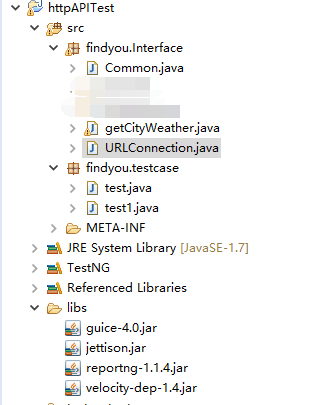
package findyou.Interface;

import java.net.HttpURLConnection;

import java.net.URL;

public class URLConnection {

	public static HttpURLConnection getConnection(String url){

		HttpURLConnection connection = null;

		try {

			// 打开和URL之间的连接

			URL postUrl = new URL(url);

			connection = (HttpURLConnection) postUrl.openConnection();

			 // 设置通用的请求属性

			connection.setDoOutput(false);//posp请求改为TRUE

			connection.setDoInput(true);

			connection.setRequestMethod("GET");

			connection.setUseCaches(false);

			connection.setInstanceFollowRedirects(true);

			connection.setRequestProperty("Content-Type", "application/json");

			connection.setRequestProperty("Charset", "utf-8");

			connection.setRequestProperty("Accept-Charset", "utf-8");

		} catch (Exception e) {

			e.printStackTrace();

		}

		return connection;

	}

}
package findyou.Interface;

import java.io.BufferedReader;

import java.io.DataOutputStream;

import java.io.IOException;

import java.io.InputStreamReader;

import java.net.HttpURLConnection;

import java.net.MalformedURLException;

public class getCityWeather {

     private static String url="";

     public String geturl() {

         return url;

     }

  public String getHttpRespone(String cityCode) throws IOException {

         String line = "";

         String httpResults = "";

         url=("http://www.weather.com.cn/data/cityinfo/"

                 + cityCode + ".html");

         try {

 			//url=("http://www.weather.com.cn/data/cityinfo/"+ cityCode + ".html");

 			HttpURLConnection urlcon = URLConnection.getConnection(url);

 			urlcon.setReadTimeout(5000);

 			urlcon.setConnectTimeout(5000);

 			urlcon.connect();

 			BufferedReader reader=new BufferedReader(new InputStreamReader(urlcon.getInputStream(),"utf-8"));

 			 //line=bf.readLine();

 			 while ((line = reader.readLine()) != null) {

                 httpResults = httpResults + line.toString();

             }

 		} catch (MalformedURLException e) {

 			// TODO Auto-generated catch block

 			e.printStackTrace();

 		}

         return httpResults;

     }

}
package findyou.Interface;

import org.codehaus.jettison.json.JSONException;

import org.codehaus.jettison.json.JSONObject;

public class Common {

	/**

	 * 解析Json内容

	 *

	 * @author Findyou

	 * @version 1.0 2016/3/23

	 * @return JsonValue 返回JsonString中JsonId对应的Value

	 **/

	public static String getJsonValue(String JsonString, String JsonId) {

		String JsonValue = "";

		if (JsonString == null || JsonString.trim().length() < 1) {

			return null;

		}

		try {

			JSONObject obj1 = new JSONObject(JsonString);

			JsonValue = (String) obj1.getString(JsonId);

		} catch (JSONException e) {

			e.printStackTrace();

		}

		return JsonValue;

	}

}
下面的代码是用Java写的测试用例
package findyou.testcase;

import java.io.IOException;

import org.testng.Assert;

import org.testng.Reporter;

import org.testng.annotations.Test;

import findyou.Interface.Common;

import findyou.Interface.getCityWeather;

public class test {

	public String httpResult= null, weatherinfo= null, city=null,exp_city = null;

	public static String cityCode="";

	getCityWeather weather=new getCityWeather();

	@Test(groups = { "BaseCase"})

	public void getShenZhen_Succ() throws IOException{

		exp_city="深圳";

		cityCode="101280601";

		Reporter.log("【正常用例】:获取"+exp_city+"天气成功!");

		httpResult=weather.getHttpRespone(cityCode);

		Reporter.log("请求地址: "+weather.geturl());

		Reporter.log("返回结果: "+httpResult);

		weatherinfo=Common.getJsonValue(httpResult, "weatherinfo");

		city=Common.getJsonValue(weatherinfo, "city");

		Reporter.log("用例结果: resultCode=>expected: " + exp_city + " ,actual: "+ city);

		Assert.assertEquals(city,exp_city);

	}

	@Test(groups = { "BaseCase"})

	public void getBeiJing_Succ() throws IOException{

		exp_city="北京";

		cityCode="101010100";

		Reporter.log("【正常用例】:获取"+exp_city+"天气成功!");

		httpResult=weather.getHttpRespone(cityCode);

		Reporter.log("请求地址: "+weather.geturl());

		Reporter.log("返回结果: "+httpResult);

		weatherinfo=Common.getJsonValue(httpResult, "weatherinfo");

		city=Common.getJsonValue(weatherinfo, "city");

		Reporter.log("用例结果: resultCode=>expected: " + exp_city + " ,actual: "+ city);

		Assert.assertEquals(city,exp_city);

	}

	@Test(groups = { "BaseCase"})

	public void getShangHai_Succ() throws IOException{

		exp_city="上海";

		cityCode="101020100";

		Reporter.log("【正常用例】:获取"+exp_city+"天气成功!");

		httpResult=weather.getHttpRespone(cityCode);

		Reporter.log("请求地址: "+weather.geturl());

		Reporter.log("返回结果: "+httpResult);

		weatherinfo=Common.getJsonValue(httpResult, "weatherinfo");

		city=Common.getJsonValue(weatherinfo, "city");

		Reporter.log("用例结果: resultCode=>expected: " + exp_city + " ,actual: "+ city);

		Assert.assertEquals(city,exp_city);

	}

}
package findyou.testcase;

import java.io.IOException;

import org.testng.Assert;

import org.testng.Reporter;

import org.testng.annotations.Test;

import findyou.Interface.Common;

import findyou.Interface.getCityWeather;

public class test1 {

	public String httpResult= null, weatherinfo= null, city=null,exp_city = null;

	public static String cityCode="";

	getCityWeather weather=new getCityWeather();

	@Test(groups = { "BaseCase"})

	public void getShenZhen_Succ() throws IOException{

		exp_city="深圳";

		cityCode="101280601";

		resultCheck(cityCode, exp_city);

	}

	@Test(groups = { "BaseCase"})

	public void getBeiJing_Succ() throws IOException{

		exp_city="北京";

		cityCode="101010100";

		resultCheck(cityCode, exp_city);

	}

	@Test(groups = { "BaseCase"})

	public void getShangHai_Succ() throws IOException{

		exp_city="上海";

		cityCode="101020100";

		resultCheck(cityCode, exp_city);

	}

	public void resultCheck(String cityCode_str, String exp_city_str) throws IOException{

		Reporter.log("【正常用例】:获取"+exp_city_str+"天气成功!");

		httpResult=weather.getHttpRespone(cityCode_str);

		Reporter.log("请求地址: "+weather.geturl());

		Reporter.log("返回结果: "+httpResult);

		weatherinfo=Common.getJsonValue(httpResult, "weatherinfo");

		city=Common.getJsonValue(weatherinfo, "city");

		Reporter.log("用例结果: City=>expected: " + exp_city_str + " ,actual: "+ city);

		Assert.assertEquals(city,exp_city_str);

	}

}
Java的get请求-----接口测试的更多相关文章
- Java的post请求-----接口测试
本次主要是对登陆的接口测试post请求,希望记录在博客里面,一点一点的成长. package com.ju.Login; import java.io.BufferedReader; import j ...
- java自动化测试-http请求结合抓包工具实际应用
继上文我编写了java的get请求与post请求之后,我现在开始写一下实际操作 很多人有疑问,接口测试的代码是哪里来的,怎么来的呢?看得见吗?我来做一个简单的演示 我们这里简单介绍一下抓包工具,对于一 ...
- Java发送Http请求并获取状态码
通过Java发送url请求,查看该url是否有效,这时我们可以通过获取状态码来判断. try { URL u = new URL("http://10.1.2.8:8080/fqz/page ...
- java 实现https请求
java 实现https请求 JSSE是一个SSL和TLS的纯Java实现,通过JSSE可以很容易地编程实现对HTTPS站点的访问.但是,如果该站点的证书未经权威机构的验证,JSSE将拒绝信任该证书从 ...
- 第三篇 :微信公众平台开发实战Java版之请求消息,响应消息以及事件消息类的封装
微信服务器和第三方服务器之间究竟是通过什么方式进行对话的? 下面,我们先看下图: 其实我们可以简单的理解: (1)首先,用户向微信服务器发送消息: (2)微信服务器接收到用户的消息处理之后,通过开发者 ...
- 通过java发送http请求
通常的http请求都是由用户点击某个连接或者按钮来发起的,但是在一些后台的Java程序中需要发送一些get或这post请求,因为不涉及前台页面,该怎么办呢? 下面为大家提供一个Java发送http请求 ...
- 深入浅出Java 重定向和请求转发的区别
深入浅出Java 重定向和请求转发的区别 <span style="font-family:FangSong_GB2312;font-size:18px;">impor ...
- 上curl java 模拟http请求
最近,我的项目要求java模拟http请求,获得dns解决 tcp处理过的信息特定的连接. java api提供urlConnection apache提供的httpClient都不能胜任该需求,二次 ...
- 使用SoapUI工具做get请求和post请求接口测试
祝大家节日快乐啦. 之前写过的一篇帖子已经介绍了SoapUI工具的基本使用,所以在此不再重复讲解关于建工程.建测试套件.添加用例等操作,可查看该篇文章详解:http://www.cnblogs.com ...
随机推荐
- 洛谷【P1140】相似基因
浅谈\(DP\):https://www.cnblogs.com/AKMer/p/10437525.html 题目传送门:https://www.luogu.org/problemnew/show/P ...
- Python collections系列之单向队列
单向队列(deque) 单项队列(先进先出 FIFO ) 1.创建单向队列 import queue q = queue.Queue() q.put(') q.put('evescn') 2.查看单向 ...
- why latches are considered bad?
A "latch" is different from a "Flip-Flop" in that a FF only changes its output i ...
- Apache Htpasswd生成和验证密码
Assuming you create the password using the following command and "myPassword" as the passw ...
- 判断唯一约束是否是唯一的Unique
//检查 唯一约束Name //检查 唯一约束Name int count = new BLL.Funcs().GetRecordCount(string.Format("Name={0}& ...
- 2016.2.13 (年初六) oracle两张表update方法
A表customers和B表tmp_cust_city有3个相同字段, customer_id,city_name,customer_type 现要根据b表更新a表 更新一个字段情况: update ...
- Solaris10镜像情况下如何修复boot archive
在某些情况下(比如:异常宕机)solaris10的boot archive可能会损坏,导致solaris无法启动,此时需要手工修复boot archive. 本文通过模拟boot archive损坏, ...
- vb和dos批处理创建或生成快捷方式
https://www.cnblogs.com/gszhl/archive/2009/04/23/1441753.html vb和dos批处理创建或生成快捷方式 首先说我现在用的一种,最有效的也是 ...
- 部署和调优 2.3 tomcat中JDK安装
目前有很多网站使用 jsp 的程序编写,所以解析 jsp 的程序就必须要有相关的软件来完成.Tomcat 就是用来解析 jsp 程序的一个软件.因为 Tomcat 技术先进.性能稳定,而且免费,因而深 ...
- springmvc 初始化参数绑定(使用属性编辑器) 来处理类型转换问题
处理一种日期格式 处理器中的写法: index.jsp中的写法: 处理多种日期格式: 处理器的写法: 自定义的属性编辑器: index.jsp的写法: