
Java的get请求-----接口测试
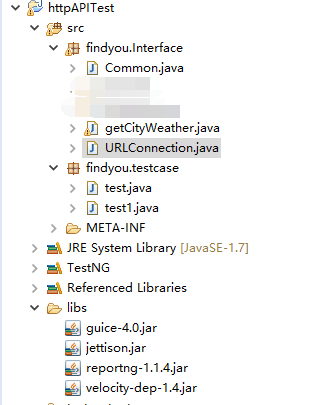
package findyou.Interface;

import java.net.HttpURLConnection;

import java.net.URL;

public class URLConnection {

	public static HttpURLConnection getConnection(String url){

		HttpURLConnection connection = null;

		try {

			// 打开和URL之间的连接

			URL postUrl = new URL(url);

			connection = (HttpURLConnection) postUrl.openConnection();

			 // 设置通用的请求属性

			connection.setDoOutput(false);//posp请求改为TRUE

			connection.setDoInput(true);

			connection.setRequestMethod("GET");

			connection.setUseCaches(false);

			connection.setInstanceFollowRedirects(true);

			connection.setRequestProperty("Content-Type", "application/json");

			connection.setRequestProperty("Charset", "utf-8");

			connection.setRequestProperty("Accept-Charset", "utf-8");

		} catch (Exception e) {

			e.printStackTrace();

		}

		return connection;

	}

}
package findyou.Interface;

import java.io.BufferedReader;

import java.io.DataOutputStream;

import java.io.IOException;

import java.io.InputStreamReader;

import java.net.HttpURLConnection;

import java.net.MalformedURLException;

public class getCityWeather {

     private static String url="";

     public String geturl() {

         return url;

     }

  public String getHttpRespone(String cityCode) throws IOException {

         String line = "";

         String httpResults = "";

         url=("http://www.weather.com.cn/data/cityinfo/"

                 + cityCode + ".html");

         try {

 			//url=("http://www.weather.com.cn/data/cityinfo/"+ cityCode + ".html");

 			HttpURLConnection urlcon = URLConnection.getConnection(url);

 			urlcon.setReadTimeout(5000);

 			urlcon.setConnectTimeout(5000);

 			urlcon.connect();

 			BufferedReader reader=new BufferedReader(new InputStreamReader(urlcon.getInputStream(),"utf-8"));

 			 //line=bf.readLine();

 			 while ((line = reader.readLine()) != null) {

                 httpResults = httpResults + line.toString();

             }

 		} catch (MalformedURLException e) {

 			// TODO Auto-generated catch block

 			e.printStackTrace();

 		}

         return httpResults;

     }

}
package findyou.Interface;

import org.codehaus.jettison.json.JSONException;

import org.codehaus.jettison.json.JSONObject;

public class Common {

	/**

	 * 解析Json内容

	 *

	 * @author Findyou

	 * @version 1.0 2016/3/23

	 * @return JsonValue 返回JsonString中JsonId对应的Value

	 **/

	public static String getJsonValue(String JsonString, String JsonId) {

		String JsonValue = "";

		if (JsonString == null || JsonString.trim().length() < 1) {

			return null;

		}

		try {

			JSONObject obj1 = new JSONObject(JsonString);

			JsonValue = (String) obj1.getString(JsonId);

		} catch (JSONException e) {

			e.printStackTrace();

		}

		return JsonValue;

	}

}
下面的代码是用Java写的测试用例
package findyou.testcase;

import java.io.IOException;

import org.testng.Assert;

import org.testng.Reporter;

import org.testng.annotations.Test;

import findyou.Interface.Common;

import findyou.Interface.getCityWeather;

public class test {

	public String httpResult= null, weatherinfo= null, city=null,exp_city = null;

	public static String cityCode="";

	getCityWeather weather=new getCityWeather();

	@Test(groups = { "BaseCase"})

	public void getShenZhen_Succ() throws IOException{

		exp_city="深圳";

		cityCode="101280601";

		Reporter.log("【正常用例】:获取"+exp_city+"天气成功!");

		httpResult=weather.getHttpRespone(cityCode);

		Reporter.log("请求地址: "+weather.geturl());

		Reporter.log("返回结果: "+httpResult);

		weatherinfo=Common.getJsonValue(httpResult, "weatherinfo");

		city=Common.getJsonValue(weatherinfo, "city");

		Reporter.log("用例结果: resultCode=>expected: " + exp_city + " ,actual: "+ city);

		Assert.assertEquals(city,exp_city);

	}

	@Test(groups = { "BaseCase"})

	public void getBeiJing_Succ() throws IOException{

		exp_city="北京";

		cityCode="101010100";

		Reporter.log("【正常用例】:获取"+exp_city+"天气成功!");

		httpResult=weather.getHttpRespone(cityCode);

		Reporter.log("请求地址: "+weather.geturl());

		Reporter.log("返回结果: "+httpResult);

		weatherinfo=Common.getJsonValue(httpResult, "weatherinfo");

		city=Common.getJsonValue(weatherinfo, "city");

		Reporter.log("用例结果: resultCode=>expected: " + exp_city + " ,actual: "+ city);

		Assert.assertEquals(city,exp_city);

	}

	@Test(groups = { "BaseCase"})

	public void getShangHai_Succ() throws IOException{

		exp_city="上海";

		cityCode="101020100";

		Reporter.log("【正常用例】:获取"+exp_city+"天气成功!");

		httpResult=weather.getHttpRespone(cityCode);

		Reporter.log("请求地址: "+weather.geturl());

		Reporter.log("返回结果: "+httpResult);

		weatherinfo=Common.getJsonValue(httpResult, "weatherinfo");

		city=Common.getJsonValue(weatherinfo, "city");

		Reporter.log("用例结果: resultCode=>expected: " + exp_city + " ,actual: "+ city);

		Assert.assertEquals(city,exp_city);

	}

}
package findyou.testcase;

import java.io.IOException;

import org.testng.Assert;

import org.testng.Reporter;

import org.testng.annotations.Test;

import findyou.Interface.Common;

import findyou.Interface.getCityWeather;

public class test1 {

	public String httpResult= null, weatherinfo= null, city=null,exp_city = null;

	public static String cityCode="";

	getCityWeather weather=new getCityWeather();

	@Test(groups = { "BaseCase"})

	public void getShenZhen_Succ() throws IOException{

		exp_city="深圳";

		cityCode="101280601";

		resultCheck(cityCode, exp_city);

	}

	@Test(groups = { "BaseCase"})

	public void getBeiJing_Succ() throws IOException{

		exp_city="北京";

		cityCode="101010100";

		resultCheck(cityCode, exp_city);

	}

	@Test(groups = { "BaseCase"})

	public void getShangHai_Succ() throws IOException{

		exp_city="上海";

		cityCode="101020100";

		resultCheck(cityCode, exp_city);

	}

	public void resultCheck(String cityCode_str, String exp_city_str) throws IOException{

		Reporter.log("【正常用例】:获取"+exp_city_str+"天气成功!");

		httpResult=weather.getHttpRespone(cityCode_str);

		Reporter.log("请求地址: "+weather.geturl());

		Reporter.log("返回结果: "+httpResult);

		weatherinfo=Common.getJsonValue(httpResult, "weatherinfo");

		city=Common.getJsonValue(weatherinfo, "city");

		Reporter.log("用例结果: City=>expected: " + exp_city_str + " ,actual: "+ city);

		Assert.assertEquals(city,exp_city_str);

	}

}
Java的get请求-----接口测试的更多相关文章
- Java的post请求-----接口测试
本次主要是对登陆的接口测试post请求,希望记录在博客里面,一点一点的成长. package com.ju.Login; import java.io.BufferedReader; import j ...
- java自动化测试-http请求结合抓包工具实际应用
继上文我编写了java的get请求与post请求之后,我现在开始写一下实际操作 很多人有疑问,接口测试的代码是哪里来的,怎么来的呢?看得见吗?我来做一个简单的演示 我们这里简单介绍一下抓包工具,对于一 ...
- Java发送Http请求并获取状态码
通过Java发送url请求,查看该url是否有效,这时我们可以通过获取状态码来判断. try { URL u = new URL("http://10.1.2.8:8080/fqz/page ...
- java 实现https请求
java 实现https请求 JSSE是一个SSL和TLS的纯Java实现,通过JSSE可以很容易地编程实现对HTTPS站点的访问.但是,如果该站点的证书未经权威机构的验证,JSSE将拒绝信任该证书从 ...
- 第三篇 :微信公众平台开发实战Java版之请求消息,响应消息以及事件消息类的封装
微信服务器和第三方服务器之间究竟是通过什么方式进行对话的? 下面,我们先看下图: 其实我们可以简单的理解: (1)首先,用户向微信服务器发送消息: (2)微信服务器接收到用户的消息处理之后,通过开发者 ...
- 通过java发送http请求
通常的http请求都是由用户点击某个连接或者按钮来发起的,但是在一些后台的Java程序中需要发送一些get或这post请求,因为不涉及前台页面,该怎么办呢? 下面为大家提供一个Java发送http请求 ...
- 深入浅出Java 重定向和请求转发的区别
深入浅出Java 重定向和请求转发的区别 <span style="font-family:FangSong_GB2312;font-size:18px;">impor ...
- 上curl java 模拟http请求
最近,我的项目要求java模拟http请求,获得dns解决 tcp处理过的信息特定的连接. java api提供urlConnection apache提供的httpClient都不能胜任该需求,二次 ...
- 使用SoapUI工具做get请求和post请求接口测试
祝大家节日快乐啦. 之前写过的一篇帖子已经介绍了SoapUI工具的基本使用,所以在此不再重复讲解关于建工程.建测试套件.添加用例等操作,可查看该篇文章详解:http://www.cnblogs.com ...
随机推荐
- LeetCode Number of Longest Increasing Subsequence
原题链接在这里:https://leetcode.com/problems/number-of-longest-increasing-subsequence/description/ 题目: Give ...
- 洛谷 P2822 组合数问题
题目描述 组合数C_n^mCnm表示的是从n个物品中选出m个物品的方案数.举个例子,从(1,2,3) 三个物品中选择两个物品可以有(1,2),(1,3),(2,3)这三种选择方法.根据组合数的 ...
- zookeeper环境及dubbo-admin管理平台搭建
一. Zookeeper的安装使用 1.1 Zookeeper介绍 Zookeeper是一个分布式的,开放源码的分布式应用程序协调服务,是Google的Chubby一个开源的实现,是Hadoop和Hb ...
- Operating System-进程间互斥的问题-生产者&&消费者引入
之前介绍的几种解决进程间互斥的方案,不管是Peterson方案还是TSL指令的方式,都有一个特点:当一个进程被Block到临界区外面时,被Block的进程会一直处于忙等待的状态,这个不但浪费了CPU资 ...
- jQuery中 :first、:first-child 和 :first-of-type 之间的不同
<!DOCTYPE html><html><head><meta charset="utf-8"><script src=&q ...
- 转:InnoDB Log Block Structure(InnoDB日志Block结构详解)
文章转载自等博 InnoDB Log Block Structure(InnoDB日志Block结构详解)
- TP-Link WR703N OpenWRT固件修改WAN LAN排序
有一种方法就是macvlan了.添加到rc.local文件中,具体不再阐述. 此方法只适合编译固件的情况下调整WAN/LAN顺序. wr703n等(包含其他未列出的单网口路由,AP),修改WAN LA ...
- DataGridView上下方向键定位
/// <summary> /// DataGridView上下方向键定位 /// </summary> /// <param name="dgv"& ...
- spring的配置文件在web.xml中加载的方式
web.xml加载spring配置文件的方式主要依据该配置文件的名称和存放的位置不同来区别,目前主要有两种方式. 1.如果spring配置文件的名称为applicationContext.xml,并且 ...
- VS2015 MSVC编译FFMPEG
1.下载安装msys2 http://www.msys2.org/下载msys2 下载安装完成后,在msys2的shell中安装编译FFMPEG必要的命令行工具 pacman -S make gcc ...