
HCNA管理设置文件系统FTP服务上传下载文件
1、拓扑图
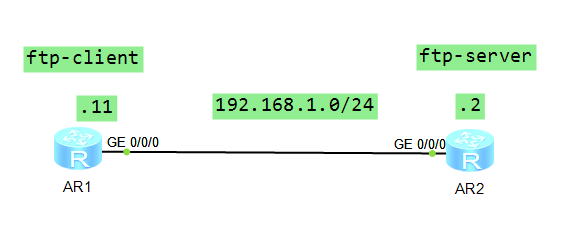
2、R2配置
The device is running!

######################################

<Huawei>sys

Enter system view, return user view with Ctrl+Z.

[Huawei]sysname R2

[R2]interface g

[R2]interface GigabitEthernet //

[R2-GigabitEthernet0//]ip add 192.168.1.2

[R2-GigabitEthernet0//]

Dec    ::-: R2 %%01IFNET//LINK_STATE(l)[]:The line protocol IP

on the interface GigabitEthernet0// has entered the UP state.

[R2-GigabitEthernet0//]q

[R2]dis in

[R2]dis ip int

[R2]dis ip interface br

[R2]dis ip interface brief

*down: administratively down

^down: standby

(l): loopback

(s): spoofing

The number of interface that is UP in Physical is

The number of interface that is DOWN in Physical is

The number of interface that is UP in Protocol is

The number of interface that is DOWN in Protocol is

Interface                         IP Address/Mask      Physical   Protocol

GigabitEthernet0//              192.168.1.2/       up         up

GigabitEthernet0//              unassigned           down       down

GigabitEthernet0//              unassigned           down       down

NULL0                             unassigned           up         up(s)

[R2]ftp server enable

Info: Succeeded in starting the FTP server

[R2]aaa

[R2-aaa]lo

[R2-aaa]local-user user-ftp pass

[R2-aaa]local-user user-ftp password ci

[R2-aaa]local-user user-ftp password cipher huawei

Info: Add a new user.

[R2-aaa]lo

[R2-aaa]local-user user-f

[R2-aaa]local-user user-ftp priv

[R2-aaa]local-user user-ftp privilege level

[R2-aaa]loc

[R2-aaa]local-user user

[R2-aaa]local-user user-ftp serv

[R2-aaa]local-user user-ftp service-type ftp

[R2-aaa]lo

[R2-aaa]local-user user

[R2-aaa]local-user user-ftp ftp

[R2-aaa]local-user user-ftp ftp-directory flash:

[R2-aaa]q

[R2]save

    ^

Error: Unrecognized command found at '^' position.

[R2]q

<R2>save

  The current configuration will be written to the device.

  Are you sure to continue? (y/n)[n]:y

  It will take several minutes to save configuration file, please wait........

  Configuration file had been saved successfully

  Note: The configuration file will take effect after being activated

<R2>
3、R1上配置并测试从服务器上下载结果
################################################################################
<Huawei>
Dec 9 2017 20:39:51-08:00 Huawei %%01IFPDT/4/IF_STATE(l)[0]:Interface GigabitEt
hernet0/0/0 has turned into UP state.
<Huawei>
Please check whether system data has been changed, and save data in time
Configuration console time out, please press any key to log on
<Huawei>sys
Enter system view, return user view with Ctrl+Z.
[Huawei]sysname R1
[R1]int g
[R1]int GigabitEthernet 0/0/0
[R1-GigabitEthernet0/0/0]ip add 192.168.1.11 24
Dec 9 2017 20:48:46-08:00 R1 %%01IFNET/4/LINK_STATE(l)[0]:The line protocol IP
on the interface GigabitEthernet0/0/0 has entered the UP state.
[R1-GigabitEthernet0/0/0]q
[R1]ping 192.168.1.2
PING 192.168.1.2: 56 data bytes, press CTRL_C to break
Reply from 192.168.1.2: bytes=56 Sequence=1 ttl=255 time=190 ms
Reply from 192.168.1.2: bytes=56 Sequence=2 ttl=255 time=90 ms
Reply from 192.168.1.2: bytes=56 Sequence=3 ttl=255 time=70 ms
Reply from 192.168.1.2: bytes=56 Sequence=4 ttl=255 time=80 ms
Reply from 192.168.1.2: bytes=56 Sequence=5 ttl=255 time=70 ms
--- 192.168.1.2 ping statistics ---
5 packet(s) transmitted
5 packet(s) received
0.00% packet loss
round-trip min/avg/max = 70/100/190 ms
[R1]ftp 192.168.1.2
^
Error: Unrecognized command found at '^' position.
[R1]q
<R1>ftp 192.168.1.2
Trying 192.168.1.2 ...
Press CTRL+K to abort
Connected to 192.168.1.2.
220 FTP service ready.
User(192.168.1.2:(none)):user-ftp
331 Password required for user-ftp.
Enter password:
230 User logged in.
[R1-ftp]?
FTP Client view commands:
ascii Set the file transfer type to ASCII, and it is the default type
binary Set the file transfer type to support the binary image
bye Terminate the FTP connection to the remote server, and exit FTP
cd Change the remote working directory
cdup Change the remote directory to parent directory
close Terminate the FTP connection to the remote server, and return to
the FTP command mode
debugging Enable system debugging functions
delete Delete a file on the remote machine
dir List the contents of the current or remote directory, and
optionally output the contents to a local file
disconnect Terminate the FTP connection to the remote server, and return to
the FTP command mode
get Download the remote file to the local host
lcd Display the current working directory
ls List the contents of the current or remote directory, and
optionally output the contents that vary with the remote host
system to a local file
mkdir Create a directory on the remote host
open Establish an FTP connection
passive Set the toggle passive mode, the default is on
put Upload a local file to the remote host
pwd Print the name of the current working directory on the remote host
[R1-ftp]
221 Server closing.
Please check whether system data has been changed, and save data in time
Configuration console time out, please press any key to log on
<R1>ftp 192.168.1.2
Trying 192.168.1.2 ...
Press CTRL+K to abort
Connected to 192.168.1.2.
220 FTP service ready.
User(192.168.1.2:(none)):user-ftp
331 Password required for user-ftp.
Enter password:
230 User logged in.
[R1-ftp]ls
200 Port command okay.
150 Opening ASCII mode data connection for *.
dhcp
..
portalpage.zip
statemach.efs
sslvpn.zip
private-data.txt
.
vrpcfg.zip
226 Transfer complete.
FTP: 86 byte(s) received in 0.210 second(s) 409.52byte(s)/sec.
[R1-ftp]lls
^
Error: Unrecognized command found at '^' position.
[R1-ftp]pwd
257 "/" is current directory.
[R1-ftp]dir
200 Port command okay.
150 Opening ASCII mode data connection for *.
drwxrwxrwx 1 noone nogroup 0 Dec 09 12:39 dhcp
-rwxrwxrwx 1 noone nogroup 121802 May 26 2014 portalpage.zip
-rwxrwxrwx 1 noone nogroup 2263 Dec 09 12:39 statemach.efs
-rwxrwxrwx 1 noone nogroup 828482 May 26 2014 sslvpn.zip
-rwxrwxrwx 1 noone nogroup 249 Dec 09 12:45 private-data.txt
drwxrwxrwx 1 noone nogroup 0 Dec 09 12:45 .
-rwxrwxrwx 1 noone nogroup 646 Dec 09 12:45 vrpcfg.zip
226 Transfer complete.
FTP: 467 byte(s) received in 0.150 second(s) 3.11Kbyte(s)/sec.
[R1-ftp]get stat
[R1-ftp]get statemach.efs 123.efs
200 Port command okay.
150 Opening ASCII mode data connection for statemach.efs.
226 Transfer complete.
FTP: 2263 byte(s) received in 0.200 second(s) 11.31Kbyte(s)/sec.
[R1-ftp]dir
200 Port command okay.
150 Opening ASCII mode data connection for *.
drwxrwxrwx 1 noone nogroup 0 Dec 09 12:39 dhcp
-rwxrwxrwx 1 noone nogroup 121802 May 26 2014 portalpage.zip
-rwxrwxrwx 1 noone nogroup 2263 Dec 09 12:39 statemach.efs
-rwxrwxrwx 1 noone nogroup 828482 May 26 2014 sslvpn.zip
-rwxrwxrwx 1 noone nogroup 249 Dec 09 12:45 private-data.txt
drwxrwxrwx 1 noone nogroup 0 Dec 09 12:45 .
-rwxrwxrwx 1 noone nogroup 646 Dec 09 12:45 vrpcfg.zip
226 Transfer complete.
FTP: 467 byte(s) received in 0.130 second(s) 3.59Kbyte(s)/sec.
[R1-ftp]pwd
257 "/" is current directory.
[R1-ftp]put sslq
[R1-ftp]put ssl
[R1-ftp]put sslvp
[R1-ftp]put sslvpn.zip 321.zip
200 Port command okay.
150 Opening ASCII mode data connection for 321.zip.
1% 3% 5% 7% 9%11%13%15%17%19%21%23%25%27%29%31%33%35%37%39%
41%43%45%47%49%51%53%55%57%59%61%63%65%67%69%71%73%75%77%79%
81%83%85%87%88%90%92%94%96%98%
100%
226 Transfer complete.
FTP: 828482 byte(s) sent in 3.050 second(s) 271.63Kbyte(s)/sec.
[R1-ftp]dir
200 Port command okay.
150 Opening ASCII mode data connection for *.
drwxrwxrwx 1 noone nogroup 0 Dec 09 12:39 dhcp
-rwxrwxrwx 1 noone nogroup 121802 May 26 2014 portalpage.zip
-rwxrwxrwx 1 noone nogroup 828482 Dec 09 13:02 321.zip
-rwxrwxrwx 1 noone nogroup 2263 Dec 09 12:39 statemach.efs
-rwxrwxrwx 1 noone nogroup 828482 May 26 2014 sslvpn.zip
-rwxrwxrwx 1 noone nogroup 249 Dec 09 12:45 private-data.txt
drwxrwxrwx 1 noone nogroup 0 Dec 09 13:02 .
-rwxrwxrwx 1 noone nogroup 646 Dec 09 12:45 vrpcfg.zip
226 Transfer complete.
FTP: 531 byte(s) received in 0.200 second(s) 2.65Kbyte(s)/sec.
[R1-ftp]ldir
^
Error: Unrecognized command found at '^' position.
[R1-ftp]
221 Server closing.
<R1>dir
Directory of flash:/
Idx Attr Size(Byte) Date Time(LMT) FileName
0 drw- - Dec 09 2017 12:39:44 dhcp
1 -rw- 121,802 May 26 2014 09:20:58 portalpage.zip
2 -rw- 2,263 Dec 09 2017 13:01:04 123.efs
3 -rw- 2,263 Dec 09 2017 12:39:27 statemach.efs
4 -rw- 828,482 May 26 2014 09:20:58 sslvpn.zip
1,090,732 KB total (784,460 KB free)
<R1>
4、R2测试从R1客户端上传文件
 Please check whether system data has been changed, and save data in time

  Configuration console time out, please press any key to log on

<R2>dir

Directory of flash:/

  Idx  Attr     Size(Byte)  Date        Time(LMT)  FileName

    0  drw-              -  Dec 09 2017 12:39:46   dhcp

    1  -rw-        121,802  May 26 2014 09:20:58   portalpage.zip

    2  -rw-        828,482  Dec 09 2017 13:02:18   321.zip

    3  -rw-          2,263  Dec 09 2017 12:39:31   statemach.efs

    4  -rw-        828,482  May 26 2014 09:20:58   sslvpn.zip

    5  -rw-            249  Dec 09 2017 12:45:50   private-data.txt

    6  -rw-            646  Dec 09 2017 12:45:50   vrpcfg.zip

1,090,732 KB total (783,640 KB free)

<R2>
HCNA管理设置文件系统FTP服务上传下载文件的更多相关文章
- linux下常用FTP命令 上传下载文件【转】
1. 连接ftp服务器 格式:ftp [hostname| ip-address]a)在linux命令行下输入: ftp 192.168.1.1 b)服务器询问你用户名和密码,分别输入用户名和相应密码 ...
- shell通过ftp实现上传/下载文件
直接代码,shell文件名为testFtptool.sh: #!/bin/bash ########################################################## ...
- Linux 终端访问 FTP 及 上传下载 文件
今天同事问我一个问题,在Linux 下访问FTP,并将文件上传上去. 我之前一直是用WinSCP工具的. 先将文件从linux copy到windows下,然后在传到ftp上.google 一下. 方 ...
- Linux 终端訪问 FTP 及 上传下载 文件
今天同事问我一个问题,在Linux 下訪问FTP,并将文件上传上去. 我之前一直是用WinSCP工具的. 先将文件从linux copy到windows下,然后在传到ftp上. google 一下. ...
- Linux 终端访问 FTP 及 上传下载 文件[转]
1. Linux 终端连接FTP [oracle@Dave ~]$ ftp 10.85.7.97 Connected to 10.85.7.97. 220 Serv-U FTP Server ...
- Spring学习---Spring中利用组件实现从FTP服务器上传/下载文件
FtpUtil.java import java.io.File; import java.io.FileInputStream; import java.io.FileNotFoundExcepti ...
- 使用批处理文件在FTP服务器 上传下载文件
1.从ftp服务器根目录文件夹下的文件到指定的文件夹下 格式:ftp -s:[配置文件] [ftp地址] 如:ftp -s:c:\vc\ftpconfig.txt 192.168.1.1 建立一个 ...
- FTP进行上传下载文件
1.需要引入外部jar包:commons-net-2.0.jar(或者是子包commons-net-ftp-2.0.jar) 2.需下载ftp服务器 3. 本地电脑访问ftp服务器格式:ftp://用 ...
- 向linux服务器上传下载文件方式收集
向linux服务器上传下载文件方式收集 1. scp [优点]简单方便,安全可靠:支持限速参数[缺点]不支持排除目录[用法] scp就是secure copy,是用来进行远程文件拷贝的.数据传输使用 ...
随机推荐
- thinkphp 3.0 核心函数U的一个致命bug
最近在玩thinkphp,感觉内置函数 U 挺强大的! 传递多个参数时,出乱子了(window环境下,xampp) 例如 echo U('Blog/cate',array('cate_id'=> ...
- 了解Linux系统
++++++++++++++++++++++++++++++++++++++++++++++++++++ 有用的参考链接: 带你初识Linux操作系统:https://www.linuxidc.com ...
- poj3020 建信号塔(匈牙利算法 最小覆盖边集)
Antenna Placement Time Limit: 1000MS Memory Limit: 65536K Total Submissions: 10518 Accepted: 518 ...
- hdu1686 KMP 求在字符串A中字符串B出现的次数
Oulipo Time Limit: 3000/1000 MS (Java/Others) Memory Limit: 32768/32768 K (Java/Others)Total Subm ...
- django终端打印Sql语句
LOGGING = { 'version': 1, 'disable_existing_loggers': False, 'handlers': { 'console':{ 'level':'DEBU ...
- No bean named 'xxxxxxx' available--springboot 上线打war包
springboot项目发布上线后,报错:No bean named 'xxxxxxx' available 因为我开发时pom用的jar,但上线发布war.解决方法: 1.pom.xml <p ...
- MSF利用ms17-010漏洞过程记录
1.使用网上以上一个监测工具,扫描出存在ms17-010的主机地址 2.在kali中使用MSF进行检测,存在mf17-010漏洞 msf > use auxiliary/scanner/smb/ ...
- vue父子组件通信(prop)
先定义子组件,注册prop接收父组件传递的值 <template> <div> <div>{{message}}(子组件)</div> </div ...
- mysql——索引失效
索引失效的几种情况:https://www.jianshu.com/p/9c9a0057221f
- my.资质
换算到每1点魔力初始,1点魔力等同于22点法资,等于0.00235点成长. 气血=等级*体力资质*0.002895+体力属性点*成长*7 魔法=等级*法力资质*0.002085+法力属性点*成长*5 ...