
.net core 2.0 jwt身份认证系统
经历了很久,.net core 2.0 终于发布了!
之前一直用的core 1.1,升级了2.0后发现认证的机制(Auth)发生了比较大的变化,在1.1中认证配置是在Configure中完成,而在2.0中,认证配置则是在ConfigureServices中完成,刚好对调了一下。
话不多说,直接看代码
1.ConfigureServices中的认证配置
            var audienceConfig = Configuration.GetSection("Audience");

            var symmetricKeyAsBase64 = audienceConfig["Secret"];

            var keyByteArray = Encoding.ASCII.GetBytes(symmetricKeyAsBase64);

            var signingKey = new SymmetricSecurityKey(keyByteArray);

            var tokenValidationParameters = new TokenValidationParameters

            {

                // The signing key must match!

                ValidateIssuerSigningKey = true,

                IssuerSigningKey = signingKey,

                // Validate the JWT Issuer (iss) claim

                ValidateIssuer = true,

                ValidIssuer = audienceConfig["Issuer"],

                // Validate the JWT Audience (aud) claim

                ValidateAudience = true,

                ValidAudience = audienceConfig["Audience"],

                // Validate the token expiry

                ValidateLifetime = true,

                ClockSkew = TimeSpan.Zero

            };

            services.AddAuthentication(options =>

            {

                options.DefaultAuthenticateScheme = JwtBearerDefaults.AuthenticationScheme;

                options.DefaultChallengeScheme = JwtBearerDefaults.AuthenticationScheme;

            })

            .AddJwtBearer(o =>

            {

                //不使用https

                //o.RequireHttpsMetadata = false;

                o.TokenValidationParameters = tokenValidationParameters;

            });
贴上appsettings.json的内容
"Audience": {

    "Secret": "Y2F0Y2yhciUyMHdvbmclMFWfsaZlJTIwLm5ldA==",

    "Issuer": "test",

    "Audience": "test"

  }
2. Configure中使用认证,这里我扩展了UseAuthentication的方法。
(1)先定义一个TokenProviderOptions类
public class TokenProviderOptions

    {

        /// <summary>

        /// 请求路径

        /// </summary>

        public string Path { get; set; } = "/Api/Token";

        public string Issuer { get; set; }

        public string Audience { get; set; }

        /// <summary>

        /// 过期时间

        /// </summary>

        public TimeSpan Expiration { get; set; } = TimeSpan.FromMinutes();

        public SigningCredentials SigningCredentials { get; set; }

    }
(2)定义一个TokenProviderExtensions类扩展UseAuthentication方法
 public static class TokenProviderExtensions

    {

        public static IApplicationBuilder UseAuthentication(this IApplicationBuilder app, TokenProviderOptions options)

        {

            if (app == null)

            {

                throw new ArgumentNullException(nameof(app));

            }

            return app.UseMiddleware<TokenProviderMiddleware>(Options.Create(options));

        }

    }
至于为什么UseAuthentication为什么长这样的,可以看https://github.com/aspnet/Security/blob/99aa3bd35dd5fbe46a93eef8a2c8ab1f9fe8d05b/src/Microsoft.AspNetCore.Authentication/AuthAppBuilderExtensions.cs源代码
(3)写了TokenProviderMiddleware类来代替AuthenticationMiddleware
 public class TokenProviderMiddleware

    {

        private readonly RequestDelegate _next;

        private readonly TokenProviderOptions _options;

        private readonly IUserService _service;

        public TokenProviderMiddleware(

            RequestDelegate next,

            IOptions<TokenProviderOptions> options, IAuthenticationSchemeProvider schemes)

        {

            _next = next;

            _options = options.Value;

            Schemes = schemes;

        }

        public IAuthenticationSchemeProvider Schemes { get; set; }

        /// <summary>

        /// invoke the middleware

        /// </summary>

        /// <param name="context"></param>

        /// <returns></returns>

        public async Task Invoke(HttpContext context,IUserServcice service)

        {
       _sercice=service;

            //

            context.Features.Set<IAuthenticationFeature>(new AuthenticationFeature

            {

                OriginalPath = context.Request.Path,

                OriginalPathBase = context.Request.PathBase

            });

            //获取默认Scheme(或者AuthorizeAttribute指定的Scheme)的AuthenticationHandler

            var handlers = context.RequestServices.GetRequiredService<IAuthenticationHandlerProvider>();

            foreach (var scheme in await Schemes.GetRequestHandlerSchemesAsync())

            {

                var handler = await handlers.GetHandlerAsync(context, scheme.Name) as IAuthenticationRequestHandler;

                if (handler != null && await handler.HandleRequestAsync())

                {

                    return;

                }

            }

            var defaultAuthenticate = await Schemes.GetDefaultAuthenticateSchemeAsync();

            if (defaultAuthenticate != null)

            {

                var result = await context.AuthenticateAsync(defaultAuthenticate.Name);

                if (result?.Principal != null)

                {

                    context.User = result.Principal;

                }

            }

            //

            if (!context.Request.Path.Equals(_options.Path, StringComparison.Ordinal))

            {

                await _next(context);

                return;

            }

            // Request must be POST with Content-Type: application/x-www-form-urlencoded

            if (!context.Request.Method.Equals("POST")

               || !context.Request.HasFormContentType)

            {

                await ReturnBadRequest(context);

                return;

            }

            await GenerateAuthorizedResult(context);

        }

        /// <summary>

        /// 验证结果并得到token

        /// </summary>

        /// <param name="context"></param>

        /// <returns></returns>

        private async Task GenerateAuthorizedResult(HttpContext context)

        {

            var username = context.Request.Form["username"];

            var password = context.Request.Form["password"];

            var identity = await GetIdentity(username, password);

            if (identity == null)

            {

                await ReturnBadRequest(context);

                return;

            }

            // Serialize and return the response

            context.Response.ContentType = "application/json";

            await context.Response.WriteAsync(GetJwt(username));

        }

        /// <summary>

        /// 验证用户

        /// </summary>

        /// <param name="username"></param>

        /// <param name="password"></param>

        /// <returns></returns>

        private Task<ClaimsIdentity> GetIdentity(string username, string password)

        {

            var isValidated = _service.Auth(username,password);

            if (isValidated)

            {

                return Task.FromResult(new ClaimsIdentity(new System.Security.Principal.GenericIdentity(username, "Token"), new Claim[] { }));

            }

            return Task.FromResult<ClaimsIdentity>(null);

        }

        /// <summary>

        /// return the bad request (200)

        /// </summary>

        /// <param name="context"></param>

        /// <returns></returns>

        private async Task ReturnBadRequest(HttpContext context)

        {

            context.Response.StatusCode = ;

            await context.Response.WriteAsync(JsonConvert.SerializeObject(new

            {

                Status = false,

                Message = "认证失败"

            }));

        }

        /// <summary>

        /// get the jwt

        /// </summary>

        /// <param name="username"></param>

        /// <returns></returns>

        private string GetJwt(string username)

        {

            var now = DateTime.UtcNow;

            var claims = new Claim[]

            {

                new Claim(JwtRegisteredClaimNames.Sub, username),

                new Claim(JwtRegisteredClaimNames.Jti, Guid.NewGuid().ToString()),

                new Claim(JwtRegisteredClaimNames.Iat, now.ToUniversalTime().ToString(),

                          ClaimValueTypes.Integer64),

                //用户名

                new Claim(ClaimTypes.Name,username),

                //角色

                new Claim(ClaimTypes.Role,"a")

            };

            var jwt = new JwtSecurityToken(

                issuer: _options.Issuer,

                audience: _options.Audience,

                claims: claims,

                notBefore: now,

                expires: now.Add(_options.Expiration),

                signingCredentials:_options.SigningCredentials

            );

            var encodedJwt = new JwtSecurityTokenHandler().WriteToken(jwt);

            var response = new

            {

                Status=true,

                access_token = encodedJwt,

                expires_in = (int)_options.Expiration.TotalSeconds,

                token_type = "Bearer"

            };

            return JsonConvert.SerializeObject(response, new JsonSerializerSettings { Formatting = Formatting.Indented });

        }

    }
(4)最后Configure中使用认证
 var audienceConfig = Configuration.GetSection("Audience");

            var symmetricKeyAsBase64 = audienceConfig["Secret"];

            var keyByteArray = Encoding.ASCII.GetBytes(symmetricKeyAsBase64);

            var signingKey = new SymmetricSecurityKey(keyByteArray);

            var SigningCredentials = new SigningCredentials(signingKey, SecurityAlgorithms.HmacSha256);

            app.UseAuthentication(new TokenProviderOptions

            {

                Audience = audienceConfig["Audience"],

                Issuer = audienceConfig["Issuer"],

                SigningCredentials = new SigningCredentials(signingKey, SecurityAlgorithms.HmacSha256)

            });
3.最后的测试
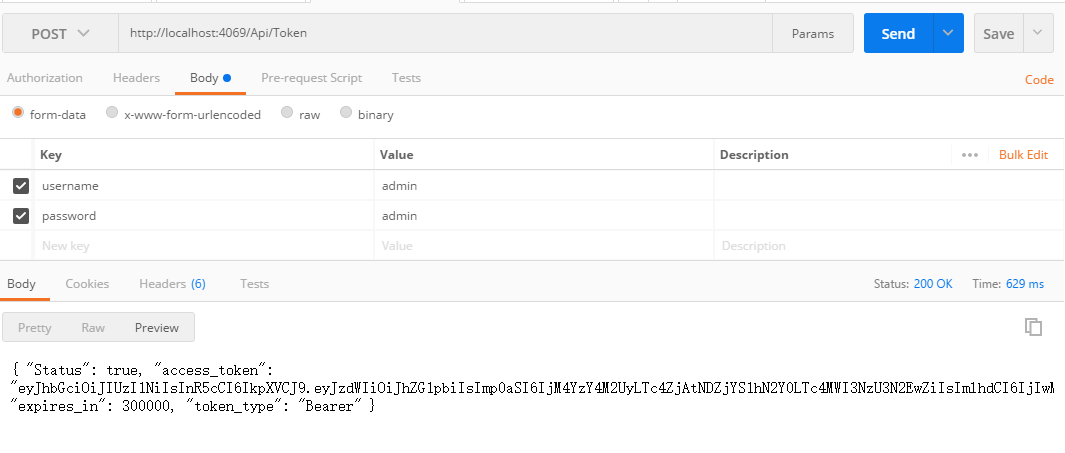
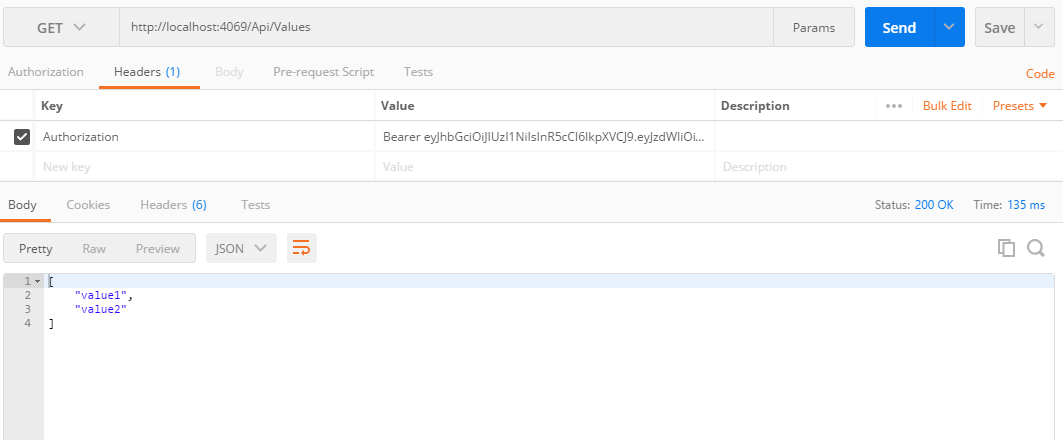
.net core 2.0 jwt身份认证系统的更多相关文章
- ASP.NET Core系列:JWT身份认证
1. JWT概述 JSON Web Token(JWT)是目前流行的跨域身份验证解决方案. JWT的官网地址:https://jwt.io JWT的实现方式是将用户信息存储在客户端,服务端不进行保存. ...
- ASP.NET Core 3.0 gRPC 身份认证和授权
一.开头聊骚 本文算是对于 ASP.NET Core 3.0 gRPC 研究性学习的最后一篇了,以后在实际使用中,可能会发一些经验之文.本文主要讲 ASP.NET Core 本身的认证授权和gRPC接 ...
- 关于ASP.Net Core Web及API身份认证的解决方案
6月15日,在端午节前的最后一个工作日,想起有段日子没有写过文章了,倒有些荒疏了.今借夏日蒸蒸之气,偷得浮生半日悠闲.闲话就说到这里吧,提前祝大家端午愉快(屈原听了该不高兴了:))!.NetCore自 ...
- 介绍 ASP.NET Identity - ASP.NET 应用程序的成员身份认证系统
ASP.NET Identity 是构建 ASP.NET web 应用程序的一种新的身份认证系统.ASP.NET Identity 可以让您的应用程序拥有登录功能,并可以轻松地自定义登录用户的相关数据 ...
- NET Core 2.0使用Cookie认证实现SSO单点登录
NET Core 2.0使用Cookie认证实现SSO单点登录 之前写了一个使用ASP.NET MVC实现SSO登录的Demo,https://github.com/bidianqing/SSO.Sa ...
- ASP.NET Core的无状态身份认证框架IdentityServer4
Identity Server 4是IdentityServer的最新版本,它是流行的OpenID Connect和OAuth Framework for .NET,为ASP.NET Core和.NE ...
- ASP.NET CORE中使用Cookie身份认证
大家在使用ASP.NET的时候一定都用过FormsAuthentication做登录用户的身份认证,FormsAuthentication的核心就是Cookie,ASP.NET会将用户名存储在Cook ...
- 中国科学技术大学统一身份认证系统CAS
CAS | Apereohttps://www.apereo.org/projects/cas 中国科学技术大学统一身份认证系统https://passport.ustc.edu.cn/login?s ...
- JWT 身份认证优缺点分析以及常见问题解决方案
本文转载自:JWT 身份认证优缺点分析以及常见问题解决方案 Token 认证的优势 相比于 Session 认证的方式来说,使用 token 进行身份认证主要有下面三个优势: 1.无状态 token ...
随机推荐
- Oracle导出导入
导出 exp 用户名/密码 file=文件名.dmp full=y; 导入 imp 用户名/密码 file=文件名.dmp full=y; 使用EXPDP和IMPDP时应该注意的事项: EXP和IMP ...
- shell脚本 - 快速到达目录
服务器中存放很多工程目录,通过ssh登录,需要手动敲命令,很麻烦,可以建立自动登录脚本 1.在服务器登录是默认的目录中建立脚本文件 vi drivers.sh #建立登录脚本 cd data/work ...
- HashSet中是如何判断元素是否重复的
HashSet不能添加重复的元素,当调用add(Object)方法时候, 首先会调用Object的hashCode方法判hashCode是否已经存在,如不存在则直接插入元素: 如果已存在则调用Obje ...
- 使用Spring AMQP开发消费者应用
前一篇中我们介绍了使用RabbitMQ Java Client访问RabbitMQ的方法.但是使用这种方式访问RabbitMQ,开发者在程序中需要自己管理Connection,Channel对象,Co ...
- iOS离屏渲染
为什么会使用离屏渲染 当使用圆角,阴影,遮罩的时候,图层属性的混合体被指定为在未预合成之前不能直接在屏幕中绘制,所以就需要屏幕外渲染被唤起. 屏幕外渲染并不意味着软件绘制,但是它意味着图层必须在被显示 ...
- 开源JS代码前面加!,+的意义
我们都知道,函数的声明方式有这两种 function fnA(){alert('msg');}//声明式定义函数 var fnB = function(){alert('msg');}//函数赋值表达 ...
- win 10 提升权限
问题:每次打开Visual Studio 提示,需要重启以获取管理员权限 解决: 1.Win+R 2.输入:gpedit.msc 3.windows设置->安全设置->本地策略->安 ...
- Android webRTC 代码下载编译
1.安装depot tools git clone https://chromium.googlesource.com/chromium/tools/depot_tools.git 然后把把depot ...
- Tiny4412 Uboot
1. Build uboot a) 安装好toolchain (arm-linux-gcc-4.5.1-v6-vfp-20120301.tgz)并设置好 环境变量PATH,保证可以正常使用. b) 解 ...
- python去掉括号之间的字符
在字符串中识别括号并删除括号及其中的内容括号包括 大中小 3种括号 输入为 1个字符串 s="我是一个人(中国人)[真的]{确定}"; 输出为 result = "我是一 ...