
Laravel开发:多用户登录验证(2)
上一篇讲了最基本的User验证,现在来讲一下Admin的验证。
先贴代码,
路由:routes/web.php加上以下代码,
//...

Route::get('admin/login', 'Admin\AuthController@showLoginForm');

Route::post('admin/login', 'Admin\AuthController@login');

Route::get('admin/register', 'Admin\AuthController@showRegistrationForm');

Route::post('admin/register', 'Admin\AuthController@register');

Route::post('admin/logout', 'Admin\AuthController@logout');

Route::get('admin', 'AdminController@index');
中间件:修改 config/auth.php 配置如下,
<?php

return [

    'defaults' => [

        'guard' => 'web',

        'passwords' => 'users',

    ],

    'guards' => [

        'web' => [

            'driver' => 'session',

            'provider' => 'users',

        ],

        'admin' => [

            'driver' => 'session',

            'provider' => 'admins',

        ],

        'api' => [

            'driver' => 'token',

            'provider' => 'users',

        ],

    ],

    'providers' => [

        'users' => [

            'driver' => 'eloquent',

            'model' => App\User::class,

        ],

        'admins' => [

            'driver' => 'eloquent',

            'model' => App\Admin::class,//根据需要设置命名空间名

            //'model' => App\Models\Admin::class,

        ],

    ],

    'passwords' => [

        'users' => [

            'provider' => 'users',

            'email' => 'auth.emails.password',

            'table' => 'password_resets',

           'expire' => 60,

        ],

    ],

];
控制器:
app/Http/Controllers/Admin/AuthController.php
代替
app/Http/Controllers/Auth/RegisterController.php 与 app/Http/Controllers/Auth/LoginController.php 所负责登录注册业务
<?php

namespace App\Http\Controllers\Admin;

use App\Admin;

use Validator;

use App\Http\Controllers\Controller;

use Illuminate\Foundation\Auth\ThrottlesLogins;

use Illuminate\Foundation\Auth\AuthenticatesUsers;

use Illuminate\Http\Request;

use Illuminate\Auth\Events\Registered;

use Illuminate\Support\Facades\Auth;

use Illuminate\Support\Facades\DB;

//use Illuminate\Foundation\Auth\RegistersUsers;

class AuthController extends Controller

{

    //use AuthenticatesUsers, ThrottlesLogins;

    //use RegistersUsers;

    use AuthenticatesUsers;

    protected $redirectTo = '/admin';

    protected $guard = 'admin';

    protected $loginView = 'admin.login';

    protected $registerView = 'admin.register';

    public function __construct()

    {

        $this->middleware('guest:admin', ['except' => 'logout']);

        //$this->middleware('guest:admin')->except('logout');

        //$this->middleware('auth');

    }

    public function showRegistrationForm(){

        return view('admin.register');

    }

    public function register(Request $request){

        $this->validator($request->all())->validate();

        event(new Registered($user = $this->create($request->all())));

        $this->guard()->login($user);

        return $this->registered($request, $user)

        ?: redirect($this->redirectPath());

    }

    protected function registered(Request $request, $user)

    {

        //

    }

    protected function guard()

    {

        return Auth::guard('admin');

    }

    public function showLoginForm()

    {

        return view('admin.login');

    }

    public function login(Request $request){

        $this->validateLogin($request);

        // If the class is using the ThrottlesLogins trait, we can automatically throttle

        // the login attempts for this application. We'll key this by the username and

        // the IP address of the client making these requests into this application.

        if ($this->hasTooManyLoginAttempts($request)) {

            $this->fireLockoutEvent($request);

            return $this->sendLockoutResponse($request);

        }

        if ($this->attemptLogin($request)) {

            return $this->sendLoginResponse($request);

        }

        // If the login attempt was unsuccessful we will increment the number of attempts

        // to login and redirect the user back to the login form. Of course, when this

        // user surpasses their maximum number of attempts they will get locked out.

        $this->incrementLoginAttempts($request);

        return $this->sendFailedLoginResponse($request);

    }

    public function username()

    {

        return 'email';

    }

    public function logout(Request $request)

    {

        $this->guard()->logout();

        $request->session()->flush();

        $request->session()->regenerate();

        return redirect('/');

    }

    protected function validateLogin(Request $request)

    {

        $this->validate($request, [

            'email' => 'required|string',

            'password' => 'required|string',

        ]);

    }

    protected function validator(array $data)

    {

        return Validator::make($data, [

            'name' => 'required|max:255',

            'email' => 'required|email|max:255|unique:admin',

            'password' => 'required|confirmed|min:6',

        ]);

    }

    protected function create(array $data)

    {

        return Admin::create([

            'name' => $data['name'],

            'email' => $data['email'],

            'password' => bcrypt($data['password']),

        ]);

    }

}
app/Http/Controllers/Admin/AdminController.php
代替
app/Http/Controllers/Home/HomeController.php 所负责的登陆后跳转等业务逻辑
<?php

namespace App\Http\Controllers;

use Illuminate\Http\Request;

use App\Http\Requests;

use App\Http\Controllers\Controller;

use Auth;

class AdminController extends Controller

{

    protected $redirectTo = '/admin';

    protected $guard = 'admin';

    public function __construct()

    {

        $this->middleware('auth:admin');

        //$this->middleware('guest:admin', ['except' => 'logout']);

    }

    public function index()

    {

        return view('admin.home');

        //$admin = \Illuminate\Support\Facades\Auth::guard('admin')->user();

        //return $admin->name;

    }

}
Table表: admin
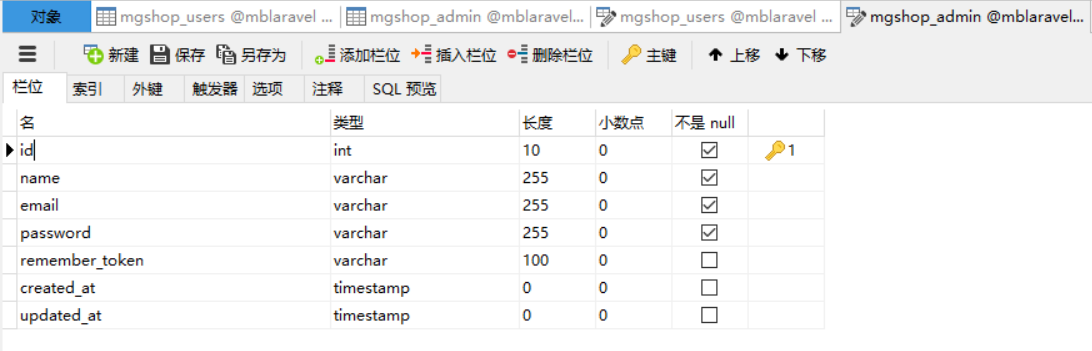
CREATE TABLE `mgshop_admin` (

  `id` int(10) unsigned NOT NULL AUTO_INCREMENT,

  `name` varchar(255) COLLATE utf8mb4_unicode_ci NOT NULL,

  `email` varchar(255) COLLATE utf8mb4_unicode_ci NOT NULL,

  `password` varchar(255) COLLATE utf8mb4_unicode_ci NOT NULL,

  `remember_token` varchar(100) COLLATE utf8mb4_unicode_ci DEFAULT NULL,

  `created_at` timestamp NULL DEFAULT NULL,

  `updated_at` timestamp NULL DEFAULT NULL,

  PRIMARY KEY (`id`)

) ENGINE=InnoDB AUTO_INCREMENT=5 DEFAULT CHARSET=utf8mb4 COLLATE=utf8mb4_unicode_ci;
Model:app/Admin.php
<?php

namespace App;

use Illuminate\Auth\Authenticatable;

use Illuminate\Database\Eloquent\Model;

use Illuminate\Contracts\Auth\Authenticatable as AuthenticatableContracts;

class Admin extends Model implements AuthenticatableContracts

{

    use Authenticatable;

    protected $table = 'admin';//'admin';//设置表名

    protected $primaryKey = 'id';//'AdminID';//设置主键

    public $timestamps = false;

    protected $fillable = ['name','email','password'];//开启白名单字段

}
app/Http/Middleware/RedirectIfAuthenticated.php(在构造函数中修改 guest 中间件,用来跳转不同路由:)
public function handle($request, Closure $next, $guard = null)

    {

        if (Auth::guard($guard)->check()) {

            // 根据不同 guard 跳转到不同的页面

            $url = $guard ? 'admin':'/home';

            return redirect($url);

        }

        /* if (Auth::guard($guard)->check()) {

            return redirect('/home');

        } */

        return $next($request);

    }
域名+/login
域名+/admin/login
访问测试!
此链接有类似且详细的实现方式,可做参考。Laravel 5.3 多用户表登录实现:http://laravelacademy.org/post/5925.html
版权声明:本文为博主原创文章,未经博主允许不得转载。
Laravel开发:多用户登录验证(2)的更多相关文章
- Laravel开发:多用户登录验证(1)
之前实现了一次,后来代码忘记放哪了,所以有跳了一次坑. 先贴上Laravel自带的验证代码: 路由:routes/web.php // Authentication Routes... $this-& ...
- Android开发之登录验证
最近在做一个小项目,项目开发中需要实现一个登录验证功能,具体的要求就是,在Android端输入用户名和密码,在服务器端验证MySQL数据库中是否有此用户,实现之前当然首要的是,如何使Android端的 ...
- laravel后台账户登录验证(5.5.48版本)
首先我是菜鸟,对laravel框架也不是很熟悉,突然有一天心血来潮就想研究一下laravel的后台登录用户登录的流程, 虽然公司项目中有这样的一套流程,也看了好几遍,越看越简单,越看我就越会了,当自己 ...
- Axure实现多用户注册验证
*****多用户登录验证***** 一.(常规想法)方法:工作量较大,做起来繁琐 1.当用户名和密码相同时怎么区分两者,使用冒号和括号来区分: eg. (admin:123456)(123456:de ...
- Laravel登录验证碰到的坑 哈希验证匹配问题
用laravel 写登录验证 本来是用Crypt加密 添加用户到数据库的 后来验证密码 解密时一直报错 The payload is invaild 由于本人是laravel框架小白 自己思考许久未 ...
- 基于 Laravel 开发博客应用系列 —— 设置 Linux/Mac 本地开发环境
1.不同 Linux 发行版本的区别 不同的 Linux 发行版本之间有一些细微区别,尤其是包管理器:CentOS 和 Fedora 使用 yum 作为包管理器,而Ubuntu 使用 apt,在 O ...
- laravel 开发辅助工具
laravel 开发辅助工具 配置 添加服务提供商 将下面这行添加至 config/app.php 文件 providers 数组中: 'providers' => [ ... App\Plug ...
- 手摸手教你让Laravel开发Api更得心应手
https://www.guaosi.com/2019/02/26/laravel-api-initialization-preparation/ 1. 起因 随着前后端完全分离,PHP也基本告别了v ...
- 如何使用laravel搭建后台登录系统
今天想用laravel搭建一个后台系统,就需要最简单的那种,有用户登录系统,试用了下,觉得laravel的用户登录这块做的还真happy.当然,前提就是,你要的用户管理系统是最简单的那种,就是没有用户 ...
随机推荐
- How to create an IPA (Xcode 5)
This tutorial will walk you through the easiest way to generate an IPA using Xcode 5. We will be usi ...
- Persisting iOS Application Data in SQLite Database Using FMDB
In previous articles we have utilized NSUserDefaults and .NET web services to persist iPhone data. N ...
- 【SVN】删除SVN上的历史资源路径和SVN上的历史用户信息
1.删除svn上历史资源路径 window--show view--other--svn资源库 可以右键选择删除 . ----------------------------------------- ...
- MessageFormat.format 字符串的模板替换
项目目前在消息的模版,模版中需要替换很多参数,比方说“用户名”,“日期”等等.不过目前没有想到更好的替换参数的方法,所以目前只能使用一个比较简单的方式来实现.这个方式太死板,参数对应必须要在代码中写死 ...
- Linux文件压缩与解压命令
1 .zip 格式压缩与解压 压缩命令 zip 压缩文件名 源文件 zip -r 压缩目录名 源目录 解压命令 unzip 文件名 td@td-Lenovo-IdeaPad-Y41 ...
- ElasticSearch _xpack角色管理
权限管理可以通过kibana的Management界面进行,本篇主要介绍的是通过命令进行,角色API使您能够在本机域中添加,删除和检索角色. 要使用此API,您必须至少具有manage_securit ...
- Spark jdbc postgresql数据库连接和写入操作源代码解读
概述:Spark postgresql jdbc 数据库连接和写入操作源代码解读.具体记录了SparkSQL对数据库的操作,通过java程序.在本地开发和执行.总体为,Spark建立数据库连接,读取数 ...
- Tomcat 编码不一致导致乱码
众所周知,Tomcat是一个基于HTTP协议的Java应用服务器(非Web服务器),也是一个Servlet容器. 一般我们会基于使用HTTP协议的Post或Get方法来传递内容或参数,中间会涉及一些编 ...
- Rails中nil? empty? blank? present?的区别
.nil? Ruby方法 .nil?方法被放置在Object类中,可以被任何对象调用,如果是nil则返回true 在Rails中只有nil对象才会返回true nil.nil? #=> true ...
- 点击Div,显示其innerHTML
<!DOCTYPE html PUBLIC "-//W3C//DTD XHTML 1.0 Transitional//EN" "http://www.w3.org/ ...