
Spark提交任务(Standalone和Yarn)
Spark Standalone模式提交任务
Cluster模式:
./spark-submit  \
--master spark://node01:7077  \
--deploy-mode cluster
--class org.apache.spark.examples.SparkPi \
--driver-memory 1g \
--executor-memory 1g \
--executor-cores 2 \
../lib/spark-examples-1.6.0-hadoop2.6.0.jar  100
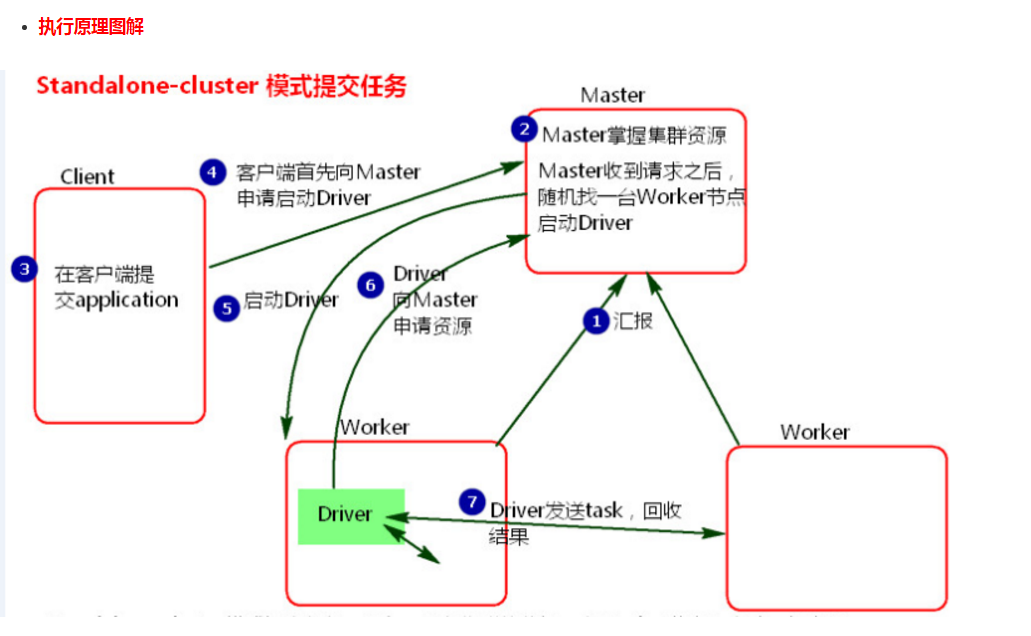
- 执行流程
1、cluster模式提交应用程序后,会向Master请求启动Driver.(而不是启动application)
2、Master接受请求,随机在集群一台节点启动Driver进程。
3、Driver启动后为当前的应用程序申请资源。Master返回资源,并在对应的worker节点上发送消息启动Worker中的executor进程。
4、Driver端发送task到worker节点上执行。
5、worker将执行情况和执行结果返回给Driver端。Driver监控task任务,并回收结果。
- 总结
1、当在客户端提交多个application时,Driver会在Woker节点上随机启动,这种模式会将单节点的网卡流量激增问题分散到集群中。在客户端看不到task执行情况和结果。要去webui中看。cluster模式适用于生产环境
2、 Master模式先启动Driver,再启动Application。
Client模式:
 ./spark-submit \
--master  spark://node01:7077 \
--class org.apache.spark.examples.SparkPi  \
--driver-memory 1g \

--executor-memory 1g \

--executor-cores 2 \
../lib/spark-examples-1.6.0-hadoop2.6.0.jar 100


---------------------------------------------------------------------

 ./spark-submit \
--master  spark://node01:7077 \
--deploy-mode client \
--class org.apache.spark.examples.SparkPi \
--driver-memory 1g \

--executor-memory 1g \

--executor-cores 2 \
../lib/spark-examples-1.6.0-hadoop2.6.0.jar 100
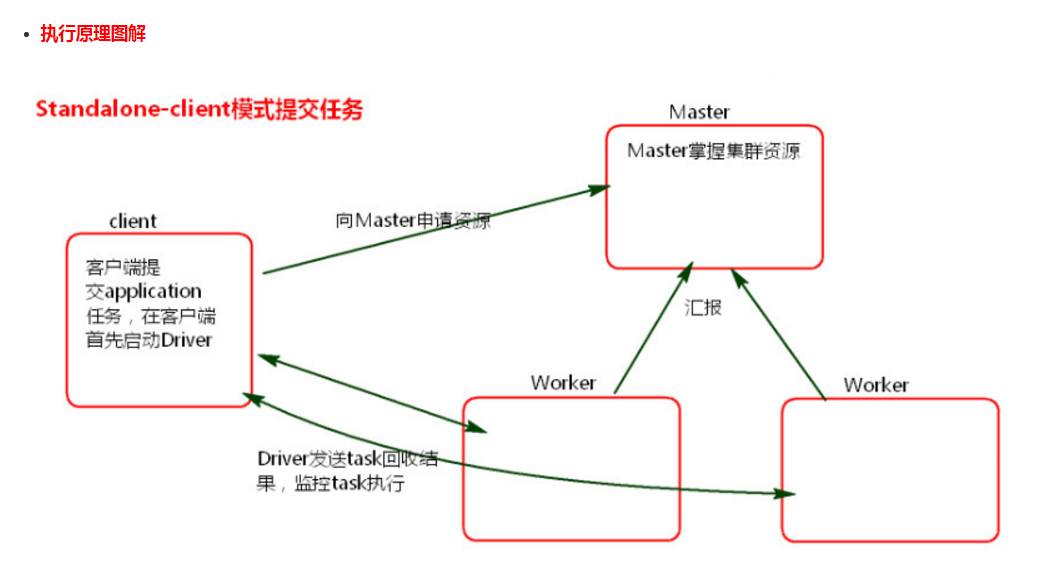
- 执行流程
1、client模式提交任务后,会在客户端启动Driver进程。
2、Driver会向Master申请启动Application启动的资源。
3、资源申请成功,Driver端将task发送到worker端执行。
4、worker将task执行结果返回到Driver端。
- 总结
1、client模式适用于测试调试程序。Driver进程是在客户端启动的,这里的客户端就是指提交应用程序的当前节点。在Driver端可以看到task执行的情况。生产环境下不能使用client模式,是因为:假设要提交100个application到集群运行,Driver每次都会在client端启动,那么就会导致客户端100次网卡流量暴增的问题。(因为要监控task的运行情况,会占用很多端口,如上图的结果图)客户端网卡通信,都被task监控信息占用。
2、Client端作用
1. Driver负责应用程序资源的申请
2. 任务的分发。
3. 结果的回收。
4. 监控task执行情况。
Spark on yarn模式提交任务
官方文档:http://spark.apache.org/docs/latest/running-on-yarn.html
Spark-Yarn Cluster模式:
./bin/spark-submit --class org.apache.spark.examples.SparkPi \

--master yarn \

--deploy-mode cluster \

--driver-memory 1g \

--executor-memory 1g \

--executor-cores  \

--queue default \

lib/spark-examples*.jar \

---------------------------------------------------------------------------------------------------------------------------------

./bin/spark-submit --class cn.edu360.spark.day1.WordCount \

--master yarn \

--deploy-mode cluster \

--driver-memory 1g \

--executor-memory 1g \

--executor-cores  \

--queue default \

/home/bigdata/hello-spark-1.0.jar \

hdfs://node-1.edu360.cn:9000/wc hdfs://node-1.edu360.cn:9000/out-yarn-1
Spark-yarn Cluster集群模式原理
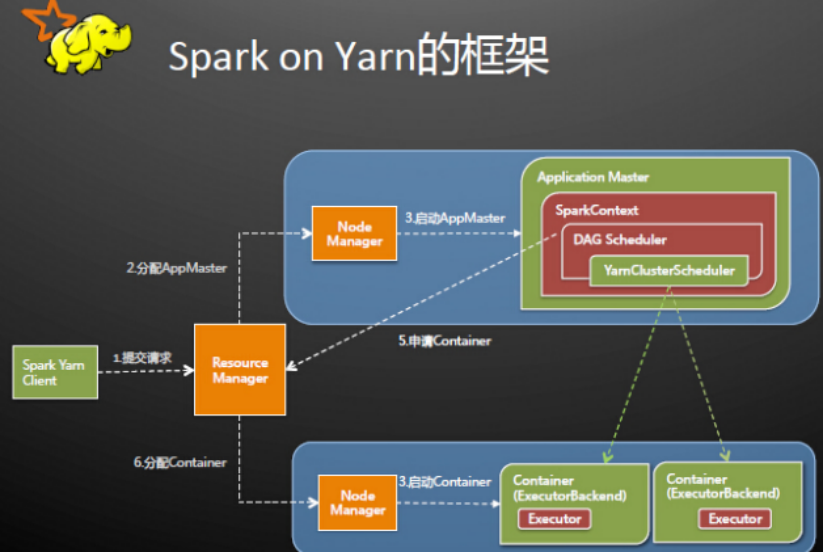
Spark Driver首先作为一个ApplicationMaster在YARN集群中启动,客户端提交给ResourceManager的每一个job都会在集群的NodeManager节点上分配一个唯一的ApplicationMaster,由该ApplicationMaster管理全生命周期的应用。具体过程:
. 由client向ResourceManager提交请求,并上传jar到HDFS上

  这期间包括四个步骤:

    a).连接到RM

    b).从RM的ASM(ApplicationsManager )中获得metric、queue和resource等信息。

    c). upload app jar and spark-assembly jar

    d).设置运行环境和container上下文(launch-container.sh等脚本)

. ResouceManager向NodeManager申请资源,创建Spark ApplicationMaster(每个SparkContext都有一个ApplicationMaster)

. NodeManager启动ApplicationMaster,并向ResourceManager AsM注册

. ApplicationMaster从HDFS中找到jar文件,启动SparkContext、DAGscheduler和YARN Cluster Scheduler

. ResourceManager向ResourceManager AsM注册申请container资源

. ResourceManager通知NodeManager分配Container,这时可以收到来自ASM关于container的报告。(每个container对应一个executor)

. Spark ApplicationMaster直接和container(executor)进行交互,完成这个分布式任务。
Spark-Yarn Client模式:
./bin/spark-submit --class org.apache.spark.examples.SparkPi \

--master yarn \

--deploy-mode client \

--driver-memory 1g \

--executor-memory 1g \

--executor-cores  \

--queue default \

lib/spark-examples*.jar \

spark-shell必须使用client模式

./bin/spark-shell --master yarn --deploy-mode client
实际案例:在YARN模式,executor-cores和executor-memory的设置对调度计算机的性能作用很重要
$ ./bin/spark-submit \

  --class cn.cstor.face.BatchCompare \

  --master yarn \

  --deploy-mode client \

  --executor-memory 30G \

  --executor-cores 20 \

  --properties-file $BIN_DIR/conf/cstor-spark.properties \

  cstor-deep-1.0-SNAPSHOT.jar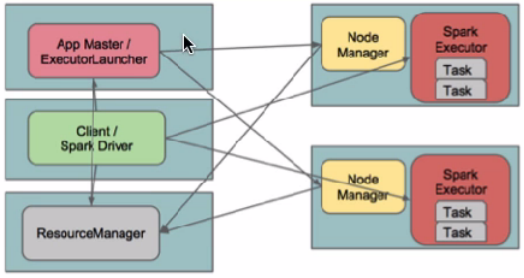
在client模式下,Driver运行在Client上,通过ApplicationMaster向RM获取资源。本地Driver负责与所有的executor container进行交互,并将最后的结果汇总。结束掉终端,相当于kill掉这个spark应用。一般来说,如果运行的结果仅仅返回到terminal上时需要配置这个。
客户端的Driver将应用提交给Yarn后,Yarn会先后启动ApplicationMaster和executor,另外ApplicationMaster和executor都 是装载在container里运行,container默认的内存是1G,ApplicationMaster分配的内存是driver- memory,executor分配的内存是executor-memory。同时,因为Driver在客户端,所以程序的运行结果可以在客户端显 示,Driver以进程名为SparkSubmit的形式存在。
如果使用spark on yarn 提交任务,一般情况,都使用cluster模式,该模式,Driver运行在集群中,其实就是运行在ApplicattionMaster这个进程成,如果该进程出现问题,yarn会重启ApplicattionMaster(Driver),SparkSubmit的功能就是为了提交任务。
如果使用交换式的命令行,必须用Client模式,该模式,Driver是运行在SparkSubmit进程中,因为收集的结果,必须返回到命令行(即启动命令的那台机器上),该模式,一般测试,或者运行spark-shell、spark-sql这个交互式命令行是使用
注意:如果你配置spark-on-yarn的client模式,其实会报错。

修改所有yarn节点的yarn-site.xml,在该文件中添加如下配置

<property>

    <name>yarn.nodemanager.pmem-check-enabled</name>

    <value>false</value>

</property>

<property>

    <name>yarn.nodemanager.vmem-check-enabled</name>

    <value>false</value>

</property>
两种模式的区别(yarn):
cluster模式:Driver程序在Yarn中运行,应用的运行结果不能在客户端显示,所以最好运行那些将结果最终保存在外部存储介质(如HDFS,Redis,MySQL)而非stdout输出的应用程序,客户端的终端显示的仅是作为Yarn的job的简单运行状况.
client模式:Driver运行在Client上,应用程序运行结果会在客户端显示,所有适合运行结果又输出的应用程序(Spark-shell)
Spark-Submit 参数详解:
  --master MASTER_URL         spark://host:port, mesos://host:port, yarn, or local.

  --deploy-mode DEPLOY_MODE   Whether to launch the driver program locally ("client") or

                              on one of the worker machines inside the cluster ("cluster")

                              (Default: client).

  --class CLASS_NAME          Your application's main class (for Java / Scala apps).

  --name NAME                 A name of your application.

  --jars JARS                 Comma-separated list of local jars to include on the driver

                              and executor classpaths.

  --packages                  Comma-separated list of maven coordinates of jars to include

                              on the driver and executor classpaths. Will search the local

                              maven repo, then maven central and any additional remote

                              repositories given by --repositories. The format for the

                              coordinates should be groupId:artifactId:version.

  --exclude-packages          Comma-separated list of groupId:artifactId, to exclude while

                              resolving the dependencies provided in --packages to avoid

                              dependency conflicts.

  --repositories              Comma-separated list of additional remote repositories to

                              search for the maven coordinates given with --packages.

  --py-files PY_FILES         Comma-separated list of .zip, .egg, or .py files to place

                              on the PYTHONPATH for Python apps.

  --files FILES               Comma-separated list of files to be placed in the working

                              directory of each executor.

  --conf PROP=VALUE

  --properties-file FILE      从文件中载入额外的配置,如果不指定则载入conf/spark-defaults.conf。

  --driver-memory MEM         Memory for driver (e.g. 1000M, 2G) (Default: 1024M).

  --driver-java-options       Extra Java options to pass to the driver.

  --driver-library-path       Extra library path entries to pass to the driver.

  --driver-class-path         Extra class path entries to pass to the driver. Note that

                              jars added with --jars are automatically included in the

                              classpath.

  --executor-memory MEM       Memory per executor (e.g. 1000M, 2G) (Default: 1G).

  --proxy-user NAME           User to impersonate when submitting the application.

  --help, -h                  Show this help message and exit

  --verbose, -v               Print additional debug output

  --version,                  Print the version of current Spark
YARN-only:

Options:

  --driver-cores NUM          driver使用的核心数,只在cluster模式使用,默认值为1。

  --queue QUEUE_NAME          提交到指定的YARN队列,默认队列为"default"。

  --num-executors NUM         启动的executor的数量,默认值为2.

  --archives ARCHIVES         Comma separated list of archives to be extracted into the

                              working directory of each executor.

  --principal PRINCIPAL       Principal to be used to login to KDC, while running on

                              secure HDFS.

  --keytab KEYTAB             The full path to the file that contains the keytab for the

                              principal specified above. This keytab will be copied to

                              the node running the Application Master via the Secure

                              Distributed Cache, for renewing the login tickets and the

                              delegation tokens periodically.
注意:如果部署模式是cluster,但是代码中有标准输出的话将看不到,需要把结果写到HDFS中,如果是client模式则可以看到输出。
Spark提交任务(Standalone和Yarn)的更多相关文章
- spark 提交任务报错 Yarn application has already ended! It might have been killed or unable to launch application master
1.任务是提交在yarn上的,查看 resourceManager页面 有如下信息 Current usage: 58.4 MB of 1 GB physical memory used; 2.2 G ...
- Spark:三种任务提交流程standalone、yarn-cluster、yarn-client
spark的runtime参考:Spark:Yarn-cluster和Yarn-client区别与联系浪尖分享资料 standalone Spark可以通过部署与Yarn的架构类似的框架来提供自己的集 ...
- Spark 学习笔记之 Standalone与Yarn启动和运行时间测试
Standalone与Yarn启动和运行时间测试: 写一个简单的wordcount: 打包上传运行: Standalone启动: 运行时间: Yarn启动: 运行时间: 测试结果: Standalon ...
- Spark基本工作流程及YARN cluster模式原理(读书笔记)
Spark基本工作流程及YARN cluster模式原理 转载请注明出处:http://www.cnblogs.com/BYRans/ Spark基本工作流程 相关术语解释 Spark应用程序相关的几 ...
- spark提交模式
spark基本的提交语句: ./bin/spark-submit \ --class <main-class> \ --master <master-url> \ --depl ...
- spark提交应用的方法(spark-submit)
参考自:https://spark.apache.org/docs/latest/submitting-applications.html 常见的语法: ./bin/spark-submit \ ...
- spark提交命令 spark-submit 的参数 executor-memory、executor-cores、num-executors、spark.default.parallelism分析
转载:https://blog.csdn.net/zimiao552147572/article/details/96482120 nohup spark-submit --master yarn - ...
- spark提交异常日志分析
java.lang.NoSuchMethodError: org.apache.spark.sql.SQLContext.sql(Ljava/lang/String;)Lorg/apache/spar ...
- 3 weekend110的job提交的逻辑及YARN框架的技术机制 + MR程序的几种提交运行模式
途径1: 途径2: 途径3: 成功! 由此,可以好好比较下,途径1和途径2 和途径3 的区别. 现在,来玩玩weekend110的joba提交的逻辑之源码跟踪 原来如此,weekend110的job提 ...
随机推荐
- 如何在eclipse查看jdk源码(src.zip)
在eclipse编写代码的过程中,有时候想点进去看看jdk的源码,了解下里面具体的实现.在没有任何配置的情况下,应该是看不到源码的. 其实只需要把jdk安装目录下的src.zip压缩包添加到eclip ...
- Angular搭建脚手架
1.安装CLI: cnpm install -g @angular/cli //卸载: npm uninstall -g @angular/cli npm cache clean 2.检测是否成功 ...
- better-scroll 遇到的问题 2
问题的描述: 在歌曲列表页面使用了scroll插件,搜索了很多歌曲,页面出现滚动,选择播放一首歌曲,弹出播放器,将播放器最小化,页面回到歌曲列表,并且页面的底部出播放歌曲的信息(在没有播放歌曲的时候是 ...
- ASP.NET MVC 音乐商店 - 5. 通过支架创建编辑表单
在上一章,我们已经从数据库获取数据,然后显示出来,这一章,我们将允许编辑数据. 创建 StoreManagerController 控制器 我们将要创建称为 StoreManager 的控制器,对于这 ...
- 安装Android模拟器Genymotion【Android学习入门】
安装Android模拟器Genymotion 推荐教程:一个强大的Android模拟器Genymotion具体内容如下: 相信很多Android开发者一定受够了速度慢.体验差效率及其地下的官方模拟器了 ...
- python 不同目录间的模块调用
有时候调用的模块不再同一个目录.直接import 是加载不进来的.默认的加载路径是sys.path中指定的路径.如果要指定加载的目录得需要把这个目录加到sys.path里面. 比如要加载父目录的同级目 ...
- Annotation版本的HelloWorld
hiberante 的 annotation历史: 在hibernate3以后,开始支持Annotation; 先有hiberante再有JPA,有了JPA标准之后,hibernate写了Annota ...
- selenium server在页面加载超时浏览器与driver通信失败时的妙用
事实上,WebDriver有两种方式“驱动”浏览器的方式.1. Selenium Server:和Selenium RC一样的,通过指定远端服务器IP地址和端口号,由这个远端服务器来驱动浏览器.2. ...
- CentOS6下DHCP服务(二)简单配置案例及故障排查
1.预分配网络参数如下:linux服务器:eth0 IP为192.168.8.250 做为局域网DHCP服务器局域网网段设置为192.168.8.0/24:内部计算机的router为192.168. ...
- April 10 2017 Week 15 Monday
He alone is poor who does not possess knowledge. 没有知识,才是贫穷. Knowledge, as a important part of wisdom ...