
Redhat 6.4 linux系统不重启识别热添加的硬盘方法
1.1 选择虚拟机添加一块硬盘
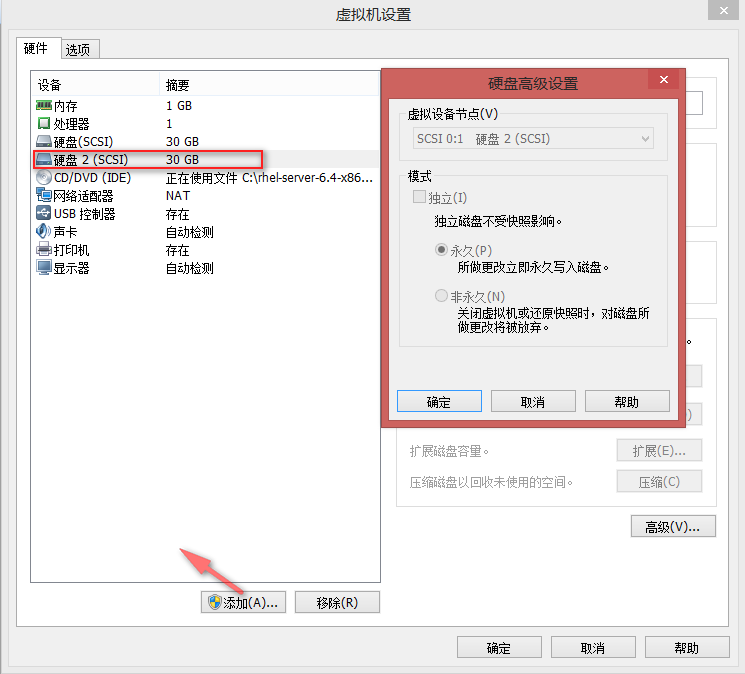
1.2 查看系统当前磁盘信息
[root@zhongyi-test ~]# ls -l /dev/sd*

brw-rw----. 1 root disk 8, 0 Jun 10 09:49 /dev/sda

brw-rw----. 1 root disk 8, 1 Jun 10 09:49 /dev/sda1

brw-rw----. 1 root disk 8, 2 Jun 10 09:49 /dev/sda2

brw-rw----. 1 root disk 8, 3 Jun 10 09:49 /dev/sda3
1.3 在shell命令行执行以下命令
[root@zhongyi-test ~]# echo "- - -" > /sys/class/scsi_host/host0/scan
[root@zhongyi-test ~]# echo "- - -" > /sys/class/scsi_host/host1/scan
[root@zhongyi-test ~]# echo "- - -" > /sys/class/scsi_host/host2/scan
1.4 查看/var/log/messages系统日志,出现重新扫描磁盘日志
[root@zhongyi-test ~]# less /var/log/messages

Jun 10 10:27:02 zhongyi-test rsyslogd: [origin software="rsyslogd" swVersion="5.8.10" x-pid="1475" x-info="http://www.rsyslog.com"] rsyslogd was HUPed

Jun 10 10:27:33 zhongyi-test rhsmd: In order for Subscription Manager to provide your system with updates, your system must be registered with the Customer Portal. Please enter your Red Hat login to ensure your system is up-to-date.

Jun 10 10:27:38 zhongyi-test kernel: scsi 2:0:1:0: Direct-Access     VMware,  VMware Virtual S 1.0  PQ: 0 ANSI: 2

Jun 10 10:27:38 zhongyi-test kernel: scsi target2:0:1: Beginning Domain Validation

Jun 10 10:27:38 zhongyi-test kernel: scsi target2:0:1: Domain Validation skipping write tests

Jun 10 10:27:38 zhongyi-test kernel: scsi target2:0:1: Ending Domain Validation

Jun 10 10:27:38 zhongyi-test kernel: scsi target2:0:1: FAST-40 WIDE SCSI 80.0 MB/s ST (25 ns, offset 127)

Jun 10 10:27:38 zhongyi-test kernel: sd 2:0:1:0: [sdb] 62914560 512-byte logical blocks: (32.2 GB/30.0 GiB)

Jun 10 10:27:38 zhongyi-test kernel: sd 2:0:1:0: [sdb] Write Protect is off

Jun 10 10:27:38 zhongyi-test kernel: sd 2:0:1:0: [sdb] Cache data unavailable

Jun 10 10:27:38 zhongyi-test kernel: sd 2:0:1:0: [sdb] Assuming drive cache: write through

Jun 10 10:27:38 zhongyi-test kernel: sd 2:0:1:0: [sdb] Cache data unavailable

Jun 10 10:27:38 zhongyi-test kernel: sd 2:0:1:0: [sdb] Assuming drive cache: write through

Jun 10 10:27:38 zhongyi-test kernel: sdb: unknown partition table

Jun 10 10:27:38 zhongyi-test kernel: sd 2:0:1:0: [sdb] Cache data unavailable

Jun 10 10:27:38 zhongyi-test kernel: sd 2:0:1:0: [sdb] Assuming drive cache: write through

Jun 10 10:27:38 zhongyi-test kernel: sd 2:0:1:0: [sdb] Attached SCSI disk

Jun 10 10:27:38 zhongyi-test kernel: sd 2:0:1:0: Attached scsi generic sg2 type 0
1.5 验证磁盘是否添加成功(标绿代表添加成功)
方式一(ls命令查看/dev/目录):

[root@zhongyi-test ~]# ls -l /dev/sd*

brw-rw----. 1 root disk 8,  0 Jun 10 09:49 /dev/sda

brw-rw----. 1 root disk 8,  1 Jun 10 09:49 /dev/sda1

brw-rw----. 1 root disk 8,  2 Jun 10 09:49 /dev/sda2

brw-rw----. 1 root disk 8,  3 Jun 10 09:49 /dev/sda3

brw-rw----. 1 root disk 8, 16 Jun 10 10:27 /dev/sdb

方法二(fdisk命令查看):

[root@zhongyi-test ~]# fdisk -l /dev/sd*

Disk /dev/sda: 32.2 GB, 32212254720 bytes

255 heads, 63 sectors/track, 3916 cylinders

Units = cylinders of 16065 * 512 = 8225280 bytes

Sector size (logical/physical): 512 bytes / 512 bytes

I/O size (minimum/optimal): 512 bytes / 512 bytes

Disk identifier: 0x0009fb16

   Device Boot      Start         End      Blocks   Id  System

/dev/sda1               1          26      204800   83  Linux

Partition 1 does not end on cylinder boundary.

/dev/sda2   *          26          90      512000   83  Linux

Partition 2 does not end on cylinder boundary.

/dev/sda3              90        3917    30739456   8e  Linux LVM

Disk /dev/sda1: 209 MB, 209715200 bytes

255 heads, 63 sectors/track, 25 cylinders

Units = cylinders of 16065 * 512 = 8225280 bytes

Sector size (logical/physical): 512 bytes / 512 bytes

I/O size (minimum/optimal): 512 bytes / 512 bytes

Disk identifier: 0x00000000

Disk /dev/sda2: 524 MB, 524288000 bytes

255 heads, 63 sectors/track, 63 cylinders

Units = cylinders of 16065 * 512 = 8225280 bytes

Sector size (logical/physical): 512 bytes / 512 bytes

I/O size (minimum/optimal): 512 bytes / 512 bytes

Disk identifier: 0x00000000

Disk /dev/sda3: 31.5 GB, 31477202944 bytes

255 heads, 63 sectors/track, 3826 cylinders

Units = cylinders of 16065 * 512 = 8225280 bytes

Sector size (logical/physical): 512 bytes / 512 bytes

I/O size (minimum/optimal): 512 bytes / 512 bytes

Disk identifier: 0x00000000

Disk /dev/sdb: 32.2 GB, 32212254720 bytes

255 heads, 63 sectors/track, 3916 cylinders

Units = cylinders of 16065 * 512 = 8225280 bytes

Sector size (logical/physical): 512 bytes / 512 bytes

I/O size (minimum/optimal): 512 bytes / 512 bytes

Disk identifier: 0x00000000
结束 ok,至此磁盘在不重启linux系统下添加成功^_^!!!
Redhat 6.4 linux系统不重启识别热添加的硬盘方法的更多相关文章
- linux 不重启识别新添加的硬盘
1.fdisk -l 看有没有新的磁盘 oebiotech@hadoop08:/media/nbc9$ sudo fdisk -l |grep sdl 2.查看主机总线 oebiotech@hadoo ...
- linux系统下重启tomcat的shell脚本
linux系统下重启tomcat的shell脚本: #!/bin/shtomcat_home=/opt/apache-tomcat- #找到tomcat进程的id并kill掉 ps -ef |grep ...
- Redhat系的Linux系统里,网络主要设置文件简介【转载】
以下是原文地址,转载请指明出处: http://blog.chinaunix.net/uid-26495963-id-3230810.html 一.配置文件详解在RHEL或者CentOS等Redhat ...
- Linux系统采用netstat命令查看DDOS攻击的方法
Linux系统采用netstat命令查看DDOS攻击的方法 来源:互联网 作者:佚名 时间:07-05 15:10:21 [大 中 小] 这篇文章主要为大家介绍了Linux系统采用netstat命令查 ...
- 【Linux】查看所使用的Linux系统是32位还是64 位的方法
查看所使用的Linux系统是32位还是64 位的方法 方法一:getconf LONG_BIT # getconf LONG_BIT 1 1 我的Linux是32位!!! 方法二:arch # arc ...
- Linux系统下重启Tomcat
在Linux系统下,重启Tomcat使用命令操作的! 首先,进入Tomcat下的bin目录 cd /usr/local/tomcat/bin 使用Tomcat关闭命令 ./shutdown.sh 查看 ...
- Linux不重启识别新添加的磁盘
现网的一台EXSI 下的虚拟机一般在进行配置变更后都会通过重启来识别新增的配置,不过业务侧某台主机因为业务需要无法重启,想通过不重启直接识别护容上去的新磁盘.经测试,发现如下方可以解决. 1.通过ex ...
- Linux系统 关机/重启/用户切换/注销,用户管理(用户创建/修改,用户组增加/删除),Linux中 / 和 ~ 的区别
1.关机/重启命令 shutdown命令 shutdown -h now :立即关机 shutdown -h 1 :1分钟后关机 shutdown -r now :立即重启 shutdown -r 1 ...
- (扩展根目录容量方法汇总)把Linux系统迁移到另一个分区或者硬盘
Linux系统扩容方法汇总 相信很多朋友都有过这样的经历,本想装个Ubantu玩玩,没想到玩久了反而不习惯Windows了,然而开始装系统的时候只分配了非常小的空间,那应该怎样扩展我们的ubantu呢 ...
随机推荐
- B树和B+树对比,为什么MySQL数据库索引选择使用B+树?
一 基础知识 二叉树 根节点,第一层的节点 叶子节点,没有子节点的节点. 非叶子节点,有子节点的节点,根节点也是非叶子节点. B树 B树的节点为关键字和相应的数据(索引等) B+树 B+树是B树的一个 ...
- react做股票、期货交易遇到的问题(不完全是react)及解决方法。
公司项目主要是做股票及期货行情展示及交易,h5相应的做了一些功能---可以看行情图及模拟交易,实盘交易存在一定的风险,老板希望做自己的产品,这样h5就尴尬了,不过没关系,项目里还是有一定技术含量的-- ...
- 集成Springboot+MyBatis+JPA
1.前言 Springboot最近可谓是非常的火,本人也在项目中尝到了甜头.之前一直使用Springboot+JPA,用了一段时间发现JPA不是太灵活,也有可能是我不精通JPA,总之为了多学学Spri ...
- XHTML教会我的一些东西-2
不知道写些什么,每次看完视频之后都按照里面的方法把相应的代码写了一遍.感觉问题不大,可能是我没去写那些复杂的代码,没有去思考其他一些新颖的架构. 在自己写代码和看视频的过程中,我明白了,一定要注意每一 ...
- jQuery属性选择器中加变量
$(function () { $('#bkhandle').on('click','#bkdel',function () { $.ajax( { url:"{% url 'bkdel' ...
- Yesterday is history, tomorrow is a mystery, but today is a gift.
Yesterday is history, tomorrow is a mystery, but today is a gift.昨天已成历史,明天太过神秘,而今天是一份礼物.
- jquery-validate插件
jQuery Validation 插件 优点:1.表单验证非常简单方便,并且提供了许多配置项目2.国际化,可以自定义提示信息 命令行安装 //初始化bowerbower init //使用bower ...
- ListView优化的时候ViewHolder的简洁写法
在ListVIew做复用优化的时候,经常会写ViewHolder,还需要很麻烦的去findview,我最讨厌写一堆的这样代码了,今天看到了一个极简的写法,很好用,很简洁啊!!! public stat ...
- 文件上传PHP
<?php $targetIp = GetIP(); $fileUpload = 'fileUpload'; $frameCount = 'frameCount'; $fileName = $_ ...
- Azure 5 月新公布
Azure 5 月新发布:CDN 高级版服务降价,MySQL Database 高级版本和新功能,以及应用程序网关中的 WAF 层发布 Azure CDN 高级版服务自 2017 年 5 月 1 ...