
使用maven搭建ssm项目配置+tomact
一、代码自动配置:https://www.cnblogs.com/weibanggang/p/10043201.html
二、手动配置
1、创建好maven项目,在pom.xml配置文件
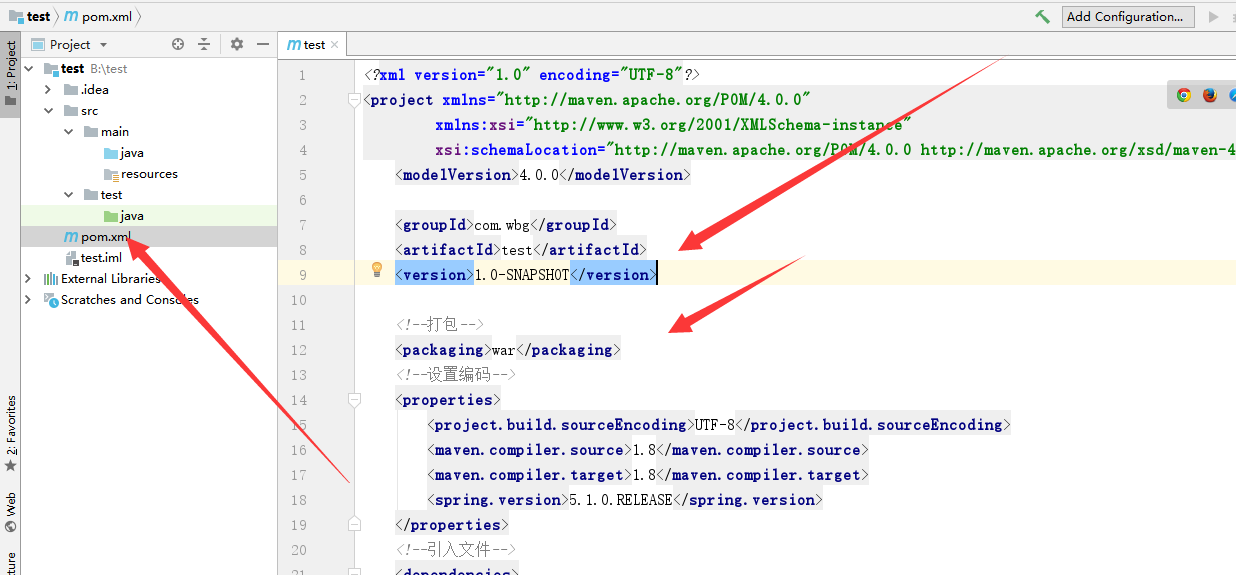
    <!--打包-->

    <packaging>war</packaging>

    <!--设置编码-->

    <properties>

        <project.build.sourceEncoding>UTF-8</project.build.sourceEncoding>

        <maven.compiler.source>1.8</maven.compiler.source>

        <maven.compiler.target>1.8</maven.compiler.target>

        <spring.version>5.1.0.RELEASE</spring.version>

    </properties>

    <!--引入文件-->

    <dependencies>

        <!-- Spring Web MVC -->

        <dependency>

            <groupId>org.springframework</groupId>

            <artifactId>spring-web</artifactId>

            <version>${spring.version}</version>

        </dependency>

        <dependency>

            <groupId>org.springframework</groupId>

            <artifactId>spring-webmvc</artifactId>

            <version>${spring.version}</version>

        </dependency>

        <!-- servlet 系列的支持 -->

        <dependency>

            <groupId>javax</groupId>

            <artifactId>javaee-api</artifactId>

            <version>8.0</version>

            <scope>provided</scope>

        </dependency>

        <dependency>

            <groupId>javax.servlet</groupId>

            <artifactId>jstl</artifactId>

            <version>1.2</version>

        </dependency>

        <dependency>

            <groupId>com.github.pagehelper</groupId>

            <artifactId>pagehelper</artifactId>

            <version>5.1.7</version>

        </dependency>

        <!-- Springframework -->

        <dependency>

            <groupId>org.springframework</groupId>

            <artifactId>spring-context</artifactId>

            <version>${spring.version}</version>

        </dependency>

        <dependency>

            <groupId>org.springframework</groupId>

            <artifactId>spring-jdbc</artifactId>

            <version>${spring.version}</version>

        </dependency>

        <dependency>

            <groupId>org.springframework</groupId>

            <artifactId>spring-aop</artifactId>

            <version>${spring.version}</version>

        </dependency>

        <dependency>

            <groupId>org.aspectj</groupId>

            <artifactId>aspectjweaver</artifactId>

            <version>1.9.1</version>

        </dependency>

        <!-- MyBatis -->

        <dependency>

            <groupId>org.mybatis</groupId>

            <artifactId>mybatis</artifactId>

            <version>3.4.6</version>

        </dependency>

        <dependency>

            <groupId>org.mybatis</groupId>

            <artifactId>mybatis-spring</artifactId>

            <version>1.3.2</version>

        </dependency>

        <!-- 数据库驱动以及数据库连接池-->

        <dependency>

            <groupId>org.mariadb.jdbc</groupId>

            <artifactId>mariadb-java-client</artifactId>

            <version>2.3.0</version>

        </dependency>

        <dependency>

            <groupId>com.mchange</groupId>

            <artifactId>c3p0</artifactId>

            <version>0.9.5.2</version>

        </dependency>

        <!-- 日志框架 -->

        <dependency>

            <groupId>log4j</groupId>

            <artifactId>log4j</artifactId>

            <version>1.2.17</version>

        </dependency>

        <!-- 通用工具 -->

        <dependency>

            <groupId>com.fasterxml.jackson.core</groupId>

            <artifactId>jackson-databind</artifactId>

            <version>2.9.7</version>

        </dependency>

        <!-- 单元测试 -->

        <dependency>

            <groupId>org.springframework</groupId>

            <artifactId>spring-test</artifactId>

            <version>${spring.version}</version>

            <scope>test</scope>

        </dependency>

        <dependency>

            <groupId>junit</groupId>

            <artifactId>junit</artifactId>

            <version>4.12</version>

            <scope>test</scope>

        </dependency>

    </dependencies>

    <build>

        <finalName>contact</finalName>

        <plugins>

            <plugin>

                <groupId>org.mybatis.generator</groupId>

                <artifactId>mybatis-generator-maven-plugin</artifactId>

                <version>1.3.7</version>

                <dependencies>

                    <dependency>

                        <groupId>org.mariadb.jdbc</groupId>

                        <artifactId>mariadb-java-client</artifactId>

                        <version>2.3.0</version>

                    </dependency>

                </dependencies>

            </plugin>

        </plugins>

        <pluginManagement><!-- lock down plugins versions to avoid using Maven defaults (may be moved to parent pom) -->

            <plugins>

                <plugin>

                    <artifactId>maven-clean-plugin</artifactId>

                    <version>3.0.0</version>

                </plugin>

                <!-- see http://maven.apache.org/ref/current/maven-core/default-bindings.html#Plugin_bindings_for_war_packaging -->

                <plugin>

                    <artifactId>maven-resources-plugin</artifactId>

                    <version>3.0.2</version>

                </plugin>

                <plugin>

                    <artifactId>maven-compiler-plugin</artifactId>

                    <version>3.7.0</version>

                </plugin>

                <plugin>

                    <artifactId>maven-surefire-plugin</artifactId>

                    <version>2.20.1</version>

                </plugin>

                <plugin>

                    <artifactId>maven-war-plugin</artifactId>

                    <version>3.2.0</version>

                </plugin>

                <plugin>

                    <artifactId>maven-install-plugin</artifactId>

                    <version>2.5.2</version>

                </plugin>

                <plugin>

                    <artifactId>maven-deploy-plugin</artifactId>

                    <version>2.8.2</version>

                </plugin>

            </plugins>

        </pluginManagement>

    </build>
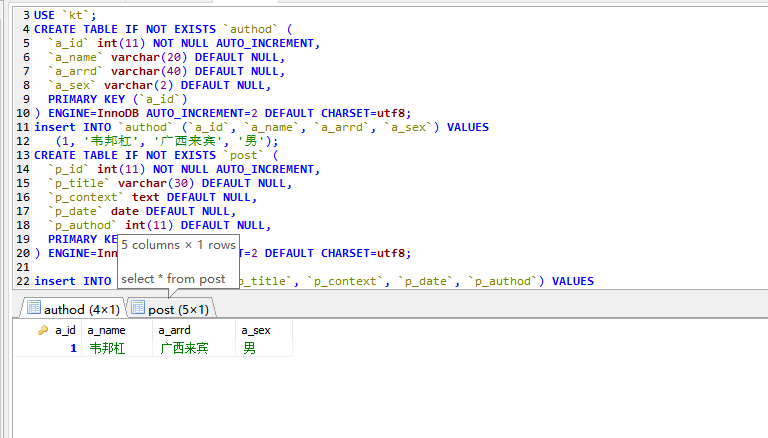
2、创建数据库
drop database kt;

CREATE DATABASE  `kt`;

USE `kt`;

CREATE TABLE IF NOT EXISTS `authod` (

  `a_id` int(11) NOT NULL AUTO_INCREMENT,

  `a_name` varchar(20) DEFAULT NULL,

  `a_arrd` varchar(40) DEFAULT NULL,

  `a_sex` varchar(2) DEFAULT NULL,

  PRIMARY KEY (`a_id`)

) ENGINE=InnoDB AUTO_INCREMENT=2 DEFAULT CHARSET=utf8;

insert INTO `authod` (`a_id`, `a_name`, `a_arrd`, `a_sex`) VALUES

    (1, '韦邦杠', '广西来宾', '男');

CREATE TABLE IF NOT EXISTS `post` (

  `p_id` int(11) NOT NULL AUTO_INCREMENT,

  `p_title` varchar(30) DEFAULT NULL,

  `p_context` text DEFAULT NULL,

  `p_date` date DEFAULT NULL,

  `p_authod` int(11) DEFAULT NULL,

  PRIMARY KEY (`p_id`)

) ENGINE=InnoDB AUTO_INCREMENT=2 DEFAULT CHARSET=utf8;

insert INTO `post` (`p_id`, `p_title`, `p_context`, `p_date`, `p_authod`) VALUES

    (1, '第一个文章', '暂时没有内容', '2018-10-23', 1);

select * from authod;

select * from post;
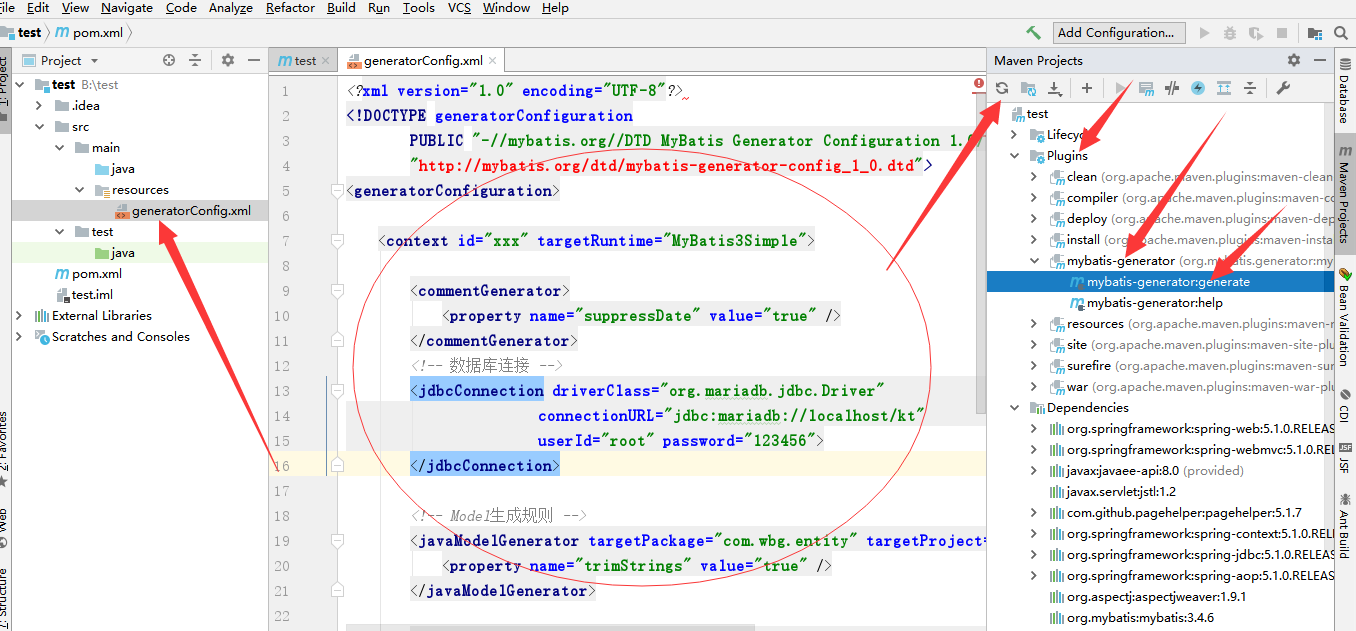
3、开始配置资源文件resources,使用自动生成代码
Mybatis-generator自动生成:https://www.cnblogs.com/weibanggang/p/9816400.html
<?xml version="1.0" encoding="UTF-8"?>

<!DOCTYPE generatorConfiguration

        PUBLIC "-//mybatis.org//DTD MyBatis Generator Configuration 1.0//EN"

        "http://mybatis.org/dtd/mybatis-generator-config_1_0.dtd">

<generatorConfiguration>

    <context id="xxx" targetRuntime="MyBatis3Simple">

        <commentGenerator>

            <property name="suppressDate" value="true" />

        </commentGenerator>

        <!-- 数据库连接 -->

        <jdbcConnection driverClass="org.mariadb.jdbc.Driver"

                        connectionURL="jdbc:mariadb://localhost/kt"

                        userId="root" password="123456">

        </jdbcConnection>

        <!-- Model生成规则 -->

        <javaModelGenerator targetPackage="com.wbg.entity" targetProject="src/main/java">

            <property name="trimStrings" value="true" />

        </javaModelGenerator>

        <sqlMapGenerator targetPackage="mapper.xml"  targetProject="src/main/resources"/>

        <!-- dao 规则 -->

        <javaClientGenerator type="XMLMAPPER" targetPackage="com.wbg.dao"  targetProject="src/main/java">

            <property name="enableSubPackages" value="true" />

        </javaClientGenerator>

        <table tableName="%">

            <generatedKey column="id" sqlStatement="Mysql"/>

        </table>

    </context>

</generatorConfiguration>
4、生成完成后:创建mybatis-config.xml配置文件
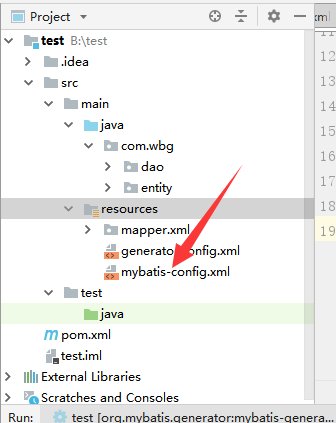
<?xml version="1.0" encoding="UTF-8" ?>

<!DOCTYPE configuration PUBLIC "-//mybatis.org//DTD Config 3.0//EN" "http://mybatis.org/dtd/mybatis-3-config.dtd">

<configuration>

    <settings>

        <!-- 使用jdbc的getGeneratedKeys获取数据库自增主键值 -->

        <setting name="useGeneratedKeys" value="true" />

        <!-- 使用列别名替换列名 默认:true -->

        <setting name="useColumnLabel" value="true" />

        <!-- 开启驼峰命名转换:Table {create_time} -> Entity {createTime} -->

        <setting name="mapUnderscoreToCamelCase" value="true" />

    </settings>

    <plugins>

        <plugin interceptor="com.github.pagehelper.PageInterceptor" />

    </plugins>

</configuration>
5、创建spring-web.xml文件
<?xml version="1.0" encoding="UTF-8"?>

<beans xmlns="http://www.springframework.org/schema/beans"

       xmlns:xsi="http://www.w3.org/2001/XMLSchema-instance"

       xmlns:contxt="http://www.springframework.org/schema/context"

       xmlns:mvc="http://www.springframework.org/schema/mvc"

       xsi:schemaLocation="http://www.springframework.org/schema/beans http://www.springframework.org/schema/beans/spring-beans.xsd http://www.springframework.org/schema/context http://www.springframework.org/schema/context/spring-context.xsd http://www.springframework.org/schema/cache http://www.springframework.org/schema/cache/spring-cache.xsd http://www.springframework.org/schema/mvc http://www.springframework.org/schema/mvc/spring-mvc.xsd">

    <!--启用注解扫描-->

    <contxt:component-scan base-package="com.wbg.controller" />

    <!--启用 mvc 的常用注解-->

    <mvc:annotation-driven />

    <!--将所有的静态资源交还 Servlet 处理-->

    <mvc:default-servlet-handler />

    <!--配置返回页面-->

    <bean class="org.springframework.web.servlet.view.InternalResourceViewResolver">

        <property name="viewClass" value="org.springframework.web.servlet.view.JstlView" />

        <property name="prefix" value="/WEB-INF/jsp/" />

        <property name="suffix" value=".jsp" />

    </bean>

    <!--配置上传下载-->

    <bean id="multipartResolver" class="org.springframework.web.multipart.support.StandardServletMultipartResolver" />

</beans>
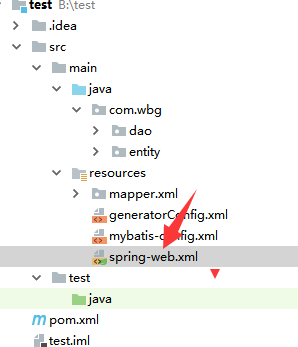
6、创建日志文件log4j.properties
# Global logging configuration

log4j.rootLogger=ERROR, ooo

# MyBatis logging configuration...

log4j.logger.com.nf147.bookstore_ssm.dao=DEBUG

# 规则1,名字为 ooo,向标准输出 System.err/out

log4j.appender.ooo=org.apache.log4j.ConsoleAppender

log4j.appender.ooo.layout=org.apache.log4j.PatternLayout

log4j.appender.ooo.layout.ConversionPattern=%5p [%t] ~ %m%n

# 规则2,输出为文件

log4j.appender.000=org.apache.log4j.FileAppender

log4j.appender.000.File=d:/log/log.out

log4j.appender.000.layout=org.apache.log4j.PatternLayout

log4j.appender.000.layout.conversionPattern=%m %n

# 规则3,输出到数据库

log4j.appender.o0o=org.apache.log4j.jdbc.JDBCAppender

log4j.appender.o0o.URL=jdbc:mariadb://localhost/lagou

log4j.appender.o0o.driver=org.mariadb.jdbc.Driver

log4j.appender.o0o.user=vip

log4j.appender.o0o.password=vip

log4j.appender.o0o.layout=org.apache.log4j.PatternLayout

log4j.appender.o0o.sql=INSERT INTO LOGS VALUES('%t')
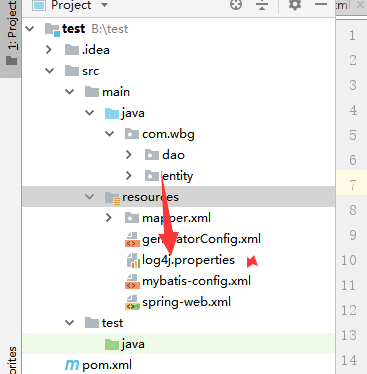
7、创建jdbc.properties配置文件(数据库配置)
jdbc.driver=org.mariadb.jdbc.Driver

jdbc.url=jdbc:mariadb://localhost:3306/kt

jdbc.user=root

jdbc.password=12345
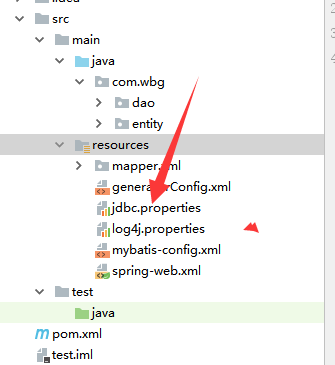
8、创建spring目录,在该目录下创建spring-dao.xml文件
<?xml version="1.0" encoding="UTF-8"?>

<beans xmlns="http://www.springframework.org/schema/beans"

       xmlns:xsi="http://www.w3.org/2001/XMLSchema-instance"

       xmlns:tx="http://www.springframework.org/schema/tx" xmlns:context="http://www.springframework.org/schema/context"

       xsi:schemaLocation="http://www.springframework.org/schema/beans http://www.springframework.org/schema/beans/spring-beans.xsd http://www.springframework.org/schema/tx http://www.springframework.org/schema/tx/spring-tx.xsd http://www.springframework.org/schema/context http://www.springframework.org/schema/context/spring-context.xsd">

    <!--使用外部文件-->

    <context:property-placeholder location="classpath:jdbc.properties" />

    <!--创建数据源-->

    <bean id="dataSource" class="com.mchange.v2.c3p0.ComboPooledDataSource">

        <property name="driverClass" value="${jdbc.driver}" />

        <property name="jdbcUrl" value="${jdbc.url}" />

        <property name="user" value="${jdbc.user}" />

        <property name="password" value="${jdbc.password}" />

        <property name="maxPoolSize" value="30" />

        <property name="minPoolSize" value="10" />

        <property name="autoCommitOnClose" value="false" />

        <property name="checkoutTimeout" value="10000" />

        <property name="acquireRetryAttempts" value="2" />

    </bean>

    <!--配置 mybatis-->

    <bean id="sqlSessionFactory" class="org.mybatis.spring.SqlSessionFactoryBean">

        <property name="dataSource" ref="dataSource" />

        <property name="typeAliasesPackage" value="com.wbg.entity" />

        <property name="configLocation" value="classpath:mybatis-config.xml" />

        <property name="mapperLocations" value="classpath:mapper/*.xml" />

    </bean>

    <!--自动注入 Mapper-->

    <bean class="org.mybatis.spring.mapper.MapperScannerConfigurer">

        <property name="sqlSessionFactoryBeanName" value="sqlSessionFactory" />

        <property name="basePackage" value="com.wbg.dao" />

    </bean>

    <!--配置声明式事务管理-->

    <bean id="transactionManager" class="org.springframework.jdbc.datasource.DataSourceTransactionManager">

        <property name="dataSource" ref="dataSource" />

    </bean>

    <tx:annotation-driven proxy-target-class="true" />

</beans>
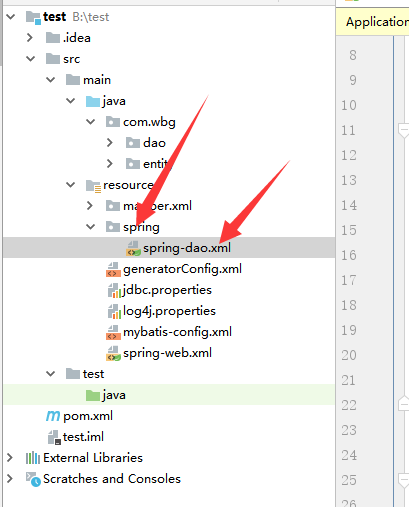
9、在创建spring-service.xml文件
<?xml version="1.0" encoding="UTF-8"?>

<beans xmlns="http://www.springframework.org/schema/beans"

       xmlns:xsi="http://www.w3.org/2001/XMLSchema-instance"

       xmlns:context="http://www.springframework.org/schema/context"

       xmlns:aop="http://www.springframework.org/schema/aop"

       xsi:schemaLocation="http://www.springframework.org/schema/beans http://www.springframework.org/schema/beans/spring-beans.xsd http://www.springframework.org/schema/context http://www.springframework.org/schema/context/spring-context.xsd http://www.springframework.org/schema/aop http://www.springframework.org/schema/aop/spring-aop.xsd">

<!--启用注解-->

    <context:component-scan base-package="com.wbg.task.service" />

    <!-- 启用 aspectj 方式 AOP-->

    <aop:aspectj-autoproxy proxy-target-class="true" />

</beans>
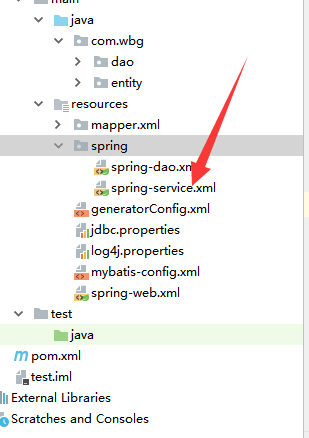
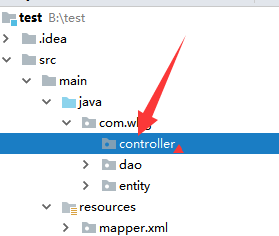
10、在java目录下的com.wbg文件夹中创建控制器controller
11、在main目录创建webapp,在webapp目录创建WEB-INF,在WEB-INF目录创建jsp目录,web.xml中
<?xml version="1.0" encoding="UTF-8"?>

<web-app xmlns="http://xmlns.jcp.org/xml/ns/javaee"

         xmlns:xsi="http://www.w3.org/2001/XMLSchema-instance"

         xsi:schemaLocation="http://xmlns.jcp.org/xml/ns/javaee http://xmlns.jcp.org/xml/ns/javaee/web-app_4_0.xsd"

         version="4.0">

    <display-name>通讯录</display-name>

    <!--解决中文乱码-->

    <filter>

        <filter-name>encodingFilter</filter-name>

        <filter-class>org.springframework.web.filter.CharacterEncodingFilter</filter-class>

        <async-supported>true</async-supported>

        <init-param>

            <param-name>encoding</param-name>

            <param-value>UTF-8</param-value>

        </init-param>

    </filter>

    <filter-mapping>

        <filter-name>encodingFilter</filter-name>

        <url-pattern>/*</url-pattern>

    </filter-mapping>

    <!--配置 Spring 的容器-->

    <context-param>

        <param-name>contextConfigLocation</param-name>

        <param-value>classpath:spring/spring-*.xml</param-value>

    </context-param>

    <listener>

        <listener-class>org.springframework.web.context.ContextLoaderListener</listener-class>

    </listener>

    <!--配置 MVC 容器-->

    <!--将所有的请求都交给 Spring MVC 处理-->

    <servlet>

        <servlet-name>app</servlet-name>

        <servlet-class>org.springframework.web.servlet.DispatcherServlet</servlet-class>

        <init-param>

            <param-name>contextConfigLocation</param-name>

            <param-value>classpath:spring-web.xml</param-value>

        </init-param>

    </servlet>

    <servlet-mapping>

        <servlet-name>app</servlet-name>

        <url-pattern>/</url-pattern>

    </servlet-mapping>

</web-app>

12、在jsp创建相应的文件,现在以我的项目为例
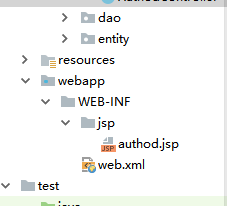
authod.jsp:
<%@ taglib prefix="c" uri="http://java.sun.com/jsp/jstl/core" %>

<%@ page contentType="text/html;charset=UTF-8" language="java" %>

<html>

<head>

    <title作者信息</title>

    <style>

        table, tr, td {

            border: 1px solid red;

        }

    </style>

</head>

<body>

<table>

    <tr>

        <th>编号:</th>

        <th>姓名:</th>

        <th>性别:</th>

        <th>地址:</th>

        <th>操作:</th>

    </tr>

    <c:forEach items="${authod}" var="authod">

        <tr>

            <td>${authod.aId}</td>

            <td>${authod.aName}</td>

            <td>${authod.aSex}</td>

            <td>${authod.aArrd}</td>

            <td><a href="/authod/del/${authod.aId}">删除</a></td>

        </tr>

    </c:forEach>

</table>

<form method="post" action="/authod">

    <table>

        <tr>

            <td>姓名:</td>

            <td><input type="text" placeholder="输入姓名" name="aName"/></td>

        </tr>

        <tr>

            <td>性别:</td>

            <td><input type="text" placeholder="输入性别" name="aSex"/></td>

        </tr>

        <tr>

            <td>地址:</td>

            <td><input type="text" placeholder="输入地址" name="aArrd"/></td>

        </tr>

        <tr>

            <input type="submit" value="添加"/>

        </tr>

    </table>

</form>

</body>

</html>
13、在controller中创建控制类
package com.wbg.controller;

import com.wbg.dao.AuthodMapper;

import com.wbg.entity.Authod;

import org.springframework.beans.factory.annotation.Autowired;

import org.springframework.stereotype.Controller;

import org.springframework.ui.Model;

import org.springframework.web.bind.annotation.RequestMapping;

import org.springframework.web.bind.annotation.RequestMethod;

import org.springframework.web.bind.annotation.RequestParam;

import java.util.List;

@Controller

@RequestMapping("/authod")

public class AuthodController {

    @Autowired

    private AuthodMapper authodMapper;

    @RequestMapping(method = RequestMethod.GET)

    public String index(@RequestParam(defaultValue = "1") int page, Model model){

        List<Authod> authodList=authodMapper.selectAll();

        model.addAttribute("authod",authodList);

        return "authod";

    }

}
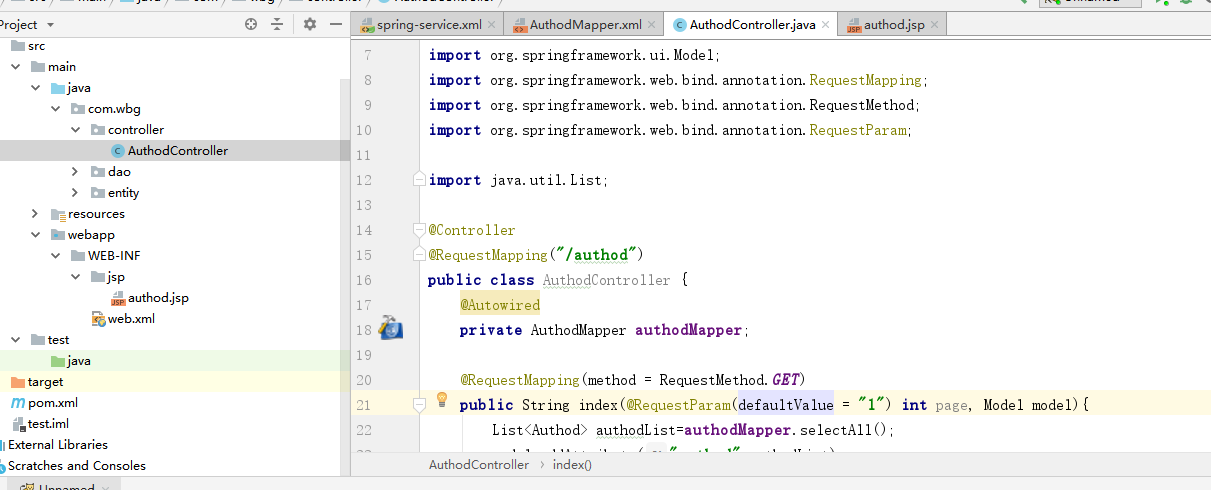
14、进行添加tomcat
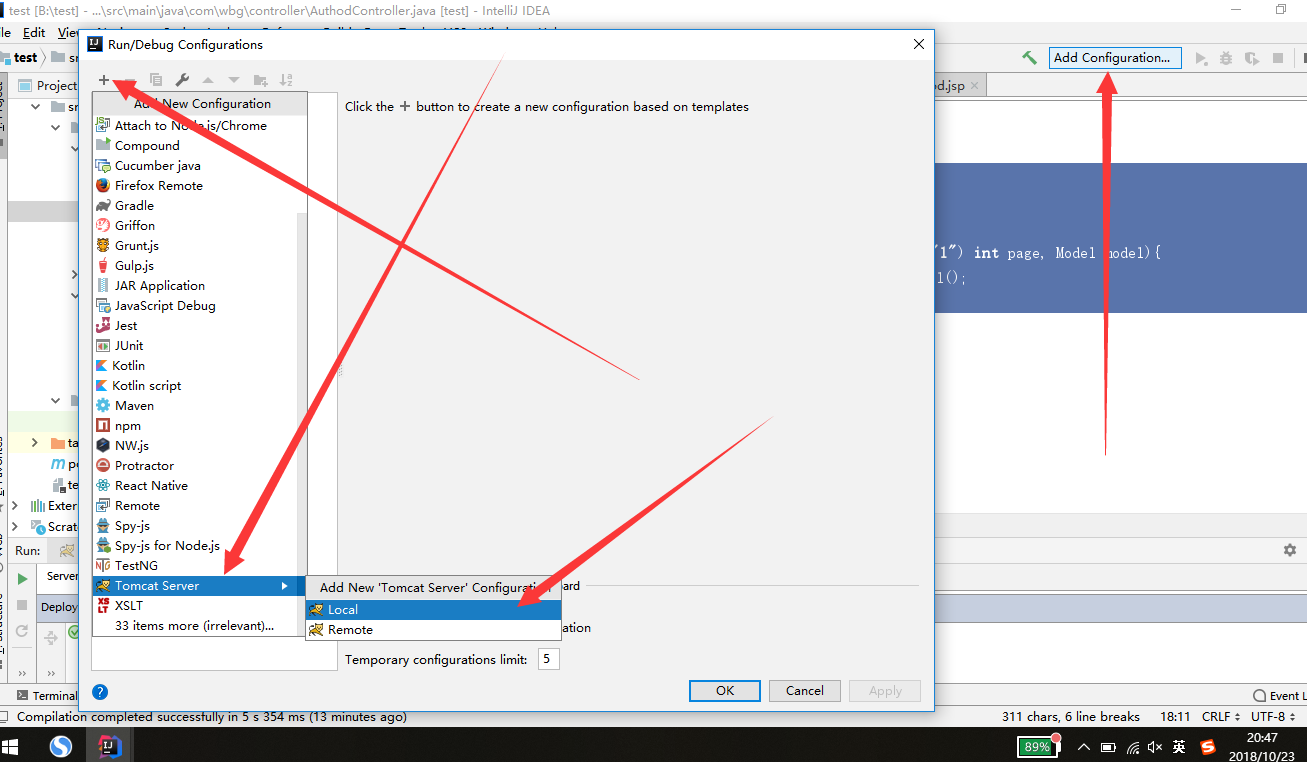
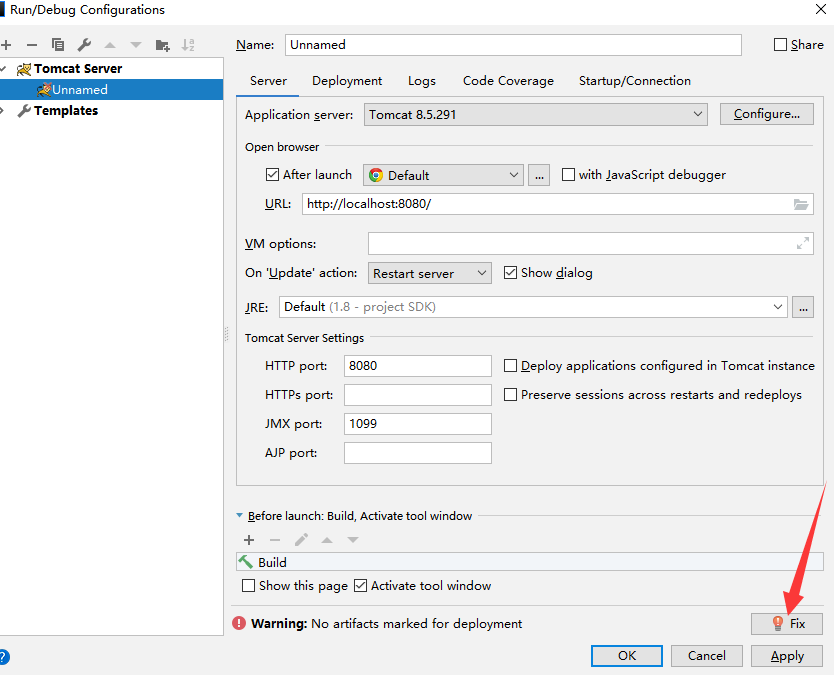
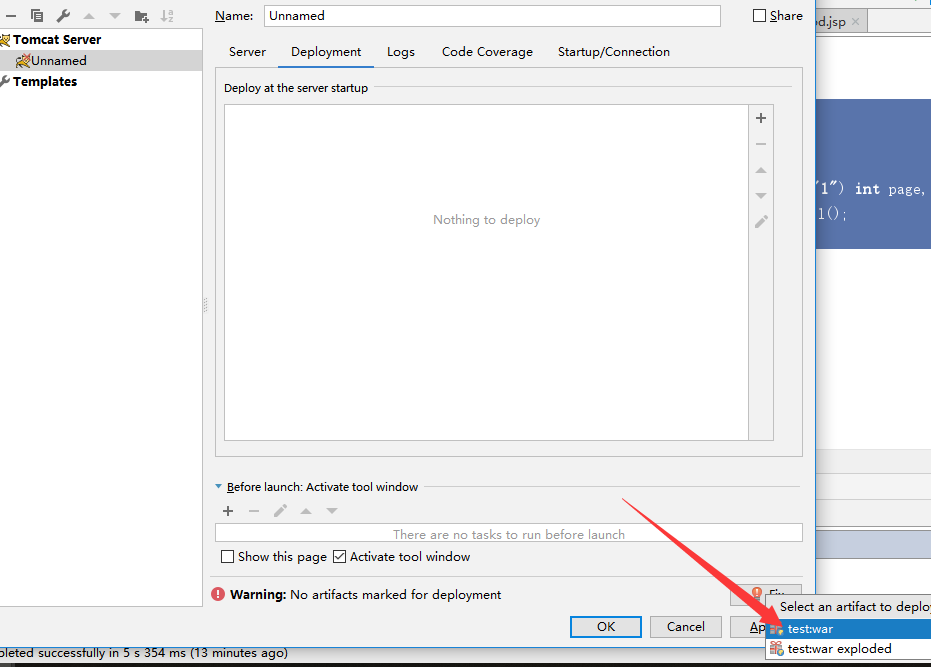
ok后

进行测试
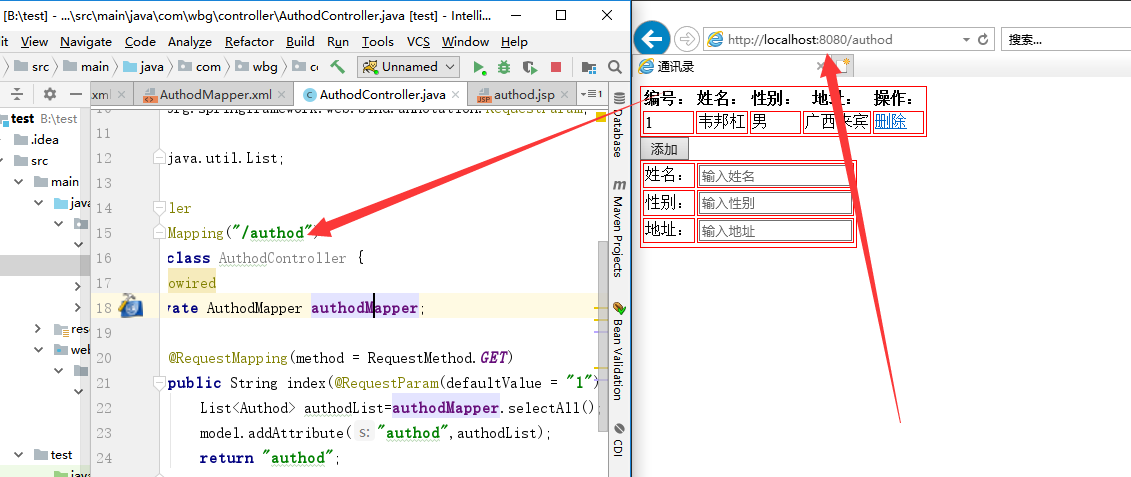
完成
项目路径:https://github.com/weibanggang/springmvc
使用maven搭建ssm项目配置+tomact的更多相关文章
- Maven 搭建 SSM 项目 (oracle)
简单谈一下maven搭建 ssm 项目 (使用数据库oracle,比 mysql 难,所以这里谈一下) 在创建maven 的web项目时,常常会缺了main/java , main/test 两个文件 ...
- Maven项目搭建(二):Maven搭建SSM框架
上一章给大家讲解了如何使用Maven搭建web项目. 这次给大家介绍一下怎么使用Maven搭建SSM框架项目. 首先我们来看一下pom.xml的属性介绍: project: pom的xml根元素. p ...
- 使用maven搭建ssm框架的javaweb项目
目前主流的javaweb项目,常会用到ssm(Spring+Spring MVC+Mybatis)框架来搭建项目的主体框架,本篇介绍搭建SSM框架的maven项目的实施流程.记之共享! 一.SSM框架 ...
- 【原】无脑操作:eclipse + maven搭建SSM框架
网上看到一些Spring + Spring MVC + MyBatis框架的搭建教程,不是很详细或是时间久远了,自己动手整一个简单无脑的! 0.系统环境 1)Windows 10 企业版 2)JDK ...
- Eclipse中使用Maven搭建SSM框架
Eclipse中不使用Maven搭建SSM框架:https://www.cnblogs.com/xuyiqing/p/9569459.html IDEA中使用Maven搭建SSM框架:https:// ...
- 自动搭建ssm项目
手把手教你搭建ssm项目 注意,必须修改:包名.数据库名称.账号.密码 注意:必须配置好第一次,“引入后”才能配置第二次 第一步:打开idea选择创建maven项目 import java.io.*; ...
- 使用maven搭建SSM框架
使用maven搭建SSM框架,首先得准备好maven环境. 搭建maven环境 第一步:下载maven http://maven.apache.org/download.cgi 下载后解压就可以了. ...
- maven搭建ssm
前言 本文旨在利用maven搭建ssm环境,而关于maven的具体内容,大家可以去阅读<Maven 实战>.其实园内这方面文章已有不少,那么为什么我还要重复造轮子呢?我只是想记录自己的实践 ...
- 使用Maven搭建SSM框架(Eclipse)
今天学习一下使用Maven搭建SSM框架,以前都是用别人配置好的框架写代码,今天试试自己配置一下SSM框架. 这里我的参数是Windows7 64位,tomcat9,eclipse-jee-neon- ...
随机推荐
- Message Unable to connect to SQL Server '(local)'
最近在sql server 加了一些job,但是run job的时候发生了一下错误: ssage Unable to connect to SQL Server '(local)' 问题根源:调用 T ...
- SQL---MySQL数据库---试炼
1.需求 user表 temp表 user_temp_salary表 1.1 查找每个人在2018年前2个月的平均工资信息 SELECT b.`name` AS userName,c.name AS ...
- myEclipse更换SVN登录账号
Win10下 找到下面路径删除其下的所有文件 C:\Users\Administrator\AppData\Roaming\Subversion\auth\svn.simple AppData默认隐藏 ...
- C# Linq 查询数据库(DataSet)生成 Tree
效果图如下 cs代码 using System; using System.Collections.Generic; using System.ComponentModel; using System ...
- 多线程编程_读写锁ReadWriteLock
Lock比传统线程模型中的synchronized方式更加面向对象,与生活中的锁类似,锁本身也应该是一个对象.两个线程执行的代码片段要实现同步互斥的效果,它们必须用同一个Lock对象. 读写锁:分为读 ...
- 2019.03.20 读书笔记 as is 以及重写隐式/显示
强转.as is 的用法 强制转换类型有两种:子类转基类,重写隐式(implicit )\显示(explicit) 转换操作符 class myclass { private int value; p ...
- 性能测试工具LoadRunner14-LR之Controller 简介
当虚拟用户开发完成之后,使用Controller将这个执行脚本的用户从单用户转化为多用户,从而模拟大量用户操作,进而形成负载.(多用户单循环,多用户多循环)我们需要对负载模拟的方式和特征进行配置. 场 ...
- Murano Setup Steps
1. Select a Linux Distribution Only Ubuntu 14.04 (Trusty), Fedora 21 (or Fedora 22) and CentOS/RHEL ...
- stm32串口学习(二)
今天继续学习stm32的串口编程(利用库函数).上次我们说了串口的发送,这次我们说接收. 接收可以用查询的方法,也可以用中断.显然,工程中多用中断的方式,那么就来看看中断接收. 代码其实很简单,基本的 ...
- 探讨PHP获取checkbox值
如何才能正确的实现PHP获取checkbox值对于初学者来说还是比较陌生的.在这里我们将为大家详细介绍相关的实现方法,希望对大家有所帮助. > > > weeks后的中括号不可漏,否 ...