
Python模块之pickle(列表,字典等复杂数据类型与二进制文件的转化)
1.pickle模块简介
The pickle module implements binary protocols for serializing and de-serializing a Python object structure。
大意是说:pickle模块是用来实现二进制存储对于python对象结构的的序列化和反序列化。
2.使用前导入模块
import pickle
3.创造要序列化的数据结构
如列表:my_list = [123,3.14,'小甲鱼',['another list',20]]
4.创建一个二进制文件
pick_file = open('D:\\test\\my_list.pkl','wb')
5.使用pickle的函数dump装入文件
pickle.dump(my_list,pick_file)
6.关闭打开的文件完成写入
pick_file.close()
7.运行结果,由于写入的是二进制文件,那么用文本打开肯定是乱码的

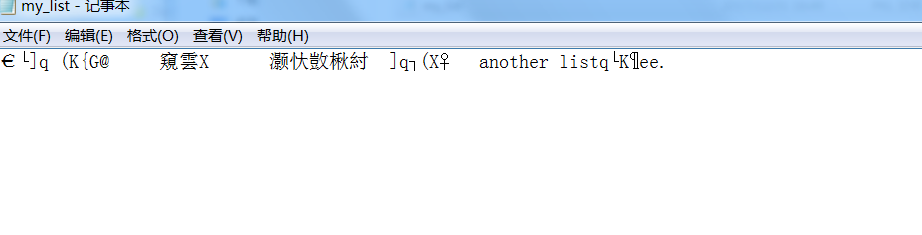
8.以指读方式打开刚才存储的二进制文件
pickfile = open('D:\\test\\my_list.pkl','rb')
9.读取文件内容到列表,怎么写入的怎么读取
listfile = pickle.load(pickfile)
10.查看读取结果,我们写入的内容又被我们读取出来了
>>> print(listfile)
[123, 3.14, '小甲鱼', ['another list', 20]]
11.介绍文档
NAME
pickle - Create portable serialized representations of Python objects.
DESCRIPTION
See module copyreg for a mechanism for registering custom picklers.
See module pickletools source for extensive comments.
Classes:
Pickler
Unpickler
Functions:
dump(object, file)
dumps(object) -> string
load(file) -> object
loads(string) -> object
Misc variables:
__version__
format_version
compatible_formats
FUNCTIONS
dump(obj, file, protocol=None, *, fix_imports=True)
Write a pickled representation of obj to the open file object file.
This is equivalent to ``Pickler(file, protocol).dump(obj)``, but may
be more efficient.
The optional *protocol* argument tells the pickler to use the given
protocol supported protocols are 0, 1, 2, 3 and 4. The default
protocol is 3; a backward-incompatible protocol designed for Python 3.
Specifying a negative protocol version selects the highest protocol
version supported. The higher the protocol used, the more recent the
version of Python needed to read the pickle produced.
The *file* argument must have a write() method that accepts a single
bytes argument. It can thus be a file object opened for binary
writing, an io.BytesIO instance, or any other custom object that meets
this interface.
If *fix_imports* is True and protocol is less than 3, pickle will try
to map the new Python 3 names to the old module names used in Python
2, so that the pickle data stream is readable with Python 2.
dumps(obj, protocol=None, *, fix_imports=True)
Return the pickled representation of the object as a bytes object.
The optional *protocol* argument tells the pickler to use the given
protocol; supported protocols are 0, 1, 2, 3 and 4. The default
protocol is 3; a backward-incompatible protocol designed for Python 3.
Specifying a negative protocol version selects the highest protocol
version supported. The higher the protocol used, the more recent the
version of Python needed to read the pickle produced.
If *fix_imports* is True and *protocol* is less than 3, pickle will
try to map the new Python 3 names to the old module names used in
Python 2, so that the pickle data stream is readable with Python 2.
load(file, *, fix_imports=True, encoding='ASCII', errors='strict')
Read and return an object from the pickle data stored in a file.
This is equivalent to ``Unpickler(file).load()``, but may be more
efficient.
The protocol version of the pickle is detected automatically, so no
protocol argument is needed. Bytes past the pickled object's
representation are ignored.
The argument *file* must have two methods, a read() method that takes
an integer argument, and a readline() method that requires no
arguments. Both methods should return bytes. Thus *file* can be a
binary file object opened for reading, an io.BytesIO object, or any
other custom object that meets this interface.
Optional keyword arguments are *fix_imports*, *encoding* and *errors*,
which are used to control compatibility support for pickle stream
generated by Python 2. If *fix_imports* is True, pickle will try to
map the old Python 2 names to the new names used in Python 3. The
*encoding* and *errors* tell pickle how to decode 8-bit string
instances pickled by Python 2; these default to 'ASCII' and 'strict',
respectively. The *encoding* can be 'bytes' to read these 8-bit
string instances as bytes objects.
loads(data, *, fix_imports=True, encoding='ASCII', errors='strict')
Read and return an object from the given pickle data.
The protocol version of the pickle is detected automatically, so no
protocol argument is needed. Bytes past the pickled object's
representation are ignored.
Optional keyword arguments are *fix_imports*, *encoding* and *errors*,
which are used to control compatibility support for pickle stream
generated by Python 2. If *fix_imports* is True, pickle will try to
map the old Python 2 names to the new names used in Python 3. The
*encoding* and *errors* tell pickle how to decode 8-bit string
instances pickled by Python 2; these default to 'ASCII' and 'strict',
respectively. The *encoding* can be 'bytes' to read these 8-bit
string instances as bytes objects.
Python模块之pickle(列表,字典等复杂数据类型与二进制文件的转化)的更多相关文章
- python模块之pickle、shelve、json
一 什么是序列化 序列化指的是将内存中的数据结构转化为一种中间格式,并存储到硬盘上. (反序列化:将硬盘上存储的中间格式数据再还原为内存中的数据结构) 二 为什么要序列化 持久保持状态 需知一个软件/ ...
- python模块--json \ pickle \ shelve \ XML模块
一.json模块 之前学习过的eval内置方法可以将一个字符串转成一个python对象,不过eval方法时有局限性的,对于普通的数据类型,json.loads和eval都能用,但遇到特殊类型的时候,e ...
- python中用json存储列表字典等文件操作
JSON字符串用json.dumps, json.loads JSON文件名用json.dump, json.load 由于需要在脚本重启后依旧能够记住之前所使用的列表内容, 故采用json存储列表文 ...
- python学习笔记(三)-列表&字典
列表: 一.列表操作"""Python内置的一种数据类型是列表:list.list是一种有序的集合,可以随时添加和删除其中的元素.比如,列出班里所有同学的名字,就可以用一 ...
- python 模块之-pickle
Pickle的问题和所有其他编程语言特有的序列化问题一样,就是它只能用于Python,并且可能不同版本的Python彼此都不兼容,因此,只能用Pickle保存那些不重要的数据,不能成功地反序列化也没关 ...
- python模块:pickle
"""Create portable serialized representations of Python objects. See module copyreg f ...
- Python字符串/元祖/列表/字典互转
#-*- coding:UTF-8 -*- #author:RXS002 #1.字典 dict = {'name':'Zara','age':7,'class':'First'} #字典转换为字符串, ...
- python中的字符串 列表 字典
字符串 一个有序的字符集合 不可变 1,可以使用for in语句进行迭代循环,返回元素 2,in类是于str.find()方法但是是返回布尔结果 str.find()返回 ...
- python模块之pickle
和json不同的是: json只支持str,int,tuple,list,dict. pickle支持python里所有的数据类型,但是只能在python里序列化,不跨平台,python独有. 代码示 ...
随机推荐
- LDA算法入门
http://blog.csdn.net/warmyellow/article/details/5454943 LDA算法入门 一. LDA算法概述: 线性判别式分析(Linear Discrimin ...
- python3.5安装pyHook,解决【TypeError: MouseSwitch() missing 8 required positional arguments: 'msg', 'x', 'y', 'data', 'time', 'hwnd', and 'window_name'】这个错误!
为什么安装 pyHook包:为Windows中的全局鼠标和键盘事件提供回调. Python应用程序为用户输入事件注册事件处理程序,例如鼠标左键,鼠标左键,键盘键等 先要实时获取系统的鼠标位置或者键盘输 ...
- POJ1837--二维背包
Balance Time Limit: 1000MS Memory Limit: 30000K Total Submissions: 13525 Accepted: 8474 Description ...
- SPOJ SERGRID - Grid BFS
SERGRID - Grid no tags You are on an nxm grid where each square on the grid has a digit on it. From ...
- node.js爬虫
这是一个简单的node.js爬虫项目,麻雀虽小五脏俱全. 本项目主要包含一下技术: 发送http抓取页面(http).分析页面(cheerio).中文乱码处理(bufferhelper).异步并发流程 ...
- Postgres中表和元组的组织方式
PG version 9.5.3 PG中四种堆文件: 普通堆 临时堆 序列堆 TOAST表 PageHeaderData长度为24(截图为8.4版本,20字节)个字节包含的内容如下: 空闲空间的起始和 ...
- 掌握NIO,程序人生
就像新IO为java带来的革新那样,让我们也开启一段新的程序人生. 关键字:NIO,BIO,伪IO,AIO,多路复用选择器,通道,缓冲区,jdk研究,回调函数,高并发 java.nio 概述 历史背景 ...
- java 之 迭代器模式(大话设计模式)
众所周知,java是编程语言中的高级语言,在java的世界里,已经有前辈为我们封装好了各个很好用的框架,工具类等,今天笔者想说的迭代器模式也已经被封装过. 就是我们经常使用的for循环迭代器.或者It ...
- python项目依赖管理分享迁移后重建开发环境(一)virtualenv 和 pip
作者:Panda Fang 出处:http://www.cnblogs.com/lonkiss/p/rebuild-development-environment-with-virtualenv-an ...
- Android数据绑定技二,企业级开发
PS:上一篇文章写了Databinding的简单使用,写了一个绑定textview的示例,和绑定的一些用法,估计有的人会说,之前的写的好好的,为什么要数据绑定这样的写法呢,没办法,社会在进步,当然是怎 ...