
robotframework的学习笔记(十六)----robotframework标准库String
官方文档:http://robotframework.org/robotframework/latest/libraries/String.html
Introduction
A test library for string manipulation and verification.String is Robot Framework's standard library for manipulating strings
Following keywords from BuiltIn library can also be used with strings:
- Catenate
- Get Length
- Length Should Be
- Should (Not) Be Empty
- Should (Not) Be Equal (As Strings/Integers/Numbers)
- Should (Not) Match (Regexp)
- Should (Not) Contain
- Should (Not) Start With
- Should (Not) End With
- Convert To String
- Convert To Bytes
Altogether 30 keywords.
| Keyword | Arguments | Documentation | ||||||||||||||||||||||||||||||
|---|---|---|---|---|---|---|---|---|---|---|---|---|---|---|---|---|---|---|---|---|---|---|---|---|---|---|---|---|---|---|---|---|
| Convert To Lowercase | string |
Converts string to lowercase. Examples:
New in Robot Framework 2.8.6. |
||||||||||||||||||||||||||||||
| Convert To Uppercase | string |
Converts string to uppercase. Examples:
New in Robot Framework 2.8.6. |
||||||||||||||||||||||||||||||
| Decode Bytes To String | bytes, encoding,errors=strict |
Decodes the given
Examples:
Use Encode String To Bytes if you need to convert Unicode strings to byte strings, and Convert To String in |
||||||||||||||||||||||||||||||
| Encode String To Bytes | string, encoding,errors=strict |
Encodes the given Unicode
Examples:
Use Convert To Bytes in |
||||||||||||||||||||||||||||||
| Fetch From Left | string, marker |
Returns contents of the If the See also Fetch From Right, Split String and Split String From Right. |
||||||||||||||||||||||||||||||
| Fetch From Right | string, marker |
Returns contents of the If the See also Fetch From Left, Split String and Split String From Right. |
||||||||||||||||||||||||||||||
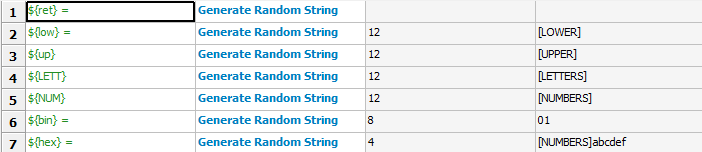
| Generate Random String | length=8, chars=[LETTERS][NUMBERS] |
Generates(生成) a string with a desired(期望) The population sequence
Examples:
log: 20170719 11:20:59.200 : INFO : ${ret} = bjgo5Rz7 |
||||||||||||||||||||||||||||||
| Get Line | string, line_number |
Returns the specified line from the given Line numbering starts from 0 and it is possible to use negative indices(负数) to refer to lines from the end. The line is returned without the newline character. Examples:
Use Split To Lines if all lines are needed. |
||||||||||||||||||||||||||||||
| Get Line Count | string |
Returns and logs the number of lines in the given string. |
||||||||||||||||||||||||||||||
| Get Lines Containing String | string, pattern,case_insensitive=False |
Returns lines of the given The The match is case-sensitive by default, but giving Lines are returned as one string catenated back together with newlines. Possible trailing newline is never returned. The number of matching lines is automatically logged. Examples:
See Get Lines Matching Pattern and Get Lines Matching Regexp if you need more complex pattern matching. |
||||||||||||||||||||||||||||||
| Get Lines Matching Pattern | string, pattern,case_insensitive=False |
Returns lines of the given The
A line matches only if it matches the The match is case-sensitive by default, but giving Lines are returned as one string catenated back together with newlines. Possible trailing newline is never returned. The number of matching lines is automatically logged. Examples:
See Get Lines Matching Regexp if you need more complex patterns and Get Lines Containing String if searching literal strings is enough. |
||||||||||||||||||||||||||||||
| Get Lines Matching Regexp | string, pattern,partial_match=False |
Returns lines of the given See BuiltIn.Should Match Regexp for more information about Python regular expression syntax in general and how to use it in Robot Framework test data in particular. By default lines match only if they match the pattern fully, but partial matching can be enabled by giving the If the pattern is empty, it matches only empty lines by default. When partial matching is enabled, empty pattern matches all lines. Notice that to make the match case-insensitive, you need to prefix the pattern with case-insensitive flag Lines are returned as one string concatenated back together with newlines. Possible trailing newline is never returned. The number of matching lines is automatically logged. Examples:
See Get Lines Matching Pattern and Get Lines Containing String if you do not need full regular expression powers (and complexity).
|
||||||||||||||||||||||||||||||
| Get Regexp Matches | string, pattern,*groups |
Returns a list of all non-overlapping matches in the given string.
If no groups are used, the returned list contains full matches. If one group is used, the list contains only contents of that group. If multiple groups are used, the list contains tuples that contain individual group contents. All groups can be given as indexes (starting from 1) and named groups also as names. Examples:
=> ${no match} = []
New in Robot Framework 2.9. |
||||||||||||||||||||||||||||||
| Get Substring | string, start,end=None |
Returns a substring from The Examples:
|
||||||||||||||||||||||||||||||
| Remove String | string, *removables |
Removes all
Use Remove String Using Regexp if more powerful pattern matching is needed. If only a certain number of matches should be removed, Replace String or Replace String Using Regexp can be used. A modified version of the string is returned and the original string is not altered. Examples:
New in Robot Framework 2.8.2. |
||||||||||||||||||||||||||||||
| Remove String Using Regexp | string, *patterns |
Removes This keyword is otherwise identical to Remove String, but the New in Robot Framework 2.8.2. |
||||||||||||||||||||||||||||||
| Replace String | string, search_for,replace_with,count=-1 |
Replaces
If the optional argument A modified version of the string is returned and the original string is not altered. Examples:
|
||||||||||||||||||||||||||||||
| Replace String Using Regexp | string, pattern,replace_with,count=-1 |
Replaces This keyword is otherwise identical to Replace String, but the If you need to just remove a string see Remove String Using Regexp. Examples:
|
||||||||||||||||||||||||||||||
| Should Be Byte String | item, msg=None |
Fails if the given Use Should Be Unicode String if you want to verify the The default error message can be overridden with the optional |
||||||||||||||||||||||||||||||
| Should Be Lowercase | string, msg=None |
Fails if the given For example, The default error message can be overridden with the optional See also Should Be Uppercase and Should Be Titlecase. |
||||||||||||||||||||||||||||||
| Should Be String | item, msg=None |
Fails if the given With Python 2, except with IronPython, this keyword passes regardless is the With Python 3 and IronPython, this keyword passes if the string is a Unicode string but fails if it is bytes. Notice that with both Python 3 and IronPython, The default error message can be overridden with the optional |
||||||||||||||||||||||||||||||
| Should Be Titlecase | string, msg=None |
Fails if given
For example, The default error message can be overridden with the optional See also Should Be Uppercase and Should Be Lowercase. |
||||||||||||||||||||||||||||||
| Should Be Unicode String | item, msg=None |
Fails if the given Use Should Be Byte String if you want to verify the The default error message can be overridden with the optional |
||||||||||||||||||||||||||||||
| Should Be Uppercase | string, msg=None |
Fails if the given For example, The default error message can be overridden with the optional See also Should Be Titlecase and Should Be Lowercase. |
||||||||||||||||||||||||||||||
| Should Not Be String | item, msg=None |
Fails if the given See Should Be String for more details about Unicode strings and byte strings. The default error message can be overridden with the optional |
||||||||||||||||||||||||||||||
| Split String | string,separator=None,max_split=-1 |
Splits the If a Split words are returned as a list. If the optional Examples:
See Split String From Right if you want to start splitting from right, and Fetch From Left and Fetch From Right if you only want to get first/last part of the string. |
||||||||||||||||||||||||||||||
| Split String From Right | string,separator=None,max_split=-1 |
Splits the Same as Split String, but splitting is started from right. This has an effect only when Examples:
|
||||||||||||||||||||||||||||||
| Split String To Characters | string |
Splits the given Example:
|
||||||||||||||||||||||||||||||
| Split To Lines | string, start=0,end=None |
Splits the given string to lines. It is possible to get only a selection of lines from Lines are returned without the newlines. The number of returned lines is automatically logged. Examples:
Use Get Line if you only need to get a single line. |
||||||||||||||||||||||||||||||
| Strip String | string, mode=both,characters=None |
Remove leading and/or trailing whitespaces from the given string.
If the optional Examples:
New in Robot Framework 3.0. |
robotframework的学习笔记(十六)----robotframework标准库String的更多相关文章
- python3.4学习笔记(十六) windows下面安装easy_install和pip教程
python3.4学习笔记(十六) windows下面安装easy_install和pip教程 easy_install和pip都是用来下载安装Python一个公共资源库PyPI的相关资源包的 首先安 ...
- python3.4学习笔记(十五) 字符串操作(string替换、删除、截取、复制、连接、比较、查找、包含、大小写转换、分割等)
python3.4学习笔记(十五) 字符串操作(string替换.删除.截取.复制.连接.比较.查找.包含.大小写转换.分割等) python print 不换行(在后面加上,end=''),prin ...
- (C/C++学习笔记) 十六. 预处理
十六. 预处理 ● 关键字typeof 作用: 为一个已有的数据类型起一个或多个别名(alias), 从而增加了代码的可读性. typedef known_type_name new_type_nam ...
- Python学习笔记011_模块_标准库_第三方库的安装
容器 -> 数据的封装 函数 -> 语句的封装 类 -> 方法和属性的封装 模块 -> 模块就是程序 , 保存每个.py文件 # 创建了一个hello.py的文件,它的内容如下 ...
- JavaScript权威设计--CSS(简要学习笔记十六)
1.Document的一些特殊属性 document.lastModified document.URL document.title document.referrer document.domai ...
- MySQL学习笔记十六:锁机制
1.数据库锁就是为了保证数据库数据的一致性在一个共享资源被并发访问时使得数据访问顺序化的机制.MySQL数据库的锁机制比较独特,支持不同的存储引擎使用不同的锁机制. 2.MySQL使用了三种类型的锁机 ...
- python 学习笔记十六 django深入学习一 路由系统,模板,admin,数据库操作
django 请求流程图 django 路由系统 在django中我们可以通过定义urls,让不同的url路由到不同的处理函数 from . import views urlpatterns = [ ...
- SharpGL学习笔记(十六) 多重纹理映射
多重纹理就把多张贴图隔和在一起.比如下面示例中,一个表现砖墙的纹理,配合一个表现聚光灯效果的灰度图,就形成了砖墙被一个聚光灯照亮的效果,这便是所谓的光照贴图技术. 多重纹理只在OpenGL扩展库中才提 ...
- yii2源码学习笔记(十六)
Module类的最后代码 /** * Registers sub-modules in the current module. * 注册子模块到当前模块 * Each sub-module shoul ...
- Swift学习笔记十六:协议
Protocol(协议)用于统一方法和属性的名称,而不实现不论什么功能. 协议可以被类.枚举.结构体实现.满足协议要求的类,枚举,结构体被称为协议的遵循者. 遵循者须要提供协议指定的成员,如属性,方法 ...
随机推荐
- javascript设计模式——策略模式
前面的话 在程序设计中,常常遇到类似的情况,要实现某一个功能有多种方案可以选择.比如一个压缩文件的程序,既可以选择zip算法,也可以选择gzip算法.这些算法灵活多样,而且可以随意互相替换.这种解决方 ...
- Batch Normalization
一.BN 的作用 1.具有快速训练收敛的特性:采用初始很大的学习率,然后学习率的衰减速度也很大 2.具有提高网络泛化能力的特性:不用去理会过拟合中drop out.L2正则项参数的选择问题 3.不需要 ...
- poj 1318Word Amalgamation
题目链接:http://poj.org/problem?id=1318 /*题意:在字母乱序的单词里面找到字母相同的字典里面的单词*/ /*此题的主要思路是要将字符排序,然后找对应,如果相同,那么就将 ...
- 使用FlexPaper实现在线预览
准备工作 1.下载并安装安装OpenOffice 2.下载并安装FlexPaper 3.下载jodconverter 5.下载并安装swftools 软件安装具体方式按照 这篇博客 :http://b ...
- Android Library projetcts cannot be exported.
记一次比較无语的犯错,前几天我在紧急打包一个apk的时候.遇到了这样一个异常:Android Library projetcts cannot be exported. 异常提示截图例如以下: wat ...
- vue-购物车
最终的实现效果: 需求分析: 购物车需要展示一个已加入购物车的商品列表,包含商品名称,商品单价,购买数量和操作等信息,还需要实时显示购买的总价.其中购买数量可以增加或减少,每类商品还可以从购物车中移除 ...
- Node.js开发Web后台服务
一.简介 Node.js 是一个基于Google Chrome V8 引擎的 JavaScript 运行环境.Node.js 使用了一个事件驱动.非阻塞式 I/O 的模型,使其轻量又高效.Node.j ...
- Spring Boot实战之逐行释义HelloWorld
一.前言 研究Spring boot也有一小段时间了,最近会将研究东西整理一下给大家分享,大概会有10~20篇左右的博客,整个系列会以一个简单的博客系统作为基础,因为光讲理论很多东西不是特别容易理解 ...
- ligerUI---ligerGrid分页排序的使用(从后台获取数据显示)
写在前面: 最近项目的前框框架用的是ligerUI,里面用到了ligerGrid表格,下面就来说说从后台获取数据并在前台页面进行完美展示.啊哈哈哈..(天啦,坐我旁边的丽姐貌似炒股 一个月可以搞几十万 ...
- CSS文字不换行,溢出省略
white-space:nowrap; overflow:hidden; text-overflow:ellipsis;