
ios控制器生存周期
- iOS中控制器的生命周期
一般我们在创建控制器的时候,有三种方法。
1. 直接通过代码创建
2. 通过storyboard创建
3. 通过Xib,在创建控制器的时候传入一个Xib文件作为这个控制器的view。
- 直接通过代码创建
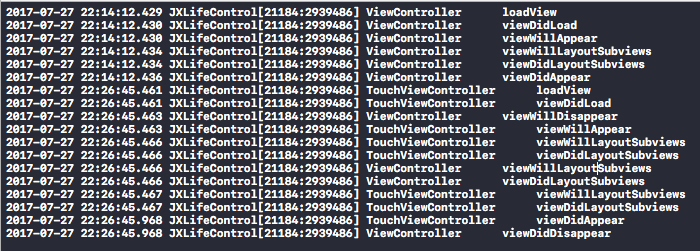
通过代码创建这种凡是,我们打印调用顺序可以发现

对应的代码调用顺序就是 loadView -> viewDidLoad -> viewWillAppear -> viewWillLayoutSubviews -> viewDidLayoutSubviews -> viewDidAppear
// 1.

- (void)loadView; // This is where subclasses should create their custom view

hierarchy if they aren't using a nib. Should never be called directly.

// 2.

- (void)viewDidLoad; // Called after the view has been loaded. For view controllers created in code, this is after -loadView. For view controllers unarchived from a nib, this is after the view is set.

// 3.

- (void)viewWillAppear:(BOOL)animated;    // Called when the view is about to made visible. Default does nothing

// 4.

- (void)viewWillLayoutSubviews NS_AVAILABLE_IOS(5_0);

// Called just after the view controller's view's layoutSubviews method is invoked. Subclasses can implement as necessary. The default is a nop.

// 5.

- (void)viewDidLayoutSubviews NS_AVAILABLE_IOS(5_0);
控制器创建之后,弹出另一个控制器(当前控制器消失),执行的代码顺序 viewWillDisappear -> viewWillLayoutSubviews -> viewDidLayoutSubviews -> viewDidDisappear
// 1.

- (void)viewWillDisappear:(BOOL)animated; // Called when the view is dismissed, covered or otherwise hidden. Default does nothing

// 2.

- (void)viewWillLayoutSubviews NS_AVAILABLE_IOS(5_0);

// Called just after the view controller's view's layoutSubviews method is invoked. Subclasses can implement as necessary. The default is a nop.

// 3.

- (void)viewDidLayoutSubviews NS_AVAILABLE_IOS(5_0);

// 4.

- (void)viewDidDisappear:(BOOL)animated;  // Called after the view was dismissed, covered or otherwise hidden. Default does nothing
- 通过storyboard创建控制器
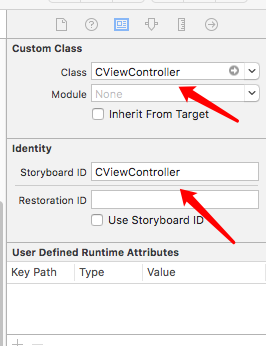
UIStoryboard *storyBoard = [UIStoryboard storyboardWithName:NSStringFromClass([CViewController class]) bundle:nil];

CViewController *touch = [storyBoard instantiateViewControllerWithIdentifier:NSStringFromClass([CViewController class])];

[self presentViewController:touch animated:YES completion:nil];
为了方便,同时减少手误,这里重用ID我们使用类名
通过打印来观察

可以看到代码的调用顺序就是 awakeFromNib -> loadView -> viewWillAppear -> viewWillLayoutSubviews -> viewDidLayoutSubviews -> viewDidAppear
// 1.

- (void)awakeFromNib NS_REQUIRES_SUPER;

// 2.

- (void)loadView; // This is where subclasses should create their custom view hierarchy if they aren't using a nib. Should never be called directly.

// 3.

- (void)viewDidLoad; // Called after the view has been loaded. For view controllers created in code, this is after -loadView. For view controllers unarchived from a nib, this is after the view is set.

// 4.

- (void)viewWillAppear:(BOOL)animated;    // Called when the view is about to made visible. Default does nothing

// 5.

- (void)viewWillLayoutSubviews NS_AVAILABLE_IOS(5_0);

// Called just after the view controller's view's layoutSubviews method is invoked. Subclasses can implement as necessary. The default is a nop.

- (void)viewDidLayoutSubviews NS_AVAILABLE_IOS(5_0);

// 6.

- (void)viewDidAppear:(BOOL)animated;     // Called when the view has been fully transitioned onto the screen. Default does nothing
这里需要注意的是,我们是控制器通过storyboard来加载,那么是根据storyboard的描述创建view。
- 通过XIB来创建加载控制器
首先创建一个XIB,快捷键 command + N 来创建。


创建后XIB之后我们还需要设置文件

- 这里设置为我们创建的控制器
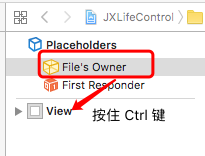
所有需要的已经设置好,这时候我们可以来码代码了。
DViewController *touch = [[DViewController alloc] initWithNibName:NSStringFromClass([DViewController class]) bundle:nil];

[self presentViewController:touch animated:YES completion:nil];
下面我们来观察控制器的生命周期

代码层面上就是
// 1.

- (void)loadView; // This is where subclasses should create their custom view hierarchy if they aren't using a nib. Should never be called directly.

// 2.

- (void)viewDidLoad; // Called after the view has been loaded. For view controllers created in code, this is after -loadView. For view controllers unarchived from a nib, this is after the view is set.

// 3.

- (void)viewWillAppear:(BOOL)animated;    // Called when the view is about to made visible. Default does nothing

// 4.可能会多次调用

- (void)viewWillLayoutSubviews NS_AVAILABLE_IOS(5_0);

// Called just after the view controller's view's layoutSubviews method is invoked. Subclasses can implement as necessary. The default is a nop.

- (void)viewDidLayoutSubviews NS_AVAILABLE_IOS(5_0);

// 5.

- (void)viewDidAppear:(BOOL)animated;     // Called when the view has been fully transitioned onto the screen. Default does nothing
说明:
加载XIB的时候,我们同样可以不指定XIB名称,这样loadView 就会最终加载与控制器同名的 XIB (命名规范很重要啊)
DViewController *touch = [[DViewController alloc] init];

[self presentViewController:touch animated:YES completion:nil];
同时,如果我们删掉 DViewController.xib ,同时创建一个 DView.xib 当我们用以上不指定xib名称,同样是可以加载出来的(命名规范很重要)。
我们可以知道,加载xib的过程是,如果指定名称,那么加载指定名称的xib,如果没有指定名称就会加载和控制器同名的xib,如果没有就会找去控制器名相同但是没有 controller 的xib来加载。
- A present B控制器再返回,两个控制器的生命周期
1. 创建A控制器

流程:
A:loadView

A:viewDidLoad

A:viewWillAppear

A:viewWillLayout...

A:viewDidAppear
2. A present 到B控制器
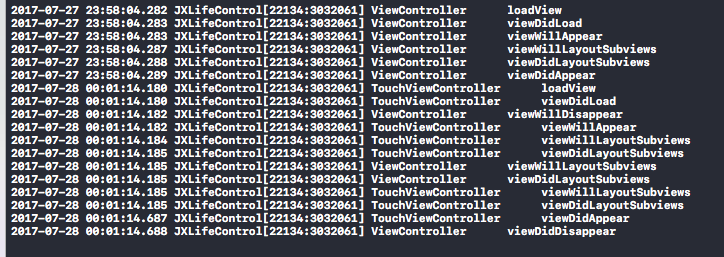
流程:
A:loadView

A:viewDidLoad

A:viewWillAppear

A:viewWillLayout...    // 可能多次调用

A:viewDidAppear

-------------- Present B控制器 --------------

B:loadView

B:viewDidLoad

A:viewWillDisappear

B:viewWillAppear

B:viewLayout....   // 可能多次调用

A;viewLayout...   // 可能多次调用

B:viewDidAppear   // 多次调用,会跟下面的调用顺序可能会有些调换

A:viewDidDisappear
ios控制器生存周期的更多相关文章
- iOS控制器的创建方式
iOS控制器的创建.除了常见的alloc init外还有通过加载storyboard和xib的方式,下边逐一展开: 1.代码alloc init 创建方式 ViewController *vc= [[ ...
- iOS 控制器的生命周期(UIController)
前言: 在iOS开发中,控制器的生命周期非常重要,什么时候加载页面,什么时候请求接口,什么时候刷新界面等等,都有很多值得优化的地方 loadView: 最先执行的方法,控制器关联的有Nib文件的时候, ...
- iOS控制器与视图加载方法
转载记录, 请看原文: 1. iOS中的各种加载方法(initWithNibName,loadNibNamed,initWithCoder,awakeFromNib等等)简单使用 http://w ...
- iOS 控制器title和tabbar的title设置问题
iOS 设置tabbarItem的title的是通过 controller.tabBarItem.title = @"标题" iOS 设置导航栏控制器title通过 contoll ...
- iOS控制器的生命周期分析和使用
转自http://blog.csdn.net/qijianli/article/details/7826979 iOS的SDK中提供很多原生ViewController,大大提高了我们的开发效率,下面 ...
- ios控制器生命周期详解
#import "MyOneViewController.h" @interface MyOneViewController () @property (nonatomic, st ...
- iOS控制器瘦身-面向超类编程
今天写这篇文章的目的,是提供一种思路,来帮助大家解决控制器非常臃肿的问题,对控制器瘦身. 滴滴 老司机要开车了 如果手边有项目,不妨打开工程看一下你的控制器代码有多少行,是不是非常多?再看一下tabl ...
- 【iOS控制器跳转时,NavigationBar有阴影动画闪过的解决办法】
如题,push控制器时,由于默认的控制器view是黑色,push到这个控制器时,navigationBar(默认是透明效果)后面有一个黑色阴影一闪而过,解决办法将navigationBar设为图片填充 ...
- ios控制器modal跳转
1. http://www.cnblogs.com/smileEvday/archive/2012/05/29/presentModalViewController.html 2012年5月- Pre ...
随机推荐
- 关于HBuilder的一些使用技巧。
在HBuilder中一个名为扩展代码块的功能. 扩展代码块 看,它就在上方工具栏的工具选项中,分为自定义html代码块, 自定义js代码块, 自定义css代码块, 自定义jquery代码块. 以下便是 ...
- Java虚拟机14:Java对象大小、对象内存布局及锁状态变化
一个对象占多少字节? 关于对象的大小,对于C/C++来说,都是有sizeof函数可以直接获取的,但是Java似乎没有这样的方法.不过还好,在JDK1.5之后引入了Instrumentation类,这个 ...
- [Linux] PHP程序员玩转Linux系列-腾讯云硬盘扩容挂载
1.PHP程序员玩转Linux系列-怎么安装使用CentOS 2.PHP程序员玩转Linux系列-lnmp环境的搭建 3.PHP程序员玩转Linux系列-搭建FTP代码开发环境 4.PHP程序员玩转L ...
- R 包 安装 卸载 查看版本
R 查看包的版本 version> packageVersion("snow") 卸载包remove.packages 从源码安装包install.packages(path ...
- Linux 进程,线程 -- (未完)
系统调用 Linux 将系内核的功能接口制作成系统调用, Linux 有 200 多个系统调用, 系统调用是操作系统的最小功能单元. 一个操作系统,以及基于操作系统的应用,都不能实现超越系统调用的功能 ...
- thinkphp5.0学习笔记(三)获取信息,变量,绑定参数
1.构造函数: 控制器类必须继承了\think\Controller类,才能使用: 方法_initialize 代码: <?php namespace app\lian\controller; ...
- PHP设计模式:简单工厂
示例代码详见https://github.com/52fhy/design_patterns 简单工厂 简单工厂模式的工厂类一般是使用静态方法,通过接收的参数的不同来返回不同的对象实例. 也就是使用的 ...
- 简单轻量级的一套JS 类库(RapidDevelopmentFramework.JS)
1.最近好久没有更新自己的博客了,一直在考虑自己应该写一些什么.4.2日从苏州回到南京的路上感觉自己的内心些崩溃和失落,我就不多说了? 猛然之间我认为自己需要找一下内心的平衡.决定开发属于自己一套快速 ...
- php Base64编码文件二进制流主要使用
<?php header( "Content-type: image/jpeg"); //$filename='1.jpg'; //$content=file_get_con ...
- 鼠标滚轮图片放大缩小功能,使用layer弹框后不起作用
今天在项目中遇到的一个问题:点击按钮使用layer弹框弹出一张图片,需要加一个鼠标滚轮放大缩小,图片也跟着放大缩小的功能.于是在网上找了一个demo. DEMO: <!DOCTYPE html ...