
spring入门之环境搭建
本人刚刚接触spring,看了一些教程,但是很多概念都不懂(以前没接触过,看着很抽象),所以我觉得通过动手可能会更好的理解并且掌握。看了一些小实例,但是都没有成功,终于在各种尝试之后搭建成功了,现在我就把我的过程简单地展示一下。
首先准备相应的jar包:spring-framework-3.1.2.RELEASE-with-docs中dist目录下所有jar包(有些多余,但是很方便) 还有spring-framework-3.1.2.RELEASE-dependences中的包(这个spring-framework-3.1.2.RELEASE-dependences.zip不好找,我是一个个百度下面的jar包):com.springsource.org.apache.commons.logging-1.1.1.jar
com.springsource.org.apache.log4j-1.2.15.jar
com.springsource.org.apache.commons.collections-3.2.1.jar(相关的jar包我已经传到我的文件中了,不知道怎么去插入链接)。
下载开发工具:SpringSource Tool Suite 参考http://jinnianshilongnian.iteye.com/blog/1413851这个讲的很详细,后面的有点不清晰
接下来的操作就是打开eclipse,建一个javaproject,然后导入jar包

如上,然后配置junit环境:选择上图中Add Libraries.. 然后会弹出一个对话框,选择junit,点击下方next 然后选择junit4
这样就ok了
下面就是代码了:
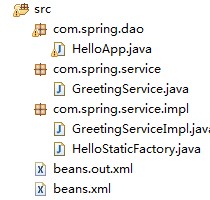
其中HelloStaticFactory.java是我自己后来加的 ,与本篇文章无关。
HelloApp.java:
package com.spring.dao;

import org.junit.Test;

import org.springframework.beans.factory.BeanFactory;

import org.springframework.beans.factory.xml.XmlBeanFactory;

import org.springframework.context.ApplicationContext;

import org.springframework.context.support.ClassPathXmlApplicationContext;

import org.springframework.core.io.FileSystemResource;

import org.springframework.test.context.TestExecutionListeners;

import com.spring.service.GreetingService;

import com.spring.service.impl.GreetingServiceImpl;

public class HelloApp {

 //这里我使用的是Junit测试的方法,也可以使用main方法来测试,使用Junit测试要导入Junit的Jar包

 @Test

 public void hello() throws Exception{

  ApplicationContext factory=new ClassPathXmlApplicationContext("beans.xml");

  GreetingService greetingService=(GreetingService)factory.getBean("greetingService");

  greetingService.sayGreeting();

}
GreetingService.java:
package com.spring.service;

public interface GreetingService {

 void sayGreeting();

}
GreetingServiceImpl.java:
package com.spring.service.impl;

import com.spring.service.GreetingService;

public class GreetingServiceImpl implements GreetingService {

 private String greeting;

 public void setGreeting(String greeting) {

  this.greeting = greeting;

 }

 public GreetingServiceImpl(){}

 public GreetingServiceImpl(String greeting){

  this.greeting=greeting;

 }

 public void sayGreeting(){

  System.out.println(greeting);

 }

}
beans.xml:
<?xml version="1.0" encoding="UTF-8"?>

<beans xmlns="http://www.springframework.org/schema/beans"

       xmlns:xsi="http://www.w3.org/2001/XMLSchema-instance"

       xsi:schemaLocation="http://www.springframework.org/schema/beans

           http://www.springframework.org/schema/beans/spring-beans-3.0.xsd">

  <bean id="greetingService" class="com.spring.service.GreetingService" >

  < property name="greeting" value="hello,world"/>

  </bean>

</beans>

按照以上方法就可以了,好好看看beans.xml更方便理解整个框架。谢谢大家!
spring入门之环境搭建的更多相关文章
- 【个人笔记】003-PHP基础-01-PHP快速入门-03-PHP环境搭建
003-PHP基础-01-PHP快速入门 03-PHP环境搭建 1.客户端(浏览器) IE FireFox CHROME Opera Safari 2.服务器 是运行网站的基本 是放置程序代码的地方 ...
- Android入门之环境搭建
欢迎访问我的新博客:http://www.milkcu.com/blog/ 原文地址:http://www.milkcu.com/blog/archives/1376935560.html 原创:An ...
- SpringData系列一 Spring Data的环境搭建
本节作为主要讲解Spring Data的环境搭建 JPA Spring Data :致力于减少数据访问层(DAO)的开发量.开发者唯一要做的就是声明持久层的接口,其他都交给Spring Data JP ...
- scala 入门Eclipse环境搭建
scala 入门Eclipse环境搭建及第一个入门经典程序HelloWorld IDE选择并下载: scala for eclipse 下载: http://scala-ide.org/downloa ...
- 新手嘛,先学习下 Vue2.0 新手入门 — 从环境搭建到发布
Vue2.0 新手入门 — 从环境搭建到发布 转自:http://www.runoob.com/w3cnote/vue2-start-coding.html 具体文章详细就不搬了,步骤可过去看,我这就 ...
- scala 入门Eclipse环境搭建及第一个入门经典程序HelloWorld
scala 入门Eclipse环境搭建及第一个入门经典程序HelloWorld 学习了: http://blog.csdn.net/wangmuming/article/details/3407911 ...
- spring boot 开发环境搭建(Eclipse)
Spring Boot 集成教程 Spring Boot 介绍 Spring Boot 开发环境搭建(Eclipse) Spring Boot Hello World (restful接口)例子 sp ...
- 总结Vue 第四天:vue-cli(Vue2.0 新手入门 — 从环境搭建到发布)
总结Vue 第四天:vue-cli(Vue2.0 新手入门 - 从环境搭建到发布) 一.Vue CLI----(Vue2.0 新手入门 - 从环境搭建到发布): ■ CLI是Command-Lin ...
- Spring1:Spring简介、环境搭建、源码下载及导入MyEclipse
框架学习前言 这个模块是面向Spring的,Spring的学习我是这么想的: 1.简单介绍Spring,主要是从网上借鉴一些重点 2.尽量说明清楚Spring的使用方法以及细节点 3.尽量以自己的理解 ...
随机推荐
- 用queue函数写广搜
以走迷宫需要的最少步数的代码为例 #include<stdio.h>#include<string.h>#include<queue> using namespac ...
- 常用html标签的只读写法
<a href="baidu.com" onclick="event.returnValue=false;">百度</a> a链接的只读 ...
- 【LeetCode】110. Balanced Binary Tree
题目: Given a binary tree, determine if it is height-balanced. For this problem, a height-balanced bin ...
- (cljs/run-at (JSVM. :all) "一起实现柯里化")
前言 习惯了Ramda.js就会潜意识地认为函数均已柯里化,然后就可以随心所欲的用函数生成函数,或者使用compose组合多个函数来生成一个新函数.如下 const f = a => b =& ...
- Mathematica学习笔记1
非常喜欢Mathematica的"自动草稿纸"的理念,Magic Paper, 唔哈~ Mathematica的矩阵操作和Matlab的风格十分不同. [ ] 是一个Part运算符 ...
- H5本地储存Web Storage
一.本地存储由来的背景 由于HTML4时代Cookie的大小.格式.存储数据格式等限制,网站应用如果想在浏览器端存储用户的部分信息,那么只能借助于Cookie.但是Cookie的这些限制,也就导致了C ...
- Openfire插件开发图解
概述 Openfire插件开发是Openfire的精髓之一,支持插件热插拔,还可以方便的在web端进行管理插件.插件分为两种,一种是以服务为主的控制台插件,一种是包括页面或对外开放Servlet接口. ...
- 在H3C交换机上开通一个VLAN并且开通一个端口ping通它
<H3C>system-view System View: return to User View with Ctrl+Z. [H3C]interface vlan-interface 2 ...
- javaScript事件绑定
事件绑定,就是要对某一个东西进行操作.(因为你想让他实现什么效果,所以就得绑定他,哈哈哈!) 要想让 JavaScript 对用户的操作作出响应,首先要对 DOM 元素绑定事件处理函数.所谓事件处理函 ...
- vijos1080题解
题目: 对于一个递归函数w(a,b,c) 如果a<=0 or b<=0 or c<=0就返回值1. 如果a>20 or b>20 or c>20就返回w(20,20 ...