
通过反射实现Microsoft Visual Studio International Pack 1.0 SR1里面的两个类
这两天打算实现拼音和简繁转换的方法, 发现Microsoft Visual Studio International Pack 1.0 SR1 提供了 . 下载地址
但是基于某些原因,
一来下载回来的是安装包 而某些msi文件安装必须安装VS2005或2008,比较麻烦.
二来不想在每个工程里面都引用里面的DLL.
所以打算把需要的Dll放入资源文件里面,然后调用里面的dll来实现.
之前只知道反射这个概念,从没怎么研究过,原本以为有很多现成的代码可供研究,但终究只有一些大概的原理.
最终去啃MSDN帮助,总算已经完成,记录下.
首先在工程里面创建一个资源文件QuoteDll.resx. 然后建立ChinaChar和ChinaConverter类

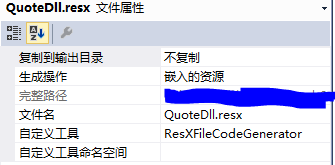
(注意:QuoteDll.resx应和两个类在同一个命名空间下)
下面就看代码吧!
/**********************************创建记录**********************************

  类  描述: 此类使用内嵌ChineseConverter.dll和ChnCharInfo.dll的资源

  类    名: ChinaChar

  创建  者:yj.zhou

  创建日期:2017/12/12 星期一 15:05:50

  类  说明:

            ChineseConverter.dll和ChnCharInfo.dll获取方法

            下载微软Microsoft Visual Studio International Pack 1.0 SR1语言包:

            解压“vsintlpack1.zip”,获得七个语言包。双击其中的“CHSPinYinConv.msi”

            完成安装后就可以在Visual Studio中引用ChnCharInfo.dll了。

            或从其它项目中直接引用ChineseConverter.dll和ChnCharInfo.dll

            疑惑:

            很多字有一个第5声(什么鬼?),所以

            ChineseChar(ChnCharInfo.dll)(ChnCharInfo.dll)类中PinyinCount并不准确.

            IsPolyphone判断他的是否多音字也未必正确.

*******************************************************************************/

using System;

using System.Collections.ObjectModel;

using System.Reflection;

using static OperateClass.PropertyHelper;

namespace OperateClass.Conver

{

    /// <summary>

    /// 汉字相关类(主要是反射实现ChineseChar(ChnCharInfo.dll)的类)

    /// </summary>

    public class ChinaChar

    {

        #region 属性

        #region 私有属性/字段

        private Type ChineseCharType;

        private object innerChnChar;

        #endregion

        #region 公共属性

        /// <summary>

        /// 获取这个汉字字符。

        /// </summary>

        public char ChineseCharacter { get; }

        /// <summary>

        /// 获取这个字符是否是多音字。

        /// </summary>

        public bool IsPolyphone { get; }

        /// <summary>

        /// 获取这个字符的拼音个数。

        /// </summary>

        public short PinyinCount { get; }

        /// <summary>

        /// 获取这个字符的拼音。

        /// </summary>

        public ReadOnlyCollection<string> Pinyins { get; }

        /// <summary>

        /// 获取这个字符的笔画数。

        /// </summary>

        public short StrokeNumber { get; }

        #endregion

        #endregion

        #region 方法

        #region 私有方法

        /// <summary>

        /// 调用ChineseChar的构造方法(ChineseChar只有一个带char参数的构造方法)

        /// </summary>

        /// <param name="chnChar">使用这个chnChar参数构造ChineseChar类型</param>

        /// <returns></returns>

        private object getChineseCharConstruct(char chnChar)

        {

            return Activator.CreateInstance(ChineseCharType, new object[] { chnChar });

        }

        private object getPublicPropertyValue(string propName)

        {

            return ChineseCharType.InvokeMember(

                propName,

                BindingFlags.DeclaredOnly |

                BindingFlags.Public |

                BindingFlags.Instance |

                BindingFlags.GetProperty,

                null, innerChnChar, null);

        }

        private object getPublicMethodResult(string methodName, Object[] args)

        {

            return ChineseCharType.InvokeMember(methodName,

                  BindingFlags.DeclaredOnly |

                  BindingFlags.Public |

                  BindingFlags.NonPublic |

                  BindingFlags.Instance |

                  BindingFlags.GetProperty, null, innerChnChar, null);

        }

        #endregion

        #region 公共方法

        #region 构造方法

        /// <summary>

        /// 构造函数

        /// </summary>

        public ChinaChar(char chnChar)

        {

            ChineseCharType = getChineseCharType();

            if (ChineseCharType == null)

            {

                throw new ArgumentNullException("不能获取资源文件定义的ChineseChar类");

            }

            innerChnChar = getChineseCharConstruct(chnChar);

            ChineseCharacter = (char)getPublicPropertyValue("ChineseCharacter");

            IsPolyphone = (bool)getPublicPropertyValue("IsPolyphone");

            PinyinCount = (short)getPublicPropertyValue("PinyinCount");

            // Pinyins = (ReadOnlyCollection<string>)getPublicPropertyValue("Pinyins");

            //这个方法必须保证类属性和 ChineseChar类的属性名是一样的,可以减少硬编码.

            Pinyins = (ReadOnlyCollection<string>)getPublicPropertyValue(

                GetPropertyName(() => Pinyins));

        }

        #endregion

        #region 实例方法

        /// <summary>

        /// 将给出的字符和实例字符的笔画数进行比较。

        /// </summary>

        /// <param name="chnChar">显示给出的字符</param>

        /// <returns>

        /// 说明比较操作的结果。

        /// 如果给出字符和实例字符的笔画数相同,返回值等于 0。

        /// 如果实例字符比给出字符的笔画多,返回值为大于 0。

        /// 如果实例字符比给出字符的笔画少,返回值为小于 0。

        /// </returns>

        public int CompareStrokeNumber(char chnChar)

        {

            return (int)getPublicMethodResult("CompareStrokeNumber", new object[1] { chnChar });

        }

        /// <summary>

        /// 识别字符是否有指定的读音。(指定的拼音字符串是否在实例字符的拼音集合中)

        /// </summary>

        /// <param name="pinyin">指定的需要被识别的拼音。</param>

        /// <returns>

        /// 如果指定的拼音字符串在实例字符的拼音集合中则返回ture,否则返回false。

        /// </returns>

        public bool HasSound(string pinyin)

        {

            return this.Pinyins.Contains(pinyin);

        }

        /// <summary>

        /// 识别给出的字符是否是实例字符的同音字。

        /// </summary>

        /// <param name="chnChar">指出需要识别的字符。</param>

        /// <returns>如果给出的实例字符是同音字则返回ture,否则返回false。</returns>

        public bool IsHomophone(char chnChar)

        {

            return (bool)getPublicMethodResult("IsHomophone", new object[1] { chnChar });

        }

        #endregion

        #region 静态方法

        #region 私有静态方法

        private static Type getChineseCharType()

        {

            Type result = null;

            // Assembly ab = Assembly.Load("ChnCharInfo");

            Assembly ab = Assembly.Load(QuoteDll.ChnCharInfo);

            foreach (Type item in ab.GetTypes())

            {

                if (item.IsClass && item.Name == "ChineseChar")

                {

                    result = item;

                    break;

                }

            }

            return result;

        }

        private static MethodInfo getChineseCharMethod(string methodName, Type[] parameters)

        {

            return getChineseCharType().GetMethod(methodName, parameters);

        }

        #endregion

        #region 还原ChnCharInfo.dll的所有静态方法

        /// <summary>

        /// 检索具有指定笔画数的字符个数。

        /// </summary>

        /// <param name="strokeNumber"></param>

        /// <returns></returns>

        public static short GetCharCount(short strokeNumber)

        {

            return (short)getChineseCharMethod("GetCharCount",

                new Type[1] { strokeNumber.GetType() }).Invoke(null, new object[] { strokeNumber });

        }

        /// <summary>

        /// 获取给定拼音的所有同音字。

        /// </summary>

        /// <param name="pinyin">拼音,指出读音。</param>

        /// <returns>返回具有相同的指定拼音的字符串列表。 如果拼音不是有效值则返回空。</returns>

        public static char[] GetChars(string pinyin)

        {

            return (char[])getChineseCharMethod("GetChars",

                new Type[1] { pinyin.GetType() }).Invoke(null, new object[] { pinyin });

        }

        /// <summary>

        /// 检索具有指定笔画数的所有字符串。

        /// </summary>

        /// <param name="strokeNumber">指出需要被识别的笔画数。</param>

        /// <returns>返回具有指定笔画数的字符列表。 如果笔画数是无效值返回空</returns>

        public static char[] GetChars(short strokeNumber)

        {

            return (char[])getChineseCharMethod("GetChars",

               new Type[1] { strokeNumber.GetType() }).Invoke(null, new object[1] { strokeNumber });

        }

        /// <summary>

        /// 检索具有指定拼音的字符数。

        /// </summary>

        /// <param name="pinyin">显示需要被识别的拼音字符串。</param>

        /// <returns>返回具有指定拼音的字符数。 如果拼音不是有效值则返回-1。 </returns>

        public static short GetHomophoneCount(string pinyin)

        {

            return (short)getChineseCharMethod("GetHomophoneCount",

                new Type[1] { pinyin.GetType() }).Invoke(null, new object[1] { pinyin });

        }

        /// <summary>

        /// 检索指定字符的笔画数

        /// </summary>

        /// <param name="chnChar">指出需要识别的字符。</param>

        /// <returns>返回指定字符的笔画数。如果字符不是有效值则返回-1。</returns>

        public static short GetStrokeNumber(char chnChar)

        {

            return (short)getChineseCharMethod("GetStrokeNumber",

               new Type[1] { chnChar.GetType() }).Invoke(null, new object[] { chnChar });

        }

        /// <summary>

        /// 识别给出的两个字符是否是同音字。

        /// </summary>

        /// <param name="chnChar1">指出第一个字符</param>

        /// <param name="chnChar2">指出第二个字符</param>

        /// <returns></returns>

        public static bool IsHomophone(char chnChar1, char chnChar2)

        {

            return (bool)getChineseCharMethod("IsHomophone",

               new Type[2] { chnChar1.GetType(), chnChar2.GetType() }).

                 Invoke(null, new object[2] { chnChar1, chnChar2 });

        }

        /// <summary>

        /// 识别给出的字符是否是一个有效的汉字字符。

        /// </summary>

        /// <param name="chnChar">显示需要被识别的笔画数。</param>

        /// <returns>返回具有指定笔画数的字符数。 如果笔画数是无效值返回-1</returns>

        public static bool IsValidChar(char chnChar)

        {

            return (bool)getChineseCharMethod("IsValidChar",

                new Type[1] { chnChar.GetType() }).Invoke(null, new object[1] { chnChar });

        }

        /// <summary>

        /// 识别给出的拼音是否是一个有效的拼音字符串。

        /// </summary>

        /// <param name="pinyin">指出需要识别的字符串。</param>

        /// <returns>如果指定的字符串是一个有效的拼音字符串则返回ture,否则返回false。</returns>

        public static bool IsValidPinyin(string pinyin)

        {

            return (bool)getChineseCharMethod("IsValidPinyin",

                new Type[1] { pinyin.GetType() }).Invoke(null, new object[1] { pinyin });

        }

        /// <summary>

        /// 识别给出的笔画数是否是一个有效的笔画数。

        /// </summary>

        /// <param name="strokeNumber">指出需要识别的笔画数。</param>

        /// <returns>如果指定的笔画数是一个有效的笔画数则返回ture,否则返回false。</returns>

        public static bool IsValidStrokeNumber(short strokeNumber)

        {

            return (bool)getChineseCharMethod("IsValidStrokeNumber",

               new Type[1] { strokeNumber.GetType() }).Invoke(null, new object[1] { strokeNumber });

        }

        #endregion

        #endregion

        #endregion

        #endregion

    }

}

然后ChinaConverter类更简单
/**********************************创建记录**********************************

  类  描述: 此类通过反射实现嵌入的资源ChineseConverter.dll里面的ChineseConverter类

  类    名: ChinaConverter

  创建  者:yj.zhou

  创建日期:2017/12/13 星期三 14:52:59

  类  说明: 参考ChinaChar类说明

*******************************************************************************/

using System;

using System.Reflection;

namespace OperateClass.Conver

{

    /// <summary>

    /// 存储转换方向,包括繁体转换为简体中文和简体转换为繁体中文。

    /// </summary>

    public enum ChineseConversionDirection

    {

        /// <summary>

        /// 把简体中文转换为繁体中文。

        /// </summary>

        SimplifiedToTraditional = 0,

        /// <summary>

        /// 把繁体中文转换为简体中文。

        /// </summary>

        TraditionalToSimplified = 1

    }

    /// <summary>

    /// 此类通过反射实现嵌入的资源ChineseConverter.dll里面的ChineseConverter类

    /// </summary>

    public class ChinaConverter

    {

        #region 静态方法

        /// <summary>

        /// 转换简体中文和繁体中文字符串。

        /// </summary>

        /// <param name="text">需要转换的字符串</param>

        /// <param name="direction">转换方向.</param>

        /// <returns></returns>

        public static string Convert(string text, ChineseConversionDirection direction = ChineseConversionDirection.SimplifiedToTraditional)

        {

            Type ChineseConverterType = null;

            Type ChineseConversionDirectionType = null;

            Assembly ab = Assembly.Load(QuoteDll.ChineseConverter);

            foreach (Type item in ab.GetTypes())

            {

                if (item.IsEnum && item.Name == "ChineseConversionDirection")

                {

                    ChineseConversionDirectionType = item;

                }

                if (item.IsClass && item.Name == "ChineseConverter")

                {

                    ChineseConverterType = item;

                }
                if (ChineseConverterType != null && ChineseConverterType != null)
                   break;
            }
            //if(ChineseConverterType == null || ChineseConversionDirectionType == null)

            // new ArgumentNullException("不能获取资源文件定义的ChineseConverter类");

            object[] parame = new object[2] { text, (int)direction };

            object obj = ChineseConverterType.GetMethod("Convert").Invoke(null, parame);

            return (string)obj;

        }

        #endregion

    }

}
现在看看测试代码吧,完全没问题.
private void btnChinaChar_Click(object sender, EventArgs e)

 {

     string ss = ChinaConverter.Convert("简体字,繁體字");

     ss = ChinaConverter.Convert("我写简体字");

     ss = ChinaConverter.Convert("你寫繁體字", ChineseConversionDirection.TraditionalToSimplified);

     ss = ChinaConverter.Convert("全都是汉字,哈哈!%$^&");

     bool b = ChinaChar.IsValidChar('万');//true

     short s = ChinaChar.GetCharCount(5);//319

     char[] ca = ChinaChar.GetChars("mo4"); //总共73个

     int ipy = ChinaChar.GetHomophoneCount("mo4");//73

     int ibh = ChinaChar.GetStrokeNumber('万');

     bool btyz = ChinaChar.IsHomophone('万', '莫'); //true


     ChinaChar chnChar = new ChinaChar('万');

}
把这两个类编译成Dll,以后其它的项目里面也不需要再添加这两个dll引用了,
通过相同的原理,做单exe程序也没啥问题了,哈哈.
接下来我就是去丰富这个基础类.实现获取汉字首拼和切换简繁体了.
通过反射实现Microsoft Visual Studio International Pack 1.0 SR1里面的两个类的更多相关文章
- Microsoft Visual Studio International Pack 1.0 SR1--关于汉字转拼音
Microsoft Visual Studio International Pack 1.0 SR1————微软的一个类库 地址:http://www.microsoft.com/zh-cn/down ...
- Microsoft Visual Studio International Pack
Visual Studio International Pack 包含一组类库,该类库扩展了.NET Framework对全球化软件开发的支持.使用该类库提供的类,.NET 开发人员可以更方便的创建支 ...
- C# 使用微软的Visual Studio International Pack 类库提取汉字拼音首字母
首先下载Visual Studio International Pack 1.0,官方下载地址:http://www.microsoft.com/downloads/zh-cn/details.asp ...
- 利用微软类库 Visual Studio International Pack 汉字转拼音
首先,从微软官网下载安装包:http://www.microsoft.com/downloads/zh-cn/details.aspx?FamilyID=44CAC7F0-633B-477D-AED2 ...
- C# 汉字转拼音 使用微软的Visual Studio International Pack 类库提取汉字拼音首字母
代码参考该文http://www.cnblogs.com/yazdao/archive/2011/06/04/2072488.html VS2015版本 1.使用Nuget 安装 "Simp ...
- Microsoft Visual Studio 2013 Language Pack
Microsoft Visual Studio 2013 Language Pack Microsoft Visual Studio 2013 各版本语言包下载地址: https://my.visua ...
- Microsoft Visual Studio Ultimate 2013 Update 2 RC 英文版--离线完整安装ISO+简体中文语言包
VS2013.2_RC_EN_Full.iso:名称:Microsoft Visual Studio 2013版本:Ultimate 2013 Update 2 RC语言:English在线下载:ht ...
- Microsoft Visual Studio 2012 文档 下载地址 vs2012 中文帮助文档
https://www.microsoft.com/zh-cn/download/confirmation.aspx?id=34794 下载地址: http://download.microsoft. ...
- Microsoft Visual Studio 6.0 Enterprise Edition
我们的老古董啊 啊啊啊 啊啊 <Microsoft Visual Studio 6.0 Enterprise Edition>(完整9CD,带中文MSDN& <Micr ...
随机推荐
- jumpserver安装详解
环境说明 主机为最小 安装的centos6.9 x86_64. [root@m01 ~]# cat /etc/redhat-release CentOS release 6.9 (Final) [ro ...
- javascript中的变量、作用域和内存问题
1.变量 变量的值的类型:基本类型值和引用类型值两种. 基本类型:Undefined.Null.Boolean.String.Number,这五类基本数据类型的值在内存中占有固定大小的空间,因此保存在 ...
- windows下配置wampserver
第一,打开局域网访问 配置文件:点击右下角的WAMP 服务器小托盘,选择Apache>httpd.conf 搜索关键字 "deny from ",会发现一处 "de ...
- 如何在RHEL7上搭建Samba服务实现Windows与Linux之间的文件共享
如何在RHEL7上搭建Samba服务实现Windows与Linux之间的文件共享 实现环境:VMware workstations.RHEL7.0 第一步:配置网卡IP及yum软件仓库 命令:vim ...
- c语言的类型、运算符与表达式
title: 2017-10-17c语言的类型.运算符与表达式 tags: c程序设计语言 grammar_cjkRuby: true --- 1.1 数据类型 char 字符型,一个字节 int 整 ...
- [转载] 使用 Twitter Storm 处理实时的大数据
转载自http://www.ibm.com/developerworks/cn/opensource/os-twitterstorm/ 流式处理大数据简介 Storm 是一个开源的.大数据处理系统,与 ...
- [转载] hessian学习
转载自http://www.cnblogs.com/yjmyzz/p/hessian-helloworld.html hessian是一个采用二进制格式传输的服务框架,相对传统soap web ser ...
- Python3 下实现 Tencent AI 调用
1.背景 a.鹅厂近期发布了自己的AI api,包括身份证ocr.名片ocr.文本分析等一堆API,因为前期项目用到图形OCR,遂实现试用了一下,发现准确率还不错,放出来给大家共享一下. b.基于py ...
- android堆栈调试--详细
1.将ndk中的arm-linux-androideabi-addr2line可执行文件的路径加入配置文件~/.bashrc中,例如: export PATH=$PATH:~/dlna/android ...
- C语言之二分猜数字游戏
#include <stdio.h>#include <windows.h>#include<string.h>int main() { int oldprice, ...