
通过Excel认识POI
1、POI是什么
<!-- https://mvnrepository.com/artifact/org.apache.poi/poi -->

<dependency>

    <groupId>org.apache.poi</groupId>

    <artifactId>poi</artifactId>

    <version>3.9</version>

</dependency>

<!-- https://mvnrepository.com/artifact/org.apache.poi/poi-ooxml -->

<dependency>

    <groupId>org.apache.poi</groupId>

    <artifactId>poi-ooxml</artifactId>

    <version>3.9</version>

</dependency><!-- https://mvnrepository.com/artifact/org.apache.poi/poi -->
<dependency>
<groupId>org.apache.poi</groupId>
<artifactId>poi</artifactId>
<version>3.9</version>
</dependency>
<!-- https://mvnrepository.com/artifact/org.apache.poi/poi-ooxml -->
<dependency>
<groupId>org.apache.poi</groupId>
<artifactId>poi-ooxml</artifactId>
<version>3.9</version>
</dependency>
HSSF is the POI Project's pure Java implementation of the Excel '97(-2007) file format.

XSSF is the POI Project's pure Java implementation of the Excel 2007 OOXML (.xlsx) file format.HSSF is the POI Project's pure Java implementation of the Excel '97(-2007) file format.
XSSF is the POI Project's pure Java implementation of the Excel 2007 OOXML (.xlsx) file format.
2、POI核心类
2.1 工作簿 Workbook
- HSSFWorkbook : 有读取.xls 格式和写入Microsoft Excel文件的方法。它与微软Office97-2003版本兼容
- XSSFWorkbook : 有读写Microsoft Excel和OpenOffice的XML文件的格式.xls或.xlsx的方法。它与MS-Office版本2007或更高版本兼容
//直接创建新的

HSSFWorkbook()

//通过输入流创建

HSSFWorkbook(java.io.InputStream s)//直接创建新的
HSSFWorkbook()
//通过输入流创建
HSSFWorkbook(java.io.InputStream s)
//直接创建新的

XSSFWorkbook()

//通过File类创建

XSSFWorkbook(java.io.File file)

//通过输入流创建

XSSFWorkbook(java.io.InputStream is)//直接创建新的
XSSFWorkbook()
//通过File类创建
XSSFWorkbook(java.io.File file)
//通过输入流创建
XSSFWorkbook(java.io.InputStream is)
2.2 标签页 Sheet
workbook.createSheet();

workbook.createSheet(String sheetName);workbook.createSheet();
workbook.createSheet(String sheetName);
2.3 行 Row
sheet.createRow(int rownum);sheet.createRow(int rownum);
2.4 单元格 Cell
row.createCell(int column);

row.createCell(int column, int type);row.createCell(int column);
row.createCell(int column, int type);
3、创建和读取
3.1 创建空白工作簿
import java.io.*;

import org.apache.poi.xssf.usermodel.*;

public class CreateWorkBook

{

   public static void main(String[] args)throws Exception

   {

      //Create Blank workbook

      XSSFWorkbook workbook = new XSSFWorkbook();

      //Create file system using specific name

      FileOutputStream out = new FileOutputStream(

      new File("createworkbook.xlsx"));

      //write operation workbook using file out object

      workbook.write(out);

      out.close();

      System.out.println("

      createworkbook.xlsx written successfully");

   }

}import java.io.*;
import org.apache.poi.xssf.usermodel.*;
public class CreateWorkBook
{
public static void main(String[] args)throws Exception
{
//Create Blank workbook
XSSFWorkbook workbook = new XSSFWorkbook();
//Create file system using specific name
FileOutputStream out = new FileOutputStream(
new File("createworkbook.xlsx"));
//write operation workbook using file out object
workbook.write(out);
out.close();
System.out.println("
createworkbook.xlsx written successfully");
}
}
3.2 打开现有的工作簿
import java.io.*;

import org.apache.poi.xssf.usermodel.*;

public class OpenWorkBook

{

   public static void main(String args[])throws Exception

   {

      File file = new File("openworkbook.xlsx");

      FileInputStream fIP = new FileInputStream(file);

      //Get the workbook instance for XLSX file

      XSSFWorkbook workbook = new XSSFWorkbook(fIP);

      if(file.isFile() && file.exists())

      {

         System.out.println(

         "openworkbook.xlsx file open successfully.");

      }

      else

      {

         System.out.println(

         "Error to open openworkbook.xlsx file.");

      }

   }

}import java.io.*;
import org.apache.poi.xssf.usermodel.*;
public class OpenWorkBook
{
public static void main(String args[])throws Exception
{
File file = new File("openworkbook.xlsx");
FileInputStream fIP = new FileInputStream(file);
//Get the workbook instance for XLSX file
XSSFWorkbook workbook = new XSSFWorkbook(fIP);
if(file.isFile() && file.exists())
{
System.out.println(
"openworkbook.xlsx file open successfully.");
}
else
{
System.out.println(
"Error to open openworkbook.xlsx file.");
}
}
}
4、方法示例:任意对象List转至为Excel文档(可用注解定义标签名和列名)
@Excel(name = "学生标签页")

public class Student {

    @Excel(name = "姓名")

    private String name;

    private boolean male;

    @Excel(name = "身高")

    private int height;

    public String getName() {

        return name;

    }

    public void setName(String name) {

        this.name = name;

    }

    public boolean isMale() {

        return male;

    }

    public void setMale(boolean male) {

        this.male = male;

    }

    public int getHeight() {

        return height;

    }

    public void setHeight(int height) {

        this.height = height;

    }

}@Excel(name = "学生标签页")
public class Student {
@Excel(name = "姓名")
private String name;
private boolean male;
@Excel(name = "身高")
private int height;
public String getName() {
return name;
}
public void setName(String name) {
this.name = name;
}
public boolean isMale() {
return male;
}
public void setMale(boolean male) {
this.male = male;
}
public int getHeight() {
return height;
}
public void setHeight(int height) {
this.height = height;
}
}
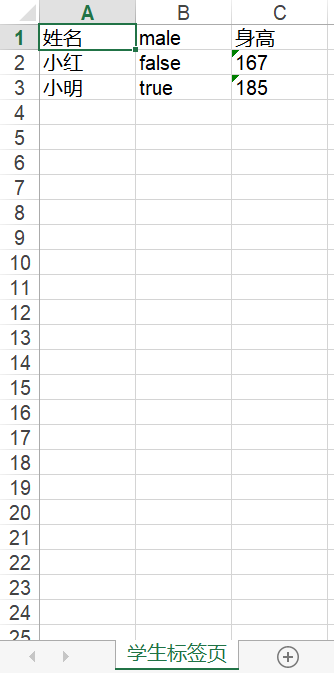
public static void main(String[] args) {

    List<Student> list = new ArrayList<Student>();

    Student student1 = new Student();

    student1.setName("小红");

    student1.setMale(false);

    student1.setHeight(167);

    Student student2 = new Student();

    student2.setName("小明");

    student2.setMale(true);

    student2.setHeight(185);

    list.add(student1);

    list.add(student2);

    File file = new File("C:/Users/Dulk/Desktop/1314.xls");

    createExcel(list, file);

}public static void main(String[] args) {
List<Student> list = new ArrayList<Student>();
Student student1 = new Student();
student1.setName("小红");
student1.setMale(false);
student1.setHeight(167);
Student student2 = new Student();
student2.setName("小明");
student2.setMale(true);
student2.setHeight(185);
list.add(student1);
list.add(student2);
File file = new File("C:/Users/Dulk/Desktop/1314.xls");
createExcel(list, file);
}
import java.lang.annotation.Retention;

import java.lang.annotation.RetentionPolicy;

@Retention(RetentionPolicy.RUNTIME)

public @interface Excel {

    //设置名称

    public String name() default "";

}import java.lang.annotation.Retention;
import java.lang.annotation.RetentionPolicy;
@Retention(RetentionPolicy.RUNTIME)
public @interface Excel {
//设置名称
public String name() default "";
}
import org.apache.log4j.Logger;

import org.apache.poi.hssf.usermodel.HSSFWorkbook;

import org.apache.poi.ss.usermodel.Cell;

import org.apache.poi.ss.usermodel.Row;

import org.apache.poi.ss.usermodel.Sheet;

import org.apache.poi.ss.usermodel.Workbook;

import org.apache.poi.xssf.usermodel.XSSFWorkbook;

import java.io.File;

import java.io.FileInputStream;

import java.io.FileNotFoundException;

import java.io.FileOutputStream;

import java.io.IOException;

import java.io.InputStream;

import java.io.OutputStream;

import java.lang.reflect.Field;

import java.lang.reflect.InvocationTargetException;

import java.lang.reflect.Method;

import java.util.ArrayList;

import java.util.List;

/**

 * Excel的操作工具类

 */

public class ExcelUtil {

    private static Logger log = Logger.getLogger(ExcelUtil.class);

    /**

     * 获取某个File文件对应的Workbook工作簿对象

     */

    public static Workbook gainWorkbook(File file) throws ExcelException {

        if (!isExcel(file)) {

            throw new ExcelException("文件不是Excel类型");

        }

        //如果文件不存在则新建

        if (!file.exists()) {

            try {

                OutputStream os = new FileOutputStream(file);

                Workbook workbook = isOlderEdition(file) ? new HSSFWorkbook() : new XSSFWorkbook();

                workbook.write(os);

                log.debug("文件不存在,新建该Excel文件");

                os.close();

            } catch (FileNotFoundException e) {

                e.printStackTrace();

            } catch (IOException e) {

                e.printStackTrace();

            }

        }

        try {

            InputStream is = new FileInputStream(file);

            return isOlderEdition(file) ? new HSSFWorkbook(is) : new XSSFWorkbook(is);

        } catch (FileNotFoundException e) {

            e.printStackTrace();

        } catch (IOException e) {

            e.printStackTrace();

        }

        return null;

    }

    /**

     * 判断某个Excel文件是否是2003-2007通用旧版

     */

    private static boolean isOlderEdition(File file) {

        return file.getName().matches(".+\\.(?i)xls");

    }

    /**

     * 判断文件是否是一个Excel文件

     */

    private static boolean isExcel(File file) {

        String fileName = file.getName();

        String regXls = ".+\\.(?i)xls";

        String regXlsx = ".+\\.(?i)xlsx";

        return fileName.matches(regXls) || fileName.matches(regXlsx);

    }

    /**

     * 将某个对象的List转换为Excel工作簿

     */

    public static <E> Workbook createExcel(List<E> list, File file) {

        String sheetName = "default";

        if (list.size() == 0) {

            return null;

        }

        Workbook workbook = null;

        try {

            Class clazz = list.get(0).getClass();

            Field[] fields = clazz.getDeclaredFields();

            if (clazz.isAnnotationPresent(Excel.class)) {

                Excel excel = (Excel) clazz.getAnnotation(Excel.class);

                sheetName = excel.name();

            }

            workbook = gainWorkbook(file);

            Sheet sheet = workbook.createSheet(sheetName);

            //创建首行

            Row line = sheet.createRow(0);

            for (int k = 0; k < fields.length; k++) {

                Cell cell = line.createCell(k);

                String columnName = fields[k].getName();

                if (fields[k].isAnnotationPresent(Excel.class)) {

                    Excel excel = fields[k].getAnnotation(Excel.class);

                    columnName = excel.name();

                }

                cell.setCellValue(columnName);

            }

            //创建数据

            for (int i = 1; i <= list.size(); i++) {

                Row row = sheet.createRow(i);

                for (int j = 1; j <= fields.length; j++) {

                    Cell cell = row.createCell(j - 1);

                    String fieldName = fields[j - 1].getName();

                    String fieldFirstLetterUpper = fieldName.substring(0, 1).toUpperCase();

                    String prefix = "get";

                    if ("boolean".equals(fields[j - 1].getType().getName())) {

                        prefix = "is";

                    }

                    String methodName = prefix + fieldFirstLetterUpper + fieldName.substring(1);

                    Method method = clazz.getMethod(methodName);

                    cell.setCellValue(String.valueOf(method.invoke(list.get(i - 1))));

                }

            }

            log.debug("List读入完毕");

            OutputStream os = new FileOutputStream(file);

            workbook.write(os);

            os.close();

        } catch (ExcelException e) {

            e.printStackTrace();

        } catch (InvocationTargetException e) {

            e.printStackTrace();

        } catch (NoSuchMethodException e) {

            e.printStackTrace();

        } catch (IllegalAccessException e) {

            e.printStackTrace();

        } catch (FileNotFoundException e) {

            e.printStackTrace();

        } catch (IOException e) {

            e.printStackTrace();

        }

        return workbook;

    }

}import org.apache.log4j.Logger;
import org.apache.poi.hssf.usermodel.HSSFWorkbook;
import org.apache.poi.ss.usermodel.Cell;
import org.apache.poi.ss.usermodel.Row;
import org.apache.poi.ss.usermodel.Sheet;
import org.apache.poi.ss.usermodel.Workbook;
import org.apache.poi.xssf.usermodel.XSSFWorkbook;
import java.io.File;
import java.io.FileInputStream;
import java.io.FileNotFoundException;
import java.io.FileOutputStream;
import java.io.IOException;
import java.io.InputStream;
import java.io.OutputStream;
import java.lang.reflect.Field;
import java.lang.reflect.InvocationTargetException;
import java.lang.reflect.Method;
import java.util.ArrayList;
import java.util.List;
/**
* Excel的操作工具类
*/
public class ExcelUtil {
private static Logger log = Logger.getLogger(ExcelUtil.class);
/**
* 获取某个File文件对应的Workbook工作簿对象
*/
public static Workbook gainWorkbook(File file) throws ExcelException {
if (!isExcel(file)) {
throw new ExcelException("文件不是Excel类型");
}
//如果文件不存在则新建
if (!file.exists()) {
try {
OutputStream os = new FileOutputStream(file);
Workbook workbook = isOlderEdition(file) ? new HSSFWorkbook() : new XSSFWorkbook();
workbook.write(os);
log.debug("文件不存在,新建该Excel文件");
os.close();
} catch (FileNotFoundException e) {
e.printStackTrace();
} catch (IOException e) {
e.printStackTrace();
}
}
try {
InputStream is = new FileInputStream(file);
return isOlderEdition(file) ? new HSSFWorkbook(is) : new XSSFWorkbook(is);
} catch (FileNotFoundException e) {
e.printStackTrace();
} catch (IOException e) {
e.printStackTrace();
}
return null;
}
/**
* 判断某个Excel文件是否是2003-2007通用旧版
*/
private static boolean isOlderEdition(File file) {
return file.getName().matches(".+\\.(?i)xls");
}
/**
* 判断文件是否是一个Excel文件
*/
private static boolean isExcel(File file) {
String fileName = file.getName();
String regXls = ".+\\.(?i)xls";
String regXlsx = ".+\\.(?i)xlsx";
return fileName.matches(regXls) || fileName.matches(regXlsx);
}
/**
* 将某个对象的List转换为Excel工作簿
*/
public static <E> Workbook createExcel(List<E> list, File file) {
String sheetName = "default";
if (list.size() == 0) {
return null;
}
Workbook workbook = null;
try {
Class clazz = list.get(0).getClass();
Field[] fields = clazz.getDeclaredFields();
if (clazz.isAnnotationPresent(Excel.class)) {
Excel excel = (Excel) clazz.getAnnotation(Excel.class);
sheetName = excel.name();
}
workbook = gainWorkbook(file);
Sheet sheet = workbook.createSheet(sheetName);
//创建首行
Row line = sheet.createRow(0);
for (int k = 0; k < fields.length; k++) {
Cell cell = line.createCell(k);
String columnName = fields[k].getName();
if (fields[k].isAnnotationPresent(Excel.class)) {
Excel excel = fields[k].getAnnotation(Excel.class);
columnName = excel.name();
}
cell.setCellValue(columnName);
}
//创建数据
for (int i = 1; i <= list.size(); i++) {
Row row = sheet.createRow(i);
for (int j = 1; j <= fields.length; j++) {
Cell cell = row.createCell(j - 1);
String fieldName = fields[j - 1].getName();
String fieldFirstLetterUpper = fieldName.substring(0, 1).toUpperCase();
String prefix = "get";
if ("boolean".equals(fields[j - 1].getType().getName())) {
prefix = "is";
}
String methodName = prefix + fieldFirstLetterUpper + fieldName.substring(1);
Method method = clazz.getMethod(methodName);
cell.setCellValue(String.valueOf(method.invoke(list.get(i - 1))));
}
}
log.debug("List读入完毕");
OutputStream os = new FileOutputStream(file);
workbook.write(os);
os.close();
} catch (ExcelException e) {
e.printStackTrace();
} catch (InvocationTargetException e) {
e.printStackTrace();
} catch (NoSuchMethodException e) {
e.printStackTrace();
} catch (IllegalAccessException e) {
e.printStackTrace();
} catch (FileNotFoundException e) {
e.printStackTrace();
} catch (IOException e) {
e.printStackTrace();
}
return workbook;
}
}
5、参考链接
通过Excel认识POI的更多相关文章
- java写入excel文件poi
java写入excel文件 java写入excel文件poi,支持xlsx与xls,没有文件自动创建 package com.utils; import java.io.File; import ja ...
- 一脸懵逼学习Java操作Excel之POI(Apache POI)
Apache POI是Apache软件基金会的开放源码函式库,POI提供API给Java程序对Microsoft Office格式档案读和写的功能. 1:下面简单的程序来创建一个空白Microsoft ...
- Excel的poi缓存问题
Excel的poi缓存问题 背景: 最近工作需要,需要完成生成新的Excel,然后从Excel中读取包含公式的文本内容. 问题: 当程序中修改公式对应的单元格数据变化时,公式获取的值仍然还是原来的值, ...
- java操作excel总结---poi
前不久做过Excel的导入导出功能,其主要的难点是java如何操作Excel文档.现在就来介绍一下利用Apache的poi如何操作Excel. 1.准备工作:导入Apache POI的相关jar包,P ...
- Java 实现导出excel表 POI
1.首先下载poi-3.6-20091214.jar 2.Student.java import java.util.Date; public class Student { private int ...
- flex+java将数据库里的数据导出到指定目录下excel表里(poi)
数据写入到excel中采用的是Apache POI: //java后台的一个工具类(该工具类适用于为不同字段添加,方便) /* 下面这个方法是将list转换为Excel工作表的 */ public s ...
- Java 操作Excel 之Poi(第一讲)
1.Poi 简介 Apache POI是Apache软件基金会的开放源码函式库,POI提供API给Java程序对Microsoft Office格式档案读和写的功能.HSSF - 提供读写Micros ...
- springMVC导入excel案例poi
直接上代码: 第一步,controller 引入 private static final String CHECK_FILE = "checkExceFile"; /** * 对 ...
- importExcel运用注解实现EXCEL导入poi类
JAVA报表 package com.app.common.excel; import java.io.File; import java.io.FileInputStream; import jav ...
- C++读写EXCEL文件OLE,java读写excel文件POI 对比
C++读写EXCEL文件方式比较 有些朋友问代码的问题,将OLE读写的代码分享在这个地方,大家请自己看.http://www.cnblogs.com/destim/p/5476915.html C++ ...
随机推荐
- Mvc数据验证总结
Mvc提供模型级数据验证 一.服务端验证: ModelState.IsValid ModelState.AddModelError("Name", "错误提示" ...
- datagrid实现行的上移和下移(转)
<html> <head> <meta http-equiv="Content-Type" content="text/html; char ...
- 使用php下载的文件打不开,自己用着没问题,客户用就不行?
1 现象: 开发的时候用的好好的文件下载功能,部署到客户那边就不好使了,几乎所有从服务器下载下来的文件都不能打开. 比较了上传前的文件.上传后服务器端的文件.下载后本机的文件,发现同一个文件,上传后还 ...
- python中列表 元组 字典 集合的区别
列表 元组 字典 集合的区别是python面试中最常见的一个问题.这个问题虽然很基础,但确实能反映出面试者的基础水平. (1)列表 什么是列表呢?我觉得列表就是我们日常生活中经常见到的清单.比如,统计 ...
- 在WP应用中创建全局应用程序栏
创建一个WindowsPhone应用程序(这个就不用说了吧,嘿嘿) 打开项目中的App.xaml文件 在打开的App.xaml文件中,如图所示, 在<Application.Resources& ...
- Tornado模板
--------------------静态文件-------------------- 1.static_path:通过向web.Application类的构造函数传递一个名为static_path ...
- caffe cifar10试跑问题总结
p.p1 { margin: 0.0px 0.0px 0.0px 0.0px; font: 12.0px "Helvetica Neue"; color: #454545 } p. ...
- C++内存布局详解
一个由C/C++编译的程序除了存放函数二进制代码的程序代码段(code段)外,数据占用的内存大致分为以下几个部分: 1.栈区(stack) 存放局部变量.函数参数.返回数据.返回地址等.系统自动分配释 ...
- Java filter拦截器的使用
1.web.xml配置 <!-- 验证是否登录 拦截功能 --> <filter> <filter-name>isLogin</filter-name> ...
- java多线程设计模式
详见:http://blog.yemou.net/article/query/info/tytfjhfascvhzxcyt220 java多线程设计模式 java语言已经内置了多线程支持,所有实现Ru ...