
Mysql 5.6 解压版配置方案
# For advice on how to change settings please see

# http://dev.mysql.com/doc/refman/5.6/en/server-configuration-defaults.html

# *** DO NOT EDIT THIS FILE. It's a template which will be copied to the

# *** default location during install, and will be replaced if you

# *** upgrade to a newer version of MySQL.

[mysqld]

  character_set_server = utf8

# Remove leading # and set to the amount of RAM for the most important data

# cache in MySQL. Start at 70% of total RAM for dedicated server, else 10%.

# innodb_buffer_pool_size = 128M

# Remove leading # to turn on a very important data integrity option: logging

# changes to the binary log between backups.

# log_bin

# These are commonly set, remove the # and set as required.

  basedir = C:\Program Files\mysql-5.6.24-winx64(自己配置好)

  datadir = C:\Program Files\mysql-5.6.24-winx64\data(自己配置好)

  port = 3306

# server_id = .....

# Remove leading # to set options mainly useful for reporting servers.

# The server defaults are faster for transactions and fast SELECTs.

# Adjust sizes as needed, experiment to find the optimal values.

# join_buffer_size = 128M

# sort_buffer_size = 2M

# read_rnd_buffer_size = 2M

sql_mode=NO_ENGINE_SUBSTITUTION,STRICT_TRANS_TABLES

[client]

port = 3306

default-character-set = utf8
1.上面是修改my.ini配置,可以直接复制文件夹中的my-dafult.ini进行修改,记得修改basedir和datadir
2.进入mysql文件夹bin中,执行命令提示符
3.mysqld -install 进行安装mysql
4.net start mysql 开启mysql服务
5.mysql -u root -p 登录
6.show variables like 'char%' 查看编码,如下则没有编码问题。
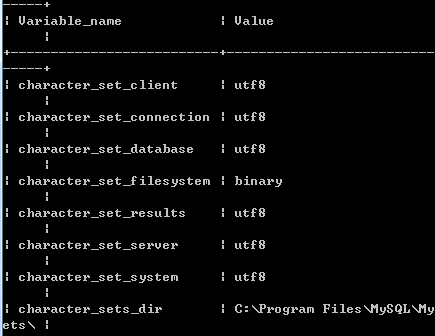
由于mysql 5.7 没有data文件,所以需要自己建立.还有就是path配置,直接配置到bin就好了
mysql 5.5解压版配置 my.ini
# Example MySQL config file for small systems.

#

# This is for a system with little memory (<= 64M) where MySQL is only used

# from time to time and it's important that the mysqld daemon

# doesn't use much resources.

#

# MySQL programs look for option files in a set of

# locations which depend on the deployment platform.

# You can copy this option file to one of those

# locations. For information about these locations, see:

# http://dev.mysql.com/doc/mysql/en/option-files.html

#

# In this file, you can use all long options that a program supports.

# If you want to know which options a program supports, run the program

# with the "--help" option.

# The following options will be passed to all MySQL clients

[client]

#password    = your_password

port        = 3306

socket        = /tmp/mysql.sock

default-character-set = utf8

# Here follows entries for some specific programs

# The MySQL server

[mysqld]

basedir = C:\Program Files\mysql5.5

datadir = C:\Program Files\mysql5.5\data

port        = 3306

socket        = /tmp/mysql.sock

skip-external-locking

key_buffer_size = 16K

max_allowed_packet = 1M

table_open_cache = 4

sort_buffer_size = 64K

read_buffer_size = 256K

read_rnd_buffer_size = 256K

net_buffer_length = 2K

thread_stack = 128K

character_set_server = utf8

# Don't listen on a TCP/IP port at all. This can be a security enhancement,

# if all processes that need to connect to mysqld run on the same host.

# All interaction with mysqld must be made via Unix sockets or named pipes.

# Note that using this option without enabling named pipes on Windows

# (using the "enable-named-pipe" option) will render mysqld useless!

#

#skip-networking

server-id    = 1

# Uncomment the following if you want to log updates

#log-bin=mysql-bin

# binary logging format - mixed recommended

#binlog_format=mixed

# Causes updates to non-transactional engines using statement format to be

# written directly to binary log. Before using this option make sure that

# there are no dependencies between transactional and non-transactional

# tables such as in the statement INSERT INTO t_myisam SELECT * FROM

# t_innodb; otherwise, slaves may diverge from the master.

#binlog_direct_non_transactional_updates=TRUE

# Uncomment the following if you are using InnoDB tables

#innodb_data_home_dir = C:\\mysql\\data\\

#innodb_data_file_path = ibdata1:10M:autoextend

#innodb_log_group_home_dir = C:\\mysql\\data\\

# You can set .._buffer_pool_size up to 50 - 80 %

# of RAM but beware of setting memory usage too high

#innodb_buffer_pool_size = 16M

#innodb_additional_mem_pool_size = 2M

# Set .._log_file_size to 25 % of buffer pool size

#innodb_log_file_size = 5M

#innodb_log_buffer_size = 8M

#innodb_flush_log_at_trx_commit = 1

#innodb_lock_wait_timeout = 50

[mysqldump]

quick

max_allowed_packet = 16M

[mysql]

no-auto-rehash

# Remove the next comment character if you are not familiar with SQL

#safe-updates

[myisamchk]

key_buffer_size = 8M

sort_buffer_size = 8M

[mysqlhotcopy]

interactive-timeout
mysql5.5 my.ini
Mysql 5.6 解压版配置方案的更多相关文章
- MySQL 5.7 解压版 安装教程(图文详细)[Windows]
最近在学习中用到了MySQL数据库,在安装过程中遇到了不少问题,在翻了大半天百度后,问题基本都解决了,所以写一篇MySQL 5.7 解压版的图文详细安装教程. 至于为什么我会选择解压版而不是安装版,一 ...
- mysql解压版配置
2. 解压MySQL压缩包 将以下载的MySQL压缩包解压到自定义目录下,我的解压目录是: "D:\Program Files\MySQL\mysql-5.6.13-win32" ...
- Mysql 64位解压版的安装
先下载解压版的mysql 下载地址 https://dev.mysql.com/downloads/file/?id=474496 解压 进到里面新建这个文件夹和文件 打开my.ini文件(用文本编辑 ...
- mysql-5.7.14-winx64解压版配置
1.下载最新的MySQL文件并且解压 我的位置是 F:\mysql-5.7.14-winx64 2.F:\mysql-5.7.14-winx64\bin; 添加到环境变量-系统变量-PATH下 3.复 ...
- Winserver2012下mysql 5.7解压版(zip)配置安装
一.安装 下载mysqlzip版本mysql不需要运行可执行文件,解压即可,下载zip版本mysqlmsi版本mysql双击文件即可安装,相对简单,本文不介绍此版本安装 配置环境变量打开环境变量配置页 ...
- MySQL解压版配置步骤
mysql-5.7.14-winx64\bin配置到Path中 在解压路径下复制my-default.ini,修改名称为my.ini 在my.ini添加如下 [mysqld] basedir=C:\\ ...
- MySQL 5.7 解压版安装配置
测试环境 系统:Windows 10专业版 版本:MySQL Server 5.7.14 提纲 修改配置文件 初始化 安装服务.启动服务 修改root密码 步骤 1.解压安装包 在MySQL官 ...
- Mysql解压版配置环境等
背景故事:安装版的mysql和我的本本有仇,最后一步老卡死 1.首先先把下载好的压缩包解压,如下图:
- MySQL解压版配置步骤详细教程
解压mysql到D盘根目录 在解压路径下复制my-default.ini,修改名称为my.ini 在my.ini内容如下 [client]default-character-set=utf8 [mys ...
随机推荐
- 关于ListView中convertView的缓存个数的探究
在面试的时候经常会被问到一个有关ListView的问题:一个ListView的高度最多可以显示5个item,但是却有20条数据要显示,问最多会有多少个convertView会被复用?或者如在ListV ...
- 看AngularJS
最近一段时间一直在看AngularJS,趁着一点时间总结一下. 官网地址:http://angularjs.org/ 先推荐几个教程 1. AngularJS入门教程 比较基础,是官方Tutorial ...
- 由link()和symlink()谈到软链接与硬链接
任何一个文件可以有多个目录项指向其i节点.创建一个向现存文件连接的方法是使用l i n k函数. #include <unistd.h> int link(const char * e x ...
- twobin博客样式
twobin博客样式—“蓝白之风” 自暑假以来,囫囵吞枣一般蒙头栽入前端自学中,且不说是否窥探其道,却不自觉中提高了对网页版面设计的要求,乃至挑剔.一个设计清爽美观的网页能让读者心旷神怡,甚至没有 ...
- 设置控件Enable=false,控件颜色不变
[System.Runtime.InteropServices.DllImport("user32.dll ")] public static extern int SetWind ...
- [原]iOS Makefile Template
export DEVELOPER_DIR := $(shell xcode-select --print-path) PLATFORM="$(DEVELOPER_DIR)/Platforms ...
- ASP.NET WebAPI HTTPS
参照文档 http://southworks.com/blog/2014/06/16/enabling-ssl-client-certificates-in-asp-net-web-api/ 第一 ...
- 2013 多校联合 2 A Balls Rearrangement (hdu 4611)
Balls Rearrangement Time Limit: 9000/3000 MS (Java/Others) Memory Limit: 65535/32768 K (Java/Othe ...
- webservice的调用方法
一.WebService在cs后台程序中的调用 A.通过命名空间和类名直接调用 示例: WebService ws = new WebService(); string s = ws.HelloWor ...
- on IRC, how to use secure connection(SSL) and get a cloak/vhost to hide your IP
On stackoverflow I found this: Follow this tutorial below: This is from http://superuser.com/questio ...