
Newly Setting up a CentOS-7 system
yum install -y epel-release glibc.i686 libtools vim clang git autoconf automake w3m glibc screen
the most import sentence I learned in meeting compiling prerequisites:
yum whatprovides */libcap* | grep dev
in *nix systems, the concept of runlevel is always met, and some softwares needs to do some changes in the relative folders.. /etc/rc3.d/..
here are some quotes from askubuntu..:
<QUOTE>{
To see the current (and previous) runlevel:
runlevel
To switch runlevels:
sudo init $runlevel
For example, to reboot:
sudo init
The init you are reading about was replaced by upstart starting with Edgy Eft 6.10; and, one of the programs provided by upstart is its own implementation of init. Here are the docs for 10.04.
To change the default runlevel, use your favorite text editor on /etc/init/rc-sysinit.conf...
sudo vim /etc/init/rc-sysinit.conf
Change this line to whichever runlevel you want...
env DEFAULT_RUNLEVEL=
Then, at each boot, upstart will use that runlevel.
}</QUOTE>
and note that the default runlevel of systems is 3 usually..
some init files..
~/.profile /etc/profile ~/.xprofile : things to do when login in graphical mode, /etc/profile is for all users
~/.bash_profile :things to do when login as personal user in bash/sh/rxvt/urxvt.
~/.bashrc : things to do when opening new bash/sh/rxvt/urxvt, open ssh, scp, sudo
~/.xinitrc : things to do when starting x server
~/.i3/config : things to do when starting i3
----orignal file above-- here are contents updated Sept. 26, 2017----
to start something while startup have several ways, one is to add a service at path /usr/lib/systemd/system/
a service file usually seems like:
[Unit]

Description=...

Documentation=man:..(id) man:..(id)

After=

Wants=

[Service]

Type=

PIDFile=

EnvironmentFile

ExecStart=

ExecReload=

KillMode=

Restart=on-failure

RestartSec=

[Install]

WantedBy=
to know more about the [Service] part of a service file, see man systemd.service. Other parts contains: man systemd.unit, man systemd.exec, man systemd.kill, man systemd.resource-control
some interesting [Service] settings:
Type, here specifies type of the service. Choices can be one of: simple, forking, oneshot, notify, dbus, idle.
quote from here, types have the following meaning:
Type=simple(default): systemd considers the service to be started up immediately. The process must not fork. Do not use this type if other services need to be ordered on this service, unless it is socket activated.Type=forking: systemd considers the service started up once the process forks and the parent has exited. For classic daemons use this type unless you know that it is not necessary. You should specifyPIDFile=as well so systemd can keep track of the main process.Type=oneshot: this is useful for scripts that do a single job and then exit. You may want to setRemainAfterExit=yesas well so that systemd still considers the service as active after the process has exited.Type=notify: identical toType=simple, but with the stipulation that the daemon will send a signal to systemd when it is ready. The reference implementation for this notification is provided by libsystemd-daemon.so.Type=dbus: the service is considered ready when the specifiedBusNameappears on DBus's system bus.Type=idle: systemd will delay execution of the service binary until all jobs are dispatched. Other than that behavior is very similar toType=simple.
ExecStart, ExecStop (either one should be specified, or the service file is illegal) is executable is prefixed with '-', then an exit code of command usually is considered as failure is ignored and considered success. If prefixed with '+', then it is executed with full privilege. If file prefixed with '@', then second token be passed as argv[0] to process. All the three prefixes can be used together.
ExecStartPre, ExecStartPost (any of the above commands fails, the service is stopped heresince and considered a failure, and continues with commands specified in ExecStopPost. ExecStop commands will also be skipped. (It is not started)
ExecStop, this command should be one that synchronously stops the process running.
RuntimeMaxSec, WatchdogSec(this should be used together with Type=Notify, NotifyAccess=main/all/.., otherwise it is defaults to 0/forever)
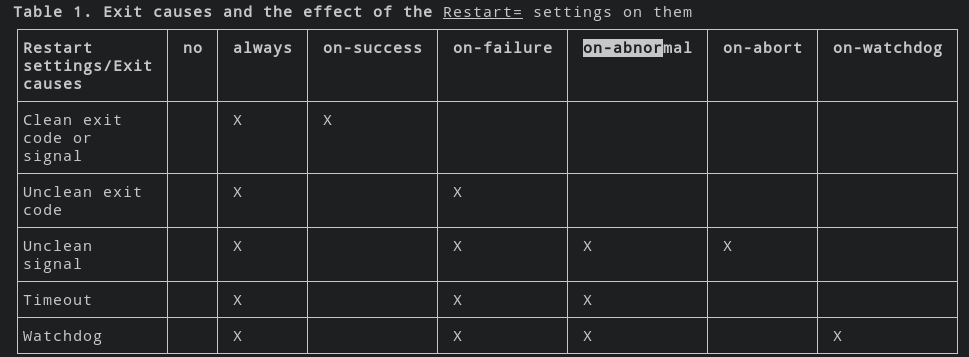
Restart, on-success, on-failure, no, on-abnormal, on-watchdog, on-abort, always.
RestartSec, specifies the seconds that waits before restart the service.
Some [Unit] settings:
Wants, Requires, Requisite, BindsTo: services Requires will be started as well when this service is started(list order is of-no-importance when being started), however, if services Requisite not running while starting this service, the start process will be failed. Wants services will also be started when this service starts, but this service will not be failed immediately when wanted services fails. When BindsTo services stopped, this service will be stopped also.
PartOf: when the specified services being started, this service will also be started, similar to Requires
Before, After, this service is before/after the mentioned services when being started, and also when stops, the inverse ordering is applied
OnFailure, services to be run when fails
ConditionArchitecture, ConditionVirtualization, ConditionHost, ConditionKernelCommandLine, ConditionPathExists, ConditionFileNotEmpty,
Some [Install] settings: the settings here be affecting systemctl enable commands
Alias,
WantedBy, RequiredBy, reverse form of Wants, Requires. But in order to take effect, this service should be enabled by systemctl enable and thus symlinks is created in the wants folder.
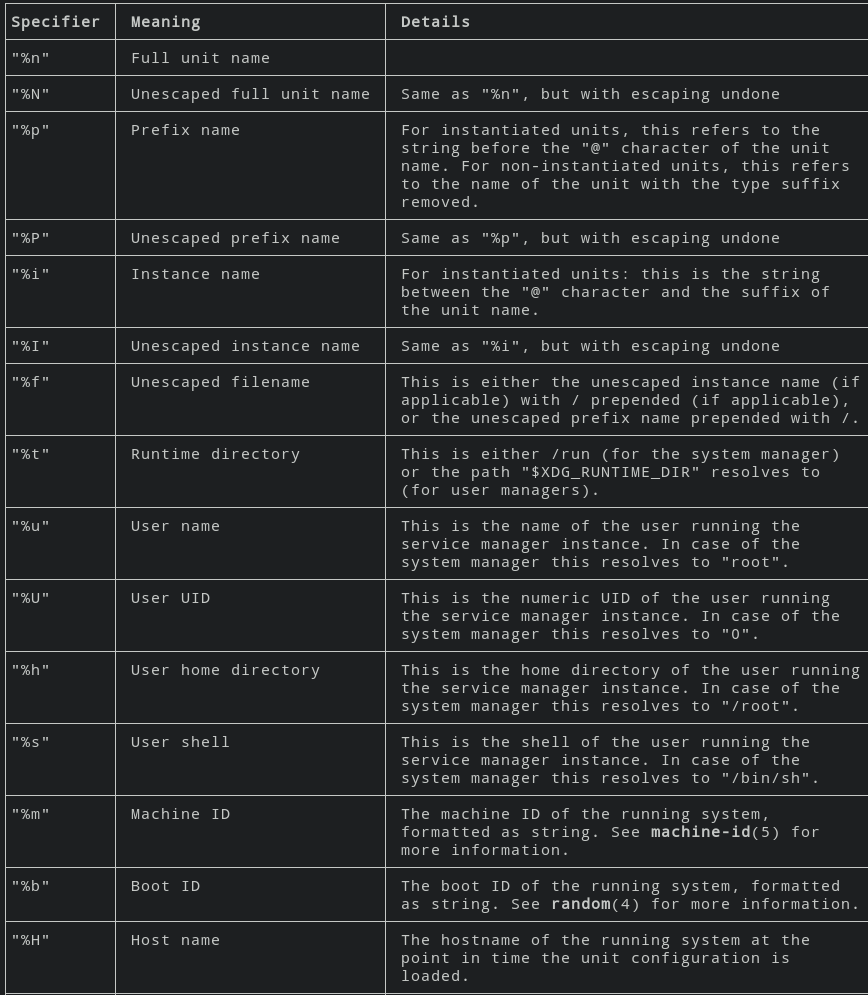
some services can be started as multiple instances, these are services end up like "name@.service", when start an instance of such service, use systemctl start name@helloworld1.service, where the helloworld1 part is the name of the instance.. and can be reached inside the service file by using %i. Here are all the escapers listed in man systemd.unit..

Service variables:
$MAINPID, $SERVICE_RESULT, $EXIT_CODE, $EXIT_STATUS
Newly Setting up a CentOS-7 system的更多相关文章
- 编写CentOS的System V init启动脚本
系统本身自带了说明,在/usr/share/doc/initscripts-(*)/sysvinitfiles,内容如下: 所有System V init脚本都命名为/etc/rc.d/init.d/ ...
- linux mysql无故无法启动了,centos 7
转自: http://support.moonpoint.com/software/database/mysql/not-running-centos7.php 下面简单翻译一下. 详细内容可以阅读英 ...
- centos 7 上安装 testlink 1.9.15/1.9.16/1.9.17/1.9.18 (mysql/php/httpd)
1.9.18 的System Requirements - server.注意,适用于 1.9.15 及以后. Server environment should consist of: web-se ...
- CentOS 7上更改MySQL数据库存储目录浅析
个人之前总结过两篇文章"MySQL更改数据库数据存储目录"和"Ubuntu上更改MySQL数据库数据存储目录",都是在工作中遇到相关案例后的一个简单总结.当 ...
- 转:CentOS/Debian/Ubuntu一键安装LAMP(Apache/MySQL/PHP)环境
CentOS/Debian/Ubuntu一键安装LAMP(Apache/MySQL/PHP) 今天遇到一个网友提到需要在Linux VPS服务器中安装LAMP(Apache/MySQL/PHP)网站环 ...
- 使用dnsmasq来提升CentOS上网速度
1. 安装dnsmasq dnsmasq的官方网址是:http://www.thekelleys.org.uk/dnsmasq/doc.html.利用里面的下载链接下载dnsmasq-2.72.tar ...
- Install FFMPEG and FFMPEG-PHP in CentOS 6 with Virtualmin
Install FFMPEG and FFMPEG-PHP in CentOS 6 with Virtualmin 1 year ago - by Daniel - howto centos v ...
- CentOS 7 install slurm cluster
//slurm install //CentOS 7 system //192.168.159.141 node01 //192.168.159.142 node02 systemctl stop f ...
- CentOS 7 单用户模式+救援模式
CentOS 7 单用户模式+救援模式 CentOS 7 单用户模式+救援模式.有时候大家可能会忘记自己的root密码,或者错误(命令输入错误,命令位置输入有误等)编辑了一个/etc目录下的核心文件导 ...
随机推荐
- Java JVM 类的连接与初始化 [ 转载 ]
Java类的连接与初始化 (及2013阿里初始化笔试题解析) 转自http://www.cnblogs.com/iceAeterNa/p/4876747.html Java虚拟机通过 ...
- 关于c++中方法名前面的双冒号
#include "iostream" using namespace std; template <typename T> void swap(T &a, T ...
- digitalocean开通德国法兰克福机房,40Gb带宽,支持IPv6
2015年4月15日,vps服务商digitalocean宣布正式开通德国法兰克福机房.5个月前digitalocean宣布筹备Germany机房中心,经过近1个月部署,总算与用户见面了.Frankf ...
- Gentoo本地化设置--Locale系统介绍
locale是什么? 一份Locale是一组信息的集合,大多数程序利用它来确定特定的国家和语言设置.这些locale以及它们包含的数据是系统库的一部分,可以在大多数系统中的/usr/share/loc ...
- idea 注册码
生成地址:http://idea.lanyus.com/ ------------------------------------- IntelliJ IDEA 注册码 *.lanyus.com及*. ...
- 安装mcrouter
下载准备: mcrouter 下载地址 : https://github.com/facebook/mcrouter gflags 下载地址:http://download.csdn.net/deta ...
- 20_学生选课数据库SQL语句练习题
一. 设有一数据库,包括四个表:学生表(Student).课程表(Course).成绩表(Score)以及教师信息表(Teacher).四个表的结构分别如表1-1的表(一)~表( ...
- Python基础(四)-集合
补充: 数据类型分类: 1.按照数据可变不可变: 可变:列表.字典 不可变:数字.字符串.元组 x={':1} print(id(x)) x.update({':2}) print(x) print( ...
- 重复T次的LIS的dp Codeforces Round #323 (Div. 2) D
http://codeforces.com/contest/583/problem/D 原题:You are given an array of positive integers a1, a2, . ...
- linux下ClamAV使用
第一步:Clamav下载http://www.clamav.net/downloads#yuminstall wget –y第二步:创建clamav用户和组groupaddclamav (创建cl ...