
企业号微信支付 公众号支付 H5调起支付API示例代码 JSSDK C# .NET
先看效果
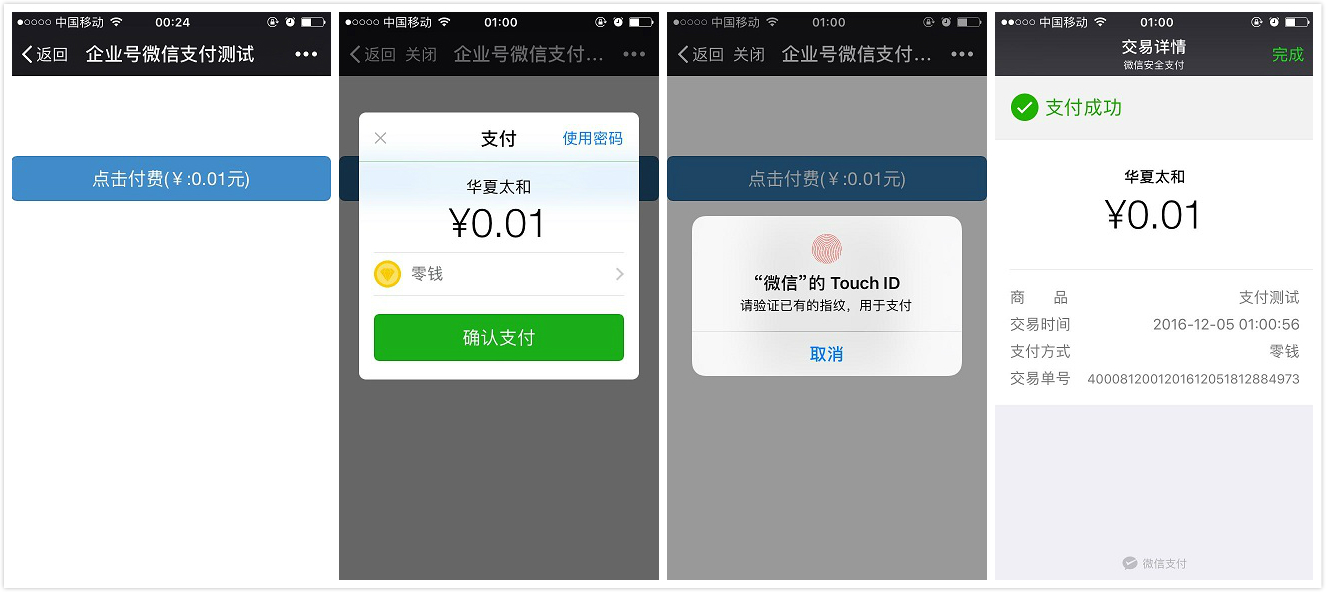
1.本文演示的是微信【企业号】的H5页面微信支付
2.本项目基于开源微信框架WeiXinMPSDK开发:https://github.com/JeffreySu/WeiXinMPSDK 感谢作者苏志巍的开源精神
一、准备部分
相关参数:
AppId:公众号的唯一标识(登陆微信企业号后台 - 设置 - 账号信息 - CorpID)
AppSecret:(微信企业号后台 - 设置 - 权限管理 - 新建一个拥有所有应用权限的普通管理组 - Secret)
Key:商户API密钥(登陆微信商户后台 - 账户中心 - API安全 - API密钥)
MchId:商户ID(微信企业号后台 - 服务中心 - 微信支付 - 微信支付 -商户信息 - 商户号)
后台设置:
微信企业号后台 - 服务中心 - 微信支付 - 微信支付 - 开发配置 :
1.测试授权目录,改成线上支付页面的目录(例:http://www.abc.com/wxpay/)
2.测试白名单,加上测试用户的白名单,只有白名单用户可以付款
二、代码
前端:
使用微信支付先引入JSSDK:http://res.wx.qq.com/open/js/jweixin-1.0.0.js
页面打开即初始化:
        $.ajax({

            type: "GET",

            url: "/WxPay/GetPayConfig",

            beforeSend: function () {

                $("#btnPay").attr({ "disabled": "disabled" });//获取到配置之前,禁止点击付款按钮

            },

            success: function (data) {

                $("#btnPay").removeAttr("disabled");//获取到配置,打开付款按钮

                wx.config({

                    debug: true, // 开启调试模式,成功失败都会有alert框

                    appId: data.appId, // 必填,公众号的唯一标识

                    timestamp: data.timeStamp, // 必填,生成签名的时间戳

                    nonceStr: data.nonceStr, // 必填,生成签名的随机串

                    signature: data.signature,// 必填,签名

                    jsApiList: ['chooseWXPay'] // 必填,需要使用的JS接口列表

                });

                wx.ready(function () {

                    // config信息验证后会执行ready方法,所有接口调用都必须在config接口获得结果之后,config是一个客户端的异步操作,所以如果需要在页面加载时就调用相关接口,则须把相关接口放在ready函数中调用来确保正确执行。对于用户触发时才调用的接口,则可以直接调用,不需要放在ready函数中。

                });

                wx.error(function (res) {

                    // config信息验证失败会执行error函数,如签名过期导致验证失败,具体错误信息可以打开config的debug模式查看,也可以在返回的res参数中查看,对于SPA可以在这里更新签名。

                });

            }

        });
对应的后端代码:
        /// <summary>

        /// 获取微信支付配置

        /// </summary>

        /// <returns></returns>

        [HttpGet]

        public JsonResult GetPayConfig()

        {

            string timeStamp = Senparc.Weixin.MP.TenPayLib.TenPayUtil.GetTimestamp();

            string nonceStr = Senparc.Weixin.MP.TenPayLib.TenPayUtil.GetNoncestr();

            string signature = new Senparc.Weixin.MP.TenPayLib.RequestHandler(null).CreateMd5Sign();

            return Json(new { appId = AppId, timeStamp = timeStamp, nonceStr = nonceStr, signature = signature }, JsonRequestBehavior.AllowGet);

        }
用户点击支付触发的函数(微信JSSDK的chooseWXPay函数):
        function startWxPay() {

            $.ajax({

                type: "POST",

                url: "/WxPay/GetPaySign",

                data: { code: code, openid: openid },

                beforeSend: function () {

                    $("#btnPay").attr({ "disabled": "disabled" });

                },

                success: function (res) {

                    $("#btnPay").removeAttr("disabled");

                    if (res.openid != null && res.openid != undefined && res.openid != "") {

                        window.localStorage.setItem("openid", res.openid);

                    }

                    wx.chooseWXPay({

                        timestamp: res.data.timeStamp, // 支付签名时间戳

                        nonceStr: res.data.nonceStr, // 支付签名随机串,不长于32 位

                        package: res.data.package, // 统一支付接口返回的prepay_id参数值,提交格式如:prepay_id=***)

                        signType: "MD5", // 签名方式,默认为'SHA1',使用新版支付需传入'MD5'

                        paySign: res.data.paysign, // 支付签名

                        success: function (res) {

                            //支付成功

                        },

                        cancel: function (res) {

                            //支付取消

                        }

                    });

                }

            });

        }
对应的服务端代码:
        /// <summary>

        /// 支付接口

        /// </summary>

        /// <param name="code"></param>

        /// <param name="openid"></param>

        /// <returns></returns>

        [HttpPost]

        public JsonResult GetPaySign(string code, string openid)

        {

            string body = "支付测试";//支付描述

            string nonce_str = Senparc.Weixin.MP.TenPayLibV3.TenPayV3Util.GetNoncestr();

            string notify_url = "http://" + HttpContext.Request.Url.Host + "/WxPay/PayNotifyUrl";//支付结果回调地址,不能带参数(PayNotifyUrl回调里能接到订单号out_trade_no参数)

            string out_trade_no = "WxPay_" + DateTime.Now.ToString("yyyyMMddHHmmssfff");//订单号:32个字符内、不得重复

            string spbill_create_ip = Request.UserHostAddress;//用户端IP

            int total_fee = ;//订单金额(单位:分),整数

            string trade_type = "JSAPI";//JSAPI,NATIVE,APP,WAP

            #region 获取用户微信OpenId

            string openidExt = string.Empty;

            if (string.IsNullOrEmpty(openid))

            {

                if (!Senparc.Weixin.QY.Containers.AccessTokenContainer.CheckRegistered(AppId))

                {

                    Senparc.Weixin.QY.Containers.AccessTokenContainer.Register(AppId, AppSecret);

                }

                var accountToken = Senparc.Weixin.QY.Containers.AccessTokenContainer.GetToken(AppId, AppSecret);

                var user = Senparc.Weixin.QY.AdvancedAPIs.OAuth2Api.GetUserId(accountToken, code);

                var model = Senparc.Weixin.QY.CommonAPIs.CommonApi.ConvertToOpenId(accountToken, user.UserId);

                openidExt = model.openid;

            }

            else

            {

                openidExt = openid;

            }

            #endregion

            #region 调用统一支付接口获得prepay_id(预支付交易会话标识)

            Senparc.Weixin.MP.TenPayLibV3.RequestHandler packageReqHandler = new Senparc.Weixin.MP.TenPayLibV3.RequestHandler(null);

            packageReqHandler.SetParameter("appid", AppId);

            packageReqHandler.SetParameter("body", body);

            packageReqHandler.SetParameter("mch_id", MchId);

            packageReqHandler.SetParameter("nonce_str", nonce_str);

            packageReqHandler.SetParameter("notify_url", notify_url);

            packageReqHandler.SetParameter("openid", openidExt);

            packageReqHandler.SetParameter("out_trade_no", out_trade_no);

            packageReqHandler.SetParameter("spbill_create_ip", spbill_create_ip);

            packageReqHandler.SetParameter("total_fee", total_fee.ToString());

            packageReqHandler.SetParameter("trade_type", trade_type);

            packageReqHandler.SetParameter("sign", packageReqHandler.CreateMd5Sign("key", Key));

            string data = packageReqHandler.ParseXML();

            var result = Senparc.Weixin.MP.AdvancedAPIs.TenPayV3.Unifiedorder(data);

            var res = System.Xml.Linq.XDocument.Parse(result);

            string prepay_id = res.Element("xml").Element("prepay_id").Value;

            #endregion

            #region 支付参数

            string timeStamp = Senparc.Weixin.MP.TenPayLibV3.TenPayV3Util.GetTimestamp();

            nonce_str = Senparc.Weixin.MP.TenPayLibV3.TenPayV3Util.GetNoncestr();

            Senparc.Weixin.MP.TenPayLibV3.RequestHandler paysignReqHandler = new Senparc.Weixin.MP.TenPayLibV3.RequestHandler(null);

            paysignReqHandler.SetParameter("appId", AppId);

            paysignReqHandler.SetParameter("timeStamp", timeStamp);

            paysignReqHandler.SetParameter("nonceStr", nonce_str);

            paysignReqHandler.SetParameter("package", string.Format("prepay_id={0}", prepay_id));

            paysignReqHandler.SetParameter("signType", "MD5");

            string paysign = paysignReqHandler.CreateMd5Sign("key", Key);

            paysignReqHandler.SetParameter("paysign", paysign);

            #endregion

            return Json(new { data = paysignReqHandler.GetAllParameters(), openid = openidExt }, JsonRequestBehavior.AllowGet);

        }
前端页面全部代码:
<!DOCTYPE html>

<html>

<head>

    <title>企业号微信支付测试</title>

    <meta http-equiv="content-type" content="text/html;charset=utf-8" />

    <meta name="viewport" content="width=device-width, initial-scale=1" />

    <link rel="stylesheet" href="http://cdn.bootcss.com/bootstrap/3.3.0/css/bootstrap.min.css">

    <script type="text/javascript" src="http://res.wx.qq.com/open/js/jweixin-1.0.0.js"></script>

    <script type="text/javascript" src="http://cdn.bootcss.com/jquery/2.2.4/jquery.min.js"></script>

</head>

<body>

    <input type="button" onclick="startWxPay()" class="btn btn-primary btn-lg btn-block" value="点击付费(¥:0.01元)" id="btnPay" style="margin-top:80px;" />

    <script type="text/javascript">

        var code = GetQueryString("code");

        var openid = window.localStorage.getItem("openid");

        $.ajax({

            type: "GET",

            url: "/WxPay/GetPayConfig",

            beforeSend: function () {

                $("#btnPay").attr({ "disabled": "disabled" });//获取到配置之前,禁止点击付款按钮

            },

            success: function (data) {

                $("#btnPay").removeAttr("disabled");//获取到配置,打开付款按钮

                wx.config({

                    debug: true, // 开启调试模式,成功失败都会有alert框

                    appId: data.appId, // 必填,公众号的唯一标识

                    timestamp: data.timeStamp, // 必填,生成签名的时间戳

                    nonceStr: data.nonceStr, // 必填,生成签名的随机串

                    signature: data.signature,// 必填,签名

                    jsApiList: ['chooseWXPay'] // 必填,需要使用的JS接口列表

                });

                wx.ready(function () {

                    // config信息验证后会执行ready方法,所有接口调用都必须在config接口获得结果之后,config是一个客户端的异步操作,所以如果需要在页面加载时就调用相关接口,则须把相关接口放在ready函数中调用来确保正确执行。对于用户触发时才调用的接口,则可以直接调用,不需要放在ready函数中。

                });

                wx.error(function (res) {

                    // config信息验证失败会执行error函数,如签名过期导致验证失败,具体错误信息可以打开config的debug模式查看,也可以在返回的res参数中查看,对于SPA可以在这里更新签名。

                });

            }

        });

        function startWxPay() {

            $.ajax({

                type: "POST",

                url: "/WxPay/GetPaySign",

                data: { code: code, openid: openid },

                beforeSend: function () {

                    $("#btnPay").attr({ "disabled": "disabled" });

                },

                success: function (res) {

                    $("#btnPay").removeAttr("disabled");

                    if (res.openid != null && res.openid != undefined && res.openid != "") {

                        window.localStorage.setItem("openid", res.openid);

                    }

                    wx.chooseWXPay({

                        timestamp: res.data.timeStamp, // 支付签名时间戳

                        nonceStr: res.data.nonceStr, // 支付签名随机串,不长于32 位

                        package: res.data.package, // 统一支付接口返回的prepay_id参数值,提交格式如:prepay_id=***)

                        signType: "MD5", // 签名方式,默认为'SHA1',使用新版支付需传入'MD5'

                        paySign: res.data.paysign, // 支付签名

                        success: function (res) {

                            //支付成功

                        },

                        cancel: function (res) {

                            //支付取消

                        }

                    });

                }

            });

        }

        function GetQueryString(name) {

            var reg = new RegExp("(^|&)" + name + "=([^&]*)(&|$)");

            var r = window.location.search.substr(1).match(reg);

            if (r != null) return unescape(r[2]); return null;

        }

    </script>

</body>

</html>
后端控制器全部代码:
using Senparc.Weixin.HttpUtility;

using System;

using System.Collections.Generic;

using System.IO;

using System.Linq;

using System.Text;

using System.Web;

using System.Web.Mvc;

namespace CNPCCMS.Controllers

{

    public class WxPayController : Controller

    {

        private static string AppId = "改成你的AppId";

        private static string AppSecret = "改成你的AppSecret";

        private static string Key = "改成你的Key";

        private static string MchId = "改成你的MchId";

        /// <summary>

        /// 获取微信支付配置

        /// </summary>

        /// <returns></returns>

        [HttpGet]

        public JsonResult GetPayConfig()

        {

            string timeStamp = Senparc.Weixin.MP.TenPayLib.TenPayUtil.GetTimestamp();

            string nonceStr = Senparc.Weixin.MP.TenPayLib.TenPayUtil.GetNoncestr();

            string signature = new Senparc.Weixin.MP.TenPayLib.RequestHandler(null).CreateMd5Sign();

            return Json(new { appId = AppId, timeStamp = timeStamp, nonceStr = nonceStr, signature = signature }, JsonRequestBehavior.AllowGet);

        }

        /// <summary>

        /// 支付接口

        /// </summary>

        /// <param name="code"></param>

        /// <param name="openid"></param>

        /// <returns></returns>

        [HttpPost]

        public JsonResult GetPaySign(string code, string openid)

        {

            string body = "支付测试";//支付描述

            string nonce_str = Senparc.Weixin.MP.TenPayLibV3.TenPayV3Util.GetNoncestr();

            string notify_url = "http://" + HttpContext.Request.Url.Host + "/WxPay/PayNotifyUrl";//支付结果回调地址,不能带参数(PayNotifyUrl回调里能接到订单号out_trade_no参数)

            string out_trade_no = "WxPay_" + DateTime.Now.ToString("yyyyMMddHHmmssfff");//订单号:32个字符内、不得重复

            string spbill_create_ip = Request.UserHostAddress;//用户端IP

            int total_fee = ;//订单金额(单位:分),整数

            string trade_type = "JSAPI";//JSAPI,NATIVE,APP,WAP

            #region 获取用户微信OpenId

            string openidExt = string.Empty;

            if (string.IsNullOrEmpty(openid))

            {

                if (!Senparc.Weixin.QY.Containers.AccessTokenContainer.CheckRegistered(AppId))

                {

                    Senparc.Weixin.QY.Containers.AccessTokenContainer.Register(AppId, AppSecret);

                }

                var accountToken = Senparc.Weixin.QY.Containers.AccessTokenContainer.GetToken(AppId, AppSecret);

                var user = Senparc.Weixin.QY.AdvancedAPIs.OAuth2Api.GetUserId(accountToken, code);

                var model = Senparc.Weixin.QY.CommonAPIs.CommonApi.ConvertToOpenId(accountToken, user.UserId);

                openidExt = model.openid;

            }

            else

            {

                openidExt = openid;

            }

            #endregion

            #region 调用统一支付接口获得prepay_id(预支付交易会话标识)

            Senparc.Weixin.MP.TenPayLibV3.RequestHandler packageReqHandler = new Senparc.Weixin.MP.TenPayLibV3.RequestHandler(null);

            packageReqHandler.SetParameter("appid", AppId);

            packageReqHandler.SetParameter("body", body);

            packageReqHandler.SetParameter("mch_id", MchId);

            packageReqHandler.SetParameter("nonce_str", nonce_str);

            packageReqHandler.SetParameter("notify_url", notify_url);

            packageReqHandler.SetParameter("openid", openidExt);

            packageReqHandler.SetParameter("out_trade_no", out_trade_no);

            packageReqHandler.SetParameter("spbill_create_ip", spbill_create_ip);

            packageReqHandler.SetParameter("total_fee", total_fee.ToString());

            packageReqHandler.SetParameter("trade_type", trade_type);

            packageReqHandler.SetParameter("sign", packageReqHandler.CreateMd5Sign("key", Key));

            string data = packageReqHandler.ParseXML();

            var result = Senparc.Weixin.MP.AdvancedAPIs.TenPayV3.Unifiedorder(data);

            var res = System.Xml.Linq.XDocument.Parse(result);

            string prepay_id = res.Element("xml").Element("prepay_id").Value;

            #endregion

            #region 支付参数

            string timeStamp = Senparc.Weixin.MP.TenPayLibV3.TenPayV3Util.GetTimestamp();

            nonce_str = Senparc.Weixin.MP.TenPayLibV3.TenPayV3Util.GetNoncestr();

            Senparc.Weixin.MP.TenPayLibV3.RequestHandler paysignReqHandler = new Senparc.Weixin.MP.TenPayLibV3.RequestHandler(null);

            paysignReqHandler.SetParameter("appId", AppId);

            paysignReqHandler.SetParameter("timeStamp", timeStamp);

            paysignReqHandler.SetParameter("nonceStr", nonce_str);

            paysignReqHandler.SetParameter("package", string.Format("prepay_id={0}", prepay_id));

            paysignReqHandler.SetParameter("signType", "MD5");

            string paysign = paysignReqHandler.CreateMd5Sign("key", Key);

            paysignReqHandler.SetParameter("paysign", paysign);

            #endregion

            return Json(new { data = paysignReqHandler.GetAllParameters(), openid = openidExt }, JsonRequestBehavior.AllowGet);

        }

        /// <summary>

        /// 支付结果回调地址

        /// </summary>

        /// <returns></returns>

        [HttpPost]

        public ActionResult PayNotifyUrl()

        {

            Senparc.Weixin.MP.TenPayLibV3.ResponseHandler payNotifyRepHandler = new Senparc.Weixin.MP.TenPayLibV3.ResponseHandler(null);

            payNotifyRepHandler.SetKey(Key);

            string return_code = payNotifyRepHandler.GetParameter("return_code");

            string return_msg = payNotifyRepHandler.GetParameter("return_msg");

            string xml = string.Format(@"<xml><return_code><![CDATA[{0}]]></return_code><return_msg><![CDATA[{1}]]></return_msg></xml>", return_code, return_msg);

            if (return_code.ToUpper() != "SUCCESS")

            {

                return Content(xml, "text/xml");

            }

            string out_trade_no = payNotifyRepHandler.GetParameter("out_trade_no");

            //微信服务器可能会多次推送到本接口,这里需要根据out_trade_no去查询订单是否处理,如果处理直接返回:return Content(xml, "text/xml"); 不跑下面代码

            //验证请求是否从微信发过来(安全)

            if (payNotifyRepHandler.IsTenpaySign())

            {

            }

            else

            {

            }

            return Content(xml, "text/xml");

        }

    }

}
三、关键点
1.支付页面的链接不管是放到自定义菜单还是嵌到公众号文章内,或是发到微信对话框让用户点击支付,最终的链接是:https://open.weixin.qq.com/connect/oauth2/authorize?appid=这里改成你的appid&redirect_uri=这里是你支付页面的地址&response_type=code&scope=SCOPE&state=1#wechat_redirect
这种约定的链接最终访问的还是redirect_uri这个链接,同时微信回调这个链接还会带上code和state两个参数。code参数是当前用户,state参数自定义,本文未用到。
2.后台GetPaySign方法同时接收code和openid是为了连续支付或者用户取消了支付再次点击支付设计的(每点一次支付就触发一次后台GetPaySign方法),因为code是微信服务器回调带的,只能用一次。所以第一次code传到后台就调接口获得用户openid发回前端缓存起来,再起发起请求code和openid一起传到后端,这个时候code无效了,但是openid可以用
3.微信支付回调接口(notify_url)不能带参数,但是回调接口里能从微信服务器推过来的xml文件里提取出订单号(out_trade_no),可以对其进行操作
4.还是报错请检查参数大小写,微信api里的参数请严格按照官方文档的大小写
爬虫可耻,本文原始链接:http://www.cnblogs.com/oppoic/p/6132533.html
四、附录
H5调起支付API:https://pay.weixin.qq.com/wiki/doc/api/jsapi.php?chapter=7_7&index=6
统一下单:https://pay.weixin.qq.com/wiki/doc/api/jsapi.php?chapter=9_1
微信JSSDK:https://mp.weixin.qq.com/wiki 微信网页开发 - 微信JS-SDK说明文档 - Ctrl+F搜索:chooseWXPay
OAuth验证接口:http://qydev.weixin.qq.com/wiki/index.php?title=OAuth验证接口
userid转换成openid:http://qydev.weixin.qq.com/wiki/index.php?title=Userid与openid互换接口
企业号微信支付 公众号支付 H5调起支付API示例代码 JSSDK C# .NET的更多相关文章
- Java微信公众平台开发之公众号支付(微信内H5调起支付)
官方文档点击查看准备工作:已通过微信认证的公众号,必须通过ICP备案域名(否则会报支付失败)借鉴了很多大神的文章,在此先谢过了 整个支付流程,看懂就很好写了 一.设置支付目录 在微信公众平台设置您的公 ...
- 微信公众号内H5调用微信支付国内服务商模式
最近在折微信公众号内H5用JSAPI调用微信支付,境内服务商版支付,微信支付给出的官方文档以及SDK不够详细,导至我们走了一些弯路,把他分享出来,我这边主要是用PHP开发,所以未加说的话示例都是PHP ...
- .NET Core之微信支付之公众号、H5支付篇
前言 本篇主要记录微信支付中公众号及H5支付全过程. 准备篇 公众号或者服务号(并开通微信支付功能).商户平台中开通JSAPI支付.H5支付. 配置篇 公众号或者服务号中 -------开发----- ...
- 微信支付-公众号支付H5调用支付详解
微信公众号支付 最近项目需要微信支付,然后看了下微信公众号支付,,虽然不难,但是细节还是需要注意的,用了大半天时间写了个demo,并且完整的测试了一下支付流程,下面分享一下微信公众号支付的经验. 一. ...
- 【微信H5支付】微信公众号里H5网页点击调取微信支付
最近在公众号里开发了下单支付H5网页,需要在H5里调用微信支付界面.开发思路和代码整理如下: todo...
- 微信JSAPI 公众号支付 H5支付以及APP支付 WEBAPI接口开发测试
统一下单入口 调用该方法入口: public void WxPayAPI() { //string PayPrice ="99.9"; ////订单号 //string Payor ...
- 公众号及H5支付
本篇主要记录微信支付中公众号及H5支付全过程. 1|1准备篇 公众号或者服务号(并开通微信支付功能).商户平台中开通JSAPI支付.H5支付. 1|2配置篇 公众号或者服务号中 -------开发-- ...
- vue 微信内H5调起支付
在微信内H5调起微信支付,主要依赖于一个微信的内置对象WeixinJSBridge,这个对象在其他浏览器中无效. 主要代码: import axios from 'axios'; export def ...
- JAVA开发微信支付-公众号支付/微信浏览器支付(JSAPI)
写这篇文章的目的有2个,一是自己的项目刚开发完微信支付功能,趁热回个炉温习一下,二也是帮助像我这样对微信支付不熟悉,反复看了多天文档还是一知半解,原理都没摸清,更不要说实现了.本以为网上的微信开发教程 ...
随机推荐
- ABP源码分析八:Logger集成
ABP使用Castle日志记录工具,并且可以使用不同的日志类库,比如:Log4Net, NLog, Serilog... 等等.对于所有的日志类库,Castle提供了一个通用的接口来实现,我们可以很方 ...
- Atitit 数据存储视图的最佳实际best practice attilax总结
Atitit 数据存储视图的最佳实际best practice attilax总结 1.1. 视图优点:可读性的提升1 1.2. 结论 本着可读性优先于性能的原则,面向人类编程优先于面向机器编程,应 ...
- iOS开发入门知识归纳
一.iOS-C基础 二.iOS-Objective-C基础 三.iOS-Swift编程 三.iOS开发简单介绍 四.iOS-UI基础 1.UI控件介绍 2.UI布局-屏幕适配 五.iOS-多线程基础 ...
- 【.NET深呼吸】基于异步上下文的本地变量(AsyncLocal)
在开始吹牛之前,老周说两个故事. 第一个故事是关于最近某些别有用心的人攻击.net的事,其实我们不用管它们,只要咱们知道自己是.net爱好者就行了,咱们就是因为热爱.net才会选择它.这些人在这段时间 ...
- PHP 高级编程(2/5) - 反射API
PHP 5 具有完整的反射 API,添加了对类.接口.函数.方法和扩展进行反向工程的能力. 此外,反射 API 提供了方法来取出函数.类和方法中的文档注释.通过使用反射API可以分析其他的类.接口.方 ...
- Java资源大全中文版(Awesome最新版)
Awesome系列的Java资源整理.awesome-java 就是akullpp发起维护的Java资源列表,内容包括:构建工具.数据库.框架.模板.安全.代码分析.日志.第三方库.书籍.Java 站 ...
- ISO日期格式标准,浏览器到服务器到mysql中的时区
时区简单理解 https://zh.wikipedia.org/wiki/%E6%97%B6%E5%8C%BA 上面的链接是时区的wiki说明,下面说说我记住的部分: GMT时区是格林威治标准时间,我 ...
- Hawk 3. 网页采集器
1.基本入门 1. 原理(建议阅读) 网页采集器的功能是获取网页中的数据(废话).通常来说,目标可能是列表(如购物车列表),或是一个页面中的固定字段(如JD某商品的价格和介绍,在页面中只有一个).因此 ...
- JVM学习(1)——通过实例总结Java虚拟机的运行机制
俗话说,自己写的代码,6个月后也是别人的代码……复习!复习!复习!涉及到的知识点总结如下: JVM的历史 JVM的运行流程简介 JVM的组成(基于 Java 7) JVM调优参数:-Xmx和-Xms ...
- Properties操作指南
一.简介: Properties是java中用的比较多的一个类,表示一个持久的属性集.继承于Hashtable,Properties可从流中加载,也可保存在流中.属性列表中每个键极其对应值共同组成一个 ...