
Spring Mvc + Easyui中根据查询结果导出文件
项目是典型的SpringMvc + Easyui,需求是前台页面根据查询条件导出生成CSV文件。
基本流程是:前台页面通过表单提交的方式,请求后台,后台接受到查询参数,根据查询参数查询到数据集合,最后导出生成CSV文件。(用ajax请求后台时遇到一点问题,回调函数一直报错,有待研究)
1、前台页面效果图:
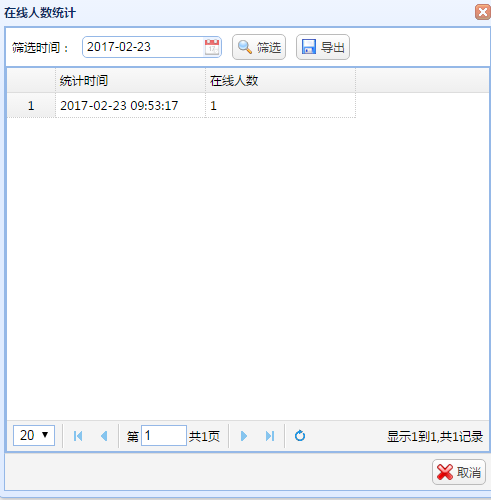
2、前台页面代码:
 <div class="easyui-layout" data-options="fit:true">

     <div class="easyui-panel" data-options="region:'north'" style="height:40px;">

         <form id="formQuery" method="post">

         <input type="hidden" id = "serverId" />

             <table cellpadding="4">

                 <tr>

                    <td><spring:message code="筛选时间" />:</td>

                    <td><input class="easyui-datebox" id="countTime" data-options="editable:false,width:140" /></td>

                    <td><a href="javascript:reloadCountData()" class="easyui-linkbutton" iconCls="icon-search"><spring:message code="筛选" /></a></td>

                    <td><a href="javascript:exportData()" class="easyui-linkbutton" iconCls="icon-save"><spring:message code="导出" /></a></td>

                 </tr>

             </table>

         </form>

     </div>

     <div data-options="region:'center'" style="width: 100%;height: 100%">

        <table id="gridOnline" class="easyui-datagrid" data-options="fit:true,pagination:true,rownumbers:true,pageSize:20,loader:loadCountData" >

             <thead>

                 <tr>

                     <th data-options="field:'id',width:150,hidden:true"><spring:message code="ID" /></th>

                     <th data-options="field:'countTime',width:150"><spring:message code="统计时间" /></th>

                     <th data-options="field:'online',width:150"><spring:message code="在线人数" /></th>

                 </tr>

             </thead>

         </table>

     </div>

 </div>
熟悉Easyui的人应该能看出来,这是一个常见的layout,north放查询条件。center放datagrid展示数据,因为要使用form提交表单的方式请求后台,所以north中的元素都放在了form中。
3、前台JS代码:
 function exportData(){

     var serverId = $("#formQuery").find("#serverId").val();

     var countTime = $("#formQuery").find("#countTime").datebox("getValue");

     if(countTime!=""){

         if(countTime.indexOf("/") > -1){  //英文状态下格式

             var month = (countTime).substring(0,2);

             var day = (countTime).substring(3,5);

             var year = (countTime).substring(6,10);

             countTime = (year+"-"+month+"-"+day)+" 00:00:00";

         }else{

             countTime+=" 00:00:00";

         }

     }

     $('#formQuery').form('submit',{

          url: '${URI}serverManager/exportOnlineData.htm?serverId='+serverId+"&countTime="+countTime

     })

 }
这是点击导出按钮调用的JS方法,其中获取serverId的值可以忽略不计,具体看需求,而对countTime进行处理的那一段代码,也可以忽略不计,因为系统实现了国际化,在英文状态下日期格式跟中文状态下日期格式不一样,统一处理成yyyy-MM-dd HH:mm:ss格式
真正起作用的代码是给form加submit事件,可以看到参数是拼接到url中的。
4、后台controller方法:
 @RequestMapping("exportOnlineData")

     public void exportOnlineData(HttpServletRequest request, HttpServletResponse response,String serverId,String countTime) throws ParseException, IllegalArgumentException, IllegalAccessException, IOException{

         SimpleDateFormat sdf = new SimpleDateFormat("yyyy-MM-dd HH:mm:ss");

         SimpleDateFormat sdf2 = new SimpleDateFormat("yyyy-MM-dd_HH_mm_ss");

         ServerManager serverManager = new ServerManager();

         serverManager.setServer(serverId);

         serverManager.setCountTime(sdf.parse(countTime));

         List<ServerManager> list = this.gameUserDao.queryOnlineListForExport(serverManager);

         String[] titles = new String[]{"服务器ID","统计时间","在线人数"};

         String[] propertys = new String[]{"server","countTimeStr","online"};

         ExportUtil.exportCsv(titles, propertys, list, sdf2.format(new Date()) + "_服务器在线人数统计.csv", request, response);

     }
这段代码,就是拿到页面传递过来的参数,查询到数据集合,之后使用工具类导出。
5、因为导出功能点较多,所以做了简单封装如下:
  /**

      *

      *              导出生成csv文件

      * @author      ccg

      * @param       titles       标题头

      * @param       propertys    每一列标题头对应数据集合里对象的属性

      * @param       list         数据集合

      * @param       fileName     文件名称注意不能有空格以及冒号

      * @param       request

      * @param       response

      * @return

      * @throws      IOException

      * @throws      IllegalArgumentException

      * @throws      IllegalAccessException

      * Created      2017年2月22日 下午8:35:57

      */

     public static<T> String exportCsv(String[] titles,String[] propertys,List<T> list,String fileName,HttpServletRequest request, HttpServletResponse response) throws IOException, IllegalArgumentException, IllegalAccessException{

         BufferedWriter bw = null;

         response.setContentType("text/html;charset=UTF-8");

         request.setCharacterEncoding("UTF-8");

         response.setHeader("Content-disposition", "attachment; filename="+URLEncoder.encode(fileName,"UTF-8"));

         //构建输出流,同时指定编码

         bw = new BufferedWriter(new OutputStreamWriter(response.getOutputStream(),"gbk"));

         //csv文件是逗号分隔,除第一个外,每次写入一个单元格数据后需要输入逗号

         for(String title : titles){

             bw.write(title);

             bw.write(",");

         }

         //写完文件头后换行

         bw.write("\r\n");

         //写内容

         for(Object obj : list){

             //利用反射获取所有字段

             Field[] fields = obj.getClass().getDeclaredFields();

             for(String property : propertys){

                 for(Field field : fields){

                     //设置字段可见性

                     field.setAccessible(true);

                     if(property.equals(field.getName())){

                         bw.write(field.get(obj).toString());

                         //如果包含:说明是日期最后写一个|否则日期不显示秒

                         if((field.get(obj).toString()).indexOf(":") > -1){

                             bw.write("|");

                         }

                         bw.write(",");

                         continue;

                     }

                 }

             }

             //写完一行换行

             bw.write("\r\n");

         }

         bw.flush();

         bw.close();

         return "0";

     }
以上实现了根据页面查询结果,将数据集合导出生成csv文件。
Spring Mvc + Easyui中根据查询结果导出文件的更多相关文章
- hibernate+spring+mvc+Easyui框架模式下使用grid++report的总结
最近刚开始接触hibernate+spring+mvc+Easyui框架,也是刚开通了博客,希望能记录一下自己实践出来的东西,让其他人少走弯路. 转让正题,以个人浅薄的认识hibernate对于开发人 ...
- Spring MVC程序中得到静态资源文件css,js,图片文件的路径问题总结
上一篇 | 下一篇 Spring MVC程序中得到静态资源文件css,js,图片 文件的路径 问题总结 作者:轻舞肥羊 日期:2012-11-26 http://www.blogjava.net/fi ...
- Spring MVC Controller中解析GET方式的中文参数会乱码的问题(tomcat如何解码)
Spring MVC Controller中解析GET方式的中文参数会乱码的问题 问题描述 在工作上使用突然出现从get获取中文参数乱码(新装机器,tomcat重新下载和配置),查了半天终于找到解决办 ...
- spring mvc controller中获取request head内容
spring mvc controller中获取request head内容: @RequestMapping("/{mlid}/{ptn}/{name}") public Str ...
- spring Mvc + Mybatis 中使用junit
在Spring Mvc + Mybatis的项目中我们有时候需要在测试代码中注入Dao操作数据库,对表进行增删改查,实现如下: 这是一般的maven项目项目结构 测试代码一般写在src/test/ja ...
- Spring MVC程序中得到静态资源文件css,js,图片
转载自:http://www.blogjava.net/fiele/archive/2014/08/24/417283.html 用 Spring MVC 开发应用程序,对于初学者有一个很头疼的问题, ...
- Spring Data Jpa 实现分页(Spring MVC+easyui)
spring data jpa很好的对dao层进行了封装,这篇文章主要来写的是实现easyui datagird数据分页,由于各个UI参数不大一样,所以如果使用的是其他UI,得稍作修改.需要说明的是我 ...
- 关于Spring mvc注解中的定时任务的配置
关于spring mvc注解定时任务配置 简单的记载:避免自己忘记,不是很确定我理解的是否正确.有错误地方望请大家指出. 1,定时方法执行配置: (1)在applicationContext.xml中 ...
- spring MVC controller中的方法跳转到另外controller中的某个method的方法
1. 需求背景 需求:spring MVC框架controller间跳转,需重定向.有几种情况:不带参数跳转,带参数拼接url形式跳转,带参数不拼接参数跳转,页面也能显示. 本来以为挺简单的一 ...
随机推荐
- 编写高质量JavaScript代码的基本要点记录
原文:深入理解JavaScript系列(1):编写高质量JavaScript代码的基本要点 1.最小全局变量(Minimizing Globals)的重要性 JavaScript通过函数管理作用域.在 ...
- CSS实现导航条Tab切换的三种方法
前面的话 导航条Tab在页面中非常常见,本文说详细介绍CSS实现导航条Tab的三种方法 布局 根据上图所示,先规定几个定义,上图的模块整体叫做导航,由导航标题和导航内容组成.要实现上图所示的布 ...
- tap是什么意思
分光是数据通过光纤传输:分路是数据通过网线传输.粗浅的说,Tap的概念类似于“三通”的意思,即原来的流量正常通行,同时分一股出来供监测设备分析使用. 其实这只是最简单的Tap的概念,目前的技术发展已经 ...
- 让Terminal显示git分支
vi ~/.bash_profile ### 显示git分支 parse_git_branch () { git branch 2> /dev/null | sed -e '/^[^*]/d' ...
- beforeunload
<!DOCTYPE html> <html> <head> <title>BeforeUnload Event Example</title> ...
- nmon在线安装及使用
安装 mkdir /usr/local/nmon cd /usr/local/nmon wget http://sourceforge.net/projects/nmon/files/nmon_lin ...
- CSS3 :target伪类实现Tab切换效果 BY commy
http://www.shejidaren.com/examples/css3-target/css3-target.html#tab1 标签一 标签二 标签三 欢迎加设计达人Q群:50063010设 ...
- hyperLink的定制
在iReport中增加hyperLink,点击之后没有反应:需要重新写一遍net.sf.jasperreports.view.JRViewer; 修改其中的gotoHyperlink方法: case ...
- 动软模板系列二(Model层模板)
动软模板其实和CodeSmith的模板差不多 实现的原理是一样的,但是CodeSmith貌似只支持表生成,而且不够“国人化”,所以打算研究下动软的模板,如果熟练掌握后想必以后开发项目效率可以提高很多了 ...
- enum 用法
public enum WeekDay { SUN(, "Sunday", "SUN"), MON(, "Monday", "MO ...