
tastypie Django REST framework API [Hello JSON]
tastypie is a good thing.
Haven't test it thoroughly. Gonna need some provement.
Now I will introduct how to use tastepie for newbies.
Let me introduce all the equipments I have to deploy tastypie.
1) linuxmint 13
2) virtualenv ( sudo apt-get install python-virtualenv )
3) install django==1.5 in the virtualenv folder ( ./bin/pip install django==1.5 )
4) install django-tastypie (./bin/pip install django-tastypie )
5) create new project ( ./bin/djangoadmin.py startproject ts2 )
6) get into the 'ts2' folder ( cd ts2 )
7) create new app (../bin/djangoadmin.py startapp myapp NOTICE: folder myapp is at the same folder level as manage.py )
8) edit file ts2/myapp/models.py as following,
from tastypie.utils.timezone import now

from django.contrib.auth.models import User

from django.db import models

from django.template.defaultfilters import slugify

class Entry(models.Model):

    user = models.ForeignKey(User)

    pub_date = models.DateTimeField(default=now)

    title = models.CharField(max_length=200)

    slug = models.SlugField()

    body = models.TextField()

    def __unicode__(self):

        return self.title

    def save(self, *args, **kwargs):

        # For automatic slug generation.

        if not self.slug:

            self.slug = slugify(self.title)[:50]

        return super(Entry, self).save(*args, **kwargs)
9) create ts2/myapp/api.py like this,
# myapp/api.py

from tastypie.resources import ModelResource

from models import Entry          # Here i corrected it. the docs from tastypieapi.org is

                     #\ wrong that from myapp.models import Entry

class EntryResource(ModelResource):

    class Meta:

        queryset = Entry.objects.all()

        resource_name = 'entry'
10) add 2 rows in the ts2/ts2/settings.py as this,

add 'tastypie' and 'myapp' in the INSTALLED_APPS ,
11) edit ts2/ts2/urls.py ,
from django.conf.urls import patterns, include, url

# Uncomment the next two lines to enable the admin:

# from django.contrib import admin

# admin.autodiscover

from myapp.api import EntryResource

entry_resource = EntryResource()

urlpatterns = patterns('',

    # Examples:

    # url(r'^$', 'ts2.views.home', name='home'),

    # url(r'^ts2/', include('ts2.foo.urls')),

    # Uncomment the admin/doc line below to enable admin documentation:

    # url(r'^admin/doc/', include('django.contrib.admindocs.urls')),

    # Uncomment the next line to enable the admin:

    # url(r'^admin/', include(admin.site.urls)),

    # The normal jazz here...

    #(r'^blog/', include('myapp.urls')),

    (r'^api/', include(entry_resource.urls)),

)
12) initialize database , forms, and data ( ../bin/python manage.py syncdb )
File struture of this project:
ts2/

|-- db.sqlite3

|-- manage.py

|-- myapp

|   |-- api.py

|   |-- __init__.py

|   |-- models.py

|   |-- tests.py

|   `-- views.py

`-- ts2

    |-- __init__.py

    |-- settings.py

    |-- urls.py

    |-- wsgi.py
13) run server ( ../bin/python manage runserver )
go to http://localhost:8000/api/entry/?format=json
Now you will see this:

This help you to read JSON ! :)
http://json.parser.online.fr/
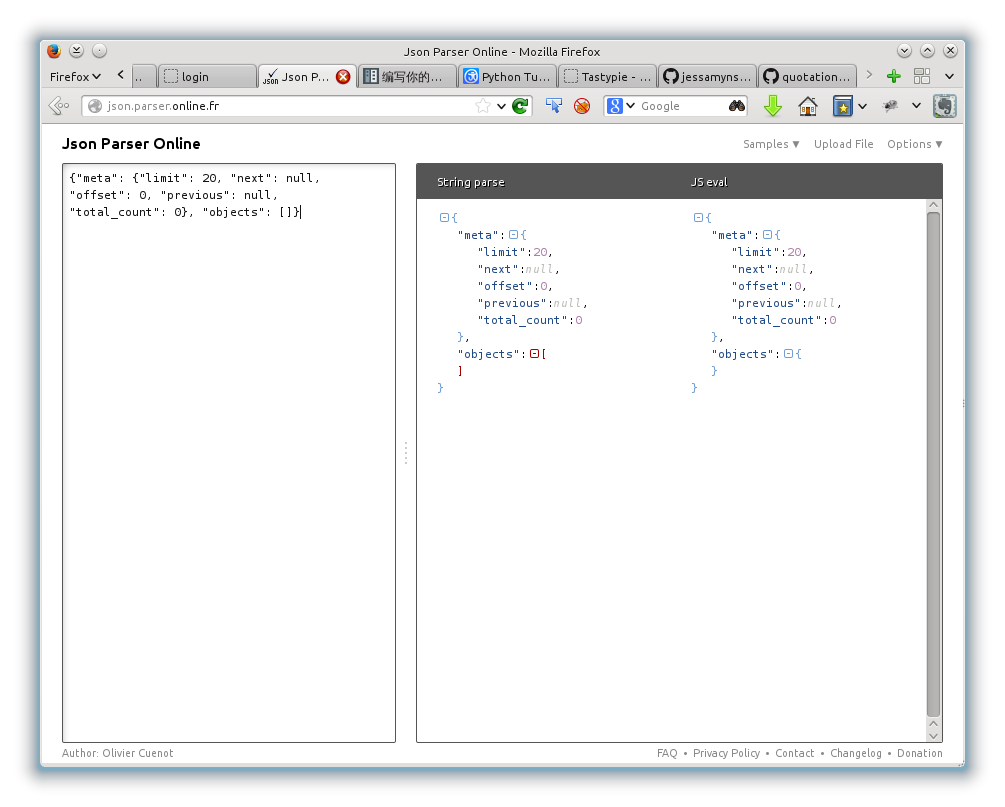
Isn't good? :P
Before awaring of tastypie, I used orignal JSON parser and 3rd party ORM to do things like REST application works.
I have also heard of django-gap which is more lighter than tastypie.
Gonna have a comparison if possible. :)
Happy Coding!
tastypie Django REST framework API [Hello JSON]的更多相关文章
- Django Rest Framework API指南
Django Rest Framework API指南 Django Rest Framework 所有API如下: Request 请求 Response 响应 View 视图 Generic vi ...
- Django REST Framework API Guide 06
本节大纲 1.Validators 2.Authentication Validators 在REST框架中处理验证的大多数时间,您将仅仅依赖于缺省字段验证,或在序列化器或字段类上编写显式验证方法.但 ...
- Django REST Framework API Guide 01
之前按照REST Framework官方文档提供的简介写了一系列的简单的介绍博客,说白了就是翻译了一下简介,而且翻译的很烂.到真正的生产时,就会发现很鸡肋,连熟悉大概知道rest framework都 ...
- Django REST Framework API Guide 04
本节大纲 1.serializers 1.Serializers Serializers允许复杂的数据,像queryset和模型实例转换成源生的Python数据类型.从而可以更简单的被渲染成JSON, ...
- Django REST Framework API Guide 03
本节大纲 1.Routers 2.Parsers 3.Renderers Routers Usage from rest_framework import routers router = route ...
- tastypie Django REST framework
Its one of the primary authors' lecture on pyCon: http://www.youtube.com/watch?v=Zv26xHYlc8s&nor ...
- Django REST Framework API Guide 02
本节大纲 1.Generic Views 2.ViewSets 1.Generic Views CBV的主要的一个优点就是极大的允许了对于代码的从用.自然,rest framework取其优势,提供 ...
- Django REST framework API开发
RESTful设计方法 1. 域名 应该尽量将API部署在专用域名之下. https://api.example.com 如果确定API很简单,不会有进一步扩展,可以考虑放在主域名下. https:/ ...
- Django REST Framework API Guide 08
1.Filtering 2.Pagination FIltering GenericAPIView的子类筛选queryset的简单方法是重写.get_quueryset()方法. 1.根据当前用户进行 ...
随机推荐
- [ACM] hdu 1671 Phone List (特里)
Phone List Problem Description Given a list of phone numbers, determine if it is consistent in the s ...
- java-list-remove()用法浅析 解决java list remove() 数据不对的问题
在java中对list进行操作很频繁,特别是进行list启遍历,这些操作我们都会,也很熟悉,但是对java中list进行删除元素,remove list中的元素就不怎么熟悉了吧,可以说很陌生,是实际操 ...
- 超酷的jQuery百叶窗图片滑块实现教程
原文:超酷的jQuery百叶窗图片滑块实现教程 今天我们要来分享一款基于jQuery的百叶窗焦点图插件,也可以说是图片滑块插件.这种jQuery焦点图插件的应用非常广泛,在早些年前,我们需要用flas ...
- 使用 COM 风格的编程接口
使用COM 风格的编程接口 假设不直接使用 COM 库.不创建自己的包装.那么更可能的是使用 COM 风格的编程接口.这是由于如今很多开发商公布应用程序时.提供了首选的互操作程序集(Primary I ...
- FlexiGrid使用手册
FlexiGrid使用手册 一.概览 Flexigrid是一个基于jQuery开发的Grid,与 Ext Gird类似.Flexigrid显示的数据能够通过Ajax获取或者从一个普通的表格转换. 它的 ...
- 从一道数学题弹程序员的思维:数学题,求证:(a+b%c)%c=(a+b)%c
在学校论坛看到这道题目,全忘了的感觉. 如果你是高中的,那我觉得你完全没问题.但是,在这个博客园的圈子,觉得全部人都是程(ban)序(zhuan)员(gong)相关的人员,解决这个问题有点难度,毕竟, ...
- 【 D3.js 进阶系列 — 5.0 】 直方图
直方图用于描写叙述概率分布,D3 提供了直方图的布局 Histogram 用于转换数据. 假设有数组 a = [10, 11, 11.5, 12.5, 13, 15, 19, 20 ],如今把10~2 ...
- - C#编程大幅提高OUTLOOK的邮件搜索能力!
原文:[原创] - C#编程大幅提高OUTLOOK的邮件搜索能力! 使用OUTLOOK, 你有没有遇到过上图的问题? 多达18419封邮件! 太多了, 每次想找一个邮件都非常耗时, 想办法解决这个问题 ...
- QT自动补全设置
在工具 -> 选项 -> 环境 -> 键盘 中,找到TextEditor -> CompleteThis,修改后面的快捷键就好了 我将它修改为Alt + /
- IIS 5.x/6.0/7.0 和 ASP.NET
原文:IIS 5.x/6.0/7.0 和 ASP.NET 本文主要介绍 3 个主要的 IIS 版本各自对 Web 请求的不同处理方式. 本文内容 IIS 5.x 和 ASP.NET IIS 6.0 和 ...