
软件工程第三个程序:“WC项目” —— 文件信息统计(Word Count ) 命令行程序
软件工程第三个程序:“WC项目” —— 文件信息统计(Word Count ) 命令行程序
格式:wc.exe [parameter][filename]
在[parameter]中,用户通过输入参数与程序交互,需实现的功能如下:
1、基本功能
支持 -c 统计文件字符数
支持 -w 统计文件单词数
支持 -l 统计文件总行数
2、拓展功能
支持 -a 返回高级选项(代码行 空行 注释行)
支持 -s 递归处理符合条件的文件
3、高级功能
支持 -x 程序以图形界面与用户交互
[filename] 是待处理文件名。
基本功能
主函数里用String字符串接收用户输入,并分解成参数数组 和 文件地址。
编写BaseCount()函数实现对文件的读操作,逐行统计统计字符数,并记录行数,同时使用StringBuffer类记录文件中所有的信息。最后一起统计 词数,避免在逐行计词时,把标点计为一词。
编写Response()函数根据用户输入的参数输出信息,这里程序不管用户输入的参数是什么,都在读取文件的时候把所有信息都记录下来并保存,用户输入的参数里有什么输出什么。
    private static void BaseCount() {

        linecount = 0;

        wordcount = 0;

        charcount = 0;

        File file = new File(sFilename);

        if(file.exists()) {

            try {

                FileInputStream fis = new FileInputStream(file);

                InputStreamReader isr = new InputStreamReader(fis,"UTF-8");

                BufferedReader br = new BufferedReader(isr);

                String line = "";

                StringBuffer sb  = new StringBuffer();

                while ((line = br.readLine()) != null)

                {

                    linecount++;

                    sb.append(line);

                    charcount += line.length();

                }

                wordcount = sb.toString().split("\\s+").length;//

                br.close();

                isr.close();

                fis.close();

            } catch (FileNotFoundException e) {

                e.printStackTrace();

            } catch (UnsupportedEncodingException e) {

                // TODO Auto-generated catch block

                e.printStackTrace();

            } catch (IOException e) {

                // TODO Auto-generated catch block

                e.printStackTrace();

            }

        }

    }
Java编写的程序 可以在cmd.exe里调用运行,提升一下bigger,输出的结果如图:
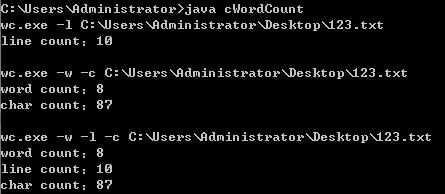
桌面上123.txt的内容如下:
using System;

namespace OneProgram

{

    class Program

        {

    Console.Write("wc.exe");

    }

}
拓展功能
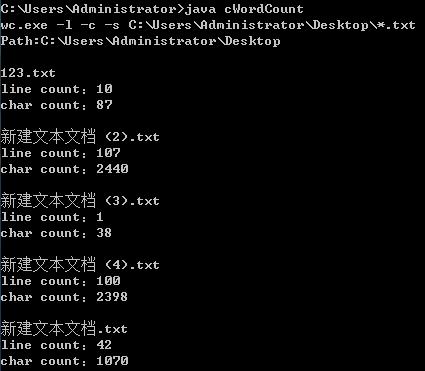
参数 -s 的使用效果为:参数中带有“-s”,文件的名称为“*.XXX”,输出所有的.XXX文件的信息。
相当于先找到所有该目录下的文件,然后判断文件的类型,再把符合的文件进行文件信息统计,最后输出。
那就直接再写一个ResponseforS()函数来专门处理参数带“-s”的命令,首先记录其他参数,分离文件路径 与 文件类型;定义字符串数组记录文件路径下的所有文件名;与用户输入的文件类型比较,对符合的文件进行文件信息统计,输出;循环 比较 输出;
    private static void ResponseforS() {

        // TODO Auto-generated method stub

        String path = sFilename.substring(0,sFilename.indexOf("*")-1);

        String type = sFilename.substring(sFilename.indexOf("*")+1,sFilename.length());

        System.out.print("Path:");

        System.out.println(path + "\n");

        File dir = new File(path);

        if(dir.isDirectory()) {

            File next[] = dir.listFiles();

            for (int i = 0; i < next.length; i++) {

                if( ! next[i].isDirectory()) {

                    //System.out.println(next[i].getName());

                    if(next[i].getName()

                            .substring(next[i].getName().indexOf(".")

                                    ,next[i].getName().length())

                            .equals(type)) {

                        System.out.println(next[i].getName());

                        sFilename = path + "\\" + next[i].getName();

                        BaseCount();

                        Response();

                    }

                }

            }

        }

        else{

            System.out.println("path error");

        }

    }
输出的结果如图:
参数 -a 的使用效果为:参数中带有“-a”,输出文件的空行、码行、注释行的统计信息。
该功能与基本功能类似,直接在BaseCount()函数里改写,函数名改为BaseAndAdvanceCount()。
在程序对文件读行的时候判断该行的长度,判断是否为空行,判断是否有连续的“/”,来判断是否为注释行,如果既不是空行 也不是注释行,则为代码行。
    private static void BaseAndAdvanceCount() {

        linecount = 0;

        wordcount = 0;

        charcount = 0;

        nullLinecount = 0;

        codeLinecount = 0;

        noteLinecount = 0;

        File file = new File(sFilename);

        if (file.exists()) {

            try {

                FileInputStream fis = new FileInputStream(file);

                InputStreamReader isr = new InputStreamReader(fis, "UTF-8");

                BufferedReader br = new BufferedReader(isr);

                String line = "";

                StringBuffer sb = new StringBuffer();

                while ((line = br.readLine()) != null) {

                    linecount++;

                    sb.append(line);

                    charcount += line.length();

                    line = line.trim();

                    // 空白行

                    if (line == "" || line.length() <= 1) {

                        nullLinecount++;

                        continue;

                    }

                    // 注释行

                    int a = line.indexOf("/");

                    int b = line.substring(a+1).indexOf("/");

                    if ( b == 0 ) {

                        noteLinecount++;

                        continue;

                    }

                    // 代码行

                    codeLinecount++;

                }

                wordcount = sb.toString().split("\\s+").length;//

                br.close();

                isr.close();

                fis.close();

            } catch (FileNotFoundException e) {

                e.printStackTrace();

            } catch (UnsupportedEncodingException e) {

                e.printStackTrace();

            } catch (IOException e) {

                e.printStackTrace();

            }

        } else {

            System.out.println("path error");

        }

    }
输出的结果如图:
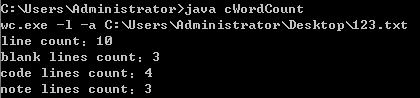
桌面上123.txt里的内容改为:
using System;

namespace OneProgram

{//

//

    class Program

    {

    Console.Write("wc.exe");

    }

}//without copyright
高级功能
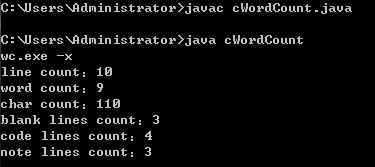
参数 -x 的使用效果为:只输入“-x”,弹出文件选择对话框,选择文件后输出该文件的所有信息。
这里仍然为参数 “-x” 建立一个独立的函数ResponseforX(),创建显示一个文件选择对话框,选中某个文件后返回该文件的绝对路径,交给BaseAndAdvanceCount()函数 与 Response()函数。输出所有信息。
    private static void ResponseforX() {

        // TODO Auto-generated method stub

        flag_x = 1;

        chooser = new JFileChooser();

        int value = chooser.showOpenDialog(null);

        if (value == JFileChooser.APPROVE_OPTION) {

            File file = chooser.getSelectedFile();

            sFilename = file.getAbsolutePath();

            BaseAndAdvanceCount();

            Response();

        }

    }
操作过程与输出的结果如图:
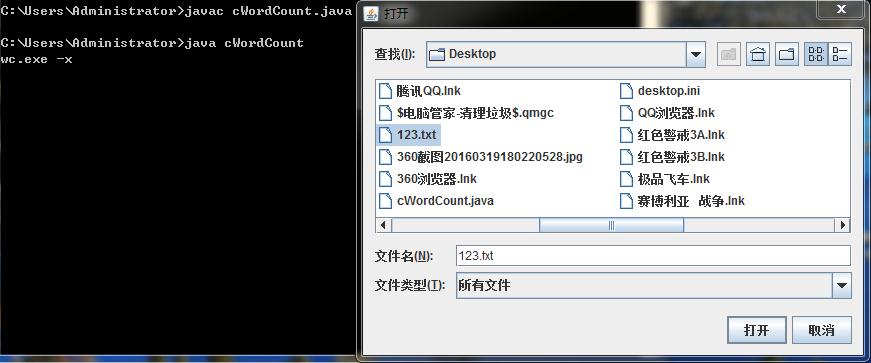
桌面上123.txt里的内容没变。
至此所有的功能已基本实现 :)
所有的代码已上传至Coding,Coding:https://coding.net/u/Mr_winter/p/ESE03/git
>>>追加
问题1.参数的顺序是固定的么?比如 -c 和 -w 的顺序是否可以交换?
回答:可以的,粘出Response()函数的部分代码如下
            for (int i = 0; i < sParameter.length; i++) {

                if (sParameter[i].equals("-l")) {

                    System.out.print("line count:");

                    System.out.println(linecount);

                } else if (sParameter[i].equals("-w")) {

                    System.out.print("word count:");

                    System.out.println(wordcount);

                } else if (sParameter[i].equals("-c")) {

                    System.out.print("char count:");

                    System.out.println(charcount);

                } else if (sParameter[i].equals("-a")) {

                    System.out.print("blank lines count:");

                    System.out.println(nullLinecount);

                    System.out.print("code lines count:");

                    System.out.println(codeLinecount);

                    System.out.print("note lines count:");

                    System.out.println(noteLinecount);

                }
先输入 -c 就先输出 char count ;先输入 -w 就先输出 word count。:)
问题2.如果要想处理/* */ 这样的注释,该如何修改代码呢?
回答:改一下代码呗
    private static void BaseAndAdvanceCount() {

        int flag_note = 0;// 为1时 说明程序正在读/* */中的内容

        linecount = 0;

        wordcount = 0;

        charcount = 0;

        nullLinecount = 0;

        codeLinecount = 0;

        noteLinecount = 0;

        File file = new File(sFilename);

        if (file.exists()) {

            try {

                FileInputStream fis = new FileInputStream(file);

                InputStreamReader isr = new InputStreamReader(fis, "UTF-8");

                BufferedReader br = new BufferedReader(isr);

                String line = "";

                StringBuffer sb = new StringBuffer();

                while ((line = br.readLine()) != null) {

                    linecount++;

                    sb.append(line);

                    charcount += line.length();

                    // ++++++++++++++++++修改区域++++++++++++++++++++

                    line = line.trim();

                    if (flag_note == 0) {

                        // 空白行

                        if (line == "" || line.length() <= 1) {

                            nullLinecount++;

                            continue;

                        }

                        // 注释行

                        int a = line.indexOf("/");

                        int b = line.substring(a + 1).indexOf("/");

                        if (b == 0) {

                            noteLinecount++;

                            continue;

                        } else {

                            int c = line.substring(a + 1).indexOf("*");

                            if (c == 0) {

                                flag_note = 1;

                                noteLinecount++;

                                continue;

                            }

                        }

                        // 代码行

                        codeLinecount++;

                    } else {

                        // 统计/* */的大小

                        int a = line.indexOf("*");

                        int b = line.substring(a + 1).indexOf("/");

                        if (b == 0) {

                            noteLinecount++;

                            flag_note = 0;// /* */结束,标志重新置0

                        } else {

                            noteLinecount++;

                        }

                    }

                }

                // +++++++++++++++++++++++++++++++++++++++++++++++

                wordcount = sb.toString().split("\\s+").length;//

                br.close();

                isr.close();

                fis.close();

            } catch (FileNotFoundException e) {

                e.printStackTrace();

            } catch (UnsupportedEncodingException e) {

                e.printStackTrace();

            } catch (IOException e) {

                e.printStackTrace();

            }

        } else {

            System.out.println("path error");

        }

    }
运行的结果让人很满意 :)

123.txt 中的内容为:
using System;

namespace OneProgram

{//

//

    class Program

/*    {

    Console.Write("wc.exe");

    }

}//without copyright*/
:)
J.X.Dinosaur
软件工程第三个程序:“WC项目” —— 文件信息统计(Word Count ) 命令行程序的更多相关文章
- c#词频统计命令行程序
这里将用c#写一个关于词频统计的命令行程序. 预计时间分配:输入处理3h.词条排序打印2h.测试3h. 实际时间分配:输入处理1h.词条排序打印2h.测试3h.程序改进优化6h. 下面将讲解程序的完成 ...
- 2019-11-29-dotnet-使用-System.CommandLine-写命令行程序
title author date CreateTime categories dotnet 使用 System.CommandLine 写命令行程序 lindexi 2019-11-29 08:33 ...
- 2019-8-31-dotnet-使用-System.CommandLine-写命令行程序
title author date CreateTime categories dotnet 使用 System.CommandLine 写命令行程序 lindexi 2019-08-31 16:55 ...
- dotnet 使用 System.CommandLine 写命令行程序
在写命令行程序的时候,会遇到命令行解析的问题,以及参数的使用和规范化等坑.现在社区开源了命令行项目,可以帮助小伙伴快速开发命令行程序,支持自动的命令行解析和规范的参数 我写过一篇关于命令行解析的博客C ...
- 在 Mac OS X 上创建的 .NET 命令行程序访问数据库 (使用Entity Framework 7 )
var appInsights=window.appInsights||function(config){ function r(config){t[config]=function(){var i= ...
- myapp——自动生成小学四则运算题目的命令行程序(侯国鑫 谢嘉帆)
1.Github项目地址 https://github.com/baiyexing/myapp.git 2.功能要求 题目:实现一个自动生成小学四则运算题目的命令行程序 功能(已全部实现) 使用 -n ...
- 用什么库写 Python 命令行程序?看这一篇就够了
作者:HelloGitHub-Prodesire HelloGitHub 的<讲解开源项目>系列,项目地址:https://github.com/HelloGitHub-Team/Arti ...
- XP下,文件夹添加右键命令行
原文:XP下,文件夹添加右键命令行 总共有3种方式: --------------------1---------------------------------------------------- ...
- 命令行程序增加 GUI 外壳
Conmajia © 2012 Updated on Feb. 21, 2018 命令行大家都用过: 图 1 命令行程序工作界面 现在想办法为它做一个 GUI 外壳,实际效果参考图 2. 图 2 带 ...
随机推荐
- 使用Google cardboard 2的一些软件
最近入手cardboard2,FQ尝试了一些软件,特别分享,给大家提供一些方便. 链接:http://pan.baidu.com/s/1slehilZ 密码:b49h
- 其他类想使用unittest的断言方法,就import unittest的框架,继承他,使用他里面的方法
在断言层 也可以同样用这个方法
- DevOps利器- Hygieia平台开发部署
前言碎语 Hygieia是什么? Capitalone(全美十大银行之一)开源的DevOps利器.使用Hygieia后,在整个软件开发周期中,用户可以选择VersionOne或Jira进行用户故事的追 ...
- PostgreSQL中的group by
问题描述:今天使用了PostgerSQL查询统计一下相关信息,发现 报错了 SELECT * FROM "public"."dc_event_data" WHE ...
- tools、site
notepad editer fiddler 一个http协议调试代理工具,它能够记录并检查所有你的电脑和互联网之间的http通讯,设置断点,查看所有的"进出"Fiddler的数据 ...
- [UE4]Overlay
Overlay容器的子控件叠加,没有z-order属性设置,只能在编辑器中调整前后层级,也不能设置位置.可以理解是Canvas Panel的简化控件
- [UE4]给Widget增加参数,Pre Construct和Construct的区别
使用Pre Construct事件可以在编辑器中实时显示出选择的背景图片. 如果使用的是“Construct”事件则只能在游戏运行时把图片显示出来.
- JDK1.6 Java.lang.Null.Pointer.Exception
先来看一下JDK1.6的API: NullPointerException (Java Platform SE 6) public class NullPointerException extends ...
- RAC集群安装校验输出信息
RAC集群安装校验输出信息 作者:Eric 微信:loveoracle11g [grid@rac-node1 grid]$ [grid@rac-node1 grid]$ ./runcluvfy.sh ...
- Zookeeper数据查看工具ZooInspector
Zookeeper作为常用的集群协调者组件被广泛应用,尤其是在大数据生态圈中: Zookeeper集群存储各个节点信息,包括:Hadoop.Hbase.Storm.Kafka等等: 二.查询ZK数据的 ...