
Python实例---模拟微信网页登录(day1)
第一步:创建Django项目
创建Django项目,添加App
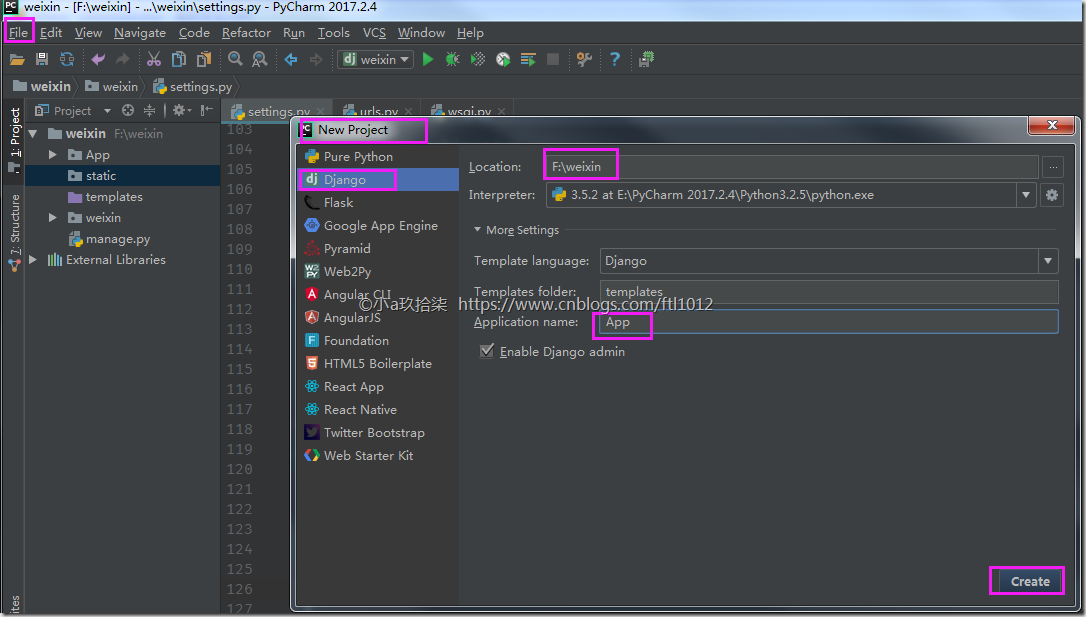
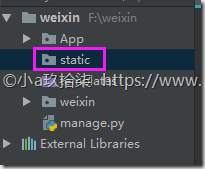
创建静态文件夹static
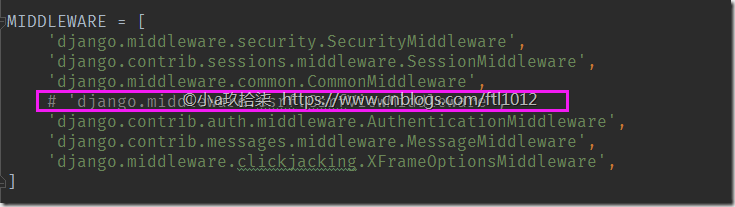
修改settings.py文件
1. 取消csrf注释
2. 添加静态文件路径
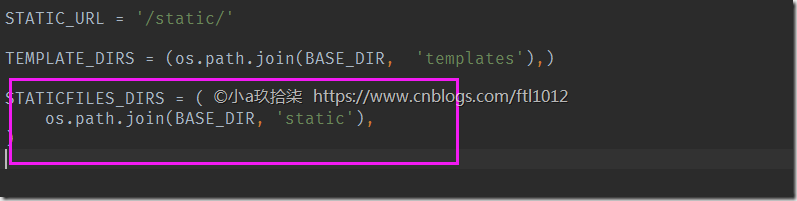
# 添加静态文件路径

STATICFILES_DIRS = (

    os.path.join(BASE_DIR, 'static'),

)
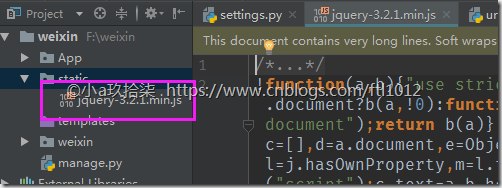
3. 导入jquery文件(复制进去即可)
4. 修改DIR路径(否则会报错差找不到templs下面的html文件)
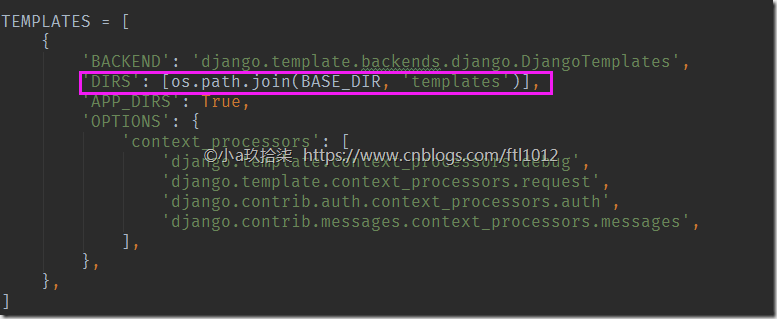
'DIRS': [os.path.join(BASE_DIR, 'templates')],
第二步: 获取验证码---Day1代码
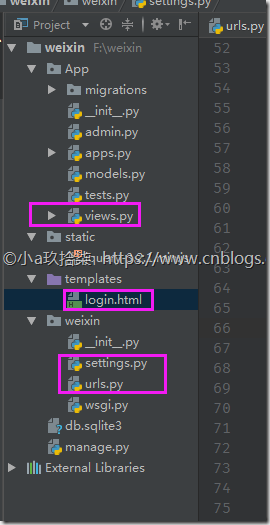
代码结构图
settings.py
"""

Django settings for weixin project.

Generated by 'django-admin startproject' using Django 2.0.1.

For more information on this file, see

https://docs.djangoproject.com/en/2.0/topics/settings/

For the full list of settings and their values, see

https://docs.djangoproject.com/en/2.0/ref/settings/

"""

import os

# Build paths inside the project like this: os.path.join(BASE_DIR, ...)

BASE_DIR = os.path.dirname(os.path.dirname(os.path.abspath(__file__)))

# Quick-start development settings - unsuitable for production

# See https://docs.djangoproject.com/en/2.0/howto/deployment/checklist/

# SECURITY WARNING: keep the secret key used in production secret!

SECRET_KEY = '*g4b=9ct3o#*1pr0o2$h+p$eb!czq!)83u933x8$(n7uj++!f%'

# SECURITY WARNING: don't run with debug turned on in production!

DEBUG = True

ALLOWED_HOSTS = []

# Application definition

INSTALLED_APPS = [

    'django.contrib.admin',

    'django.contrib.auth',

    'django.contrib.contenttypes',

    'django.contrib.sessions',

    'django.contrib.messages',

    'django.contrib.staticfiles',

    'App.apps.AppConfig',

]

MIDDLEWARE = [

    'django.middleware.security.SecurityMiddleware',

    'django.contrib.sessions.middleware.SessionMiddleware',

    'django.middleware.common.CommonMiddleware',

    # 'django.middleware.csrf.CsrfViewMiddleware',

    'django.contrib.auth.middleware.AuthenticationMiddleware',

    'django.contrib.messages.middleware.MessageMiddleware',

    'django.middleware.clickjacking.XFrameOptionsMiddleware',

]

ROOT_URLCONF = 'weixin.urls'

TEMPLATES = [

    {

        'BACKEND': 'django.template.backends.django.DjangoTemplates',

        'DIRS': [os.path.join(BASE_DIR, 'templates')],

        'APP_DIRS': True,

        'OPTIONS': {

            'context_processors': [

                'django.template.context_processors.debug',

                'django.template.context_processors.request',

                'django.contrib.auth.context_processors.auth',

                'django.contrib.messages.context_processors.messages',

            ],

        },

    },

]

WSGI_APPLICATION = 'weixin.wsgi.application'

# Database

# https://docs.djangoproject.com/en/2.0/ref/settings/#databases

DATABASES = {

    'default': {

        'ENGINE': 'django.db.backends.sqlite3',

        'NAME': os.path.join(BASE_DIR, 'db.sqlite3'),

    }

}

# Password validation

# https://docs.djangoproject.com/en/2.0/ref/settings/#auth-password-validators

AUTH_PASSWORD_VALIDATORS = [

    {

        'NAME': 'django.contrib.auth.password_validation.UserAttributeSimilarityValidator',

    },

    {

        'NAME': 'django.contrib.auth.password_validation.MinimumLengthValidator',

    },

    {

        'NAME': 'django.contrib.auth.password_validation.CommonPasswordValidator',

    },

    {

        'NAME': 'django.contrib.auth.password_validation.NumericPasswordValidator',

    },

]

# Internationalization

# https://docs.djangoproject.com/en/2.0/topics/i18n/

LANGUAGE_CODE = 'en-us'

TIME_ZONE = 'UTC'

USE_I18N = True

USE_L10N = True

USE_TZ = True

# Static files (CSS, JavaScript, Images)

# https://docs.djangoproject.com/en/2.0/howto/static-files/

STATIC_URL = '/static/'

TEMPLATE_DIRS = (os.path.join(BASE_DIR,  'templates'),)

STATICFILES_DIRS = (

    os.path.join(BASE_DIR, 'static'),

)
views.py
from django.shortcuts import render, redirect, HttpResponse

import re

import time

import requests

# Create your views here.

CURRENT_TIME = None

def login(request):

    # https://login.wx.qq.com/jslogin?appid=wx782c26e4c19acffb&redirect_uri=https%3A%2F%2Fwx.qq.com%2Fcgi-bin%2Fmmwebwx-bin%2Fwebwxnewloginpage&fun=new&lang=zh_CN&_=1486951705941

    base_qode_url = 'https://login.wx.qq.com/jslogin?appid=wx782c26e4c19acffb&redirect_uri=https%3A%2F%2Fwx.qq.com%2Fcgi-bin%2Fmmwebwx-bin%2Fwebwxnewloginpage&fun=new&lang=zh_CN&={0}'

    global CURRENT_TIME  # 更改全局变量需要更改添加global

    global QCODE

    CURRENT_TIME = str(time.time())  # 时间戳【返回是float类型,转换为str类型】

    q_code_url = base_qode_url.format(CURRENT_TIME)

    response = requests.get(q_code_url)  # 获取到随记字符串,返回是个response对象

    # code: <Response [200]>

    # type(code):  <class 'requests.models.Response'>

    # code.text : window.QRLogin.code = 200; window.QRLogin.uuid = "gb8OTUPMpA==";

    print('Response对象: ', response, type(response))

    print('Response内容: ', response.text)

    code = re.findall('uuid = "(.*)"', response.text)[0]  # findall返回一个列表,注意空格

    QCODE = code

    print("随记字符:", QCODE)

    return render(request, 'login.html', {"code": QCODE})
url.py
from django.contrib import admin

from django.urls import path

from App import views

urlpatterns = [

    path('admin/', admin.site.urls),

    path('login/', views.login),

]
login.html
<!DOCTYPE html>

<html lang="en">

<head>

    <meta charset="UTF-8">

    <title>Title</title>

</head>

<body>

    <div>

         <div style="width: 300px; margin: 0 auto ">

        <img id="qcode" style="width: 300px; height: 300px;"

             src="https://login.weixin.qq.com/qrcode/{{ code }}"/>

    </div>

    </div>

</body>

</html>
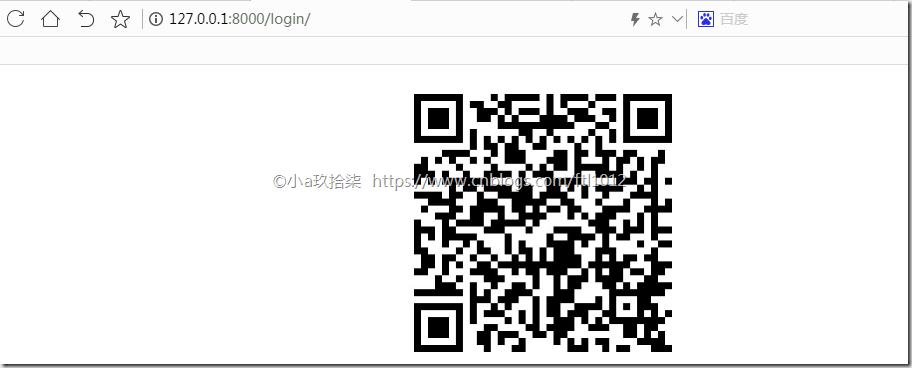
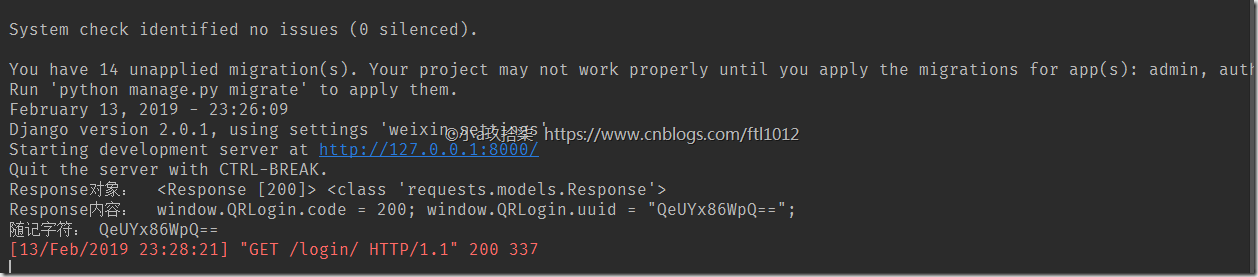
页面请求:
Python实例---模拟微信网页登录(day1)的更多相关文章
- Python实例---模拟微信网页登录(day5)
第六步: 实现发送/接受消息---day5代码 settings.py """ Django settings for weixin project. Generated ...
- Python实例---模拟微信网页登录(day4)
第五步: 获取联系人信息---day4代码 settings.py """ Django settings for weixin project. Generated b ...
- Python实例---模拟微信网页登录(day3)
第四步: 扫码成功后获取最近联系人信息---day3代码 settings.py """ Django settings for weixin project. Gene ...
- Python实例---模拟微信网页登录(day2)
第三步: 实现长轮询访问服务器---day2代码 settings.py """ Django settings for weixin project. Generate ...
- Python学习---模拟微信网页登录180410
WEB微信 网页登录的猜想: a. 访问页面出现二维码 b. 长轮询监听是否已经扫码并且点击确认 c. 如何进行会话保持 d. 如何获取用户列表 e. 如何发送消息(接收消息) 过程:访问微信官网[h ...
- JustAuth 1.15.9 版发布,支持飞书、喜马拉雅、企业微信网页登录
新增 修复并正式启用 飞书 平台的第三方登录 AuthToken 类中新增 refreshTokenExpireIn 记录 refresh token 的有效期 PR 合并 Github #101:支 ...
- 基于ASP.NET MVC 微信网页登录授权(scope为snsapi_base) 流程 上 获取OPENID
流程图 我们需要判断是否存在OPENID 首先我们得先定义一个全局的OPENID 类似于普通账号密码登录系统的 当前登录用户ID 因为我是MVC 框架 我这里定义一个控制器基类 BaseCont ...
- VC显示网页验证码、模拟CSDN网页登录
摘要:by:koma 这两天,本来想花点时间研究一下QQ空间.农场外挂,于是抓包分析一了下,只可惜,在QQ网页登录时进行了加密处理,可惜我对网页编程一窍不通.有些朋友曾讲过那些是通过JS代码进行加密, ...
- 微信网页登录Tips
http://www.ruanyifeng.com/blog/2014/05/oauth_2_0.html 以这篇文章为例,一般都是用户在第三方app中登录时,由第三方去申请资源服务器的登录权限等.即 ...
随机推荐
- 搭建laravel到nginx
一.laravel的安装 搭建的第一步当然是安装好laravel,这里推介composer安装,由于国内的问题,极其推介使用国内的镜像去搭建,我在终端里本已经设置好常规的https和http之类的FQ ...
- 【详解】JNI (Java Native Interface) (四)
案例四:回调实例方法与静态方法 描述:此案例将通过Java调用的C语言代码回调Java方法. 要想调用实例对象的方法,需要进行以下步骤: 1. 通过对象实例,获取到对象类的引用 => GetO ...
- 爬虫---selenium动态网页数据抓取
动态网页数据抓取 什么是AJAX: AJAX(Asynchronouse JavaScript And XML)异步JavaScript和XML.过在后台与服务器进行少量数据交换,Ajax 可以使网页 ...
- vue-cli + element-ui + webpack 新建项目
1.进入项目目录 2.全局安装vue-cli 输入命令:npm install vue-cli -g 若报错:ENOENT: no such file or directory, access.... ...
- 用Collectors对List去重
在学习本篇之前,最好对java8新特性有一定的了解.可以参考:Java8新特性--流(Stream) 场景:有一个实体的List集合,需要根据实体中的某个字段对List去重 要想去重,可以考虑使用Tr ...
- Spring源码分析:非懒加载的单例Bean初始化过程(下)
上文Spring源码分析:非懒加载的单例Bean初始化过程(上),分析了单例的Bean初始化流程,并跟踪代码进入了主流程,看到了Bean是如何被实例化出来的.先贴一下AbstractAutowireC ...
- [原创]C#中的堆和栈理解
引言:程序运行时,它的数据必须存在内存中,一个数据需要多大内存.存储在什么地方以及如何存储都依赖于该数据的数据类型. 1.什么是栈 栈是一个内存数组,是一个LIFO(Last-In-First-Out ...
- winform窗体 控件【MDI 窗体容器】
MDI :窗体容器 -- 在窗体中放置窗体 属性 IsMdiContainer : 是否是窗体 -- 只有 Form 有此属性 Form2 f2 = new Form2(); ...
- API 与 SDK
API 和SDK是软件行业的两个缩写词. API (Application Programming Interface)=应用程序编程接口 通过一套套的要求,用来管理应用程序之间的沟通.一个API相当 ...
- Stack源码解析
我们从一个DEMO作为入口,了解Java的Stack的源码,代码如: Stack<String> stack = new Stack<>(); stack.push(" ...