
c#中数组array和list在函数间传递 转置
 using System;

 using System.Collections.Generic;

 using System.Linq;

 using System.Text;

 namespace ConsoleApplication2

 {

     class Program

     {

         static void Main(string[] args)

         {

             double[,] array = new double[, ];

             for (int i = ; i < ; i++)

             {

                 for (int j = ; j < ; j++)

                 {

                     array[i, j] = i + j;

                 }

             }

             //显示原数组

             Console.WriteLine("Source Array:");

             for (int i = ; i < ; i++)

             {

                 string soureResult = string.Empty;

                 for (int j = ; j < ; j++)

                 {

                     soureResult += array[i, j] + "  ";

                 }

                 Console.WriteLine(soureResult);

             }

             double[,] newArray = Rotate(array);

             //显示转置后的数组

             Console.WriteLine("Destiney Array:");

             for (int i = ; i < ; i++)

             {

                 string dstResult = string.Empty;

                 for (int j = ; j < ; j++)

                 {

                     dstResult += newArray[i, j] + "  ";

                 }

                 Console.WriteLine(dstResult);

             }

             Console.ReadLine();

         }

         public static double[,] Rotate(double[,] array)

         {

             int x = array.GetUpperBound(); //一维

             int y = array.GetUpperBound(); //二维

             double[,] newArray = new double[y + , x + ]; //构造转置二维数组

             for (int i = ; i <= x; i++)

             {

                 for (int j = ; j <= y; j++)

                 {

                     newArray[j, i] = array[i, j];

                 }

             }

             return newArray;

         }

     }

 }
二维数组函数间传递及转置
 using System;

 using System.Collections.Generic;

 using System.Linq;

 using System.Text;

 namespace ConsoleApplication2

 {

     class Program

     {

         /// <summary>

         /// 二维数组转置函数

         /// </summary>

         /// <param name="array"></param>

         /// <returns></returns>

         public static string[,] Rotate(string[,] array)

         {

             int x = array.GetUpperBound(); //一维

             int y = array.GetUpperBound(); //二维

             string[,] newArray = new string[y + , x + ]; //构造转置二维数组

             for (int i = ; i <= x; i++)

             {

                 for (int j = ; j <= y; j++)

                 {

                     newArray[j, i] = array[i, j];

                 }

             }

             return newArray;

         }

         /// <summary>

         /// 将二维列表(List)转换成二维数组,二维数组转置,然后将二维数组转换成列表

         /// </summary>

         /// <param name="original"></param>

         /// <returns></returns>

         public static List<List<string>> Rotate(List<List<string>> original)

         {

             List<string>[] array = original.ToArray();

             List<List<string>> lists = new List<List<string>>();

             if (array.Length == )

             {

                 throw new IndexOutOfRangeException("Index OutOf Range");

             }

             int x = array[].Count;

             int y = original.Count;

             //将列表抓换成数组

             string[,] twoArray = new string[y, x];

             for (int i = ; i < y; i++)

             {

                 int j = ;

                 foreach (string s in array[i])

                 {

                     twoArray[i, j] = s;

                     j++;

                 }

             }

             string[,] newTwoArray = new string[x, y];

             newTwoArray = Rotate(twoArray);//转置

             //二维数组转换成二维List集合

             for (int i = ; i < x; i++)

             {

                 List<string> list = new List<string>();

                 for (int j = ; j < y; j++)

                 {

                     list.Add(newTwoArray[i, j]);

                 }

                 lists.Add(list);

             }

             return lists;

         }

         static void Main(string[] args)

         {

             List<List<string>> sourceList = new List<List<string>>(); //测试的二维List

             for (int i = ; i < ; i++)

             {

                 List<string> list = new List<string>();

                 for (int j = ; j < ; j++)

                 {

                     list.Add(i.ToString() + j.ToString());

                 }

                 sourceList.Add(list);

             }

             //显示原列表

             Console.WriteLine("Source List:");

             for (int i = ; i < sourceList.Count; i++)

             {

                 string soureResult = string.Empty;

                 for (int j = ; j < sourceList[i].Count; j++)

                 {

                     soureResult += sourceList[i][j] + "  ";

                 }

                 Console.WriteLine(soureResult);

             }

             List<List<string>> dstList = Rotate(sourceList);

             //显示转置后的列表

             Console.WriteLine("Destiney List:");

             for (int i = ; i < dstList.Count; i++)

             {

                 string dstResult = string.Empty;

                 for (int j = ; j < dstList[i].Count; j++)

                 {

                     dstResult += dstList[i][j] + "  ";

                 }

                 Console.WriteLine(dstResult);

             }

             Console.ReadLine();

         }

     }

 }
list转置(通过数组中间变量)
参考:https://www.cnblogs.com/jeffwongishandsome/archive/2009/11/15/1603130.html
 using System;

 using System.Collections.Generic;

 using System.Linq;

 using System.Text;

 namespace ConsoleApplication2

 {

     class Program

     {

         /// <summary>

         /// 二维数组转置函数

         /// </summary>

         /// <param name="array"></param>

         /// <returns></returns>

         static void Main(string[] args)

         {

             List<List<double>> twolist = new List<List<double>>();

             List<double> onelist = new List<double>();

             onelist.Add(11.0);

             onelist.Add(12.0);

             onelist.Add(13.0);

             twolist.Add(onelist);

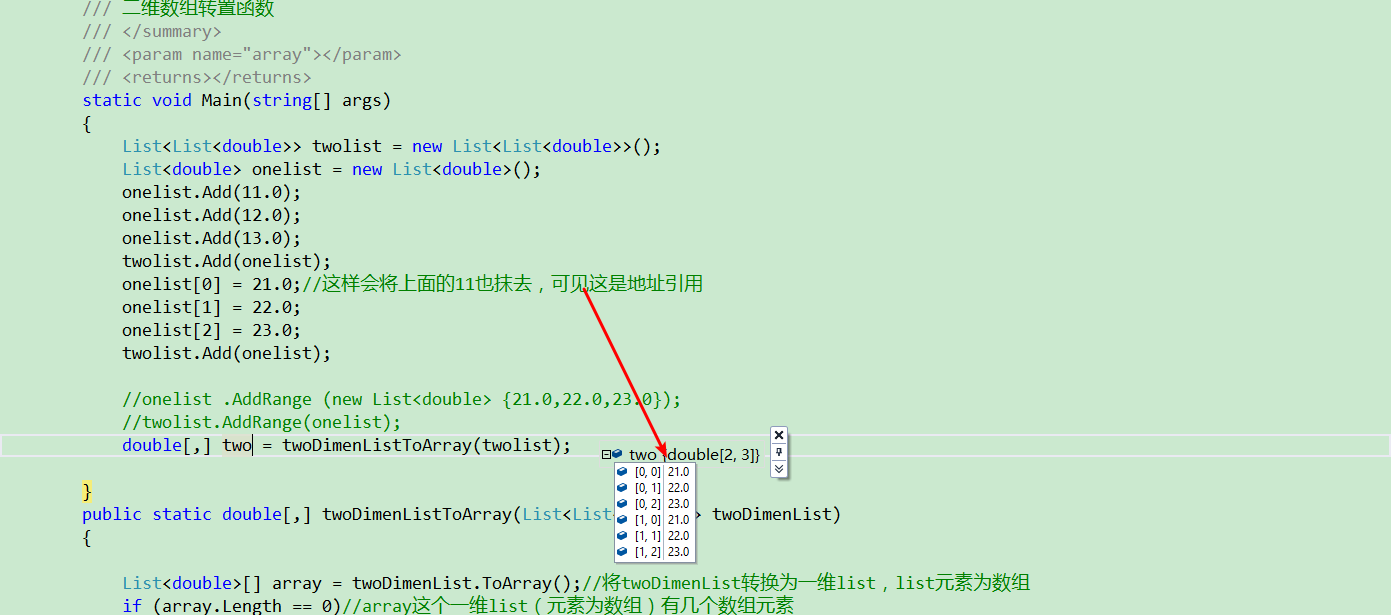
             onelist[] = 21.0;//这样会将上面的11也抹去,可见这是地址引用

             onelist[] = 22.0;

             onelist[] = 23.0;

             twolist.Add(onelist);

             //onelist .AddRange (new List<double> {21.0,22.0,23.0});

             //twolist.AddRange(onelist);

             double[,] two = twoDimenListToArray(twolist);

         }

         public static double[,] twoDimenListToArray(List<List<double>> twoDimenList)

         {

             List<double>[] array = twoDimenList.ToArray();//将twoDimenList转换为一维list,list元素为数组

             if (array.Length == )//array这个一维list(元素为数组)有几个数组元素

             {

                 throw new IndexOutOfRangeException("Index OutOf Range");

             }

             int x = array[].Count;//array这个一维list(元素为数组)第一个元素(数组)内有几个元素(double类型数据),相当于列数

             int y = twoDimenList.Count;//二维list中有几个list,相当于行数

             double[,] twoDimenArray = new double[y, x];

             for (int i = ; i < y; i++)//先写行

             {

                 int j = ;

                 foreach (double d in array[i])

                 {

                     twoDimenArray[i, j] = d;

                     j++;

                 }

             }

             return twoDimenArray;

         }

     }

 }
将二维list转换为二维数组
修改:
using System;

using System.Collections.Generic;

using System.Linq;

using System.Text;

namespace ConsoleApplication2

{

    class Program

    {

        /// <summary>

        /// 二维数组转置函数

        /// </summary>

        /// <param name="array"></param>

        /// <returns></returns>

        static void Main(string[] args)

        {

            List<List<double>> twolist = new List<List<double>>();

            List<double> onelist = new List<double>();

            onelist.Add(11.0);

            onelist.Add(12.0);

            onelist.Add(13.0);

            twolist.Add(onelist);

            List<double> onelist1 = new List<double>();

            onelist1.Add(21.0);//这样会将上面的11也抹去,可见这是地址引用

            onelist1.Add(22.0) ;

            onelist1.Add(23.0);

            twolist.Add(onelist1);

            //onelist .AddRange (new List<double> {21.0,22.0,23.0});

            //twolist.AddRange(onelist);

            double[,] two = twoDimenListToArray(twolist);

        }

        public static double[,] twoDimenListToArray(List<List<double>> twoDimenList)

        {

            List<double>[] array = twoDimenList.ToArray();//将twoDimenList转换为一维list,list元素为数组

            if (array.Length == )//array这个一维list(元素为数组)有几个数组元素

            {

                throw new IndexOutOfRangeException("Index OutOf Range");

            }

            int x = array[].Count;//array这个一维list(元素为数组)第一个元素(数组)内有几个元素(double类型数据),相当于列数

            int y = twoDimenList.Count;//二维list中有几个list,相当于行数

            double[,] twoDimenArray = new double[y, x];

            for (int i = ; i < y; i++)//先写行

            {

                int j = ;

                foreach (double d in array[i])

                {

                    twoDimenArray[i, j] = d;

                    j++;

                }

            }

            return twoDimenArray;

        }

    }

}
 using System;

 using System.Collections.Generic;

 using System.Linq;

 using System.Text;

 namespace ConsoleApplication2

 {

     class Program

     {

         /// <summary>

         /// 二维数组转置函数

         /// </summary>

         /// <param name="array"></param>

         /// <returns></returns>

         static void Main(string[] args)

         {

             List<List<double>> twolist = new List<List<double>>();

             List<double> onelist = new List<double>();

             onelist.Add(11.0);

             onelist.Add(12.0);

             onelist.Add(13.0);

             twolist.Add(onelist);

             List<double> onelist1 = new List<double>();

             onelist1.Add(21.0);//这样会将上面的11也抹去,可见这是地址引用

             onelist1.Add(22.0) ;

             onelist1.Add(23.0);

             twolist.Add(onelist1);

             //onelist .AddRange (new List<double> {21.0,22.0,23.0});

             //twolist.AddRange(onelist);

             double[,] two = twoDimenListToArray(twolist);

             double[] one=oneDimenListToArray(onelist);

         }

         /// <summary>

         /// 将二维list转换为二维数组

         /// </summary>

         /// <param name="twoDimenList">传入的要转换的二维list列表</param>

         /// <returns>返回转换得到的二维数组</returns>

         public static double[,] twoDimenListToArray(List<List<double>> twoDimenList)

         {

             List<double>[] array = twoDimenList.ToArray();//将twoDimenList转换为一维list,list元素为数组

             if (array.Length == )//array这个一维list(元素为数组)有几个数组元素

             {

                 throw new IndexOutOfRangeException("Index OutOf Range");

             }

             int x = array[].Count;//array这个一维list(元素为数组)第一个元素(数组)内有几个元素(double类型数据),相当于列数

             int y = twoDimenList.Count;//二维list中有几个list,相当于行数

             double[,] twoDimenArray = new double[y, x];

             for (int i = ; i < y; i++)//先写行

             {

                 int j = ;

                 foreach (double d in array[i])

                 {

                     twoDimenArray[i, j] = d;

                     j++;

                 }

             }

             return twoDimenArray;

         }

         /// <summary>

         /// 将一维list转换为一维数组

         /// </summary>

         /// <param name="oneDimenList">传入的要转换的一维list列表</param>

         /// <returns>返回转换得到的一维数组</returns>

         public static double[] oneDimenListToArray(List<double> oneDimenList)

         {

             double[] oneDimenArray = oneDimenList.ToArray();

             return oneDimenArray;

         }

     }

 }
添加一维的转换
c#中数组array和list在函数间传递 转置的更多相关文章
- JavaScript中数组Array方法详解
ECMAScript 3在Array.prototype中定义了一些很有用的操作数组的函数,这意味着这些函数作为任何数组的方法都是可用的. 1.Array.join()方法 Array.join()方 ...
- C#中数组Array、ArrayList、泛型List<T>的比较
在C#中数组Array,ArrayList,泛型List都能够存储一组对象,但是在开发中根本不知道用哪个性能最高,下面我们慢慢分析分析. 一.数组Array 数组是一个存储相同类型元素的固定大小的顺序 ...
- JavaScript学习总结(三、函数声明和表达式、this、闭包和引用、arguments对象、函数间传递参数)
一.函数声明和表达式 函数声明: function test() {}; test(); //运行正常 function test() {}; 函数表达式: var test = functio ...
- C语言中数组名作为参数进行函数传递
用数组名作函数参数与用数组元素作实参有几点不同. 1) 用数组元素作实参时,只要数组类型和函数的形参变量的类型一致,那么作为下标变量的数组元素的类型也和函数形参变量的类型是一致的.因此,并不要求函数的 ...
- javascript中数组Array的方法
一.常用方法(push,pop,unshift,shift,join)push pop栈方法,后进先出var a =[1,2,3];console.log(a.push(40)); //4 返回数组的 ...
- JavaScript中数组Array.sort()排序方法详解
JavaScript中数组的sort()方法主要用于对数组的元素进行排序.其中,sort()方法有一个可选参数.但是,此参数必须是函数. 数组在调用sort()方法时,如果没有传参将按字母顺序(字符编 ...
- shell脚本中数组array常用技巧学习实践
shell中数组的下标默认是从0开始的 1.将字符串放在数组中,获取其长度 #!/bin/bashstr="a b --n d"array=($str)length=${#arra ...
- JAVA中数组Array与List互转
List<String> list = new ArrayList<String>();String[] array = new String[10]; 1.数组转成Listl ...
- JS中数组Array的用法{转载}
js数组元素的添加和删除一直比较迷惑,今天终于找到详细说明的资料了,先给个我测试的代码^-^var arr = new Array();arr[0] = "aaa";arr[1] ...
随机推荐
- 802.1X技术介绍
1.802.1X IEEE802 LAN/WAN委员会为解决无线局域网网络安全问题,提出了802.1X协议.后来,802.1X协议作为局域网端口的一个普通接入控制机制在以太网中被广泛应用,主要解决以太 ...
- iOS 组件化流程详解(git创建流程)
[链接]组件化流程详解(一)https://www.jianshu.com/p/2deca619ff7e
- 2017-2018-2 20165315 实验三《敏捷开发与XP实践》实验报告
2017-2018-2 20165315 实验三<敏捷开发与XP实践>实验报告 一.编码标准 编写代码一个重要的认识是"程序大多时候是给人看的",编程标准使代码更容易阅 ...
- Head First Servlets & JSP 学习笔记 第二章 —— Web应用体系结构
Servlet没有main()方法,所以Servlet受其他人控制,这个其他人就是容器!而Tomcat就是一种容器. 容器向Servlet提供Http请求和Http响应:容器来调用Servlet的do ...
- 开启Windows文件共享必须开启的两个服务
开启Windows文件共享必须开启的两个服务分别是: 1.Server服务. 2.Workstation服务. 如果文件共享丢失,可以去首先去查看这两个服务是否停止,如果停止,请启动或者重启.
- JAVA动手动脑及课后作业
1.查看其输出结果.如何解释这样的输出结果?从中你能总结出什么? 运行结果 true true false 原因 1)在Java中,内容相同的字串常量(“Hello”)只保存一份以节约内存,所以s0, ...
- PAT 1056 组合数的和(15)(代码)
1056 组合数的和(15 分) 给定 N 个非 0 的个位数字,用其中任意 2 个数字都可以组合成 1 个 2 位的数字.要求所有可能组合出来的 2 位数字的和.例如给定 2.5.8,则可以组合出: ...
- myeclipse的安装与配置和JUnit的简单使用
安装配置 首先根据自己电脑系统选择合适的JDK版本 http://www.oracle.com/technetwork/java/javase/downloads/index.html 这是JDK下载 ...
- NC 6系后台调用接口保存单据
IPFBusiAction ipf = (IPFBusiAction)NCLocator.getInstance().lookup(IPFBusiAction.class); ipf.processA ...
- serial -1
#include <reg52.h>#include <stdio.h>#define uchar unsigned charsbit LED = P2^2;uchar rec ...