
tensorflowwindows安装
1.在python官网下载3.5 64位版本的python,并进行安装

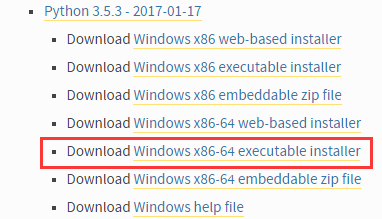
2.进行安装,配置环境变量
3.命令行执行pip3 install numpy
4.命令行执行pip3 install tensorflow
5.运行测试
将以下代码保存到test.py中,然后通过python test.py运行
import tensorflow as tf

import numpy as np

x_data = np.random.rand(100).astype(np.float32)

y_data = x_data*0.1 + 0.3

Weights = tf.Variable(tf.random_uniform([1], -1.0, 1.0))

biases = tf.Variable(tf.zeros([1]))

y = Weights*x_data + biases

loss = tf.reduce_mean(tf.square(y-y_data))

optimizer = tf.train.GradientDescentOptimizer(0.5)

train = optimizer.minimize(loss)

init = tf.global_variables_initializer()

sess = tf.Session()

sess.run(init)

for step in range(201):

    sess.run(train)

    if step % 20 == 0:

        print(step, sess.run(Weights), sess.run(biases))
运行结果(我们计算 x*0.1+0.3=y tensorflow通过x与y的值,逼近0.1和0.3)
0 [-0.03866833] [ 0.56909722]

20 [ 0.0400503] [ 0.33504695]

40 [ 0.08370772] [ 0.30952457]

60 [ 0.09557232] [ 0.30258846]

80 [ 0.09879671] [ 0.30070347]

100 [ 0.099673] [ 0.30019119]

120 [ 0.09991115] [ 0.30005196]

140 [ 0.09997585] [ 0.30001414]

160 [ 0.09999346] [ 0.30000383]

180 [ 0.09999823] [ 0.30000106]

200 [ 0.09999952] [ 0.30000031]
6.如果出现报错,则安装搜索Microsoft Visual C++ 2015 Redistributable Update 3安装
https://www.microsoft.com/zh-CN/download/details.aspx?id=52685
Traceback (most recent call last):

  File "D:\Python35\lib\site-packages\tensorflow\python\pywrap_tensorflow_internal.py", line , in swig_import_helper

    return importlib.import_module(mname)

  File "D:\Python35\lib\importlib\__init__.py", line , in import_module

    return _bootstrap._gcd_import(name[level:], package, level)

  File "<frozen importlib._bootstrap>", line , in _gcd_import

  File "<frozen importlib._bootstrap>", line , in _find_and_load

  File "<frozen importlib._bootstrap>", line , in _find_and_load_unlocked

  File "<frozen importlib._bootstrap>", line , in _load_unlocked

  File "<frozen importlib._bootstrap>", line , in module_from_spec

  File "<frozen importlib._bootstrap_external>", line , in create_module

  File "<frozen importlib._bootstrap>", line , in _call_with_frames_removed

ImportError: DLL load failed: 找不到指定的模块。

During handling of the above exception, another exception occurred:

Traceback (most recent call last):

  File "D:\Python35\lib\site-packages\tensorflow\python\pywrap_tensorflow.py", line , in <module>

    from tensorflow.python.pywrap_tensorflow_internal import *

  File "D:\Python35\lib\site-packages\tensorflow\python\pywrap_tensorflow_internal.py", line , in <module>

    _pywrap_tensorflow_internal = swig_import_helper()

  File "D:\Python35\lib\site-packages\tensorflow\python\pywrap_tensorflow_internal.py", line , in swig_import_helper

    return importlib.import_module('_pywrap_tensorflow_internal')

  File "D:\Python35\lib\importlib\__init__.py", line , in import_module

    return _bootstrap._gcd_import(name[level:], package, level)

ImportError: No module named '_pywrap_tensorflow_internal'

During handling of the above exception, another exception occurred:

Traceback (most recent call last):

  File "test.py", line , in <module>

    import tensorflow as tf

  File "D:\Python35\lib\site-packages\tensorflow\__init__.py", line , in <module>

    from tensorflow.python import *

  File "D:\Python35\lib\site-packages\tensorflow\python\__init__.py", line , in <module>

    from tensorflow.python import pywrap_tensorflow

  File "D:\Python35\lib\site-packages\tensorflow\python\pywrap_tensorflow.py", line , in <module>

    raise ImportError(msg)

ImportError: Traceback (most recent call last):

  File "D:\Python35\lib\site-packages\tensorflow\python\pywrap_tensorflow_internal.py", line , in swig_import_helper

    return importlib.import_module(mname)

  File "D:\Python35\lib\importlib\__init__.py", line , in import_module

    return _bootstrap._gcd_import(name[level:], package, level)

  File "<frozen importlib._bootstrap>", line , in _gcd_import

  File "<frozen importlib._bootstrap>", line , in _find_and_load

  File "<frozen importlib._bootstrap>", line , in _find_and_load_unlocked

  File "<frozen importlib._bootstrap>", line , in _load_unlocked

  File "<frozen importlib._bootstrap>", line , in module_from_spec

  File "<frozen importlib._bootstrap_external>", line , in create_module

  File "<frozen importlib._bootstrap>", line , in _call_with_frames_removed

ImportError: DLL load failed: 找不到指定的模块。

During handling of the above exception, another exception occurred:

Traceback (most recent call last):

  File "D:\Python35\lib\site-packages\tensorflow\python\pywrap_tensorflow.py", line , in <module>

    from tensorflow.python.pywrap_tensorflow_internal import *

  File "D:\Python35\lib\site-packages\tensorflow\python\pywrap_tensorflow_internal.py", line , in <module>

    _pywrap_tensorflow_internal = swig_import_helper()

  File "D:\Python35\lib\site-packages\tensorflow\python\pywrap_tensorflow_internal.py", line , in swig_import_helper

    return importlib.import_module('_pywrap_tensorflow_internal')

  File "D:\Python35\lib\importlib\__init__.py", line , in import_module

    return _bootstrap._gcd_import(name[level:], package, level)

ImportError: No module named '_pywrap_tensorflow_internal'

Failed to load the native TensorFlow runtime.

See https://www.tensorflow.org/install/install_sources#common_installation_problems

for some common reasons and solutions.  Include the entire stack trace

above this error message when asking for help.
tensorflowwindows安装的更多相关文章
- tensorflow-windows下安装,python3.6
安装: pip install tensorflow ps:我第一次安装了,但是导入却失败了. 进入\python3\Lib\site-packages\删除了tensorflow,再次pip ins ...
- 【TensorFlow-windows】(零)TensorFlow的"安装"
Tensorflow的安装,具体操作就不演示了.具体操作请移步: http://blog.csdn.net/darlingwood2013/article/details/60322258#comme ...
- docker——容器安装tomcat
写在前面: 继续docker的学习,学习了docker的基本常用命令之后,我在docker上安装jdk,tomcat两个基本的java web工具,这里对操作流程记录一下. 软件准备: 1.jdk-7 ...
- 网络原因导致 npm 软件包 node-sass / gulp-sass 安装失败的处理办法
如果你正在构建一个基于 gulp 的前端自动化开发环境,那么极有可能会用到 gulp-sass ,由于网络原因你可能会安装失败,因为安装过程中部分细节会到亚马逊云服务器上获取文件.本文主要讨论在不变更 ...
- Sublime Text3安装JsHint
介绍 Sublime Text3使用jshint依赖Nodejs,SublimeLinter和Sublimelinter-jshint. NodeJs的安装省略. 安装SublimeLinter Su ...
- Fabio 安装和简单使用
Fabio(Go 语言):https://github.com/eBay/fabio Fabio 是一个快速.现代.zero-conf 负载均衡 HTTP(S) 路由器,用于部署 Consul 管理的 ...
- gentoo 安装
加载完光驱后 1进行ping命令查看网络是否通畅 2设置硬盘的标识为GPT(主要用于64位且启动模式为UEFI,还有一个是MBR,主要用于32位且启动模式为bois) parted -a optima ...
- Linux平台 Oracle 10gR2(10.2.0.5)RAC安装 Part3:db安装和升级
Linux平台 Oracle 10gR2(10.2.0.5)RAC安装 Part3:db安装和升级 环境:OEL 5.7 + Oracle 10.2.0.5 RAC 5.安装Database软件 5. ...
- Linux平台 Oracle 10gR2(10.2.0.5)RAC安装 Part1:准备工作
Linux平台 Oracle 10gR2(10.2.0.5)RAC安装 Part1:准备工作 环境:OEL 5.7 + Oracle 10.2.0.5 RAC 1.实施前准备工作 1.1 服务器安装操 ...
随机推荐
- zabbix moniter
zabbix moniter http://blog.csdn.net/xiegh2014/article/category/6945291/2
- Thinkphp 3.1. 3 ueditor 1.4.3 添加水印
1.引入Ueditor <!-- 实例化编辑器 --> <script type="text/javascript"> window.UEDITOR_HO ...
- 修改machine.config遇到System.Net.ServicePointManager 的类型初始值设定项引发异常
<system.net>节点应该在</configuration>上面添加,即config页尾. 而不是在<configuration> 后面添加. 在</s ...
- sql 数据类型转换
1.convert(float,endtimepart)——conver(数据类型,字段名称) 2.cast(endtimepart as float)——cast(字段名称 as 数据类型)
- ThinkPHP 介绍及安装 -1
一.ThinkPHP的介绍 MVC M - Model 模型 工作:负责数据的操作 V - View 视图(模板) 工作:负责前台页面显示 C - Con ...
- 【maven】之打包不带版本号的问题
今天在写maven项目的时候发现打包没有带版本号,只有包名 百思不得其解,我翻看之前的项目发现并没有这种情况,最后看了一下文档 发现是自己在build中写了fileName 导致的!删除自定义的fi ...
- C/C++基础----标准库几个工具库tuple,bitset,正则表达式,随机数,IO库
tuple tuple可以有任意多个成员 默认初始化,值初始化 构造函数是explicit,必须直接初始化 make_tuple(v1,v2,-,vn) get<i> (t) 返回第i个数 ...
- 【正则表达式】使用正则表达式的group,查找出String中的参数值
需求 指标基本格式: clm.{type}.{hostId}.$metricItem 示例1: // 待匹配表达式:<hostId: 为36位的UUID> summarize(clm.pm ...
- Windump教程-参数介绍
1 应用 Windump是tcpdump的Windows版本,主要的参数如下: -D 列出所有的接口 -i interface 指定用于抓包的接口 -c packetcount 指定抓包的个数 -w ...
- PAT 乙级 1048 数字加密(20) C++版
1048. 数字加密(20) 时间限制 400 ms 内存限制 65536 kB 代码长度限制 8000 B 判题程序 Standard 作者 CHEN, Yue 本题要求实现一种数字加密方法.首先固 ...