
【Redis】编译错误zmalloc.h:50:31: fatal error: jemalloc/jemalloc.h: No such file or directory
【Redis】编译错误zmalloc.h:50:31: fatal error: jemalloc/jemalloc.h: No such file or directory
在安装redis进行编译时候。出错
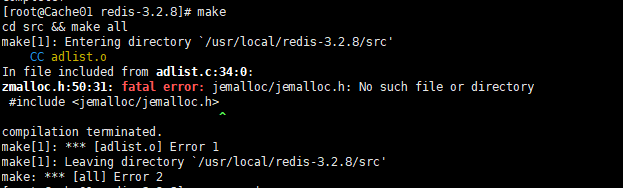
解决办法: 使用以下命令
make MALLOC=libc
原因分析:
在README 有这个一段话。
Allocator
———
Selecting a non-default memory allocator when building Redis is done by setting
the `MALLOC` environment variable. Redis is compiled and linked against libc
malloc by default, with the exception of jemalloc being the default on Linux
systems. This default was picked because jemalloc has proven to have fewer
fragmentation problems than libc malloc.
To force compiling against libc malloc, use:
% make MALLOC=libc
To compile against jemalloc on Mac OS X systems, use:
% make MALLOC=jemalloc
说关于分配器allocator, 如果有MALLOC 这个 环境变量, 会有用这个环境变量的 去建立Redis。
而且libc 并不是默认的 分配器, 默认的是 jemalloc, 因为 jemalloc 被证明 有更少的 fragmentation problems 比libc。
但是如果你又没有jemalloc 而只有 libc 当然 make 出错。 所以加这么一个参数
【Redis】编译错误zmalloc.h:50:31: fatal error: jemalloc/jemalloc.h: No such file or directory的更多相关文章
- lua.c:80:31: fatal error: readline/readline.h: No such file or directory
make linuxcd src && make linuxmake[1]: Entering directory `/root/lua/lua-5.3.2/src'make all ...
- /msgsrvmgr.cpp:4:26: fatal error: kdl/frames.hpp: No such file or directory #include <kdl/frames.hpp>
/home/xxx/ros_workspace/src/bp_protocol_bridge/protospot/src/msgsrvmgr.cpp::: fatal error: kdl/frame ...
- sh make.sh fatal error: opencv2/opencv.hpp: No such file or directory
问题: sh make.sh fatal error: opencv2/opencv.hpp: No such file or directory 解决: sudo apt-get install l ...
- 「caffe编译bug」python/caffe/_caffe.cpp:10:31: fatal error: numpy/arrayobject.h: No such file or directory
在Makefile.config找到PYTHON_INCLUDE,发现有点不同: PYTHON_INCLUDE := /usr/include/python2.7 \ /usr/lib ...
- 编译openwrt时报错:FMCGenericError.h:34:27: fatal error: libxml/parser.h: No such file or directory
解决办法: 更新openwrt的feeds,并重新make menuconfig ./script/feeds update -a ./script/feeds install -a
- cuda_device_functions.h:32:31: fatal error: cuda/include/cuda.h: 没有那个文件或目录
问题在复现工程https://github.com/google/hdrnet时遇到. 现象: 解决办法: 修改hdrnet文件夹下的Makefile文件:在在nvcc里面添加路径:-I /usr/l ...
- ././include/linux/kconfig.h:4:32: fatal error: generated/autoconf.h: No such file or directory 解决办法
我在编写内核驱动模块的时候报了一个非常奇怪的错误,如下图: 在目录下看了一下确实没有发现这个文件,感觉很奇怪,因为我记得之前编译模块是没有错误的,所以不可能是我代码写的有问题. 查阅了资料很多说要清除 ...
- 如何解决编译linux内核(解决声卡问题),遭遇fatal error: linux/limits.h: 没有那个文件或目录
最近帮一位上海的朋友搞一块小板,在ubuntu15.04 vivid上已经加载了对应了.ko驱动包 但关键是系统根本就枚举不到该声卡ALC5640,试了OpenSUSE也是一样的结果,看来是内核漏加载 ...
- 解决Ubuntu16.04 fatal error: json/json.h: No such file or directory
参考博客 错误产生 安装json-c库之后,根据GitHub上面的readme文件链接到json-c库时出现以下错误: SDMBNJson.h:9:23: fatal error: json/json ...
随机推荐
- 日志分析-mime统计
提取日志中未落入标准字段的mime,分adx,adtype 统计mime的数量和包含js的数量占比 require 'date' require 'net/http' require 'uri' re ...
- linux磁盘检测和修复
显示磁盘和闪存的信息,以及分区信息 [root@bogon shell]# fdisk -l Disk /dev/sda: 21.5 GB, 21474836480 bytes, 41943040 s ...
- Cassandra基础
Apache Cassandra特性 Apache Cassandra由Facebook基于Amazon的Dynamo及其在Google的Bigtable上的数据模型设计开发的面相列的数据库,实现没有 ...
- java int and Integer
本文转自:https://www.cnblogs.com/guodongdidi/p/6953217.html int和Integer的区别 1.Integer是int的包装类,int则是java的一 ...
- [转]Proxy代理详解
一.代理的概念 动态代理技术是整个java技术中最重要的一个技术,它是学习java框架的基础,不会动态代理技术,那么在学习Spring这些框架时是学不明白的. 动态代理技术就是用来产生一个对象的代理对 ...
- oracle之 单实例监听修改端口
Oracle 单一主机多个实例多个监听器配置要点 1. 一台服务器主机, 有多个实例, 如: TSDB/ORCL; 又需要配置多个监听器 2. 需要指定不同的LISTENER端口 3.pmon ...
- tcpdump过滤某个端口
一般我们使用Tcpdump时都是使用: Java代码 tcpdump -i ethx www.2cto.com 下面这条命令就是查看80端口的访问量,进行排序,取前20位 Ja ...
- KNN手写实践:Python基于数据集整体计算以及排序
1. 距离计算,不要通过遍历每个样本来计算和指定样本距离,而是通过对于指定样本进行广播(复制)成为一个shape和全局一致后,再进行整体计算,这里的广播 / 复制采用的是tile函数来实现的: 2. ...
- Qt中的标准对话框之QMessageBox
1. Qt标准对话框 Qt为开发者提供了一些可复用的对话框类型 Qt提供的可复用对话框全部继承自QDialog类 Qt中的对话框的使用方式和QDialog完全一致 2. 标准对话框的使用步骤 ①定义对 ...
- OpenSSL 1.0.0生成p12、jks、crt等格式证书的命令个过程 -参考自http://lavasoft.blog.51cto.com/62575/1104993/
OpenSSL 1.0.0生成p12.jks.crt等格式证书的命令个过程 此生成的证书可用于浏览器.java.tomcat.c++等.在此备忘! 1.创建根证私钥命令:openssl g ...