
知识点4: 配置echarts折线图和饼图
- 折线图
效果图
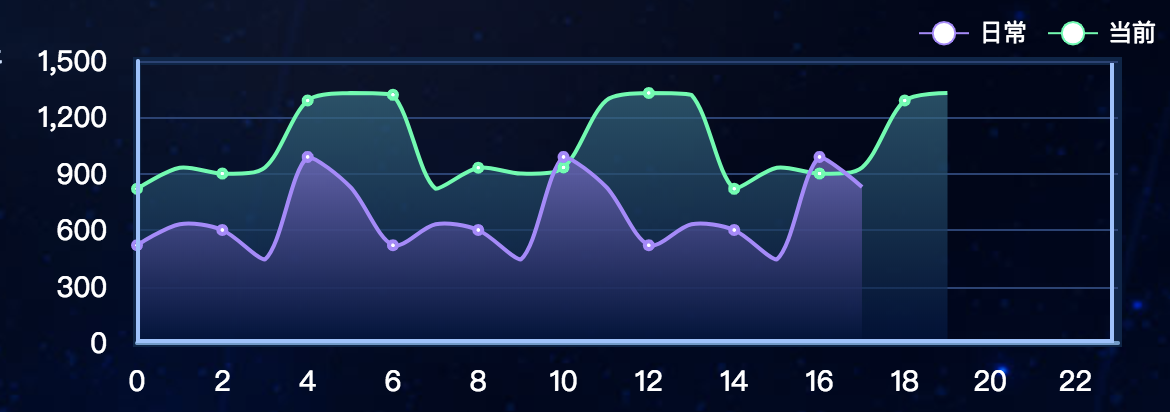
html
<template>

    <div id="v11-charts3"></div>

</template>
js
  export default {

    methods: {

      // 初始化

        init(){

            this.chart3 = echarts.init(document.getElementById('v11-charts3'));

            this.chart3.setOption(option3);

        }

      },
 option3: {

    // 直角坐标系内绘制表格

    grid: {

      show: true,

      left: 23,

      top: 25,

      right: 24,

      bottom: 14,

      borderColor: '#0a2549',

      containLabel: true,

      borderWidth: 4

    },

    // 图例组件

    legend: {

      left: 'right',

      textStyle: {

        color: '#fff'

      },

      // 图例的数据数组

      data:[

        {

          name: '日常'

        },

        {name: '当前'}

      ]

    },

    // 图例的 tooltip 配置

    tooltip: {

      show: true,

      trigger: 'axis',

      axisPointer: {

        type: 'line'

      }

    },

    // 直角坐标系 grid 中的 x 轴

    xAxis: {

      type: 'category',

      // name: '(TB)',

      nameLocation: 'start',

      nameGap: 30,

      boundaryGap: false,

      // 坐标轴轴线相关设置

      axisLine: {

        show: true,

        lineStyle: {

          color: '#6a9bcc',

          width: 2

        }

      },

      // 坐标轴刻度标签的相关设置

      axisLabel: {

        show: true,

        fontSize: 14,

        margin: 12,

        fontFamily: 'Microsoft YaHei',

        color: '#ffffff'

      },

      // 坐标轴刻度相关设置

      axisTick: {

        show: false

      },

      data: [0, 1, 2, 3, 4, 5, 6, 7, 8, 9, 10, 11, 12, 13, 14, 15, 16, 17, 18, 19, 20, 21, 22, 23]

    },

    // 直角坐标系 grid 中的 y 轴

    yAxis: {

      type: 'value',

      show: true,

      splitNumber: 4,

      //y轴颜色

      axisLine: {

        show: true,

        lineStyle: {

          color: '#99c2ff',

          width: 2

        }

      },

      axisLabel: {

        show: true,

        fontSize: 14,

        margin: 15,

        fontFamily: 'Microsoft YaHei',

        color: '#ffffff'

      },

      // 坐标轴在 grid 区域中的分隔线

      splitLine: {

        show: true,

        lineStyle: {

          color: '#294277',

          width: 1,

          type: 'solid'

        }

      },

      axisTick: {

        show: false

      }

    },

    // 系列列表

    series: [

      {

        type: 'line',

        name: '当前',

        symbolSize: 2,

        smooth: true,

        itemStyle: {

          normal: {

            color: '#00ffaa',

              // lineStyle: {

              //     color: "#2ec7c9"

              // }

            borderColor:'#00ffaa',

            borderWidth:'4',

            // 线条样式

            lineStyle: {

              normal: {

                color: '#00ffaa',

                width: 2

              }

            },

        }

      },

        // 区域填充样式

        areaStyle: {

          normal: {

            color: new echarts.graphic.LinearGradient(0, 0, 0, 1, [{

              offset: 0,

              // color: 'rgba(101, 84, 170, 0.3)' // 0% 处的颜色

              color: '#276d85'

            }, {

              offset: 1,

              // color: 'rgba(16, 27, 77, 0)' // 100% 处的颜色

              color: '#011441'

            }], false)

          }

        },

        data: [820, 932, 901, 934, 1290, 1330, 1320, 820, 932, 901, 934, 1290, 1330, 1320, 820, 932, 901, 934, 1290, 1330,]

      },

      {

        type: 'line',

        name: '日常',

        symbolSize: 2,

        smooth: true,

        //拐点样式

        itemStyle: {

          normal: {

            //本应该是拐点颜色,此处成了线条颜色,不知道啥原因

            color: '#ad85ff',

            //拐点边框颜色

            borderColor:'#ad85ff',

            borderWidth:'4',

            // 线条样式

            lineStyle: {

              normal: {

                // color: '#ac84fe',

                width: 2

              }

            },

        }

        },

        //区域样式

        areaStyle: {

          normal: {

            color: new echarts.graphic.LinearGradient(0, 0, 0, 1, [{

              offset: 0,

              // color: 'rgba(12, 42, 82, 0.8)' // 0% 处的颜色

              color: '#836bcd'

            }, {

              offset: 1,

              // color: 'rgba(3, 243, 167, 0)' // 100% 处的颜色

              color: '#00123b'

            }], false)

          }

        },

        data: [520, 632, 601, 444, 990, 830, 520, 632, 601, 444, 990, 830, 520, 632, 601, 444, 990, 830]

      }

    ]

  },
- 饼图(option配置不同)
效果图

option1: {

    series: [

      {

        type: 'pie',

        silent: true,

        radius: ['30%', '60%'],

        startAngle: 0,

        label: {

          normal: {

            show: true,

            position: 'outside',

            fontSize: 20,

            align: 'center',

            fontFamily: 'MF_LangQian',

            // formatter: '{b}',

            formatter: function(params) {

              if (params.name === '') {

                return 0 + '%'

              }

            }

          }

        },

        labelLine: {

          normal: {

            show: true,

            length: 40,

            lineStyle: {

              width: 2

            }

          }

        },

        itemStyle: {

          normal: {

            borderWidth: 3,

            borderColor: 'rgba(1,9,22,0.9)'

          },

          emphasis: {

            borderWidth: 0,

            shadowBlur: 5,

            shadowOffsetX: 0,

            shadowColor: 'rgba(0, 0, 0, 0.2)'

          }

        },

        data: [

          {

            value: 55,

            name: '0',

            itemStyle: {

              normal: {

                // 图形的颜色

                color: '#faef6f'

                // color: 'yellow'

              }

            }

          },

          {

            value: 55,

            name: '59',

            itemStyle: {

              normal: {

                color: '#00d5ff'

              }

            }

          },

          {

            value: 55,

            name: '51',

            itemStyle: {

              normal: {

                color: '#26bd59'

              }

            }

          },

          {

            value: 55,

            name: '14',

            itemStyle: {

              normal: {

                color: '#d6c956'

              }

            }

          }

        ]

      }

    ]

  }
知识点4: 配置echarts折线图和饼图的更多相关文章
- 数据可视化(Echart) :柱状图、折线图、饼图等六种基本图表的特点及适用场合
数据可视化(Echart) 柱状图.折线图.饼图等六种基本图表的特点及适用场合 参考网址 效果图 源码 <!DOCTYPE html> <html> <head> ...
- vue使用axios读取本地json文件来显示echarts折线图
编辑器:HBuilderx axios文档:http://www.axios-js.com/zh-cn/docs/ echarts实例:https://echarts.apache.org/examp ...
- 安卓图表引擎AChartEngine(三) - 示例源码折线图、饼图和柱状图
折线图: package org.achartengine.chartdemo.demo.chart; import java.util.ArrayList; import java.util.Lis ...
- 实现Echarts折线图的虚实转换
需求:医院的体温单,在统计体温时,对于正常情况下统计的体温数据,需要显示实线:对于进行物理降温后统计的体温数据,需要显示虚线. 现有的体温单是运用 Echarts 折线图,统一用实线显示.因此在这基础 ...
- HighCharts之2D柱状图、折线图和饼图的组合图
HighCharts之2D柱状图.折线图和饼图的组合图 1.实例源码 ColumnLinePie.html: <!DOCTYPE html> <html> <head&g ...
- echarts折线图动态改变数据时的一个bug
echarts折线图中当增加dataZoom,修改start大于0的时候,会出现折线混乱,变成竖直的线,绘制有问题. 解决方法,在dataZoom中增加filterMode: 'empty' http ...
- d3.js 教程 模仿echarts折线图
今天我们来仿echarts折线图,这个图在echarts是折线图堆叠,但是我用d3改造成了普通的折线图,只为了大家学习(其实在简单的写一个布局就可以).废话不多说商行代码. 1 制作 Line 类 c ...
- ECharts折线图堆叠设置为不堆叠的方法
下图是ECharts折线图堆叠的官方源码,设置折线图不堆叠只需要将每一个stack的值设置为不一样的名称或者将stack属性删除即可. option = { title: { text: '折线图堆叠 ...
- 利用pandas读取Excel表格,用matplotlib.pyplot绘制直方图、折线图、饼图
利用pandas读取Excel表格,用matplotlib.pyplot绘制直方图.折线图.饼图 数据: 折线图代码: import pandas as pdimport matplotlib. ...
随机推荐
- springmvc使用步骤
1.导包 2.在web.xml文件中配置前端控制器dispatchServlet 3.创建springmvc配置文件springmvc.xml 4.编写controller 5.在springmvc中 ...
- 常用docker镜像
oracle12c: mkdir -p /path/to/oradata docker run --name oracle12c \ -p 1521:1521 -p 5500:5500 \ -v /p ...
- SQL SERVER 事务相关
1 准备数据 及 涉及到的几个设置 SET TRANSACTION ISOLATION LEVEL READ UNCOMMITTED --设置事务会话的隔离等级(默认值为 READ UNCOMMIT ...
- GRUB2 命令行使用笔记
在GRUB界面按C可进入命令行模式,学会命令行模式有助于玩转单机多OS. 磁盘描述规则: hd0,0 表示第1硬盘第1分区 help 显示帮助(内容会比这里全,此处只做几条常用命令介绍) cat 命令 ...
- 分享微信开发Html5轻游戏中的几个坑
这段时间团队一直在做微信端的一些产品设计和开发,当然也包含一定的运营工作.做过的东西也不少,微名片.微抢票.微活动.微招聘等一些小case. 今天想说的是我们在微信中被玩的最活跃的轻游戏--微刮奖,这 ...
- BZOJ3812主旋律
/* 这道题其实没有看懂 所以整理一下吧 首先思想转化成所有方案减去不强联通的方案 不强联通的方案相当于很多强联通分量缩点后的dag 转化成子问题, 问很多点的dag方案数 然后枚举作为出度为0的点集 ...
- 测试oracle数据库连接
1.ping 192.168.0.12.telnet 192.168.0.1 1521 按下ctrl+] 组合键出现命令回显才是端口连接成 3.tnsping 192.168.0.1:1521/db
- Tomcat启动报错:Possible root causes include a too low setting for -Xss and illegal cyclic inheritance dependencies
错误代码如下: Caused by: java.lang.IllegalStateException: Unable to complete the scan for annotations for ...
- Java之ConcurrentHashMap
由于工作中使用到了ConcurrentHashMap,然后查了一波资料,最后整理如下: 1. 描述: ConcurrentHashMap是在Java1.5作为HashTable的替代选择新引入的,是c ...
- QT编写TCP的问题
---->>>TCP编写实战的小项目 TCP套接字:主机(IP+端口) 和 服务器(IP+端口) 进行通讯,需要中间的一个锁套进行 啮合,这个锁套就是套接字的作用. 其中套接字的使 ...