
TFS 2015 Build Agent failing syncing the repository 获取源码 不全 失败
当我们使用TFS2015d的生成代理时,我们将生成定义加入代理池队列中,但是代理可能无法完全下载我们在TFS代码浏览器中看到的所有目录,这肯定会导致编译失败呀!为什么呢?
原因在于tfscompile这个账号在某个项目的版本控制中,对某个源码目录没有权限
但是不可能啊,我们已经在根节点上给了权限了呀,
是的,你的确给了根目录所有权限,但是仔细观察你会发现,有个关于继承的隐藏开关

如果某个目录勾选了“关闭”,那么这个目录对TFSCOMPILE账号就无权访问,当然生成代理就无法下载咯。
因此,我们还是仔细点,挨个目录检查一遍。
当然,其实这个功能是有用的,比如我就是想让TFSCOMPILE不下载某个目录(比如branchs等)。
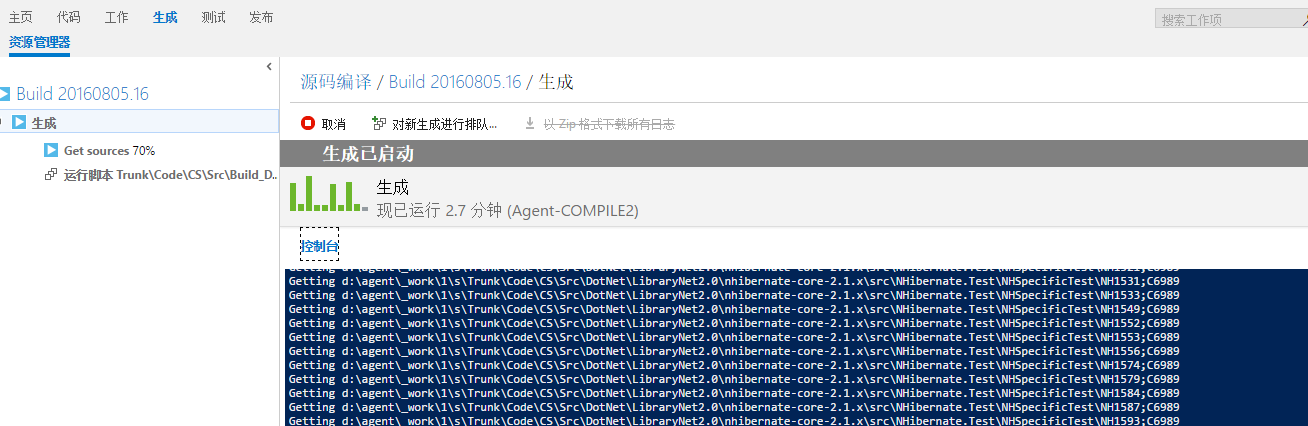
I would like to share with you my last struggle with TFS. I received a call from a colleague about some problem with the ‘new’ TFS build. Initially I tough it is only a miss-configuration and that the solution will be trivial, but as you can imagine, it wasn’t.
The problem lied in the fact that build agent couldn’t retrieve the sources and the error message was not treated as such. You could only see logged a (workspace version -1) inside the Get Sources step, after stating that syncing the repository was done.

As a first thing, I tough about agent not having sufficient rights to retrieve the source code. After a quick check and making sure that the agent service user has sufficient rights to retrieve the code, I run my build again and I got the same result. Didn’t helped.
Next thing I checked all sort of settings, running the build on a different build agent on different server, running the agent under different account, making sure that permissions for the _work folder are setup correctly, all sort of things. I ended up realizing that if I moved the code from that Team project to another team project, suddenly my build agent was able to retrieve the code again. There where two things, or the project was corrupted or there where some security issues. Thanks to the Microsoft support assistance, I managed to get to the right solution. And guess what? It was a security issue.
For an unknown reason the permission inheritance was disabled on the folder that contained all of the interested branches.
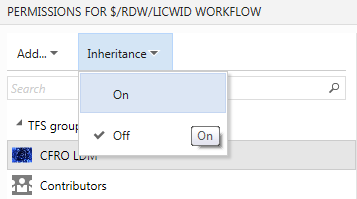
By enabling this setting, I saw that there is a small change in the way build agents are authenticated against TFVC. XAML build agent identifies itself with the user that agent runs under. 2015 build agent in the other hand, uses a Project Collection Build Service group to do so. It is added automatically to the source code permissions tree, and in order to propagate it needs to have the permission inheritance switched on or you need to manually set rights for that user group.
Same goes for the owner of the local workspace created by the agent.
You can change those settings by editing the security for a give item in the source control.
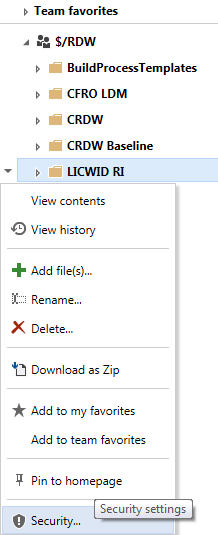
Once this is done, you should see your build agent syncing the sources correctly.
Hi Adam, that’s exactly what I do mention in the post. Also in yesterdays post on MSDN ALM Blog (http://blogs.msdn.com/b/visualstudioalm/archive/2016/01/07/receive-an-error-when-resolving-a-bug-created-by-your-build.aspx) they do mention the same: new build system uses a service account. That service account should be automatically inherited, and in case the inheritance is set to off, it doesn’t happen. You can have inheritance set to off and still make it work by manually adding the above mentioned account and granting the necessary rights.
TFS 2015 Build Agent failing syncing the repository 获取源码 不全 失败的更多相关文章
- 搭建TFS 2015 Build Agent环境(一)
Download the build agent Downloading the build agent is really simple. Navigate to your TFS control ...
- 搭建TFS 2015 Build Agent环境(四)
在通过TFS做DI时,我们经常用到FTP文件上传.TFS发布中,提供了cURL上载文件功能.要想使用此功能,请参考下面步骤启用: 1.登录BuildAgent所在的机器 2.打开cmd(以管理员权限运 ...
- 搭建TFS 2015 Build Agent环境(三)
在配置时,一定要注意下面的几个地方: 1.项目集合生成服务账号 中一定要包含: 2.Build Agent机器上防止Agent的路径一定要短,不要出现特殊字符,比如:C:\Agent 3.一定要安装V ...
- 搭建TFS 2015 Build Agent环境(二)
在执行和安装配置的过程中,注意一定要使用管理员权限运行:ConfigureAgent.cmd 和RunAgent.cmd.配置的过程中,要注意几个内容:1.TFS地址不要写DefaultCollect ...
- 瞎折腾之 NHibernate ORM框架的接触(MVC + Repository源码)(一)
在这炮火连天.技术更新迅猛的年代,不接触了解.甚至会用2~3种框架都不好意思说自己有多少年工作经验.况且出去面试也会有点吹牛的底子嘛. 这次折腾了NHibernate.其实这些ORM框架封装好了都是给 ...
- 浅谈 qmake 之 shadow build(将源码路径和构建路径分开,一套源码要分别用msvc2008、msvc2008、mingw分别编译又不互相干扰)
shadow build shadow build 是什么东西?就是将源码路径和构建路径分开(也就是生成的makefile文件和其他产物都不放到源码路径),以此来保证源码路径的清洁. 这不是qmake ...
- TFS: 解决The build agent error - the session for this agent already exists
来源:http://ericphan.net/blog/2016/6/10/solving-the-tfs-build-agent-error-the-session-for-this-agent-a ...
- #VSTS 日志# TFS 2015 Update 1 发布 – Git和TFVC代码库可以混合使用了
Visual Studio Team Foundation Server 2015 Update 1已经发布了. 这是 Team Foundation Server (TFS) 的最新版本,是 Mic ...
- How to Build Office Developer Tools Projects with TFS Team Build 2012
Introduction Microsoft Visual Studio 2012 provides a new set of tools for developing apps for Office ...
随机推荐
- malloc 函数详解
很多学过C的人对malloc都不是很了解,知道使用malloc要加头文件,知道malloc是分配一块连续的内存,知道和free函数是一起用的.但是但是: 一部分人还是将:malloc当作系统所提供的或 ...
- Linux常见问题总结【转】
作为一名合格的 Linux 运维工程师,一定要有一套清晰.明确的解决故障思路,当问题出现时,才能迅速定位.解决问题,这里给出一个处理问题的一般思路: 重视报错提示信息:每个错误的出现,都是给出错误提示 ...
- maven:多个镜像配置
<mirrors> <mirror> <id>nexus-aliyun</id> <mirrorOf>nexus-aliyun</mi ...
- ckeditor:基本使用方法
引用网址:http://blog.sina.com.cn/s/blog_6961ba9b0102wwye.html 1.获得值 var editor=CKEDITOR.replace( 'editor ...
- mybatis,genarate自动生成代码
---恢复内容开始--- generatorConfig.xml配置文件: <?xml version="1.0" encoding="UTF-8"?&g ...
- KnockoutJs学习笔记(十)
event binding主要用于为指定的事件添加相应的处理函数,可以作用于任意事件,包括keypress.mouseover.mouseout等(也包括之前提到的click,根据后面的描述,clic ...
- 【noip模拟赛3】拣钱
描述 最近,Henry由于失恋(被某大牛甩掉!)心情很是郁闷.所以,他去了大牛家,寻求Michael大牛的帮助,让他尽快从失恋的痛苦中解脱出来.Michael大牛知道Henry是很爱钱的,所以他是费尽 ...
- 用python做一个图片验证码
看一下做出来的验证码长啥样 验证码分析 1. 有很多点 2. 有很多线条 3. 有字母,有数字 需要用到的模块: 1. random 2. Pillow (python3中使用pillow) 安装p ...
- QT学习笔记9:QTableWidget的用法总结
最近用QT中表格用的比较多,使用的是QTableWidget这个控件,总结一下QTableWidget的一些相关函数. 1.将表格变为禁止编辑: tableWidget->setEditTrig ...
- tarjan算法讲解
tarjan算法,一个关于 图的联通性的神奇算法.基于DFS算法,深度优先搜索一张有向图.!注意!是有向图.根据树,堆栈,打标记等种种神奇方法来完成剖析一个图的工作.而图的联通性,就是任督二脉通不通. ...