
TableStore:单行操作
说明:
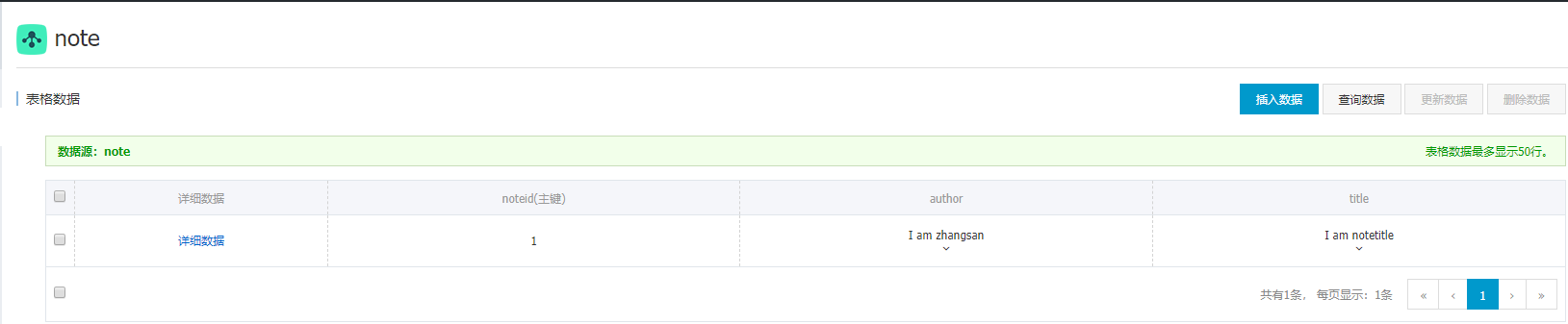
首先需要添加TableStore的依赖
<dependency>
    <groupId>com.aliyun.openservices</groupId>
    <artifactId>tablestore</artifactId>
    <version>4.10.2</version>
</dependency>
运行项目时可能会出现SLF4J相关的红字提示:

该提示不影响使用,如果觉得不爽的话,可以添加下面依赖去除:
<dependency>
    <groupId>org.slf4j</groupId>
    <artifactId>slf4j-simple</artifactId>
    <version>1.7.26</version>
</dependency>
TableStore的主键含自增类型,该类型为Interger,但是值很大,不能通过这中自增主键查询数据,因此下面的SDK查询操作都是不允许有自增主键的。
另外。表中的数据操作,对Column或者说属性是有版本号这个概念的,该版本号以时间戳为准。当然,如果属性需要存储多个版本号的数据,在建表的时候要注意最大版本号这么一项,需要设置大于1

1、根据主键查询数据
package com.example.demo;

import com.alicloud.openservices.tablestore.SyncClient;
import com.alicloud.openservices.tablestore.model.Column;
import com.alicloud.openservices.tablestore.model.GetRowRequest;
import com.alicloud.openservices.tablestore.model.GetRowResponse;
import com.alicloud.openservices.tablestore.model.PrimaryKey;
import com.alicloud.openservices.tablestore.model.PrimaryKeyBuilder;
import com.alicloud.openservices.tablestore.model.PrimaryKeyValue;
import com.alicloud.openservices.tablestore.model.Row;
import com.alicloud.openservices.tablestore.model.SingleRowQueryCriteria;

public class Query {

    public static void main(String[] args) {

        final String endPoint = "实例访问地址";
        final String accessKeyId = "accessKeyId";
        final String accessKeySecret = "accessKeySecret";
        // 实例名
        final String instanceName = "owlforest";

        SyncClient client = new SyncClient(endPoint, accessKeyId, accessKeySecret, instanceName);

        // 构造主键
        PrimaryKeyBuilder primaryKeyBuilder = PrimaryKeyBuilder.createPrimaryKeyBuilder();
        primaryKeyBuilder.addPrimaryKeyColumn("noteid", PrimaryKeyValue.fromLong(1));
        PrimaryKey primaryKey = primaryKeyBuilder.build();
        SingleRowQueryCriteria criteria = new SingleRowQueryCriteria("note", primaryKey);
        // 设置读取最新版本
        criteria.setMaxVersions(1);        // 读取所有数据
        GetRowResponse getRowResponse = client.getRow(new GetRowRequest(criteria));
        Row row = getRowResponse.getRow();
        // 遍历所有列
        Column[] columns = row.getColumns();
        for (Column column : columns) {
            System.out.println("Name:" + column.getName() + " Value:" + column.getValue());
        }
    }

}
如果只需要读取指定列,可以这样设置:
// 设置读取某些列
String[] a = { "author" };
criteria.addColumnsToGet(a);
GetRowResponse getRowResponse2 = client.getRow(new GetRowRequest(criteria));
Row row2 = getRowResponse2.getRow();
Column[] columns2 = row2.getColumns();
for (Column column : columns2) {
    System.out.println("Name:" + column.getName() + " Value:" + column.getValue());
}
经测试,criteria.addColumnsToGet("author");这么设置运行也不会报错,不过仍然会读出所有属性。
2、根据主键查询数据-设置过滤器
可以表示的列与值的比较关系包括:EQUAL(=), NOT_EQUAL(!=), GREATER_THAN(>), GREATER_EQUAL(>=), LESS_THAN(<)以及LESS_EQUAL(<=)。
SyncClient client = new SyncClient(endPoint, accessKeyId, accessKeySecret, instanceName);

// 构造主键
PrimaryKeyBuilder primaryKeyBuilder = PrimaryKeyBuilder.createPrimaryKeyBuilder();
primaryKeyBuilder.addPrimaryKeyColumn("noteid", PrimaryKeyValue.fromLong(1));
PrimaryKey primaryKey = primaryKeyBuilder.build();

// 读一行
SingleRowQueryCriteria criteria = new SingleRowQueryCriteria("note", primaryKey);
// 设置读取最新版本
criteria.setMaxVersions(1);

//设置过滤器
SingleColumnValueFilter singleColumnValueFilter = new SingleColumnValueFilter(
"author", CompareOperator.EQUAL, ColumnValue.fromString("I am zhangsan"));
//如果不存在此列,也不返回
singleColumnValueFilter.setPassIfMissing(false);
criteria.setFilter(singleColumnValueFilter);

GetRowResponse getRowResponse = client.getRow(new GetRowRequest(criteria));
Row row = getRowResponse.getRow();

if(row != null) {
    Column[] columns = row.getColumns();
    for(Column column : columns) {
System.out.println("Name:" + column.getName() + " Value:" + column.getValue() + "\n");
    }
}else {
    System.out.println("Row为空");
}
3、根据主键修改一行数据
修改前

SyncClient client = new SyncClient(endPoint, accessKeyId, accessKeySecret, instanceName);

// 构造主键
PrimaryKeyBuilder primaryKeyBuilder = PrimaryKeyBuilder.createPrimaryKeyBuilder();
primaryKeyBuilder.addPrimaryKeyColumn("noteid", PrimaryKeyValue.fromLong(1));
PrimaryKey primaryKey = primaryKeyBuilder.build();

RowUpdateChange rowUpdateChange = new RowUpdateChange("note", primaryKey);
//修改author属性
rowUpdateChange.put(new Column("author", ColumnValue.fromString("我叫张三")));
//新增属性阅读量view
rowUpdateChange.put(new Column("view", ColumnValue.fromLong(10)));//删除title属性rowUpdateChange.deleteColumns("title");// 删除某列的某一版本//rowUpdateChange.deleteColumn(属性名, 版本号);
UpdateRowResponse response = client.updateRow(new UpdateRowRequest(rowUpdateChange));
修改后

4、新增一行数据
SyncClient client = new SyncClient(endPoint, accessKeyId, accessKeySecret, instanceName);

// 构造主键
PrimaryKeyBuilder primaryKeyBuilder = PrimaryKeyBuilder.createPrimaryKeyBuilder();
primaryKeyBuilder.addPrimaryKeyColumn("noteid", PrimaryKeyValue.fromLong(1));
PrimaryKey primaryKey = primaryKeyBuilder.build();

RowPutChange rowPutChange = new RowPutChange("note", primaryKey);
long ts = System.currentTimeMillis();

rowPutChange.addColumn(new Column("year", ColumnValue.fromLong(2019), ts));
rowPutChange.addColumn(new Column("month", ColumnValue.fromLong(3), ts));

rowPutChange.addColumn(new Column("day", ColumnValue.fromString("天"), ts + 1));
rowPutChange.addColumn(new Column("day", ColumnValue.fromString("日"), ts + 2));

client.putRow(new PutRowRequest(rowPutChange));
note表当中原先就有一条noteid为1的数据,执行PutRow之后,发现原数据被新数据直接覆盖了。

5、期望原行不存在时写入
经测试:当主键1存在时,添加条件RowExistenceExpectation.EXPECT_NOT_EXIST,执行PutRow会出现异常Failed RetriedCount:0 [ErrorCode]:OTSConditionCheckFail, [Message]:Condition check failed.

如果构造的主键不存在于数据库,则可以正常插入。这个条件的使用场景比较让人费解,先记下,兴许后续会用上。
SyncClient client = new SyncClient(endPoint, accessKeyId, accessKeySecret, instanceName);

// 构造主键
try {
    PrimaryKeyBuilder primaryKeyBuilder = PrimaryKeyBuilder.createPrimaryKeyBuilder();
    primaryKeyBuilder.addPrimaryKeyColumn("noteid", PrimaryKeyValue.fromLong(1));
    PrimaryKey primaryKey = primaryKeyBuilder.build();
    RowPutChange rowPutChange = new RowPutChange("note", primaryKey);
        rowPutChange.setCondition(new Condition(RowExistenceExpectation.EXPECT_NOT_EXIST));
        rowPutChange.addColumn(new Column("attr", ColumnValue.fromString("主键为1,看不到我"),System.currentTimeMillis()));
    client.putRow(new PutRowRequest(rowPutChange));
} catch (Exception e) {
    System.out.println(e.getMessage());
}
6、期望存在并某属性满足某条件时,覆盖写入行
同上,满足条件是覆盖该主键的数据,否则出错
SyncClient client = new SyncClient(endPoint, accessKeyId, accessKeySecret, instanceName);
PrimaryKeyBuilder primaryKeyBuilder = PrimaryKeyBuilder.createPrimaryKeyBuilder();
primaryKeyBuilder.addPrimaryKeyColumn("noteid", PrimaryKeyValue.fromLong(2));
PrimaryKey primaryKey = primaryKeyBuilder.build();
RowPutChange rowPutChange = new RowPutChange("note", primaryKey);

try {
    // 期望原行存在,且属性year=2019时插入
    Condition condition = new Condition(RowExistenceExpectation.EXPECT_EXIST);
    condition.setColumnCondition(
    new SingleColumnValueCondition("year", CompareOperator.EQUAL, ColumnValue.fromLong(2019)));
    rowPutChange.setCondition(condition);

    rowPutChange.addColumn(new Column("attr", ColumnValue.fromString("2019年")));
    client.putRow(new PutRowRequest(rowPutChange));
} catch (Exception e) {
    System.out.println(e.getMessage());
}
7、删除一行数据
SyncClient client = new SyncClient(endPoint, accessKeyId, accessKeySecret, instanceName);

// 构造主键
PrimaryKeyBuilder primaryKeyBuilder = PrimaryKeyBuilder.createPrimaryKeyBuilder();
primaryKeyBuilder.addPrimaryKeyColumn("noteid", PrimaryKeyValue.fromLong(10));
PrimaryKey primaryKey = primaryKeyBuilder.build();

RowDeleteChange rowDeleteChange = new RowDeleteChange("note", primaryKey);
client.deleteRow(new DeleteRowRequest(rowDeleteChange));
8、根据条件删除数据
SyncClient client = new SyncClient(endPoint, accessKeyId, accessKeySecret, instanceName);

// 构造主键
try {
    PrimaryKeyBuilder primaryKeyBuilder = PrimaryKeyBuilder.createPrimaryKeyBuilder();
    primaryKeyBuilder.addPrimaryKeyColumn("noteid", PrimaryKeyValue.fromLong(1));
    PrimaryKey primaryKey = primaryKeyBuilder.build();

    RowDeleteChange rowDeleteChange = new RowDeleteChange("note", primaryKey);
    Condition condition = new Condition(RowExistenceExpectation.EXPECT_EXIST);
    condition.setColumnCondition(new SingleColumnValueCondition("year",
    SingleColumnValueCondition.CompareOperator.EQUAL, ColumnValue.fromLong(2019)));
    rowDeleteChange.setCondition(condition);

    client.deleteRow(new DeleteRowRequest(rowDeleteChange));
} catch (Exception e) {
    System.out.println(e.getMessage());
}
TableStore:单行操作的更多相关文章
- aliyun TableStore相关操作汇总
总结:这个东西本身可能技术还不成熟,使用的人少,有问题很验证解决 遇到的问题:(1)没有一个GUI工具,使用门槛高(2)查询的GetRange不方便,把查询出来的数据使用System.out.prin ...
- hive支持事务及单行操作 update delete
测试环境 Hive 1.2.1000.2.6.0.3-8 set hive.support.concurrency=true; set hive.exec.dynamic.partition.mod ...
- python 全栈开发,Day124(MongoDB初识,增删改查操作,数据类型,$关键字以及$修改器,"$"的奇妙用法,Array Object 的特殊操作,选取跳过排序,客户端操作)
一.MongoDB初识 什么是MongoDB MongoDB 是一个基于分布式文件存储的数据库.由 C++ 语言编写.旨在为 WEB 应用提供可扩展的高性能数据存储解决方案. MongoDB 是一个介 ...
- hbase简单操作
hbase有hbase shell以及hbase 客户端api两种方式进行hbase数据库操作: 首先,hbase shell是在linux命令行进行操作,输入hbase shell命令,进入shel ...
- SQLAlchemy常用操作
Models 只是配置和使用比较简单,因为他是Django自带的ORM框架,也正是因为是Django原生的,所以兼容性远远不如SQLAlchemy 真正算得上全面的ORM框架必然是我们的SQLAlch ...
- MySQL之基础操作
一.安装 Mysql是最流行的关系型数据库管理系统之一,由瑞典MySQL AB公司开发,目前属于Oracle公司. MySQL是一种关联数据库管理系统,关联数据库将数据保存在不同的表中,而不是将所有数 ...
- python工业互联网应用实战5—Django Admin 编辑界面和操作
1.1. 编辑界面 默认任务的编辑界面,对于model属性包含"choices"会自动显示下来列表供选择,"datetime"数据类型也默认提供时间选择组件,如 ...
- Visual Studio Code 配置指南
Visual Studio Code (简称 VS Code)是由微软研发的一款免费.开源的跨平台文本(代码)编辑器.在我看来它是「一款完美的编辑器」. 本文是有关 VS Code 的特性介绍与配置指 ...
- 2、C#面向对象:封装、继承、多态、String、集合、文件(上)
面向对象封装 一.面向对象概念 面向过程:面向的是完成一件事情的过程,强调的是完成这件事情的动作. 面向对象:找个对象帮你完成这件事情. 二.面向对象封装 把方法进行封装,隐藏实现细节,外部直接调用. ...
随机推荐
- apt-get update 与 apt-get upgrade 的区别
总而言之,update是更新软件列表,upgrade是更新软件:所以,这两命令都是一块用,update后再upgrade. update 是更新 /etc/apt/sources.list 和 /et ...
- 什么情况下,英文单词中的k发音变g,t发音变d,p发音变b
当k,t,p在s发音的后面,且在重读音节中,k,t,p就要发相对应的浊辅音g,d,b.
- 记一次shell脚本编写及执行
首先cd进一个目录下 tauch tset.sh //新建一个test.sh文件 vim test.sh 编辑脚本 i 插入 #!/bin/bash data 按Esc键 再按ctrl+: wq + ...
- PHP破解wifi密码(wifi万能钥匙的接口)
新建wifi.php,复制粘贴 <?php $bssid = $_POST["bssid"] ; $ssid = $_POST["ssid"] ; if ...
- 黄聪:VS2017调试时提示“运行时无法计算表达式的值”
具体操作: 工具-选项-调试-常规,选中“使用托管兼容模式”,问题解决
- C# 生成时间戳
编写网络程序中难免用到一些时间戳. 早前不知道哪里复制过一个代码,如下: public static string GetTimeStamp() { TimeSpan ts = DateTime.Ut ...
- Hive数据导入导出的几种方式
一,Hive数据导入的几种方式 首先列出讲述下面几种导入方式的数据和hive表. 导入: 本地文件导入到Hive表: Hive表导入到Hive表; HDFS文件导入到Hive表; 创建表的过程中从其他 ...
- JavaScript for...in 循环
JavaScript for...in 语句循环遍历对象的属性. 语法 for (对象中的变量) { 要执行的代码 } 注释:for...in 循环中的代码块将针对每个属性执行一次. 实例 循环遍历对 ...
- 学习笔记之C / C++
面试总结之C/C++ - 浩然119 - 博客园 https://www.cnblogs.com/pegasus923/p/5558919.html 学习笔记之C++ How to Program(p ...
- SwipeRefreshLayout 和RecyclerView 使用
使用是布局 <android.support.v4.widget.SwipeRefreshLayout android:id="@id/id_swiperefreshlayout&qu ...