
JS实现文本中查找并替换字符
JS实现文本中查找并替换字符
效果图:
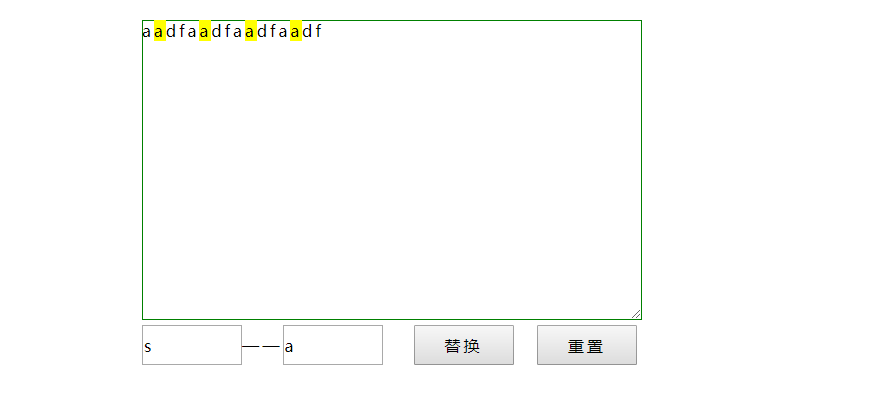
代码如下,复制即可使用:
<!DOCTYPE html>
<html>
<head>
<style type="text/css">
*{font-family:"微软雅黑";font-size:16px;margin:0;padding:0;letter-spacing:3px;line-height:22px;}
#wrap{width:500px;height:300px;margin:20px auto;position:relative;}
#text{width:500px;height:300px;border:1px solid green;}
#result{width:500px;position:absolute;left:0px;top:0px;display:none;}
input{width:100px;height:40px;margin-top:5px;}
span{background-color:yellow;}
</style>
</head>
<body>
<div id="wrap">
<div id="result"></div>
<textarea id="text" placeholder="请在此输入文本。。。。"></textarea>
<input type="text" id="val" placeholder="被查找字符"/>——<input type="text" id="new_val" placeholder="替换后字符"/>
<input type="button" id="btnFind" value="替换"/> <input type="button" value="重置" id="reset"/>
</div>
<script type="text/javascript"> function replace(){
var inner=null;
var txt=document.getElementById('text').value.toString();
var val=document.getElementById('val').value.toString();
var newVal=document.getElementById('new_val').value.toString();
newInner="<span>"+newVal+"</span>";
for(var i=0;i<=txt.length-val.length;i++){
if(txt==""||val=="") {
alert("请输入内容!");
return false;
}
if(txt.length<val.length) {
return false;
}
if(i+val.length>=txt.length){
if(txt.substring(i)==val){
inner=txt.split('');
inner.splice(i,val.length,newInner);
txt=inner.join("");
i=i+newInner.length-1;
} }
else {
if(txt.substring(i,i+val.length)==val) {
inner=txt.split('');
inner.splice(i,val.length,newInner);
txt=inner.join("");
i=i+newInner.length-1;
}
}
}
document.getElementById("result").innerHTML=txt;
document.getElementById("text").value=null;
document.getElementById("text").placeholder="";
document.getElementById("result").style.display="block";
} document.getElementById('btnFind').onclick=function(){
replace();
}
document.getElementById('reset').onclick=function(){
document.getElementById("result").style.display="none";
document.getElementById("val").value=null;
document.getElementById("new_val").value=null;
document.getElementById("text").placeholder="请在此输入文本。。。。"; } </script>
</div>
</body>
</html>
如有错误,欢迎联系我改正,非常感谢!!!
JS实现文本中查找并替换字符的更多相关文章
- C# 在word中查找及替换文本
C# 在word中查找及替换文本 在处理word文档时,很多人都会用到查找和替换功能.尤其是在处理庞大的word文档的时候,Microsoft word的查找替换功能就变得尤为重要,它不仅能让我们轻易 ...
- 【python cookbook】【字符串与文本】6.以不区分大小写的方式对文本做查找和替换
问题:以不区分大小写的方式对文本做查找和替换 解决方法:使用re模块,并对各种操作都添加上re.IGNORECASE标记 text='UPPER PYTHON,lower python,Mixed P ...
- Linux中在vim/vi模式下对文本的查找和替换
查找: 1.vim filename 进入一般模式下 2.查找和替换方法 /word 向下查找word 的字符串 例如 /chengtingting 向下查找字符chengtingt ...
- C# 在excel中查找及替换数据
在使用Excel处理数据时,有时候工作表内容很多,如果手动地一行一行的找数据很难发现它们在哪个地方.微软Excel给我们提供了一个很强大的数据处理功能-查找和替换,通过这个功能,我们可以快速地找到想要 ...
- [LeetCode] Find And Replace in String 在字符串中查找和替换
To some string S, we will perform some replacement operations that replace groups of letters with ne ...
- [转]grep 在文本中查找内容
转自: http://www.lampweb.org/linux/3/27.html 功能:grep系列是Linux中使用频率最高的文本查找命令.主要功能在一个或者多个文件中查找特定模式的字符串.如果 ...
- 使用SQL除掉文本中特殊的ascll字符比如Enter,Tab,空格键
一.在SQL查询的字段中如果包含tab.enter.空格键,可以使用ascii码进行替换: --替换了文本中含有tab键,Enter键,空格键的ascii码 select REPLACE(REPLAC ...
- Sublime 、NotePad++中查找匹配中文字符
在Sublime .NotePad++中可以使用正则表达式 [\x{4e00}-\x{9fa5}] 查找匹配中文字符.
- 在LoadRunner中查找和替换字符串
参考<Search & Replace function for LoadRunner>: http://ptfrontline.wordpress.com/2009/03/13/ ...
随机推荐
- 消息队列1:RabbitMQ解析并基于Springboot实战
RabbitMQ简介 AMQP:Advanced Message Queue,高级消息队列协议.它是应用层协议的一个开放标准,为面向消息的中间件设计,基于此协议的客户端与消息中间件可传递消息,并不受产 ...
- js保留两位小数方法总结
js保留两位小数方法总结 最近在做结算系统,经常需要用到金额保留两位小数,刚开始我一直用的是Angular中的过滤器number |2,但是,这无法满足我的需求.问题是,当用户离开文本框时,我需要将用 ...
- poj 1511 Invitation Cards(最短路中等题)
In the age of television, not many people attend theater performances. Antique Comedians of Malidine ...
- MT【85】正整数系数
评:这类与正整数有关的题,是很多学生所不习惯以及无从下手的.事实上很多时候要用到整数的这个性质:$m>n,m,n\in Z$则$m\ge n+1$,这道题用二次函数区间上有根的一般做法也可以,大 ...
- 【刷题】BZOJ 4916 神犇和蒟蒻
Description 很久很久以前,有一只神犇叫yzy; 很久很久之后,有一只蒟蒻叫lty; Input 请你读入一个整数N;1<=N<=1E9,A.B模1E9+7; Output 请你 ...
- 洛谷P2480 古代猪文
这道题把我坑了好久...... 原因竟是CRT忘了取正数! 题意:求 指数太大了,首先用欧拉定理取模. 由于模数是质数所以不用加上phi(p) 然后发现phi(p)过大,不能lucas,但是它是个sq ...
- John:How JavaScript Timers Work
John大神的bolg链接:http://ejohn.org/blog/how-javascript-timers-work/ JavaScript中的定时器经常表现的跟我们想象的不同,我们用三个函数 ...
- MySQL存储引擎对比
MySQL存储引擎对比 作者:尹正杰 版权声明:原创作品,谢绝转载!否则将追究法律责任. 一.MySQL的存储引擎 大家应该知道MySQL的存储引擎应该是表级别的概念,因为我们无法再创建databas ...
- .net 里面打不出来ConfigurationManager
ConfigurationManager 这个东东是读取配置文件时需要的. 首先要引用命名空间里面 using System.Configuration; 其次呢,在解决方案的引用里,单机右键进行添加
- Oracle之xml的增删改查操作
工作之余,总结一下xml操作的一些方法和心得! tip: xmltype函数是将clob字段转成xmltype类型的函数,若字段本身为xmltype类型则不需要引用xmltype()函数 同名标签用数 ...