
JS实现文本中查找并替换字符
JS实现文本中查找并替换字符
效果图:
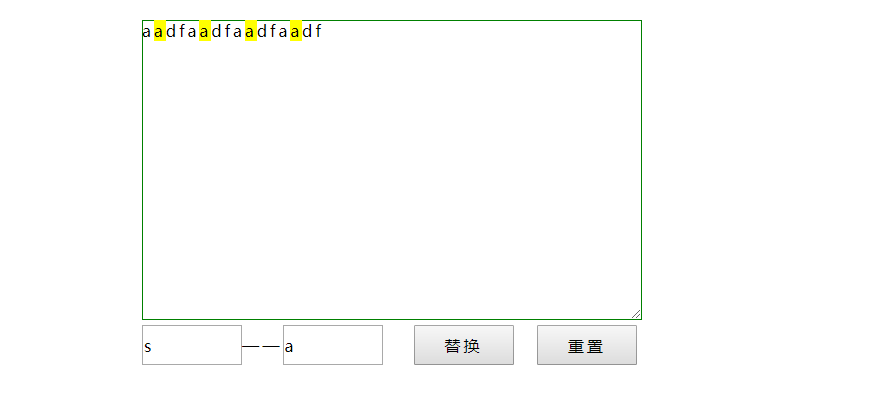
代码如下,复制即可使用:
<!DOCTYPE html>
<html>
<head>
<style type="text/css">
*{font-family:"微软雅黑";font-size:16px;margin:0;padding:0;letter-spacing:3px;line-height:22px;}
#wrap{width:500px;height:300px;margin:20px auto;position:relative;}
#text{width:500px;height:300px;border:1px solid green;}
#result{width:500px;position:absolute;left:0px;top:0px;display:none;}
input{width:100px;height:40px;margin-top:5px;}
span{background-color:yellow;}
</style>
</head>
<body>
<div id="wrap">
<div id="result"></div>
<textarea id="text" placeholder="请在此输入文本。。。。"></textarea>
<input type="text" id="val" placeholder="被查找字符"/>——<input type="text" id="new_val" placeholder="替换后字符"/>
<input type="button" id="btnFind" value="替换"/> <input type="button" value="重置" id="reset"/>
</div>
<script type="text/javascript"> function replace(){
var inner=null;
var txt=document.getElementById('text').value.toString();
var val=document.getElementById('val').value.toString();
var newVal=document.getElementById('new_val').value.toString();
newInner="<span>"+newVal+"</span>";
for(var i=0;i<=txt.length-val.length;i++){
if(txt==""||val=="") {
alert("请输入内容!");
return false;
}
if(txt.length<val.length) {
return false;
}
if(i+val.length>=txt.length){
if(txt.substring(i)==val){
inner=txt.split('');
inner.splice(i,val.length,newInner);
txt=inner.join("");
i=i+newInner.length-1;
} }
else {
if(txt.substring(i,i+val.length)==val) {
inner=txt.split('');
inner.splice(i,val.length,newInner);
txt=inner.join("");
i=i+newInner.length-1;
}
}
}
document.getElementById("result").innerHTML=txt;
document.getElementById("text").value=null;
document.getElementById("text").placeholder="";
document.getElementById("result").style.display="block";
} document.getElementById('btnFind').onclick=function(){
replace();
}
document.getElementById('reset').onclick=function(){
document.getElementById("result").style.display="none";
document.getElementById("val").value=null;
document.getElementById("new_val").value=null;
document.getElementById("text").placeholder="请在此输入文本。。。。"; } </script>
</div>
</body>
</html>
如有错误,欢迎联系我改正,非常感谢!!!
JS实现文本中查找并替换字符的更多相关文章
- C# 在word中查找及替换文本
C# 在word中查找及替换文本 在处理word文档时,很多人都会用到查找和替换功能.尤其是在处理庞大的word文档的时候,Microsoft word的查找替换功能就变得尤为重要,它不仅能让我们轻易 ...
- 【python cookbook】【字符串与文本】6.以不区分大小写的方式对文本做查找和替换
问题:以不区分大小写的方式对文本做查找和替换 解决方法:使用re模块,并对各种操作都添加上re.IGNORECASE标记 text='UPPER PYTHON,lower python,Mixed P ...
- Linux中在vim/vi模式下对文本的查找和替换
查找: 1.vim filename 进入一般模式下 2.查找和替换方法 /word 向下查找word 的字符串 例如 /chengtingting 向下查找字符chengtingt ...
- C# 在excel中查找及替换数据
在使用Excel处理数据时,有时候工作表内容很多,如果手动地一行一行的找数据很难发现它们在哪个地方.微软Excel给我们提供了一个很强大的数据处理功能-查找和替换,通过这个功能,我们可以快速地找到想要 ...
- [LeetCode] Find And Replace in String 在字符串中查找和替换
To some string S, we will perform some replacement operations that replace groups of letters with ne ...
- [转]grep 在文本中查找内容
转自: http://www.lampweb.org/linux/3/27.html 功能:grep系列是Linux中使用频率最高的文本查找命令.主要功能在一个或者多个文件中查找特定模式的字符串.如果 ...
- 使用SQL除掉文本中特殊的ascll字符比如Enter,Tab,空格键
一.在SQL查询的字段中如果包含tab.enter.空格键,可以使用ascii码进行替换: --替换了文本中含有tab键,Enter键,空格键的ascii码 select REPLACE(REPLAC ...
- Sublime 、NotePad++中查找匹配中文字符
在Sublime .NotePad++中可以使用正则表达式 [\x{4e00}-\x{9fa5}] 查找匹配中文字符.
- 在LoadRunner中查找和替换字符串
参考<Search & Replace function for LoadRunner>: http://ptfrontline.wordpress.com/2009/03/13/ ...
随机推荐
- php内置函数分析之str_pad()
PHP_FUNCTION(str_pad) { /* Input arguments */ zend_string *input; /* Input string 输入字符串*/ zend_long ...
- catboost原理以及Python代码
原论文: http://learningsys.org/nips17/assets/papers/paper_11.pdf catboost原理: One-hot编码可以在预处理阶段或在训练期间 ...
- 【Luogu P4074】[WC2013]糖果公园(树上带修改莫队)
题目描述 Candyland 有一座糖果公园,公园里不仅有美丽的风景.好玩的游乐项目,还有许多免费糖果的发放点,这引来了许多贪吃的小朋友来糖果公园游玩. 糖果公园的结构十分奇特,它由 \(n\) 个游 ...
- Linux上查找
locate 用法:locate filename locate是Linux系统中的一个查找(定位)文件命令,和find命令等找寻文件的工作原理类似,但locate是通过生成一个文件和文件夹的索引数据 ...
- log4j2打印jdbcTemplate的sql以及参数
log4j2打印jdbcTemplate的sql以及参数 ——IT唐伯虎 摘要: log4j2打印jdbcTemplate的sql以及参数. 在log4j2.xml加上这两个logger即可: < ...
- oracle 工作笔记,不定期更新
此博客为工作时,所见技术问题的解决方案笔记,欢迎大家转载,转载请注明出处,谢谢~ 更新时间: 2017-07-12 1. clob字段值读取时,借用extractvalue或extract函数读取节点 ...
- Hadoop源码阅读-HDFS-day1
HDFS声明及构造函数 @InterfaceAudience.Private @InterfaceStability.Evolving public class Hdfs extends Abstra ...
- jQuery总结或者锋利的jQuery笔记一
在线测试脚本网站 层次 选择器要多花时间看看. 第一章: hover = enter+leave jQuery对象 jQuery产生的对象时jQuery独有的,只能自己调用 var $c=$(&q ...
- MongoDB探索之路(三)——索引
1.索引介绍 2.创建语句 1)基础索引 在字段age 上创建索引,1(升序);-1(降序):db.users.ensureIndex({age:1}) _id 是创建表的时候自动创建的索引,此索引是 ...
- sh脚本学习之:变量
变量的创建 环境配置 /etc/profile =>~/.bash_profile(~/.bash_login,~/.profile) => ~/.bashrc sh声明 name=&qu ...